
If your signing flow works poorly on a phone, contracts get delayed. Learn what good mobile signing should look like and how to audit your current process.
When a document reaches the signer at the wrong moment, the problem usually is not the document itself. The problem is the device.
A client is between meetings. A new employee is reading their contract on the bus. A courier is standing at the door and needs a signature on a handover report. A sales lead opens the invitation on their phone and decides within seconds whether to do it now or leave it for later.
That is often the exact moment when a contract either moves forward or stalls.
By 2026, mobile signing is no longer a side topic. According to StatCounter, mobile accounted for 52.48% of worldwide web usage in February 2026. And GSMA estimates that nearly half a billion people in Europe use mobile internet. This does not mean every document is ultimately signed on a phone. But it does mean that the first contact with a signing invitation often happens on mobile.
If that first experience is smooth, the document keeps moving. If it is confusing, slow, or full of unnecessary friction, “I’ll sign now” quickly becomes “I’ll do it later”.
In the Baltics, mobile signing is already normal behavior
This matters even more in the Baltic market because phone-based signing is not a futuristic concept here. It is already part of day-to-day work.
According to RIA, more than 800 million digital signatures were given in Estonia during the first 20 years of digital signing. The same source notes that the average Mobile-ID user gives more than 10 signatures per month. RIA’s eID tools overview reported 232,000 Mobile-ID users in Estonia in March 2025, while SK ID Solutions said in early 2025 that nearly 800,000 Estonians use Smart-ID as their primary digital identification method.
In other words, phone-based authentication and signing are already familiar. The question is no longer whether your signer is ready for mobile. The question is whether your process is actually designed to work well on mobile.
Poor mobile UX causes delay, not just annoyance
It is easy to assume that if a document is important enough, it will get signed eventually. Sometimes that is true. But time is also a cost.
Baymard Institute’s mobile checkout research is not about e-signatures specifically, but it offers a strong analogy: 43.2% of smartphone or tablet users had abandoned an online order during mobile checkout in the last two months, and 61% said they sometimes or always switch to desktop to finish the flow. The same psychology appears in signing workflows. If people need to zoom too much, create an account, search for the right button, or switch devices, the task stops feeling quick and starts feeling like work.
And work gets postponed.
For businesses, that means:
- slower contract cycle times,
- more reminders and follow-ups,
- more partially completed documents,
- and a weaker customer experience right at the stage where trust should be strongest.
Where mobile signing flows usually break
The problem rarely starts at the signature itself. It usually starts earlier.
The invitation only works as an email flow
Email works well in office scenarios. But it is not always the best channel in real-time situations. On-site signing, field work, customer desks, deliveries, events, and quick approvals often work better with a direct link or QR code.
The document opens on mobile, but is not pleasant to use there
Being technically viewable on a phone is not the same as being mobile-friendly. If the text is too small, the action button is hidden, or the layout requires constant zooming, the flow is available on mobile but not really designed for it.
The process introduces too many new steps
Good mobile signing does not force the signer to relearn everything just for one document. ID.ee explains that Mobile-ID works in e-services without a separate card reader or special software. If the user already has a familiar identity method, your flow should build on that instead of adding unnecessary onboarding.
The signer does not immediately understand what they are confirming
Mobile screens are smaller, so clarity matters even more. From the first screen, the signer should understand what the document is, who sent it, why it needs signing, and what the next step is.
The end state is too vague
After signing, the user should instantly know the task is complete. Was the document signed successfully? Does anyone else still need to act? Can the file be downloaded? If the end is unclear, uncertainty takes over.
What signers actually expect on a phone
Strip away the marketing language and the expectation is simple: the signer wants to complete one small, fast, trustworthy action on their phone.
In practice, that means six things:
- the invitation reaches them in a channel that fits the moment,
- the document opens quickly and reads well,
- the next action is obvious,
- the signer can use a familiar signing method,
- the success state is clear,
- the whole experience feels professional.
That last point matters more than many teams realize. Signing is often one of the final moments before a deal, employment relationship, or agreement becomes real. If that moment feels smooth, it strengthens your brand. If it feels clumsy, that is what people remember.
A 7-question audit for your current process
If you want a quick way to evaluate whether your current signing flow works well on mobile, start with these seven questions.
1. Can the signer open the invitation from a phone through one clear link?
If the answer is “yes, but only from email”, ask whether that covers field and on-site use cases too.
2. Does the first screen immediately explain what the document is and who sent it?
If users need to hunt for that information, confidence drops.
3. Is the document readable without constant zooming?
If not, the issue is not the phone. It is the presentation.
4. Does the signer need to create a new account just to complete the process?
Every mandatory extra step lowers the chance of immediate completion.
5. Can the signer use a familiar method?
In the Baltics, that often means Smart-ID, Mobile-ID, or other established identity methods.
6. Does the flow work well on both iPhone and Android?
“It works on my phone” is not a meaningful quality standard.
7. Is it crystal clear that the process finished successfully?
If the end state is weak, questions and follow-up work increase.
If you answered “no” to several of these, the problem is probably not signer discipline. It is process design.
Where mobile-first signing creates the biggest gains
In some workflows, mobile signing is simply convenient. In others, it is a direct speed advantage.
Employment contracts and onboarding. A new employee may not yet be sitting at a company laptop, but they are almost certainly on their phone. If the employment agreement or NDA arrives as a simple signing link, the process moves faster.
Sales documents. Offers, approvals, NDAs, and service agreements lose momentum when a client feels they need to “do it later from a computer”.
Handover reports and field work. In these scenarios, the phone is often the main device. A direct link or QR code is naturally more practical than a long email chain.
Customer service and on-site confirmations. If the person is already physically present, nobody wants to pause the moment just to search for a later invitation. This is where mobile-first design becomes very concrete.
How Agrello approaches this
Agrello’s strength is not only that documents can be signed. It is that signing is built as a workflow that reflects real situations.
For example, the signer can receive the invitation as a link and does not need to create a separate Agrello account. Signing works in a web browser on mobile, and people can use familiar methods such as Smart-ID, Mobile-ID, and in other markets eParaksts mobile. Agrello also added support for sharing signing invitations through links and QR codes in early 2026, which is especially useful when email is not the best channel.
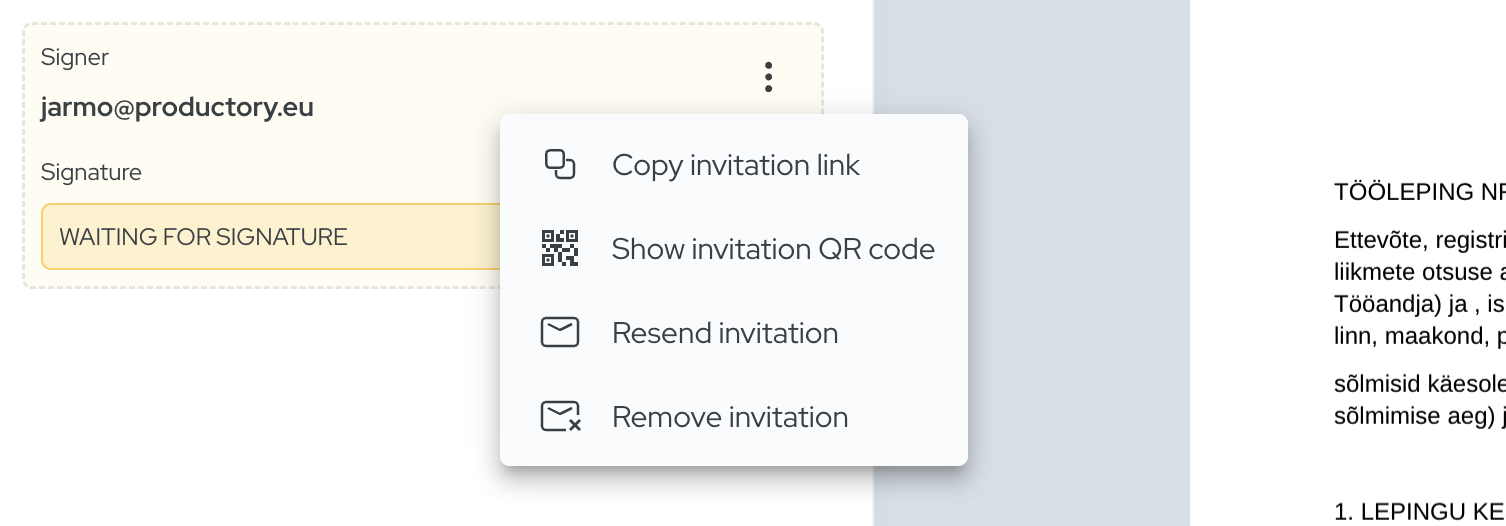
On the sender’s side, reminders, workflow visibility, and easier status tracking reduce manual chasing. That is a meaningful difference from the old “I sent the file, let’s see what happens” approach.
Conclusion
In 2026, mobile signing is no longer a UX detail. It directly affects how fast contracts move, how many follow-ups your team has to do, and how professional your process feels to customers, partners, and employees.
In the Baltic market, phone-based authentication and signing are already mainstream. So the right question is not just “Can our documents be signed on a phone?” The better question is: is the mobile experience simple, clear, and fast enough that people actually want to finish it immediately?
If the answer is not a confident yes, there is probably a real opportunity to improve contract speed, completion rate, and overall customer experience.
If you want to test your signing flow against real-life behavior, run it yourself on a phone from beginning to end. And if you want a workflow that is genuinely mobile-first, try Agrello free.
Frequently Asked Questions
Why is mobile signing so important in 2026?
Because a large share of web usage now happens on phones, and many signers first open document invitations on mobile. If that experience is poor, signatures get delayed or abandoned.
Is mobile signing only relevant for simple documents?
No. Mobile signing matters for employment contracts, NDAs, sales agreements, handover acts, and many other workflows, as long as the signing flow is clear and well designed.
What usually breaks in a mobile signing flow?
Common issues include unreadable document views, too many steps, mandatory account creation, unclear action buttons, and weak confirmation after signing.
Does the signer need an Agrello account?
No. In Agrello, the signer can receive a link and sign without creating a separate Agrello account.
How can I test if our mobile signing process is good enough?
Run the full flow yourself on a phone from invitation to final confirmation. If the process feels slow, unclear, or awkward, there is likely friction hurting completion.
Ready to get started?
Join Agrello and manage your contracts the smart way.