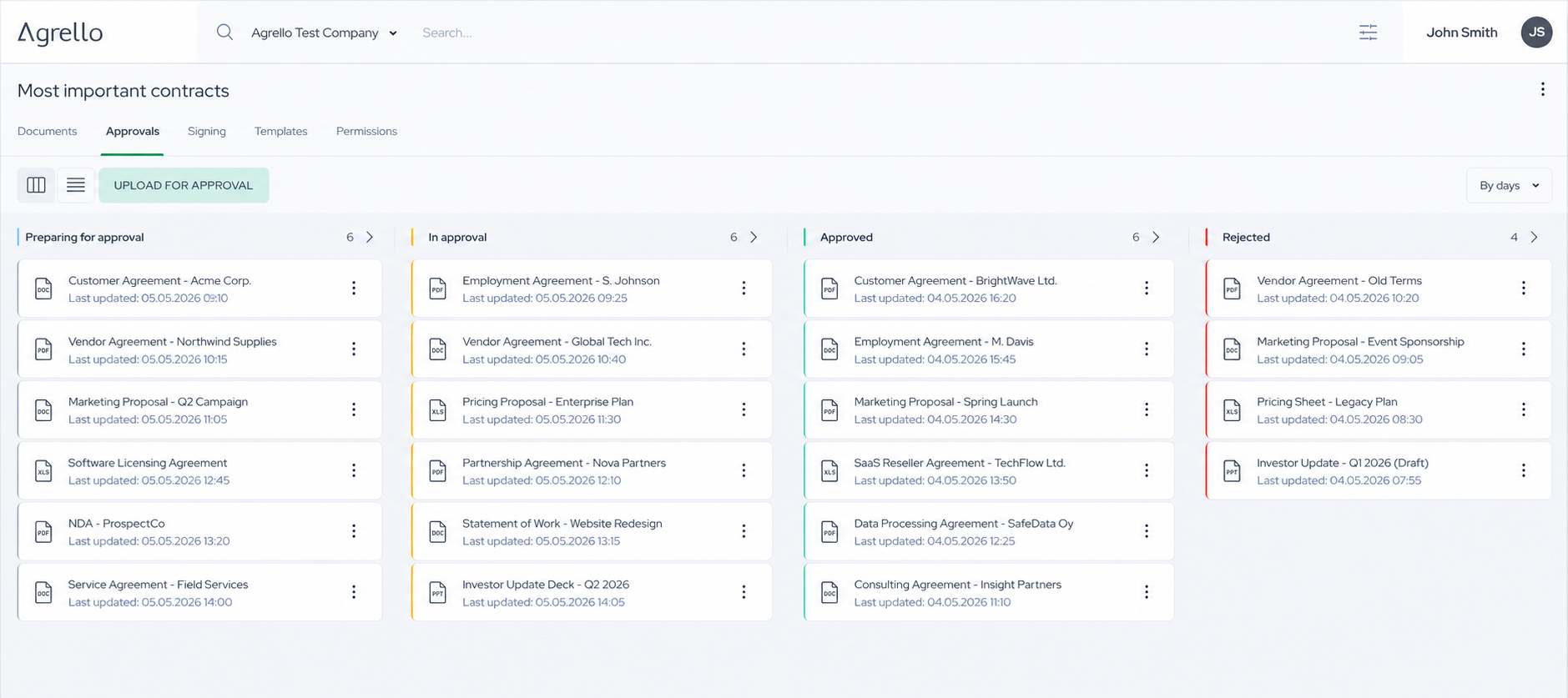
Agrello Approvals adds a clear internal review step before signing, helping teams approve, reject, and comment on documents in one workflow.
Most contract delays do not happen when someone is signing. They happen earlier: a document is sent for “a quick review,” feedback arrives in separate email threads, and nobody is quite sure which version is ready to move forward.
That is why we are introducing Approvals in Agrello; A dedicated internal review step that helps teams move from draft to approved document to signature with more clarity.
A controlled step before signing
In many organizations, the person preparing a document is not the person who usually makes the final internal decision. A sales manager may need to review a customer agreement before it gets signed off by a board memeber. An HR lead may need to check an employment document before it's gets sent our for signing. A finance colleague may need to confirm commercial terms before a vendor contract is pushed our for signature collection.
Previously, these checks could happen through a mixture of email, chat messages, and document attachments. That makes it easy to lose context or send a document for signature before the right person has reviewed it.
With Approvals, the process has a clear sequence:
- Prepare the document.
- Send it for internal approval.
- Let the approvers review the document and approve, reject, or leave a comment.
- Once approved, continue with the signing process.
The result is a simple decision gate between preparing a document and asking people to sign it.
What happens when a document needs changes?
Approval workflows are useful because they make decision process visible and transparent, including also decisions not to proceed.
If an approver rejects a document, the workflow stops. The document is not automatically sent for signing, so an issue can be addressed before it reaches a customer, employee, supplier, or business partner. After the necessary changes are made, the document owner can restart the approva workflow.
Approvers can also leave comments when they need clarification or want to explain what should be checked. That gives the document owner useful context instead of a vague message such as “please update this and resend it.”
This distinction matters. An approval is not just another status label; it is a clear signal that the document has passed an agreed internal checkpoint.
Practical use cases for operations teams
Customer and sales contracts
Sales teams often need to move quickly, while the business still needs control over discounts, liability clauses, payment terms, or non-standard commitments. An internal approval step allows the right colleague to review those details before the agreement goes to the customer.
HR and people documents
Employment agreements, contractor documents, and policy acknowledgements may involve several internal stakeholders. An HR team can use Approvals to confirm that the document contains the correct role, compensation, dates, and internal information before inviting the employee to sign.
Supplier and procurement agreements
Vendor contracts can require input from procurement, finance, legal, or a department owner. A structured approval step helps make sure the agreement is ready before the supplier receives a signing invitation.
Higher-risk or exceptional documents
Not every document needs the same level of review. Teams can use an approval step when a document falls outside a standard template, exceeds an internal threshold, or includes terms that require additional attention.
Why internal approvals belong in the document workflow
A separate review process may seem manageable when a team handles only a few documents. As volume increases, however, manual coordination creates recurring questions:
- Who is responsible for the next decision?
- Which version did they review?
- Was the document approved before it was sent externally?
- What did the approver ask to change?
- What should happen after a rejection?
Keeping the approval step close to the document gives the team a shared point of reference. It also creates a more consistent process for routine work, without requiring every team to design its own system of inbox labels, chat messages, and spreadsheets.
Approvals do not replace good judgment or appropriate legal review. They provide the workflow structure that helps the right people apply that judgment at the right point in the process.
From document preparation to document completion
Agrello is designed to support the broader journey of a business document: preparing content, collaborating on it, obtaining internal approval, collecting signatures, and keeping track of the resulting records.
The new Approvals workflow adds an important control point to that journey. It helps teams separate two decisions that are often mixed together:
- Is this document ready to send for signature?
- Is this document ready for the other parties to sign?
By answering the first question internally, teams can approach the second with greater confidence.
Approvals is now available in Agrello. If your team is still coordinating document reviews through email and chat, contact us to discuss how a clearer approval-to-signing workflow could fit your operations.
Ready to get started?
Join Agrello and manage your contracts the smart way.