Cloud Based Document Management System for Better Workflows

Content authorBy Toomas PihlPublished onReading time11 min read
Business professional in a modern office representing cloud-based document management and streamlined digital workflows

This article explains how to build an approval workflow that keeps moving when someone is out of office or when a reviewer forgets. It covers mapping the lifecycle and configuring routing and escalation rules in cloud document management software.

Why approvals stall

Approvals stall because a cloud based document management system was never told what to do when the reviewer is on holiday, or when a contract crosses a value threshold nobody defined. The document sits in an inbox, and the schedule slips by a week.

The cost is measurable. Deloitte and World Commerce & Contracting drew on data from more than 1,200 organisations and found average contract value erosion of 8.6%, with the worst performers above 20%. Most of that leakage comes from fragmented processes run across multiple systems with no single point of data.

So the work here is deciding, in advance, what the system does at every fork in the road. A cloud based document management system enforces the decisions you've already made, which means the quality of your rules determines the quality of your outcome.

Map the document lifecycle

Before you configure anything, write down what actually happens to a document today. Who creates it and who has authority to say yes. Then mark every point where the file stops moving and a human has to send a chasing message.

Those stopping points are your real project scope. The McKinsey Global Institute estimated that knowledge workers spend one day each work week searching for and gathering information, and a separate MGI analysis put email management at 28 percent of the workweek. Hunting for the current version of a purchase order is a large part of that.

Pay attention to the exceptions too, because exceptions are what break rigid automation. A supplier agreement that needs finance sign-off above a certain value and a data processing addendum that needs privacy review. Cloud document management software handles these fine, but only if you've named them first.

Compliance requirements belong on the same map. ISO 15489-1:2016 treats records as evidence of business activity that depend on metadata to preserve context, which is a useful frame. If you can't say what evidence a document produces and how long you must keep it, you can't archive it correctly later.

Standardize document intake

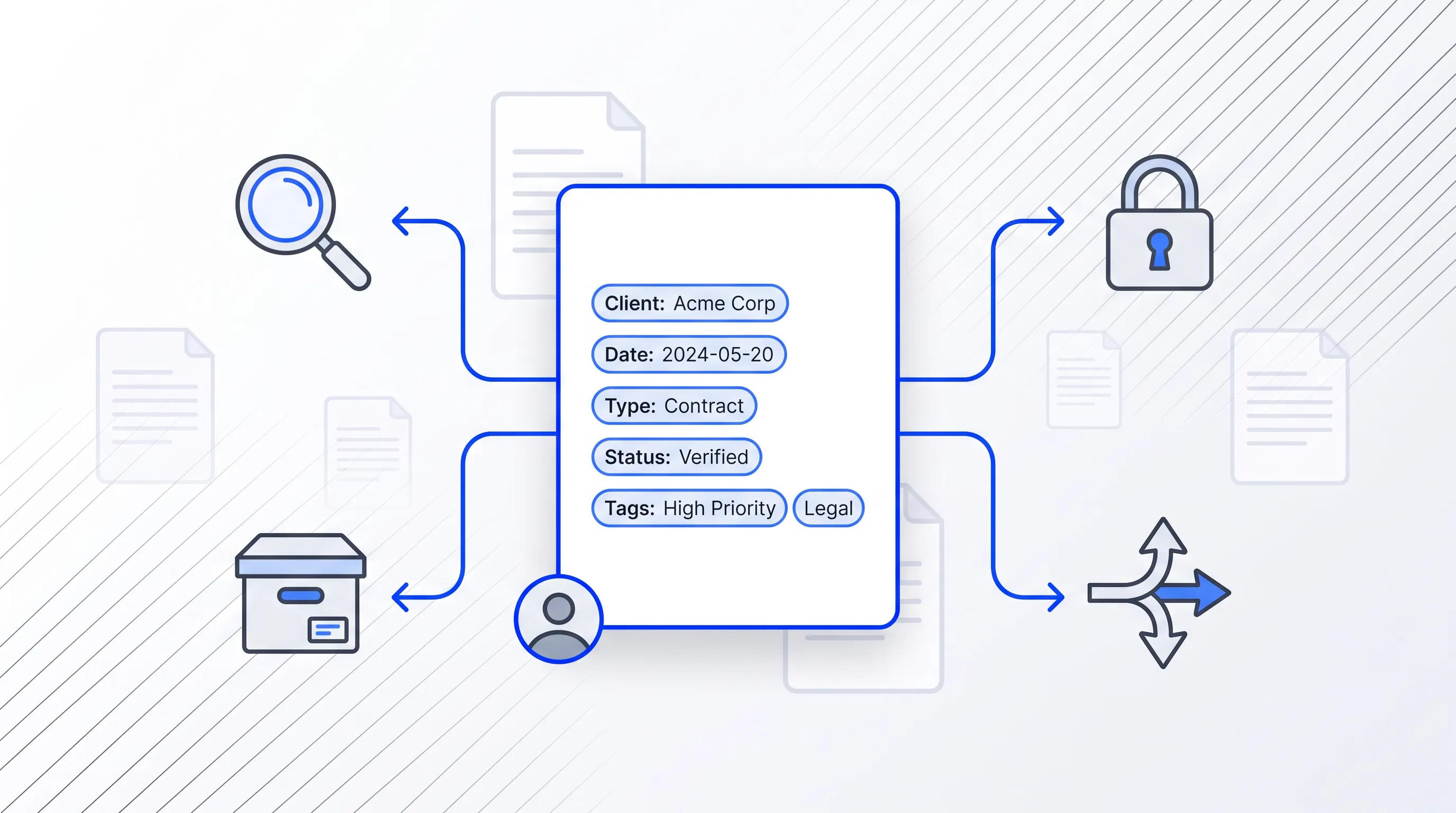
Modern flat design illustration of a central document icon with metadata, surrounded by line icons for searchability, access, archiving, and routing.

Routing rules read metadata. If the metadata is inconsistent, the whole chain reverts to manual forwarding. That's why intake is where most of the real configuration work sits.

Build reusable templates for your high-volume document types and make the fields mandatory at creation.

At minimum, capture:

  • Document type and the owning department

  • Named owner and their deputy

  • Contract or transaction value, where one applies

  • Risk or sensitivity classification

  • Response deadline and the retention category

ISO 23081-1 sets out principles for records metadata without prescribing a fixed set, and that flexibility is the point. Your fields should reflect the decisions your workflow actually makes. A field nobody routes on is a field nobody will fill in honestly.

Consistent intake pays off four times over. Search works because the tags are uniform and access controls apply because sensitivity is declared. Archiving works because retention was assigned on day one, and a cloud based document management system can route the file without anyone choosing a recipient from a dropdown.

Documents shouldn't be manual work.

Standardize how your business creates, manages, and signs recurring documents - without complex enterprise software.

Cloud based document management system

Now configure the core sequence. Think of it as a chain of small, boring rules rather than one clever automation, because boring rules are the ones you can debug six months from now when a document goes missing.

The sequence runs as the template creates the document with metadata attached and rules assign the first reviewer. Conditions decide whether extra review is needed before signing happens inside the same environment, after which the executed file moves to its archive location with permissions locked. Each step writes to an audit trail. ISO 16175-1:2020 sets functional requirements for software managing digital records, and the recurring theme is that you must be able to show who did what to which object.

Accountability and speed aren't in tension here. A cloud based document management system that logs every action gives you the traceability an auditor wants, and the same log tells you which reviewer sat on the file for nine days.

Set role-based routing

Assign reviews to roles. The principle behind role-based access control is that permissions are assigned to roles rather than individual users, so people can be reassigned without rebuilding the underlying structure. When Anna leaves, you update one group membership instead of auditing forty workflows.

Triggers should read the metadata you collected at intake. Document type sends the file to the right functional queue. Value sends it up or down the approval ladder. Risk classification decides whether security sees it at all. Configured this way, a cloud based document management system routes correctly on the first attempt rather than after a correction.

Add conditional branches

Most documents are routine and should travel the short path. A standard non-disclosure agreement built from an approved template does not need legal review, and forcing it through one is how you build a backlog that has nothing to do with risk.

Define the branches by the conditions that genuinely change the stakes. Contracts above a value threshold pick up finance. Anything touching personal data picks up privacy review, since the storage limitation principle and the rest of Article 5 apply from the moment the record exists. Documents with edits to protected clauses go to legal. Incomplete submissions bounce back to the author rather than entering the queue at all.

A cloud based document management system should also handle the executive path without drama. Set one clear trigger for board-level sign-off and leave everything below it alone. Deloitte and World Commerce & Contracting found 77% of organisations reevaluating their contracting identified process streamlining as a priority, and cutting unnecessary reviewers is the fastest version of that.

Connect cloud document management

The handoffs between tools are where documents get lost. Draft in one place and email for review. Every hop is a chance for someone to work on the wrong version.

Linking templates and signing workflows inside one environment removes those hops. Signing in particular should not leave the system, because under the eIDAS Regulation a qualified electronic signature has the equivalent legal effect of a handwritten signature, and that status depends on how the signature was created and validated. The European Commission's framework recognises three signature tiers, so pick deliberately rather than by default.

Cloud document management software also fixes version control by making it invisible. One file, one history, with prior versions preserved and the current one obvious. Nobody has to append "final_v3_REALFINAL" to a filename again.

Documents shouldn't be manual work.

Standardize how your business creates, manages, and signs recurring documents - without complex enterprise software.

Prevent stalled approvals

The single mistake that ruins otherwise good automation is the rigid one-reviewer path with no time limit. It works until the reviewer takes two weeks off, and then it fails silently, because nothing in the system knows a deadline was missed.

Build the safety net into every stage:

  1. A review deadline attached to each step, derived from the intake metadata rather than set by hand

  2. Automatic reminders before the deadline

  3. A named substitute for every role, with delegation the reviewer can set themselves

  4. Escalation to the role above after a defined period of inaction

  5. A visible overdue queue that an operations owner checks daily

The payoff shows up immediately in turnaround. In a Forrester study of contract lifecycle management, the vice president of finance and legal at a software discovery company described the change this way: "Before, our NDA turnaround was seven to nine working days, and now it's under 24 hours. The old way was just email, [a direct messaging platform], and chasing down versions."

Escalation is an admission that people get busy, and that a cloud based document management system should treat silence as a signal rather than a pause.

Automate final archiving

Approval is not the end state. Decide what happens the moment the last signature lands: status flips to executed and the file moves to the archive location tied to its retention label.

Retention has to be assigned automatically, from the category set at intake, because manual filing decays within a quarter. Estonia's public sector shows what full digital handling looks like at scale, with 96% of tax declarations filed electronically in 2015 and digitally signed documents accepted by every public institution. That volume only works when disposal rules run without human intervention.

Then handle the documents that don't get approved, which is where most archiving designs fall apart. Rejected drafts need a controlled path with the rejection reason recorded. Expired documents need a status change and a trigger for renewal. Superseded versions stay accessible but clearly marked, since cloud document management keeps history rather than deleting it.

Monitor workflow performance

You can't fix a bottleneck you can't see. A dashboard over the audit trail gives you cycle time by document type and the count of overdue reviews by role.

Measurement is rarer than it should be. Deloitte's work with World Commerce & Contracting found that only a little over 20 percent of organisations attempt to monitor or calculate the cost or benefits of contract management. If you're among the ones that do, you'll spot the problem stage within a month.

Read the numbers as instructions. A role with chronic overdue reviews is either understaffed or wrongly assigned. A document type with four revision rounds has a bad template. A high rejection rate at stage one means intake validation is too loose. Cloud document management software gives you the evidence, and you make the change in the rule.

One cycle-time benchmark worth holding yourself to: Deloitte's contracting practice reports that optimising the contracting process can reduce cycle time by 30%. A cloud based document management system won't deliver that on its own, but a measured one will tell you how close you are.

Apply the workflow in Agrello

Agrello is a document management and e-signing platform built in Estonia, and the pieces described above map onto it directly. Templates create the document and partners can be invited in to comment and sign without the file ever leaving the environment.

Signing is where the schedule breaks, and Agrello covers both national e-ID methods and its own international advanced electronic signature. In Estonia the term digital signature refers only to a signature that is legally equivalent to a handwritten one, with the signer's identity verified and the time of signing fixed, so the distinction matters when a counterparty is in another country.

What this removes is coordination work. Nobody downloads a PDF and nobody emails it onward. A cloud based document management system set up this way keeps notification and storage in one chain, which is the whole point.

Test and improve

Pilot one document type with real volume behind it. Run the normal path first, then deliberately break it: let a deadline expire and send a document above the value threshold.

Check permissions from the outside. Log in as a reviewer who shouldn't see a restricted file and confirm they can't. Pull the audit record afterwards and read it as an auditor would so you can confirm it shows who approved what and when.

Then ask the people who used it what annoyed them, because routing gaps show up as complaints before they show up in the data. Fix those and only then extend the pattern to your next document type. Cloud document management software rewards this pace, since each workflow you add inherits rules you've already proven.

Where to start

A workflow that holds up is mostly bookkeeping done in advance. You decide who reviews what and what happens when they don't. The technology part is ordinary, and the discipline part is where the schedule is won or lost. Agrello brings templates and compliant e-signing into one place, which is what a working cloud based document management system has to do. Start a free trial, or talk to the Agrello team about your own approval chain.

Documents shouldn't be manual work.

Standardize how your business creates, manages, and signs recurring documents - without complex enterprise software.

Set shorter deadlines for documents tied to fixed transaction dates, regulatory filings, or customer commitments. Give routine documents a longer window, then record the rule in the workflow rather than relying on personal judgment. Review missed deadlines after the first month and adjust the timing when the data shows a recurring delay.

Test the normal route and each exception before expanding it. Submit a restricted document, trigger an approval threshold, let a deadline expire, and check the resulting audit records. Also verify access with a user who lacks permission. Record each failure, correct the rule, and repeat the test before adding another document type.

Yes, a reviewer can delegate approval authority when the workflow supports named substitutes and defined delegation periods. The substitute should receive only the permissions needed for that role, while the audit trail records the substitute’s action. Remove the delegation when the reviewer returns and check open tasks so none remain assigned to the wrong person.

Choose the signature level required by the transaction, the parties involved, and applicable law. A qualified electronic signature has the legal effect of a handwritten signature under eIDAS. An advanced signature provides signer identification and stronger evidence than a basic electronic signature, but it may not meet a rule that requires qualification. Ask Agrello about the appropriate option for your approval chain.

No, a cloud based document management system applies a retention policy, but it doesn't create the policy for you. Define retention periods, legal holds, archive locations, and disposal authority first. Then connect those decisions to document categories and statuses. If you need help mapping the rules, speak to Agrello or start a free trial to test the workflow.

Schedule a Meeting

Book a time that works best for you and let's discuss your project needs.

You Might Also Like

Discover more insights and articles

Business professional standing in a modern office, representing collaboration and document controls for legal, sales, and operations teams.

Which Collaboration Controls Do Legal, Sales and Ops Need?

Seven controls matter. They include defined roles and clause-level comments. Version history and review handoffs with visible approval status also matter, as do least-privilege access and event-based notifications. A documented signing-readiness check completes the set. Together they let the three departments contribute to the same agreement while only one person holds decision authority at each stage.

Businessman reviewing a contract approval workflow in an office

How Do You Ensure the Approved Contract Gets Signed?

You get the approved contract signed by locking the file under one identifier and one owner, and you send only that locked file to signature. Everything else stays a draft. The control is unglamorous and it holds, because wrong-file risk lives in the gap between someone saying "looks good" and someone clicking send.

Businesswoman standing in an office with a workflow diagram, illustrating document control and records management by lifecycle and retention.

Document control and records management compared by lifecycle and retention

This article compares document control and records management by lifecycle stage and retention rule. It uses ISO 9001 and ISO 15489 to locate the moment a working document stops being editable and becomes fixed evidence, then follows an inspection form and a set of signed agreements through that point.

Woman evaluating remote signing solutions for business documents during a professional team meeting

How to Evaluate Remote Signing for Business Documents

Evaluate remote signing by testing signer access without paid accounts and mobile usability against your real contracts. Platform features matter less than whether your specific employees and suppliers can finish signing.