Professional team collaborating on reusable digital signature templates and document workflow planning in a modern office

How to Create Reusable Digital Signature Templates

Every week, your team sends the same offer letter, NDA, or service agreement. Every week, someone rebuilds it from scratch, re-adds the signature fields, and hopes the formatting matches last time. That repetitive grind eats hours and invites mistakes.

Content authorBy Toomas PihlPublished onReading time9 min read

What You'll Learn in This Guide

This guide walks you through creating reusable digital signature templates that standardize your documents once and let you send them hundreds of times without rethinking the layout. You'll learn how to define signer roles, place form fields, set a signing order, and share templates across your team. We'll also cover how AI is starting to optimize these templates over time, so your workflow keeps getting smarter. Whether you're in HR, sales, or operations, you'll finish this article with a clear, repeatable process you can put into action today.

Why Reusable E-Signature Templates Matter

Before jumping into the steps, it's worth understanding exactly what makes templates so valuable for recurring document workflows.

A reusable e-signature template saves your document layout, signer roles, signing order, and all form fields so you can generate consistent signature requests without manual setup each time. Think of it as a master copy that never gets worn out.

Here's what that consistency delivers:

  • Speed: Creating a reusable template takes under two minutes in most platforms once you know the steps. Sending from that template later takes even less.

  • Fewer errors: Standardized fields mean no one accidentally deletes the date line or misspells a job title.

  • Team alignment: Everyone sends the same version of the document, regardless of who hits "send."

  • Easier onboarding: New hires or coordinators follow the template instead of guessing at formatting.

For growing companies where multiple people prepare similar agreements, templates turn a scattered process into a reliable one. That's the foundation everything below builds on. For a deeper perspective on workflow improvements, see How Can I Send Documents for E-Signing Automatically?.

Choose the Right Document to Templatize

Not every document needs a template. Start with the ones your team sends most often and that follow a predictable structure.

Good candidates include:

  • Employment offer letters

  • Nondisclosure agreements

  • Vendor or contractor agreements

  • Sales proposals with standard terms

  • Client onboarding forms

Pick one document to start with. Open the most recent, finalized version and review it for any fields that change between recipients (name, date, dollar amount) versus fields that stay the same (company address, legal clauses). This distinction matters in the next step.

If you're unsure which documents waste the most time, ask your team to track how many minutes they spend formatting and field-placing over a single week. The answer usually makes the choice obvious. For more details on selecting and structuring the right templates, check out How to Create a docusign contract template Step-by-Step.

Set Up the Template in Your E-Signature Platform

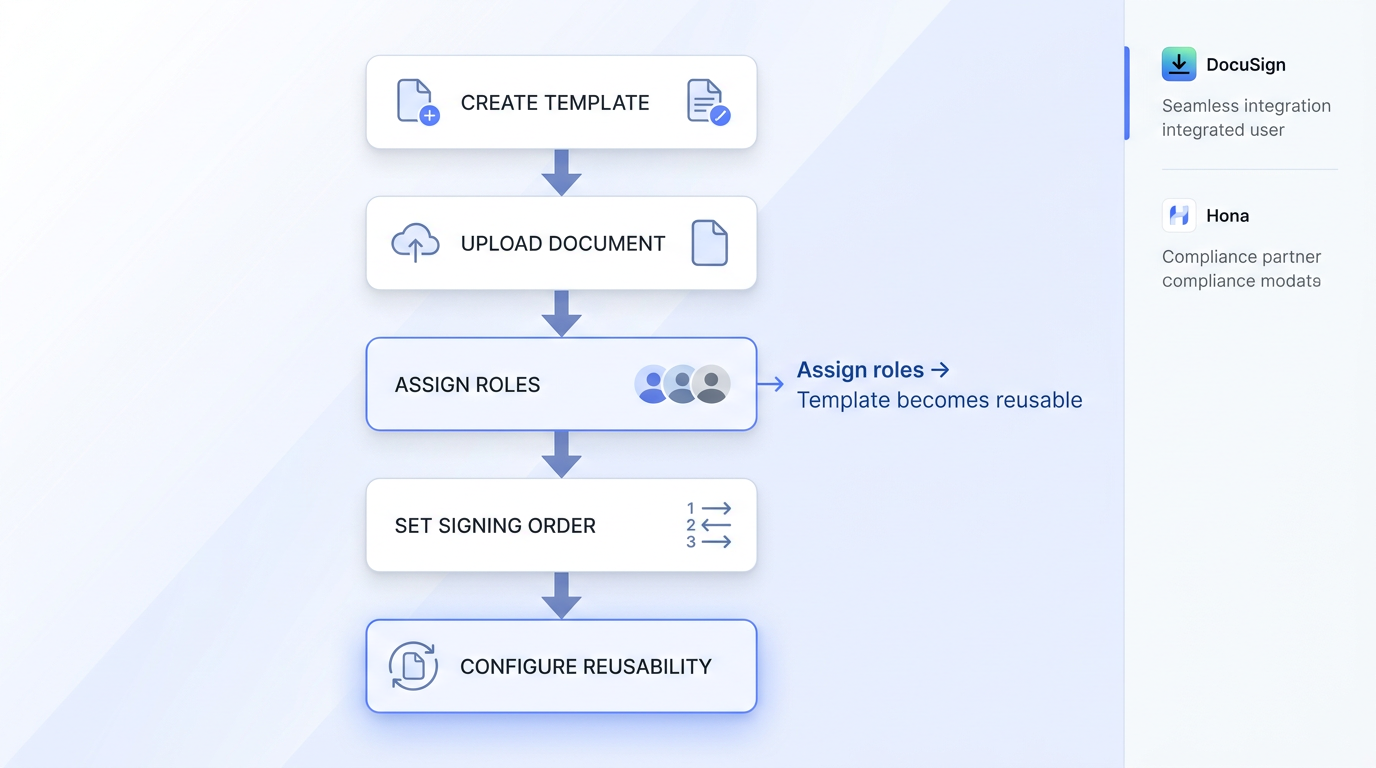
Flowchart illustrating steps to set up a reusable e-signature template on a soft white-to-pale-blue background, with muted icons.

With your document chosen, it's time to build the actual template. The process is similar across major platforms, though the interface differs slightly.

Uploading and Naming

Start by navigating to your platform's templates section. In most tools, you'll find a "New" or "Create Template" button. In DocuSign eSignature, templates are created from the Templates page by clicking NEW and selecting Create Template, with all steps optional so you can build at whatever level of detail you need. Other platforms like Hona follow a similar flow: select New Template, add a title, choose single or multiple signers, and upload the document.

Give the template a clear, descriptive name. "NDA_v3_final_FINAL" won't help anyone. Something like "Mutual NDA - Standard Vendor" tells your team exactly what the document is and when to use it.

Adding Signer Roles

Rather than assigning specific people, assign roles. Roles are placeholders like "Client," "Hiring Manager," or "Vendor Representative." When you send the template later, you simply map a real person to each role.

This is what makes the template truly reusable. DocuSign templates save document layout, signer roles, signing order, and all fields for consistent use across every envelope you create from that template.

Define:

  • How many signers are needed

  • The signing order (sequential or parallel)

  • Which role sees which pages, if your document has restricted sections

Getting roles right upfront prevents confusion when a colleague grabs the template and isn't sure who signs first. For tips on signage field mapping and user roles, see contract templates speed up business.

Place and Configure Your Form Fields

This step is where your template becomes more than just a PDF. Form fields turn a static document into an interactive signing experience.

Types of Fields to Include

Most platforms offer these standard field types:

  • Signature and initials: The core reason you're here.

  • Date signed: Auto-populates when the signer completes their signature.

  • Text fields: For names, titles, addresses, or any variable information.

  • Checkboxes and dropdowns: Useful for selecting options within the agreement.

  • Read-only fields: Pre-filled data that signers can see but not change.

In Adobe Acrobat Sign, reusable document templates save the document and allocated form fields so you don't have to reposition anything when you prepare the same file again.

Field Placement Tips

Drag each field to its correct position on the document. A few guidelines to keep things clean:

  • Align signature fields at the bottom of the last page, not buried mid-document.

  • Group related fields together (signer name directly above signature line).

  • Mark required fields as mandatory so the document can't be completed with blanks.

  • Use consistent font sizes for all text input fields to avoid a patchwork look.

For inspiration on formatting and automation, explore What’s the fastest way to sign and send documents online?.

Take five extra minutes here to check spacing and alignment. A polished template reflects professionalism every time it goes out. One small formatting mistake can also slow down completion rates. For example, when signature and date fields are placed too close together on mobile devices, signers often tap the wrong field or abandon the process entirely. Teams usually only notice this after repeated support complaints or delayed approvals.

Configure Sharing and Permissions

A template locked to one person's account doesn't help a team. Set sharing permissions so the right people can access, use, and (when appropriate) edit the template.

Adobe Acrobat Sign templates can be set for access by only the creator, any user in the group, or any user in the organization, with shared templates protected from editing or deletion by others. Most platforms offer similar tiering.

Consider this structure:

  • Template owners (usually team leads or ops specialists) can edit the master template.

  • Template users (coordinators, managers) can send from the template but not modify it.

  • View-only access for stakeholders who need visibility but shouldn't be sending documents.

This prevents the "too many cooks" problem where someone tweaks a clause and the change goes unnoticed for weeks.

In practice, this issue shows up more often than teams expect. A common example is HR departments duplicating templates for urgent hiring rounds, then forgetting which version contains the latest legal language. After a few months, multiple “almost identical” templates start circulating internally, creating compliance and approval issues that are difficult to track.

Test Before You Launch

Before rolling a template out to the entire department, send a test run.

  • Assign yourself to every signer role and complete the document.

  • Check that required fields actually block completion when left blank.

  • Verify the signing order works as expected.

  • Open the completed document to confirm the final PDF looks correct.

Fix anything that feels clunky. If you stumble during testing, your clients or candidates will stumble too. One round of testing now saves dozens of support questions later.

Use AI to Improve Templates Over Time

Here's where things get interesting. Static templates are already a huge upgrade over manual prep, but AI-powered platforms are now learning from your signing data to make templates even better.

AI can help by:

  • Suggesting field placements based on where signers commonly interact with similar documents.

  • Flagging fields that get skipped or cause errors, so you can redesign problem areas.

  • Recommending changes to signing order based on completion-time data.

  • Auto-detecting document types and applying the correct template before you even choose one.

Platforms like Agrello are incorporating AI into the digital signature workflow to help teams continuously refine their templates. For a deep dive into how this works, see How do I generate a digital signature automatically with AI?.

Instead of reviewing templates manually every quarter, the system highlights what's working and what isn't, so you can make data-driven adjustments.

Over time, this means your reusable e-signature templates don't just stay consistent. They actually get faster and easier for everyone involved.

Reusable E-Signature Templates Explained in Simple Terms

A reusable digital signature template is a pre-configured document that stores the layout, signer roles, signing order, and form fields so teams can send consistent agreements repeatedly without manual setup. Creating one involves choosing a high-frequency document, uploading it to your e-signature platform, defining roles instead of specific people, placing and configuring form fields, setting team permissions, and testing before deployment.

Conclusion

Reusable digital signature templates do more than save a few minutes per document. They create operational consistency across your entire signing workflow. Instead of rebuilding the same agreements over and over, teams work from a structured system where signer roles, fields, permissions, and document layouts are already standardized and tested. That consistency matters more as organizations grow. Without templates, small formatting mistakes, missing fields, outdated clauses, and approval delays gradually become part of everyday operations. With reusable templates, documents move faster, onboarding becomes simpler, and teams spend less time fixing preventable errors.

The key is to start small and refine over time. Begin with your highest-volume agreement, configure it carefully, test the workflow from the signer's perspective, and monitor where friction appears. As AI-powered tools continue evolving, platforms can increasingly identify bottlenecks, optimize field placement, and improve signing workflows based on real usage patterns instead of guesswork.

Over time, the result is not just a faster signing process. It is a more scalable, reliable, and professional way to manage agreements across your business.

Most platforms allow you to build a working template in under five minutes. The bulk of the time goes into placing form fields precisely. Once the template is saved, sending from it takes seconds.

Yes. Most e-signature platforms let you share templates at the group or organization level. You control who can edit versus who can only send, which keeps the master template intact while giving your whole team access.

Any document your team sends repeatedly with a predictable structure is a strong candidate. Common examples include NDAs, employment agreements, sales contracts, vendor forms, and client onboarding packets.

No. Modern e-signature platforms use drag-and-drop interfaces for field placement and simple menus for role assignment. If you can attach a file to an email, you can build a template.

AI analyzes signing behavior, such as where errors happen, which fields cause delays, and how long completion takes, then suggests improvements. This turns your templates into evolving tools rather than static files. Get more details in this analysis: [How can AI detect and prevent forged digital signatures?](https://www.agrello.io/articles/ai-signature-verification).

Schedule a Meeting

Book a time that works best for you and let's discuss your project needs.

You Might Also Like

Discover more insights and articles

Professional smiling man beside handwritten signature sketches with headline about adding an electronic signature in Microsoft Word

How to Add an Electronic Signature in Word Easily

Still printing documents just to sign them by hand? If your team sends contracts, offer letters, or internal approvals through Microsoft Word, you already know how tedious the print-sign-scan cycle can be. Teams across HR, sales, legal, and operations still lose hours every week to manual signing workflows. At Agrello, we've worked with businesses streamlining high-volume document approvals and e-signature processes, giving us firsthand visibility into where Word-based signing workflows break down - and how to fix them efficiently.

Professional thinking about electronic signature software options with cloud and workflow sketches in the background

Best Electronic Signature Software for Small and Mid-Sized Teams

Choosing a digital signature tool shouldn't feel like buying enterprise software you'll never fully use. But for small and mid-sized teams, that's exactly what happens: you end up paying for features built for Fortune 500 companies when all you really need is a fast, reliable way to get contracts signed.

Team discussion in front of a strategy whiteboard with overlay text about AI automating contract reminders and renewals

How Can AI Automate Contract Reminders and Renewals?

A single missed renewal deadline can lock your team into unfavorable terms for another year, or worse, let a critical vendor agreement lapse without warning. When contract dates live in scattered spreadsheets and someone's memory, it's only a matter of time before something slips through.

Smiling professional with overlay text about AI tracking document signing and approval activity

How can I insert a digital signature into an email?

Sending an important contract or approval via email requires more than just a polite sign-off. You need a reliable way to prove your identity and protect the contents of your message. How can I insert a digital signature into an email?