File Naming Conventions for Legacy Archives

Content authorBy Toomas PihlPublished onReading time11 min read
Team discussing file naming conventions for legacy document archives in an office

This article sets out a controlled sequence for applying file naming conventions to archives of signed legacy contracts. It runs from scope definition through post-rename verification, so that signatures and chain-of-custody records survive the cleanup intact.

Why renaming a signed archive is an evidence problem

Renaming a contract archive looks like housekeeping until an auditor asks why file naming conventions changed the name printed on a signed PDF. At that moment the question stops being about tidiness. It becomes a question about whether the record in front of the auditor is the same record that was executed.

The risk is narrow but real. A file-system rename touches directory metadata and leaves the bytes alone. Opening the same document in a PDF editor and saving it under a new name rewrites the file, and once bytes change, a cryptographic seal no longer validates. Understanding how electronic signatures work helps explain why preserving the original document bytes matters after signing.

Under Article 25 of Regulation (EU) No 910/2014, an electronic signature can't be denied admissibility as evidence, but only if it still verifies. So the work ahead is less about naming taste and more about proving nothing moved.

Prepare the archive

Start by writing down what's in scope and what isn't. Pick the repositories and the date range for the contract families you're touching, then name the owners in legal and IT who sign off before anything executes. Retention obligations come into this early, because a record scheduled for disposal next quarter doesn't belong in a renaming project at all.

Set the source archive to read-only and work from a copy. Every step after this one runs against the copy, which means a rollback is a matter of deleting the working set rather than reconstructing originals. Write the rollback procedure before you need it so that it already records who can authorise it and how the archive is confirmed restored.

Agree the governance wrapper at the same time. ISO 15489-1:2016 frames records controls and assigned responsibilities as the foundation of a records system, and file naming conventions are one of those controls. The same distinction matters when defining document control and records management across the document lifecycle. Treat the project as a change to a controlled system.

Catalog every record

Before renaming anything, build an inventory. For each contract you want the original filename and its exact storage path. You also want the format and signature status, along with the contract identifier and the certificate of completion that accompanies it. The inventory is the thing that tells you whether file naming conventions can be applied automatically or whether a human has to look first.

Formats matter. A PDF carrying an embedded PAdES signature behaves differently from an ASiC container holding file objects such as a PDF plus a detached signature file, because in the container case the internal names are referenced by the signature structures. Recording format identifiers, for example the PRONOM unique identifiers used in preservation systems, keeps that distinction visible later.

Then flag the problems instead of hiding them. Missing certificates and duplicate filenames go to a manual review queue, as do corrupted files and contracts you can't match to an identifier. File naming best practices break down the moment a script is asked to guess, and a guess inside an audit trail is a finding waiting to happen.

Set file naming conventions

A scheme for legacy contracts has one job: given the same record, it produces the same name every time, on any machine, run by anyone. That's what deterministic means here. If two operators run the scheme against the same contract and get different results, the scheme isn't finished.

The second requirement is stability. Ownership changes and storage moves from a file share to a cloud repository, so none of those things can appear in the name. Build the name out of facts about the contract itself. That's where file naming best practices and records governance meet, because a name built from immutable attributes keeps working after the organisation around it has been reorganised twice.

Documents shouldn't be manual work.

Standardize how your business creates, manages, and signs recurring documents - without complex enterprise software.

Choose stable identifiers

Prioritise attributes that were fixed at execution and can't drift afterwards:

  • The contract identifier from your contract register, which is the anchor the manifest will key on

  • Document type, drawn from a short controlled vocabulary such as MSA, NDA, SOW, or AMD

  • Execution date, written in the YYYY-MM-DD format defined by ISO 8601, so that alphabetical order equals chronological order

  • A controlled version or amendment label, where amendments are numbered rather than described

Exclude everything mutable or ambiguous. Personal names change and create data-protection exposure. Status words like "final" or "signed-latest" stop being true, and improvised abbreviations mean nothing to the person who inherits the archive. Unsupported characters are the quiet killer, since slashes and colons break on at least one platform you'll eventually migrate to. File naming best practices here are conservative by design: lowercase or consistent capitalisation with hyphens inside fields, and underscores between fields.

Apply document naming conventions

Write the rule down field by field, in order, with the separator and the casing specified for each. Document how extensions are preserved and what the maximum length is, because deep folder structures still collide with path limits in Windows environments. ISO house style uses the same sortable date form in tables for exactly this reason, and borrowing it costs nothing.

A worked pattern for signed agreements and their completion certificates:

  • CTR-2019-0417_MSA_2019-06-14_v1_signed.pdf for the executed agreement

  • CTR-2019-0417_MSA_2019-06-14_v1_coc.pdf for the certificate of completion

  • CTR-2019-0417_AMD-02_2021-03-02_v1_signed.pdf for the second amendment

  • CTR-2019-0417_MSA_2019-06-14_v1_signed__dup01.pdf for a confirmed duplicate held pending review

Pairing the agreement with its certificate under a shared stem is the part most teams skip. Keep the two linked by name and by manifest entry, because an auditor who can see the signed instrument but can't find its completion record has found a gap. Good document naming conventions make that pairing visible without opening a single file.

Record baseline SHA-256 hashes

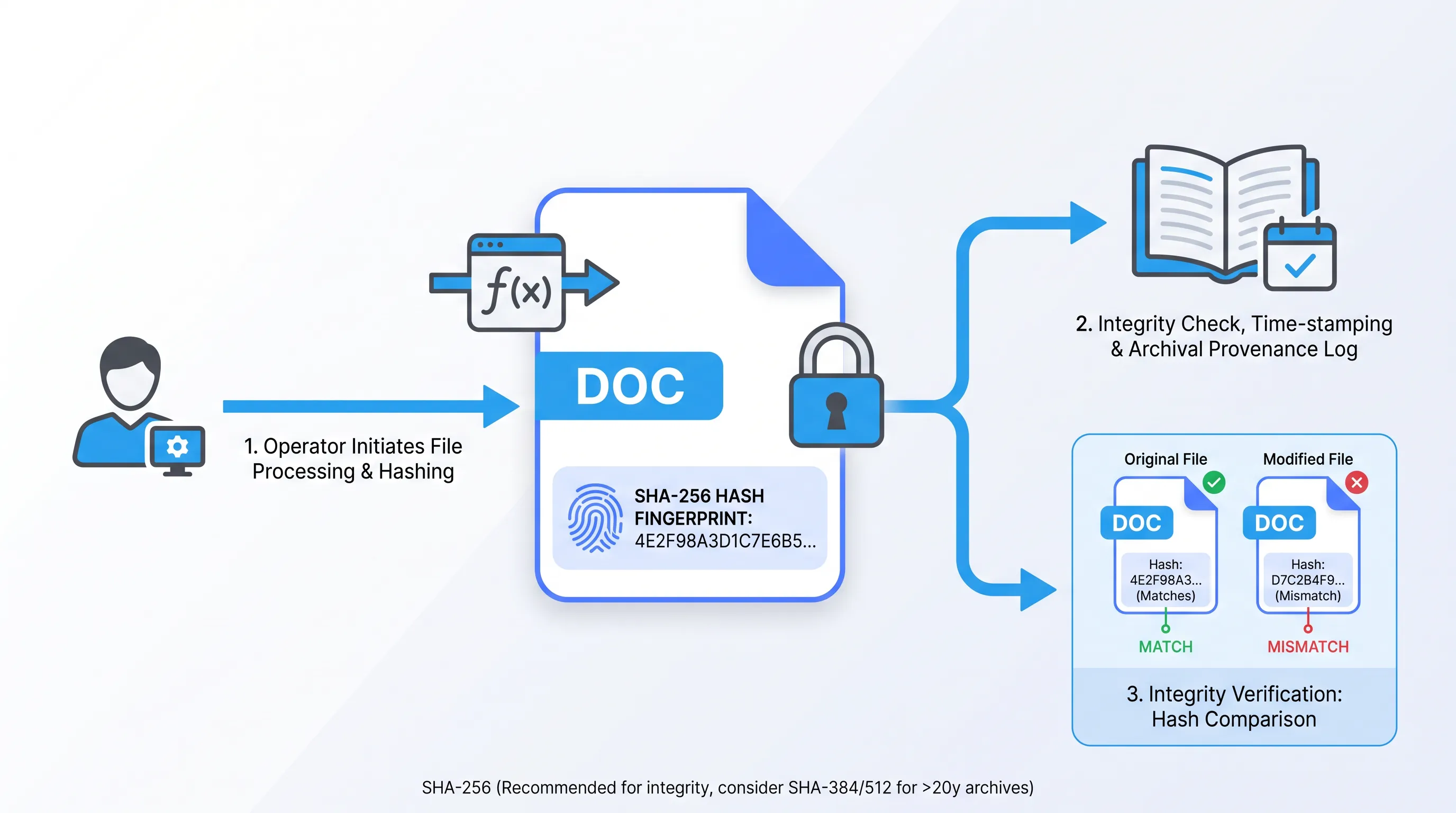
Modern flat-design flow diagram showing file integrity process using SHA-256 hashing, featuring icons and a comparison inset.

Now calculate a hash for every file, against the untouched source, before anything is renamed. Use SHA-256 as defined in FIPS 180-4, which ETSI lists as recommended for signature use. SHA-1 doesn't belong here, since its first known practical collision landed in February 2017 and the function has been off the recommended list far longer than that.

Each hash is a fixed-length fingerprint of the file's exact bytes. Change one byte and the output changes completely, which is the whole point. That value is your pre-renaming integrity baseline, and it's the number you'll compare against when the work is done.

Log more than the digest. Record the tool and version used and the UTC timestamp. Capture the operator and the file path, then store the output itself, because a hash with no provenance proves nothing. For archives you expect to hold longer than 20 years, ETSI now points toward SHA-384 or SHA-512, so decide that before you start rather than rehashing a million files later. Applying file naming conventions after this step is safe, because you can always prove what the file was.

Documents shouldn't be manual work.

Standardize how your business creates, manages, and signs recurring documents - without complex enterprise software.

Build the cross-reference manifest

The manifest is the bridge between the old archive and the new one. One row per record, written once and stored immutably as a signed file. It's the artefact an auditor reads first.

Each row carries the original filename and the standardized name. It also carries the contract identifier and the baseline hash, with the certificate reference and the source location. Around the rows sit the approvals: who authorised the batch, when, and under what version of the scheme. The approach mirrors what ISO 14641-1 asks of an electronic archiving system, where integrity rests on fingerprints of archived objects and a time-stamped log of operations.

Version the manifest itself and never overwrite it. If the scheme changes mid-project, you issue version 2 and record why, so that version 1 stays readable. Exception notes belong in the same file, so that every record a script refused to touch has a documented reason sitting next to it. File naming conventions without a manifest are just a preference, and the manifest is what turns them into evidence.

Rename files safely

Rename at the file-system level only. The operation changes the directory entry and nothing else, which means no library that opens or re-serialises the document. Any tool that loads a PDF into memory to write it back out has already left the safe path.

Pilot on a small batch first, maybe 50 records spanning your messiest formats, and verify that batch fully before scaling. The script refuses to overwrite an existing name and stops on the first exception rather than continuing. It writes an append-only log of every action with its timestamp and result. File naming best practices at this stage are mostly about restraint: do one thing and halt when reality disagrees with the manifest.

Collisions are the most common failure. When two records resolve to the same standardized name, the run stops and both go to review, because silently appending a counter buries a duplicate-contract problem inside a naming problem. Applying file naming conventions is reversible. Losing track of which of two agreements was the executed one is not.

Avoid the Save As trap

Here's the failure that undoes an entire project. Someone opens a signed contract in a PDF editor, uses Save As to give it the new name, and the editor rewrites the file structure on the way out. The signature panel then reports a problem, because modifying a signed document invalidates existing electronic signatures.

Certification signatures make this stricter still. A PDF sealed with the DocMDP setting NO_CHANGE_PERMITTED treats any change to the document as invalidating, so there's no benign rewrite. Format conversion carries the same hazard, which is why ETSI notes that a document should be converted to PDF/A before signing rather than after.

There's a second, quieter discrepancy. Certificates of completion frequently stamp the filename as it existed at signing, so a rewritten file can end up with a name that contradicts its own certificate. Quarantine anything suspected of a rewrite and route it to legal and technical review together. File naming conventions state in plain terms that Save As is prohibited on signed records.

Verify renamed files

Recalculate SHA-256 over every renamed file and compare each result to its intake value. The match has to be exact. A single mismatch means the file was rewritten rather than renamed, and that record goes back to quarantine rather than into the archive.

Reconcile counts as well as hashes. The number of agreements and the number of certificates agree with the number of manifest rows, and any shortfall gets explained before sign-off. Re-run signature validation on a sample using an independent validator, such as the tools described in the European Commission's eSignature validation guidance, so you're not relying solely on the hash comparison. File naming best practices end with proof.

Then obtain written approval before the working copy replaces anything. The approval references the manifest version and the verification report. Only after that does the source archive come off read-only.

Preserve evidence in Agrello

A renamed archive is only as defensible as the evidence stored alongside it. Keep the completed records together with the sealed manifest and the certificates of completion. Store both sets of hash results and the approvals in one place with consistent references between them. An auditor takes a standardized name and finds its manifest row. The auditor reads the original filename and baseline hash, then confirms the signature still validates.

That continuity is what makes file naming conventions safe to apply to historical contracts rather than risky. Since the eIDAS Regulation took effect on 1 July 2016, the EU has recognised three levels of electronic signature, and the higher levels rest on cryptographic structures described in ETSI EN 319 142-1 that your renaming process must leave untouched. Agrello stores signed documents with their signature data and audit records in one repository, which is where this evidence set belongs. Document naming conventions and chain of custody then live in the same system instead of in two spreadsheets that drift apart.

Closing the loop

The sequence is unglamorous and it works: scope it and inventory it, then hash it and map it. You then rename it at the file-system level and verify byte for byte. The sequence requires that you refuse to open the files.

Agrello is a document management and e-signing platform where signed agreements and their certificates sit together. Talk to Agrello about preserving signature validity across a legacy archive, or start a free trial and test your file naming conventions against a real signed record set.

Documents shouldn't be manual work.

Standardize how your business creates, manages, and signs recurring documents - without complex enterprise software.

Stop the rename and send both records to manual review. Don’t add a counter automatically, because the collision could indicate duplicate contracts, an incorrect identifier, or an incomplete naming rule. Record the exception in the manifest, resolve the records, then rerun file naming conventions only after approval.

Yes, a file-system rename can change directory metadata, such as a modification timestamp, depending on the operating system. Capture relevant metadata before the project and record the rename time separately. Use the file’s baseline hash to prove that its contents stayed unchanged.

Quarantine the contract and place it in a manual review queue before renaming it. Check the contract register, source repositories, and retention records for the missing certificate. Document each search and the final decision in the exception record, then link that record to the manifest row.

An immutable manifest preserves the original-to-new filename relationship after the batch ends. It also protects the baseline hash, source path, approvals, and exception notes from silent changes. Create a new version when the naming rule changes, and retain earlier versions for audit review.

Store the contracts, certificates, sealed manifest, hash reports, validation results, and approvals in one controlled repository with consistent references. Agrello can keep signed documents with signature data and audit records together. Speak to Agrello about preserving this evidence set, or test the process with a free trial.

Schedule a Meeting

Book a time that works best for you and let's discuss your project needs.

You Might Also Like

Discover more insights and articles

Title:
Which New-Hire Documents Should Be Prepared and Signed?

Meta description:
Organize your HR onboarding documents by stage and owner so you meet legal deadlines and prepare new hires on time.

A

Which New-Hire Documents Should Be Prepared and Signed?

New-hire paperwork splits into pre-start documents that set the terms and first-day documents that confirm identity and tax status, with post-start documents covering benefits and training. Each one needs a named preparer and a signer, with a deadline and a storage destination per location.

Business professional standing in a modern office, representing collaboration and document controls for legal, sales, and operations teams.

Which Collaboration Controls Do Legal, Sales and Ops Need?

Seven controls matter. They include defined roles and clause-level comments. Version history and review handoffs with visible approval status also matter, as do least-privilege access and event-based notifications. A documented signing-readiness check completes the set. Together they let the three departments contribute to the same agreement while only one person holds decision authority at each stage.

Business professional in a modern office representing cloud-based document management and streamlined digital workflows

How to keep document workflows moving with a cloud based document management system

This article explains how to build an approval workflow that keeps moving when someone is out of office or when a reviewer forgets. It covers mapping the lifecycle and configuring routing and escalation rules in cloud document management software.

Businessman reviewing a contract approval workflow in an office

How Do You Ensure the Approved Contract Gets Signed?

You get the approved contract signed by locking the file under one identifier and one owner, and you send only that locked file to signature. Everything else stays a draft. The control is unglamorous and it holds, because wrong-file risk lives in the gap between someone saying "looks good" and someone clicking send.