Overview
Electronic signatures allow documents to be signed quickly from anywhere, eliminating the delays of printing, scanning, and physical paperwork. Behind this convenience is a secure process that verifies the signer’s identity, protects the document from tampering, and creates a legally defensible record of the transaction.
This article explains how electronic signatures work step by step - from document preparation and identity verification to cryptographic sealing and audit logging - so managers and decision-makers can confidently use digital signing tools for critical business agreements.
The Core Concept: It Is More Than Just an Image
Many people assume an electronic signature is just a picture of a handwritten signature pasted onto a PDF. If that were the case, it would be easy to forge. True electronic signature technology is much smarter. It involves a process that binds your identity to the document using cryptography.
Think of it less like using a rubber stamp and more like putting the document inside a digital safe that only specific people can open. When you use tools like Agrello to manage this process, the software handles a complex series of mathematical checks in the background. These checks ensure that the document you see is the exact same document that gets recorded.
Here is what defines a secure electronic signature process:
-
Identity Authentication: The system proves the signer is who they say they are.
-
Intent to Sign: The software requires an affirmative action, like clicking "Confirm," to show the signer meant to sign.
-
Data Integrity: The document is sealed so that any future changes invalidate the signature.
If you want a deeper dive into how these processes work and why digital signatures are more secure, check out What’s the difference between electronic and digital signatures?.
The demand for this technology is exploding because it solves the bottleneck of paper. In fact, the e-signature sector is projected to grow at a compound annual rate exceeding 30% by 2025. This growth is driven by the need for speed and security in business transactions.
Document Preparation and Identity Verification
The process begins before anyone signs anything. The document owner uploads a file to an electronic signature platform. This sets the stage for the transaction. The software converts the document into a format that can be read by the system and prepares it for processing.
During this stage, the sender decides who needs to sign and where. But the most critical part of this step is security. The sender must choose how the recipient will prove their identity. For a basic internal memo, an email address might be enough. For a high-value sales contract, you need stronger proof.
Common verification methods include:
-
Email Authentication: Sending a unique link to a specific email address.
-
SMS Codes: Sending a one-time password to the signer’s mobile phone.
-
Bank ID or Government ID: Using verified third-party services to confirm identity.
If you're curious about creating signatures that hold up legally and the importance of identity checks, see How do I create a legally binding e-signature?.
Security standards are rising globally. For example, Advanced Electronic Signature (AES) requires unique linkage to the signer and cryptographic protection, which often involves two-factor authentication. This ensures that the person opening the email is the actual person authorized to sign the contract.
The Signing Event and Digital Hashing

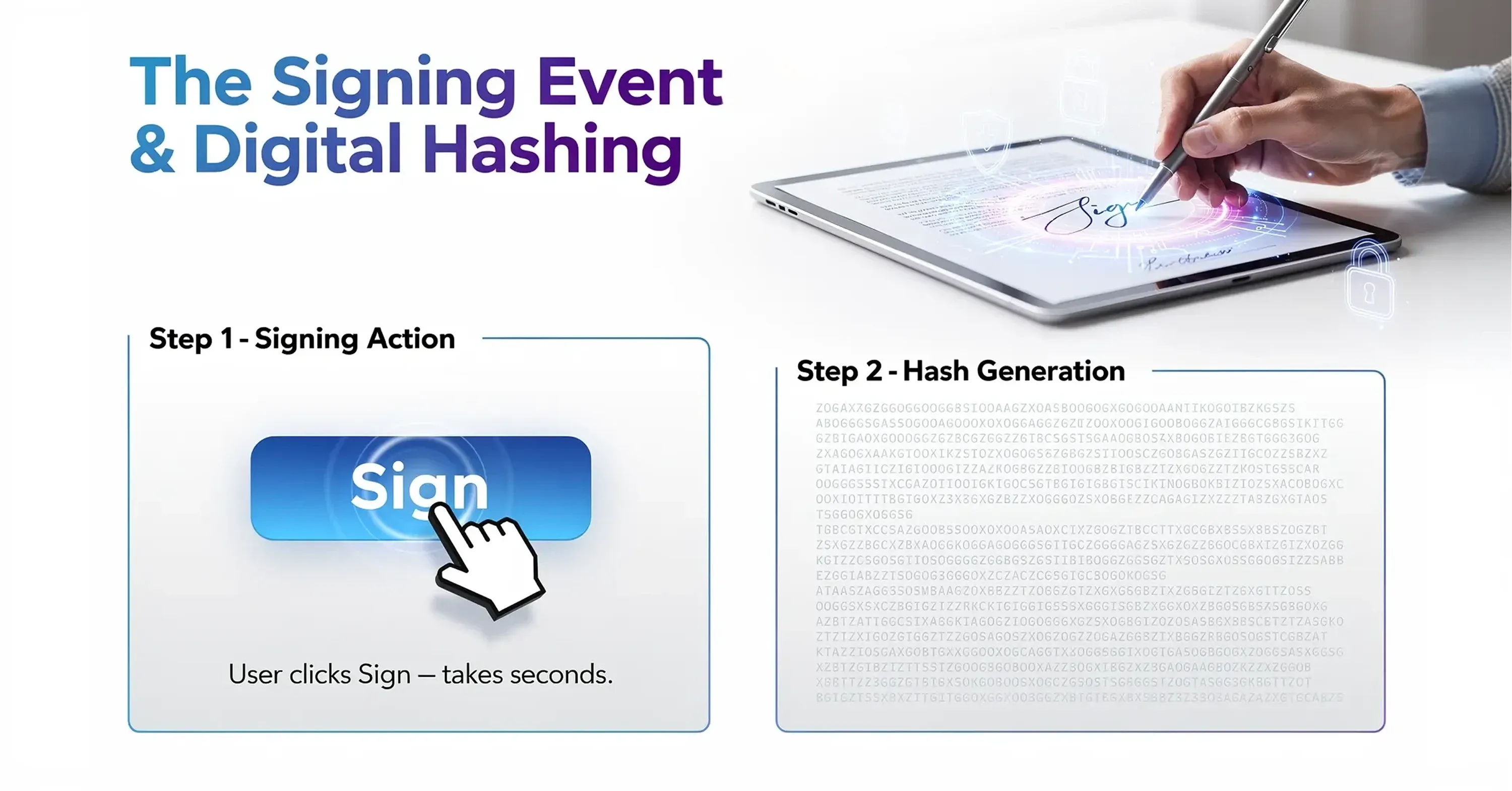
Once the signer opens the document and verifies their identity, they review the content. When they are ready, they perform the action of signing. This might be typing their name or clicking a button. To the user, this takes a split second. However, the software is performing a vital mathematical operation called "hashing."
A hash is like a digital fingerprint for that specific document. The software scans the entire file - every word, comma, and pixel - and generates a unique string of characters. If even a single letter in the contract is changed later, that digital fingerprint will change completely. This mechanism alerts the system that the document has been tampered with.
Here is how the hashing process protects you:
-
Unique Generation: The hash is unique to that specific version of the document.
-
Instant Calculation: The platform calculates this string the moment the signature is applied.
-
Encryption: The signer’s private key encrypts this hash, creating the digital signature.
If you want more details about the technology that makes this work - including digital fingerprints and cryptography - refer to Digital Signing Certificates: What They Are & How to Issue One.
This automated precision reduces mistakes significantly. Recent industry forecasts from Gartner suggest that AI in eSignature platforms reduces manual errors by up to 40%. By automating the capture of intent, the software removes the risk of missing pages or incomplete fields.
Sealing the Deal with Public Key Infrastructure
After the document is hashed and signed, it needs to be locked. This is where the concept of a digital signature comes into play. While "electronic signature" refers to the broad legal concept of agreeing to a record, a digital signature is the specific cryptographic technology used to secure it.
The system uses a Public Key Infrastructure (PKI). The signer has a "private key" (secret) used to sign, and the recipient uses a "public key" (open) to verify it. Think of it like a safety deposit box with two keys. The private key locks the box (signs the document), and the public key verifies that the lock belongs to the sender and has not been forced open.
For more on PKI, digital certificates, and their business applications, see What Is a Certified Digital Signature? Legal Meaning & How to Get One.
The benefits of this encryption layer include:
-
Tamper Evidence: If someone tries to edit the PDF after signing, the digital seal breaks.
-
Long-term Validity: The encryption remains valid even years after the transaction.
-
Global Compliance: This standard is recognized by major regulations like eIDAS in Europe.
Regulatory bodies are pushing for even stronger security measures. For instance, eIDAS 2.0 became effective from 2024, introducing advanced standards for trust services. This ensures that a contract signed today remains technically valid and secure for decades.
Verification and the Audit Trail
The final piece of the puzzle is the audit trail. For a manager, this is often the most valuable part of the process. If a dispute arises three years from now, you cannot rely on memory. You need proof. Electronic signature platforms automatically generate a detailed log of every action taken on the document.
This log acts as a digital witness. It records the entire story of the document from the moment it was created until the final signature was applied. It is much more reliable than a physical witness because it is based on objective data timestamps rather than human memory.
To understand how audit trails transform your contracts into legally defensible records, read Simplifying Document Signing Processes: The Magic of E-Signatures.
A standard audit trail typically captures:
-
Timestamps: The exact second the document was viewed and signed.
-
IP Addresses: The location of the computer or device used to sign.
-
Browser Information: The type of software used to access the file.
-
Email Addresses: Confirmation of which accounts were involved.
This level of detail is why legal industries are shifting away from paper. A survey of law firms in 2024 shows that electronic signatures are now considered critical to the business continuity of legal operations. They provide a chain of custody that paper simply cannot match.
Mobility and Accessibility
Understanding the technical process helps, but the practical application is what drives adoption. The technology described above works seamlessly on mobile devices. This capability has transformed how modern teams operate. You no longer need to be at a desk with a printer and scanner to execute a binding agreement.
If you want to learn about the best apps and mobile security considerations, see Best E-Signature Apps for Mobile Signing (iOS & Android).
Mobile signing uses the same hashing and encryption security as desktop signing. The interface is just adapted for a smaller screen. Platforms like Agrello are designed to make this experience intuitive, ensuring that a sales manager can approve a contract from a taxi without compromising security.
The shift toward mobile is undeniable. Mobile eSignature usage is expected to surge 50% by 2025 due to remote work normalization. This flexibility ensures that business does not stop just because a decision-maker is out of the office.
Conclusion
Understanding how electronic signatures work reveals why they are superior to ink on paper. It is not just about convenience; it is about better security and stronger evidence. The process converts your document into a mathematically unique file, locks it with encryption, and tracks every step in an audit log.
For functional managers and department heads, this technology removes the uncertainty from contract management. You get speed without sacrificing control. As the market grows to a predicted $12.7 million by 2030, adopting these tools is no longer just a tech upgrade. It is a fundamental standard for secure, efficient business.