Which New-Hire Documents Should Be Prepared and Signed?

Content authorBy Toomas PihlPublished onReading time11 min read
Title:
Which New-Hire Documents Should Be Prepared and Signed?

Meta description:
Organize your HR onboarding documents by stage and owner so you meet legal deadlines and prepare new hires on time.

A

New-hire paperwork splits into pre-start documents that set the terms and first-day documents that confirm identity and tax status, with post-start documents covering benefits and training. Each one needs a named preparer and a signer, with a deadline and a storage destination per location.

What belongs in the document inventory?

A document inventory is a location-specific register listing every file a new hire touches, sorted by whether the law requires it or a condition triggers it, and it includes files your company chose. Without that register, each hiring location invents its own list, and nobody can tell the difference between a missing form and a form that never applied.

Build the register around categories rather than single documents, from employment agreements to anything tied to a specific role.

Paperwork already eats more of onboarding than most teams admit. A Kronos and Human Capital Institute survey of 350 US HR leaders found that about 40% of onboarding activities consist of completing forms. If that much of the process is document handling, the inventory is the actual onboarding program. Mark each item as required or conditional, because the conditional items are the ones that disappear quietly when a hire crosses a state or country line.

Which documents belong at each stage?

Stage assignment works when every document carries nine fields. The checklist below is the smallest version that survives a second hiring location.

  • Document name and the location or entity it applies to

  • Owner who prepares it, approver who reviews it, and the person who signs

  • Deadline measured from offer acceptance or start date

  • Current status, storage destination, and the date local requirements were last checked

Keep it editable in whatever system your team already opens daily. A register nobody updates is worse than none, because it creates false confidence.

Timing matters more than completeness alone. An Aberdeen Group study cited by SHRM found that 83% of the highest performing organizations start onboarding before the new hire's first day. Front-loading works because anything you can legally finish before day one frees the first day for the forms that genuinely can't move, which is a scheduling argument. For a more automated approach, see onboarding workflows.

Pre-start files establish employment terms

Pre-start documents are the ones that define the relationship, from the offer letter to the bank and identification details payroll needs to open a record.

These travel well because they don't depend on physical presence. SilkRoad surveyed 312 HR leaders in the United States, with respondents also drawn from Canada and Mexico, and found that only 24% named paperwork processing as a top onboarding goal, with Gartner's Brian Kropp noting companies now push transactional paperwork to candidates before they arrive onsite.

So the pre-start stage carries the heaviest legal content and the lowest logistical friction. That combination is why it deserves your strictest approval routing. A contract clause error signed three weeks early is cheaper to fix than the same error discovered during a payroll run.

First-day files confirm required acknowledgments

First-day files are the ones with a legal clock attached. In the US, that means Form I-9 and federal and state tax withholding forms.

The I-9 timing is unforgiving. Section 1 must be completed by the employee no later than their first day of work, and the employer must verify documents within three business days of employment.

That three-day window is the real reason first-day paperwork can't be treated as a welcome ritual. It's a deadline that starts running whether or not anyone assigned an owner, which means the person who verifies documents should be named in your register before the hire accepts.

Documents shouldn't be manual work.

Standardize how your business creates, manages, and signs recurring documents - without complex enterprise software.

Post-start files complete ongoing enrollment

Post-start documents are triggered by eligibility or role rather than by the start date itself. Benefits elections and training completion records land here.

Several carry their own deadlines. For the Work Opportunity Tax Credit, employers have traditionally needed to submit Form 8850 to the state workforce agency within 28 calendar days after the new hire's start date.

Post-start deadlines are the ones that fail most often, because the urgency of day one is gone and the document now belongs to whoever remembers it exists. That's an argument for putting reminder ownership in the register rather than in someone's calendar. A benefit election missed by a week costs the employee coverage, and a tax credit missed by a week costs the company money nobody will ever notice losing.

Who owns each paperwork step?

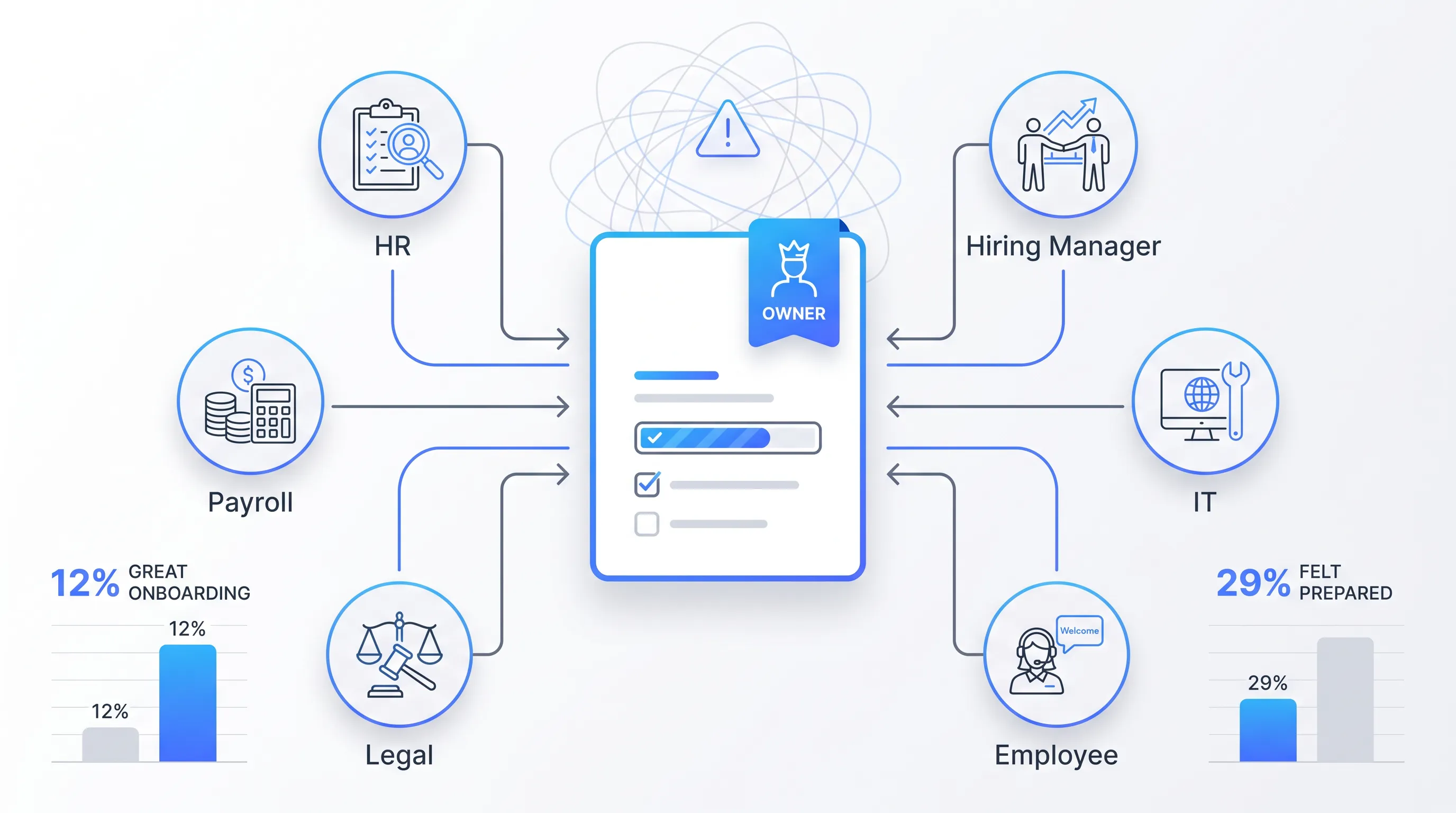
Modern flat-design SaaS onboarding workflow with a central document icon, flow lines, and bar charts on a minimal white gradient background.

One accountable owner per document, with everyone else assigned a narrower verb. HR owns the register and the templates. The hiring manager supplies role-specific terms and equipment needs. Payroll validates compensation and tax fields, and information technology handles access and device acknowledgments. Legal reviews language before it reaches a template. The employee signs and supplies personal data once.

The distinction worth protecting is between accountability and administration. Giving six functions equal authority over a document produces a workflow where nobody can close it.

Gallup research reported by SHRM found that only 12% of employees say their company did a great job onboarding them, and 29% felt prepared to excel in the new role. Those numbers are read as a culture problem. Read them as an ownership problem instead, and the fix becomes concrete, because diffuse responsibility is what produces an onboarding experience that feels like nobody was driving it.

How should templates be controlled?

Keep exactly one approved master per document per location, with a named owner and a version date printed on the file itself. Lock the legal language. Leave only the fields that change between hires editable. When a template is superseded, retire it so it can't be pulled from a shared drive six months later. Start with reusable templates that have already been approved.

Government forms make the case for version discipline better than any internal policy. US Citizenship and Immigration Services issued a Form I-9 edition dated 01/20/25, and employers running an older edition in an electronic system must update that system by July 31, 2026 with an edition carrying a 05/31/2027 expiration date.

Notice what that deadline implies for your own documents. If a federal agency assumes employers need an explicit retirement date to stop using a stale form, your internal handbook acknowledgment needs one too. Version dates without retirement rules just tell you which old file someone used.

How should employee data populate documents?

Map every field to one authoritative source, then collect sensitive data from the employee a single time. The applicant tracking system owns candidate identity and the human resources information system (HRIS) owns the employment record. Payroll owns banking and tax fields, and the document layer pulls from those rather than asking again.

Collecting once is also a legal posture. Article 5 of the General Data Protection Regulation requires that personal data be adequate, relevant and limited to what's necessary for the purposes it's processed for, the principle known as data minimisation.

Read that alongside how onboarding actually runs and a practical rule falls out: every duplicate collection point is both a data-quality risk and an exposure you chose. Validate transfers between systems at the point of handoff and restrict who can see completed files. Treat a field that appears in two systems with different values as a defect rather than a formatting quirk. Document automation can reduce repeated data entry when the underlying sources are controlled.

Documents shouldn't be manual work.

Standardize how your business creates, manages, and signs recurring documents - without complex enterprise software.

What signing sequence prevents delays?

Route internal approval before the document reaches the employee. A signature request that arrives and then gets recalled for a correction costs more trust than the delay it was meant to avoid. Decide per document whether signers run in parallel or in sequence and attach a deadline to each. Define what happens when someone declines or spots an error.

Electronic routing is settled ground legally. The US Congress passed the E-Sign Act in 2000, which gives electronic signatures the same legal status as physical ones when the signer consents, as Jesse Wood, CEO of document management company eFileCabinet, explained to SHRM. He added that every signature needs an unalterable audit trail recording the document's full history. Use electronic signing to keep that sequence in one workflow.

That audit trail is the part teams underbuild. If your signing tool can't show who signed what and when, the exception path has nowhere to record a correction, and your only evidence of a completed workflow is the final PDF.

Where should completed files be stored?

Completed documents and their audit evidence go to one designated employee record, with the storage system named in the register before the first signature. Decide which system is the record of truth, because when the HRIS and a shared drive hold copies alongside the signing tool, three teams will answer the same retrieval question differently.

Retention rules differ by document type, and some are short. Under federal requirements compiled by SHRM, job applications and other hire or no-hire records must be kept for one year after creation or the decision, whichever is later, with federal contractors held to two years.

Retention periods that vary by document are a storage design constraint. If everything lands in one undifferentiated folder, you can't delete on schedule without manual review, which means you'll keep records longer than you should and discover it during an audit. A complete audit trail also helps preserve evidence about how each file was completed.

Which requirements need local review?

This framework proves your workflow is complete without proving you're compliant. Those are different claims, and conflating them is how a tidy checklist gives a multi-location team false confidence.

Before you publish any form or deadline, date-check it against the issuing authority. For US hiring, that means USCIS for Form I-9 and E-Verify, plus the Internal Revenue Service for withholding forms. The Department of Labor covers wage and hour notices, along with whichever state or city agency governs the worksite.

Rules shift inside a single year. Since August 1, 2023, E-Verify employers in good standing have been able to use virtual document inspection for I-9 completion, provided they use E-Verify at that hiring site and conduct a live video review, then retain copies and check the alternative procedure box.

That option exists only for qualifying employers at qualifying sites, which is exactly the kind of conditional rule a location-blind checklist flattens into a company-wide policy it was never meant to be.

Which onboarding questions belong here?

Variants of this question belong on one canonical page rather than scattered across competing articles. Questions about which documents a new employee signs and how requirements differ by location are the same workflow question asked from different angles.

Splitting them across pages fragments the answer and leaves each version thinner than the problem deserves. Keep them together at /new-hire-paperwork and let the stage structure carry the differences.

Location variation is the hardest of these to answer generically. E-Verify is voluntary for most employers but mandatory for federal contractors and for all employers in Alabama, Arizona, and Florida, among other states. One hiring process spanning those states and others runs two different first-day sequences, which is why the register field for location decides which checklist a hire gets.

Standardize employee files with Agrello

Agrello is a document preparation and e-signing platform built for repeatable files like these. It handles the layer between your register and the signed record as it produces documents from approved templates with locked language and routes them to internal approvers and then the employee.

Signing works through national electronic identity credentials or Agrello's own advanced electronic signature, which matters when your hires sit in different countries.

What it does and what it doesn't do:

  1. It fits recurring document workflows where the same file set repeats per hire, per location.

  2. It isn't an HRIS and it doesn't give employment-law guidance.

Date-check your forms and deadlines with the relevant authority first, as of January 2026 or whenever you're reading this, then build the template set once. Start with your single highest-volume location and map the pre-start stage into templates. Add locations after the first one runs clean for a month.

Documents shouldn't be manual work.

Standardize how your business creates, manages, and signs recurring documents - without complex enterprise software.

Route the exception to the named owner and record the missed deadline, reason, and next action. Don’t edit a document after signing to fix an error. Withdraw and replace the incorrect version through the approved workflow, then preserve the original audit record and escalate unresolved issues before access or payroll deadlines are affected.

Audit each hire against the location-specific register and check every item’s owner, status, deadline, storage path, and version date. Review signature timestamps and exception notes, then test a sample from each hiring location. Record missing files as control failures and assign a correction deadline instead of marking the checklist complete.

Employees can receive copies when law or company policy requires it, and providing access to signed records supports accurate personal files. Define which documents employees receive, how they request replacements, and how identity is verified before release. Store proof of delivery with the employee record when the process requires it.

Recheck the employee’s paperwork against the requirements for the new work location before the transfer takes effect. Keep the original documents in the existing personnel record, add only the forms triggered by the move, and record the effective date. Don’t replace an earlier location’s records with documents from the new location.

Use a separate checklist for contractors because their documents depend on worker classification, contract terms, and the governing location. Confirm whether the person is an employee, independent contractor, or supplied through an agency before collecting forms. Have legal or compliance review uncertain classifications because misclassification can affect taxes, benefits, and wage obligations.

Schedule a Meeting

Book a time that works best for you and let's discuss your project needs.

You Might Also Like

Discover more insights and articles

Team discussing file naming conventions for legacy document archives in an office

How to apply file naming conventions to legacy archives without breaking audit trails

This article sets out a controlled sequence for applying file naming conventions to archives of signed legacy contracts. It runs from scope definition through post-rename verification, so that signatures and chain-of-custody records survive the cleanup intact.

Business professional standing in a modern office, representing collaboration and document controls for legal, sales, and operations teams.

Which Collaboration Controls Do Legal, Sales and Ops Need?

Seven controls matter. They include defined roles and clause-level comments. Version history and review handoffs with visible approval status also matter, as do least-privilege access and event-based notifications. A documented signing-readiness check completes the set. Together they let the three departments contribute to the same agreement while only one person holds decision authority at each stage.

Business professional in a modern office representing cloud-based document management and streamlined digital workflows

How to keep document workflows moving with a cloud based document management system

This article explains how to build an approval workflow that keeps moving when someone is out of office or when a reviewer forgets. It covers mapping the lifecycle and configuring routing and escalation rules in cloud document management software.

Businessman reviewing a contract approval workflow in an office

How Do You Ensure the Approved Contract Gets Signed?

You get the approved contract signed by locking the file under one identifier and one owner, and you send only that locked file to signature. Everything else stays a draft. The control is unglamorous and it holds, because wrong-file risk lives in the gap between someone saying "looks good" and someone clicking send.