Close-up of professional with overlay text about how AI improves HR document signing processes and digital signature automation

How Does AI Improve HR Document Signing Processes?

Every new hire means a stack of paperwork. Offer letters, tax forms, policy acknowledgments, benefits enrollment, direct deposit authorization. For HR teams managing dozens or hundreds of employees, keeping all of that moving smoothly is a constant challenge.

Content authorBy Toomas PihlPublished onReading time8 min read

What This Article Covers

This article breaks down how AI is changing the way HR teams handle document signing, specifically for onboarding, policy acknowledgments, and payroll forms. You will learn where manual effort gets cut, how employee experience improves, and what practical results HR managers can expect when AI meets e-signature workflows. We will also look at real numbers from industry research and explain where tools like Agrello fit into the picture.

Why Traditional HR Document Signing Falls Short

Before exploring what AI brings to the table, it is worth understanding why the old way creates so many headaches.

Most HR departments still deal with a surprising amount of manual work around documents. According to the CIPD, 80% of business document processes still involve paper, even in organizations that consider themselves digitally mature. In HR, that translates to printed forms, wet signatures, scanning, filing, and chasing people down for missing pages.

The consequences are predictable:

  • Onboarding timelines stretch because documents sit in inboxes or on desks

  • Errors in payroll forms lead to payment delays and frustrated employees

  • Policy acknowledgments go unsigned for weeks, creating compliance gaps

  • HR specialists spend hours on follow-ups instead of strategic work

Even teams that have adopted basic electronic signatures often hit a ceiling. Without intelligent automation behind the signing workflow, someone still has to manually route each document, verify completeness, and track down stragglers. That is where AI steps in. For deeper insight on this topic, see how AI and RPA transform HR contract management.

How AI Streamlines Onboarding Document Workflows

Onboarding is the single biggest document-heavy moment in the employee lifecycle. A typical new hire might sign 10 to 15 documents in their first week. Multiply that across a growing company, and the volume becomes unmanageable without smart systems.

Intelligent Document Routing

AI can analyze a new hire's role, department, and location, then automatically assemble the correct document package. Instead of an HR specialist manually selecting which forms apply, the system handles it.

  • A remote employee in one state gets the right tax withholding form, while a hire in another state gets a different one

  • Managers receive approval requests only for documents that need their signature

  • Compliance-sensitive forms get flagged and prioritized automatically

This removes guesswork. HR teams stop worrying about whether they sent the right version of a form, because the system already knows.

Smart Reminders and Follow-Ups

AI-powered signing platforms track where each document sits in the process and nudge signers at the right time. Rather than HR sending generic "please sign your documents" emails, the system sends targeted reminders based on urgency and behavior patterns.

The result is faster completion rates and fewer unsigned documents clogging the pipeline. For the employee, the experience feels smooth and guided rather than overwhelming. At Smarten Logistics, this shift eliminated roughly a week's worth of manual HR work per month - time that now goes into hiring quality and employee development instead of document tracking.

Reducing Errors in Payroll and Benefits Forms

Payroll forms are where small mistakes cause outsized problems. A wrong bank account number, a missing Social Security digit, or an unsigned W-4 can delay someone's first paycheck. That is a terrible first impression.

AI helps here in two specific ways.

Field Validation and Auto-Population

Modern AI-powered e-signature tools can pre-fill known employee data, pulling from HRIS systems or previous submissions. They also validate entries in real time, flagging inconsistencies before a document gets submitted.

  • If an employee enters a routing number that does not match standard formats, the system catches it immediately

  • Fields that require specific data types, like dates or numeric values, reject incorrect entries on the spot

  • Required fields cannot be skipped, eliminating incomplete submissions

Research from Forrester found that organizations using intelligent contract management saw an 85% reduction in errors in their document processes. While that study focused on sales contracts, the same principle applies to HR forms where accuracy matters just as much. For a practical breakdown of how AI prevents such errors and automates contract checks, see What Are the Key Benefits of AI-Powered E-Signature Workflows?

Automated Audit Trails

Every digital signature captured through an AI-enabled platform generates a complete audit trail: who signed, when, from what device, and whether any fields were modified. This is critical for payroll documentation, where disputes sometimes arise months later.

HR teams no longer need to dig through filing cabinets or email threads. The record is there, timestamped and tamper-proof. You can learn more about audit trails and creating legally binding e-signatures in How do I create a legally binding e-signature?.

Improving Policy Acknowledgment Compliance

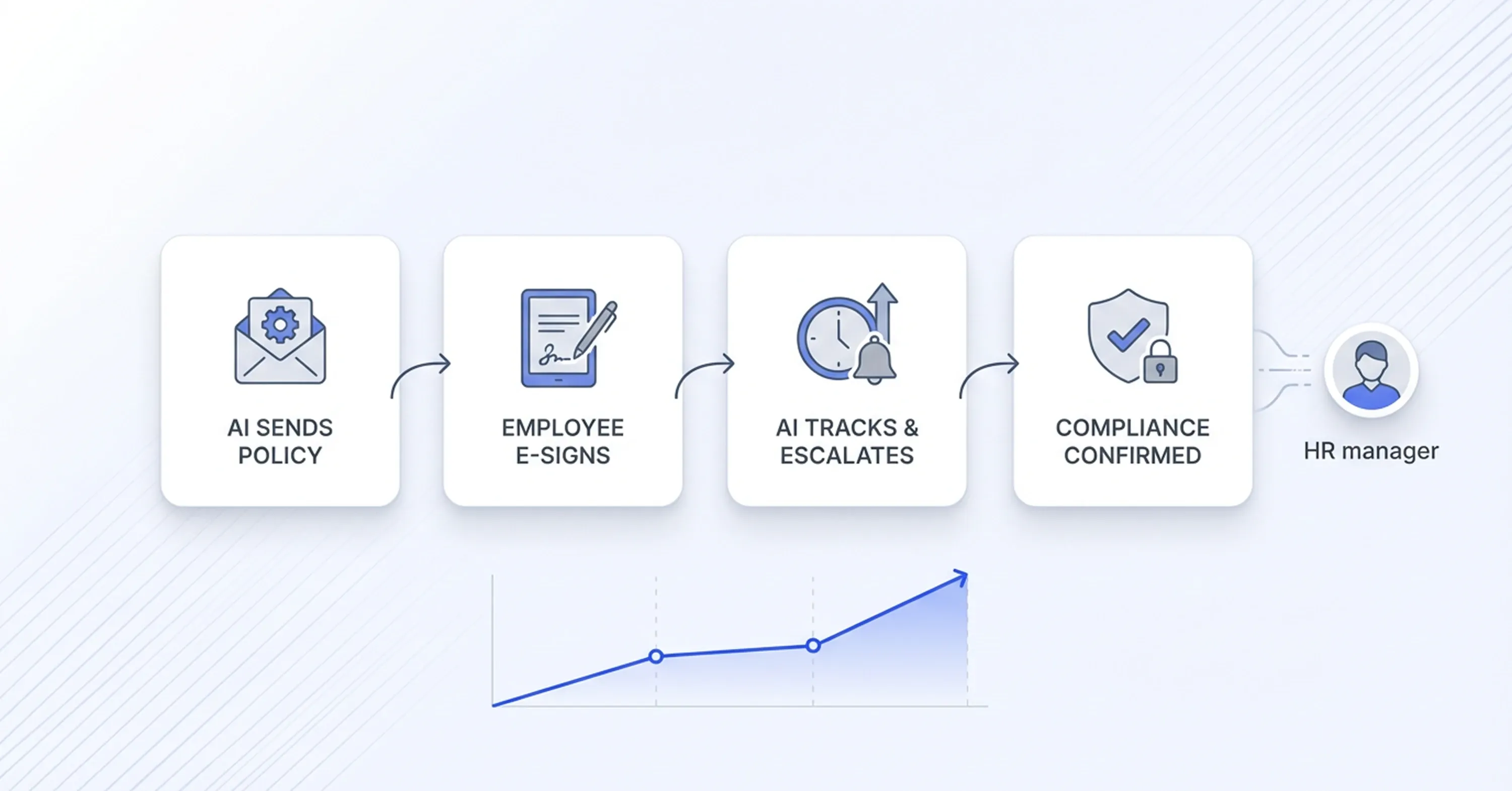
Workflow diagram showing AI HR process where policies are sent employees e-sign documents AI tracks progress and confirms compliance

Policy acknowledgments are easy to overlook because they feel routine. But from a legal and compliance standpoint, they are essential. Whether it is an updated harassment policy, a remote work agreement, or a data privacy notice, organizations need proof that every employee reviewed and signed.

AI makes this process reliable rather than hopeful.

  • When a policy is updated, the system automatically identifies which employees need to re-sign and sends the document

  • Dashboards show real-time completion rates by department, location, or manager

  • Escalation rules trigger automatically if acknowledgments remain unsigned past a deadline

This is a major improvement over the old approach of emailing a PDF and hoping for the best. HR managers get visibility without having to build spreadsheets or manually track responses.

For growing companies especially, this kind of HR automation e-signature workflow prevents compliance issues from scaling alongside headcount.

The Business Case: Numbers That Matter

The shift toward AI-powered document signing is not just a convenience play. It has measurable financial impact.

The global electronic signature market reflects this momentum. One analysis valued the market at USD 7.3 billion in 2024, projecting growth to $76.2 billion by 2033 at a 26.8% CAGR. A separate report from The Insight Partners estimated the electronic signature software market could reach $35.7 billion by 2030 with a 34.2% CAGR.

On the ROI front, Forrester's 2024 Total Economic Impact study found that organizations implementing intelligent contract lifecycle management achieved a 449% return on investment. The same study reported a 90% reduction in time to create new contracts and an 80% decrease in labor costs for researching contract terms.

For a practical way to forecast savings and efficiency gains from automation in your office, check the Document Automation ROI Calculator.

These figures reflect what HR teams report on the ground. The time savings are measurable. But practitioners often point to something harder to quantify: the reduction in cognitive load - no longer mentally tracking who signed what, which form version is current, which new hire is still missing a document. When the system handles that, HR professionals describe it as getting a second brain.

What AI-Powered Signing Looks Like in Practice

To make this concrete, here is what a typical HR workflow looks like with AI handling the document signing process:

  1. A new hire accepts an offer, triggering automatic assembly of their onboarding packet

  2. AI selects the correct forms based on role, location, and employment type

  3. Documents are sent for digital signature with pre-filled employee data

  4. The employee reviews and signs from any device, with real-time field validation

  5. Completed documents are automatically filed, indexed, and linked to the employee record

  6. HR receives a dashboard summary showing completion status across all active onboarding cases

Platforms like Agrello are built around this kind of intelligent workflow, combining digital signature capabilities with AI-driven document handling that reduces the manual burden on HR teams. For more on how teams manage large-scale document workflows using AI, see How can I bulk sign multiple documents with AI?.

Meanwhile, a Gartner survey found that 45% of managers report AI has lived up to their expectations in improving their teams' work. As AI in HR automation e-signature workflows matures, that number is likely to grow.

What AI Actually Improves in HR Document Signing

AI improves HR document signing processes by automating document assembly, routing, validation, tracking, and filing. It reduces manual effort for HR teams, cuts errors in payroll and compliance forms, and creates a faster, smoother signing experience for employees. The technology works best when integrated into existing HR systems and applied to high-volume, repetitive document workflows like onboarding, policy acknowledgments, and benefits enrollment.

Conclusion

AI is not replacing HR teams. It is redesigning how HR operations work at scale. By removing manual routing, follow-ups, and error-prone data entry, AI turns document signing from a bottleneck into a structured, predictable workflow.

The impact goes beyond efficiency. Onboarding becomes faster and more consistent. Payroll errors drop before they happen. Compliance is no longer reactive, but built into the process itself. Most importantly, HR teams stop operating as coordinators of paperwork and return to what actually drives value: hiring, retention, and employee experience.

For companies growing headcount and complexity, AI-powered document signing is not an optimization. It is operational infrastructure. The difference is simple: without it, HR teams chase documents. With it, the system runs itself.

AI automatically selects the correct documents based on an employee's role, location, and employment type. It pre-fills known data, routes forms to the right signers, and sends smart reminders. This eliminates the need for HR specialists to manually assemble, send, and track each document package.

Yes. AI tracks which employees have signed required policy acknowledgments and flags those who have not. It generates complete audit trails for every signed document, providing verifiable proof of compliance. Automated escalation rules ensure nothing slips through the cracks.

High-volume, repetitive documents benefit the most. These include offer letters, tax withholding forms (like W-4s), direct deposit authorizations, non-disclosure agreements, policy acknowledgments, and benefits enrollment forms. Any document that follows a predictable pattern is a strong candidate.

AI-powered digital signature platforms use encryption, identity verification, and tamper-evident audit trails to protect documents. These security measures often exceed what paper-based or basic email processes can offer, making them suitable for sensitive HR and payroll data.

Many organizations report noticeable improvements within the first onboarding cycle. Document completion times typically drop significantly, error rates decrease, and HR staff spend less time on follow-ups. The speed of results depends on how well the tool integrates with existing HR systems.

Schedule a Meeting

Book a time that works best for you and let's discuss your project needs.

You Might Also Like

Discover more insights and articles

Woman reviewing signed documents with text about secure storage and management of e-signed documents, representing digital document security solutions.

What's the Safest Way to Store and Manage Signed Documents?

You just got a contract signed. It's locked in, legally binding, and ready to file away. But where exactly does it go, and who can access it six months from now when someone needs it for an audit? More importantly, will you be able to find the right version quickly, prove its authenticity, and show a clear record of who signed and accessed it?

Man signing a document with illustration of cloud workflow, representing automatic document sending for e-signature and digital signing process.

How Can I Send Documents for E-Signing Automatically?

Every week, your team sends the same contracts, NDAs, and approval forms. Someone downloads a template, fills in the names, attaches it to an email, and waits. Multiply that by dozens of documents, and you've built a bottleneck nobody asked for.

Team reviewing documents with overlay text about verifying if a digital signature is authentic.

How to Verify If a Digital Signature Is Authentic

You just received a signed contract, and now you're staring at a little icon or banner in your PDF reader wondering: is this signature actually real? You're not alone. With the global digital signature market valued at USD 9.85 billion in 2025, more documents than ever carry digital signatures, and knowing how to verify digital signature authenticity has become a daily workplace skill.

Professional man with glasses working on digital documents with text about creating a professional e-signature design.

How to Create a Professional E-Signature Design

Every contract, proposal, and agreement your team sends carries your brand's reputation. When a client opens a document and sees a messy, inconsistent signature block, it quietly chips away at trust before they even read the terms.