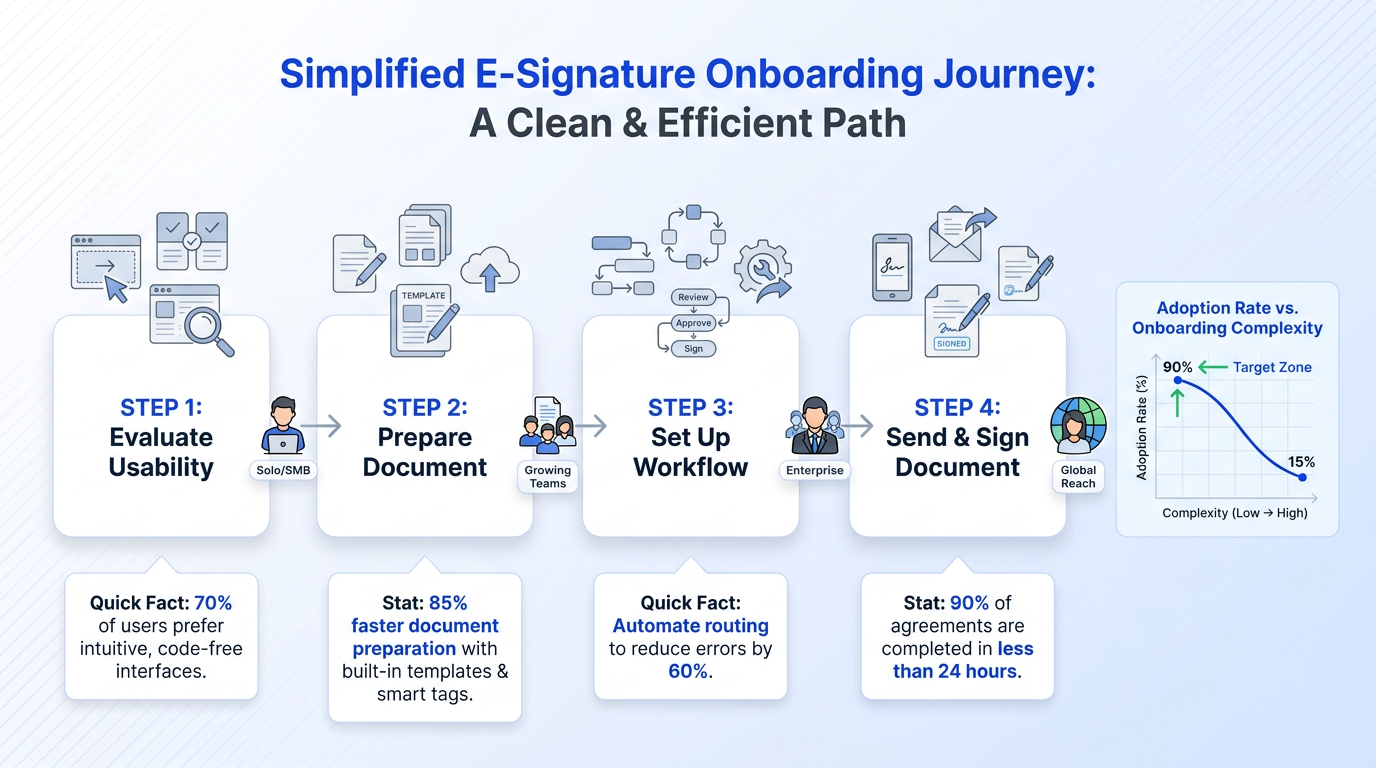
What This Guide Covers
This article breaks down what matters most when picking the best electronic signature software for growing teams. You'll get a clear look at pricing models, usability, workflow features, and security across several popular tools. We'll compare options like Docusign, signNow, PandaDoc, SignWell, and others, so you can figure out which one actually fits how your team works day to day. Whether you're in HR, sales ops, or managing a department that handles dozens of agreements a month, this guide is built for you.
Why the Right E-Signature Tool Matters for Growing Teams
When your team is small, every tool needs to earn its spot. A clunky signature platform slows down onboarding, delays deals, and creates unnecessary back-and-forth. The right electronic signature software removes friction from contract workflows without adding complexity.
Here's what growing teams typically need:
-
Fast document turnaround with minimal training
-
Clear tracking so managers know where a contract stands
-
Affordable pricing that doesn't penalize you for adding users
-
Legally binding digital signature capabilities that hold up under compliance requirements
If you're a department manager or coordinator evaluating tools, you're not shopping for a document management suite. You want something that works out of the box and doesn't require a dedicated admin to maintain.
For a broader perspective on the leading options in the market - and which features matter most for small and mid-sized teams - review this analysis of 12 Must-Have eSignature Tools for Teams and Enterprises.
The tools that win in this space tend to share a few qualities: intuitive interfaces, transparent pricing, and enough workflow control to handle multi-signer documents without turning every contract into a project.
Comparing Pricing: What You'll Actually Pay
Pricing is often the first filter for smaller teams, and it's where the biggest differences show up. Let's look at what several popular platforms charge.
Subscription-Based Plans
Most e-signature tools follow a per-user, per-month model. Docusign pricing starts from $15 per month, which covers basic signing features for an individual user. That price climbs quickly when you add team members or need advanced features like bulk send or integrations.
SignWell provides free signing for up to 3 documents per month, with paid plans from $12 per month. That free tier is handy for solo users or teams just getting started, but you'll hit the ceiling fast if you process more than a handful of agreements.
On the other end, signNow allows unlimited users on paid plans in 2026, which makes it an attractive option if your team is growing and you don't want per-seat pricing eating into your budget.
Pay-Per-Document Models
Not every team needs a monthly subscription. Some tools let you pay as you go.
The takeaway: match your pricing model to your actual volume. A flat monthly fee makes sense if you're sending dozens of contracts a week. Pay-per-document works better for teams that sign in bursts. For a clear breakdown on which approach is the best value, compare your needs using this guide: Choosing Between Free and Paid e-Signature Tools: A Comparison.
Usability and Onboarding Speed

A tool is only useful if your team actually adopts it. This is where a lot of enterprise-grade platforms fall short for smaller organizations. They offer powerful features behind steep learning curves.
What Makes a Tool Easy to Adopt
Look for these signals when evaluating usability:
-
Drag-and-drop document preparation
-
Pre-built templates for common agreement types (NDAs, offer letters, vendor contracts)
-
Mobile signing that doesn't require app downloads for recipients
-
Clear status dashboards showing pending, completed, and expired documents
Platforms like PandaDoc lean into usability. With over 15 million eSignatures completed on their platform, they've had plenty of time to refine the signing experience. Their template library and document editor make it easy for non-technical users to build, send, and track contracts.
Agrello takes a similar approach, focusing on simplicity for teams that need to move quickly. It's designed so that coordinators and managers can set up signing workflows without IT involvement, which is a real advantage when you're a team of 10 or 50, not 5,000.
For a deeper dive into adopting e-signature tools and how onboarding impacts productivity, see What’s the fastest way to sign and send documents online?.
The Onboarding Test
Here's a quick way to evaluate any e-signature tool: can a new team member send their first document within 15 minutes of signing up? If the answer is no, the tool is probably more complex than your team needs.
Workflow Control Without Enterprise Overhead
Small and mid-sized teams still need structure. You want to know who signed what, when, and whether the right approvals happened in the right order. But you don't need a 47-step approval chain.
The best electronic signature software for this audience hits a sweet spot:
-
Sequential and parallel signing options
-
Role-based access (so your sales team sees sales contracts, not HR documents)
-
Automated reminders for unsigned documents
-
Audit trails that satisfy compliance requirements without requiring manual logging
BoldSign is positioned as one of the best eSignature software solutions in 2026, partly because it balances workflow control with a clean, developer-friendly interface. For teams that want to embed signing into their existing tools, that flexibility matters.
Agrello also handles this well by keeping workflow setup straightforward. You can define signing order, set deadlines, and track progress from a single dashboard, all without the overhead that comes with platforms designed for legal departments at large corporations.
If workflow automation is a priority, explore practical strategies in How Can I Send Documents for E-Signing Automatically?, which covers triggers, templates, and integration best practices.
Security and Legal Validity
Every electronic signature tool worth considering uses encryption and complies with eIDAS, ESIGN, or UETA regulations. But the specifics matter, especially if your team handles sensitive HR documents or financial agreements.
What to Check
-
Does the platform provide a tamper-evident audit trail?
-
Are documents encrypted both in transit and at rest?
-
Can you verify signer identity through email, SMS, or ID verification?
-
Does the tool support qualified digital signature standards if you operate in the EU?
For most small and mid-sized teams, standard electronic signatures are legally sufficient. But if you're working across borders or in regulated industries, make sure your chosen tool supports the level of assurance you need. For an accessible breakdown of e-signature types, legal distinctions, and compliance requirements, read What Is an E-Signature? Define e signature, Meaning & Examples.
Quick-Reference Comparison
What is the best electronic signature software for small and mid-sized teams? The best option depends on your team's size, signing volume, and workflow needs. Docusign offers broad integrations starting at $15/month. signNow stands out with unlimited users on paid plans. SignWell is budget-friendly with a free tier. eSignatures works for pay-as-you-go needs. PandaDoc excels at document creation alongside signing. Agrello is built for teams that want simple, fast contract workflows without enterprise complexity.
For a broad side-by-side feature look at leading tools, including compliance, templates, automations, integrations, and pricing, see this Best Digital Signature Tool of 2025 (Security-Focused Comparison).
How to Make Your Final Decision
Before you commit to any platform, run this quick checklist:
-
Sign up for a free trial and send a real document within 15 minutes
-
Invite two team members and see how quickly they figure it out
-
Test the mobile signing experience from the recipient's side
-
Check whether integrations with your CRM, HR system, or cloud storage actually work
-
Review the audit trail on a completed document
The tool that passes all five of those tests without frustration is probably the right one for your team.
Conclusion
The best electronic signature software for your team isn't necessarily the one with the longest feature list. It's the one that fits your signing volume, budget, and workflow without adding unnecessary steps. For small and mid-sized teams, that usually means prioritizing speed, simplicity, and clear tracking over enterprise-level customization. The right platform should help your team move faster, not create another system people avoid using. Whether you're onboarding employees, sending sales agreements, or managing vendor contracts, a good e-signature tool reduces delays and keeps document workflows organized without requiring constant oversight.
Test a few options with real documents, involve the people who'll use the platform daily, and pay attention to how quickly your team adapts to the workflow. In many cases, the best choice is the tool that feels intuitive from day one and scales with your team as your signing volume grows.