What This Article Covers
If you handle contracts, purchase orders, HR documents, or internal approvals, you've probably wondered whether technology can catch a reused or manipulated signature before it causes damage. This article explains how AI-powered signature recognition actually works on scanned and copied signatures, what it can and can't detect, and what practical steps your team can take to reduce fraud risk without overhauling your entire workflow. By the end, you'll have a clear picture of where AI fits into your document review process.
How AI Signature Recognition Works on Scanned Documents
Before exploring specific fraud scenarios, it helps to understand the basic mechanics. AI signature recognition isn't a single tool. It's a combination of techniques that work together to analyze images of signatures embedded in documents.
At a high level, these systems follow a consistent process:
-
Image extraction: The AI locates signature fields within a scanned document, separating them from surrounding text, logos, and formatting.
-
Feature analysis: Algorithms examine the visual characteristics of the signature, including stroke patterns, line thickness, spacing, and overall shape.
-
Comparison against references: The extracted signature is compared to one or more known genuine signatures stored in a reference database.
-
Confidence scoring: The system produces a score indicating how likely the signature is to be authentic.
ProgressSoft's Intelligent Signature Recognition solution, for example, automatically analyzes and compares signatures extracted from checks or official documents with genuine reference signatures using AI. Similarly, Base64.ai states that its Signature AI recognizes, extracts, and verifies signatures on documents and images, confirming that modern AI models operate directly on scanned or imaged content.
The important takeaway here is that AI doesn't need the original pen-on-paper document. It works with digital images, which means scanned PDFs, photographed forms, and uploaded copies are all fair game. For a closer look at the mechanics behind these AI signature solutions - including the role of deep learning, biometric data, and anti-fraud pattern recognition - see How can AI detect and prevent forged digital signatures?.
What Makes Copied or Reused Signatures Detectable
So if AI works on images, can it really tell a genuine scanned signature apart from one that was copied and pasted? The answer depends on what the system is designed to look for.
Visual Inconsistencies in Pasted Signatures
When someone copies a signature from one document and places it on another, subtle visual artifacts often appear. These include:
-
Mismatched resolution or pixel density between the signature and the rest of the document
-
Inconsistent background shading where the pasted image overlaps the new page
-
Compression artifacts from repeated saving and resizing
-
Slight rotation, scaling, or positioning errors that wouldn't occur with a naturally placed signature
AI image analysis can flag these inconsistencies because the algorithms are trained to notice patterns that human reviewers typically miss during quick visual checks.
Behavioral and Biometric Markers
More advanced AI signature recognition goes beyond simple image matching. Inaza explains that AI-powered systems analyze pressure, speed, and rhythm alongside shape and stroke patterns, then generate a confidence score indicating the likelihood of authenticity.
This matters because a photocopied or scanned-and-pasted signature is static. It preserves the shape but strips away all behavioral data. When a system expects dynamic characteristics and finds none, that absence itself becomes a red flag.
Inaza also notes that these systems can detect forged signatures that don't match the original's unique characteristics, composite signatures created from various sources, and changes to other critical data in the document.
If you want to learn more about technical and behavioral clues modern AI uses for fraud detection, and see illustrative examples of these “giveaways,” check out How can AI detect and prevent forged digital signatures?.
Understanding these detection layers is useful, but it's equally important to know what AI can't do yet.
Where AI Signature Recognition Falls Short

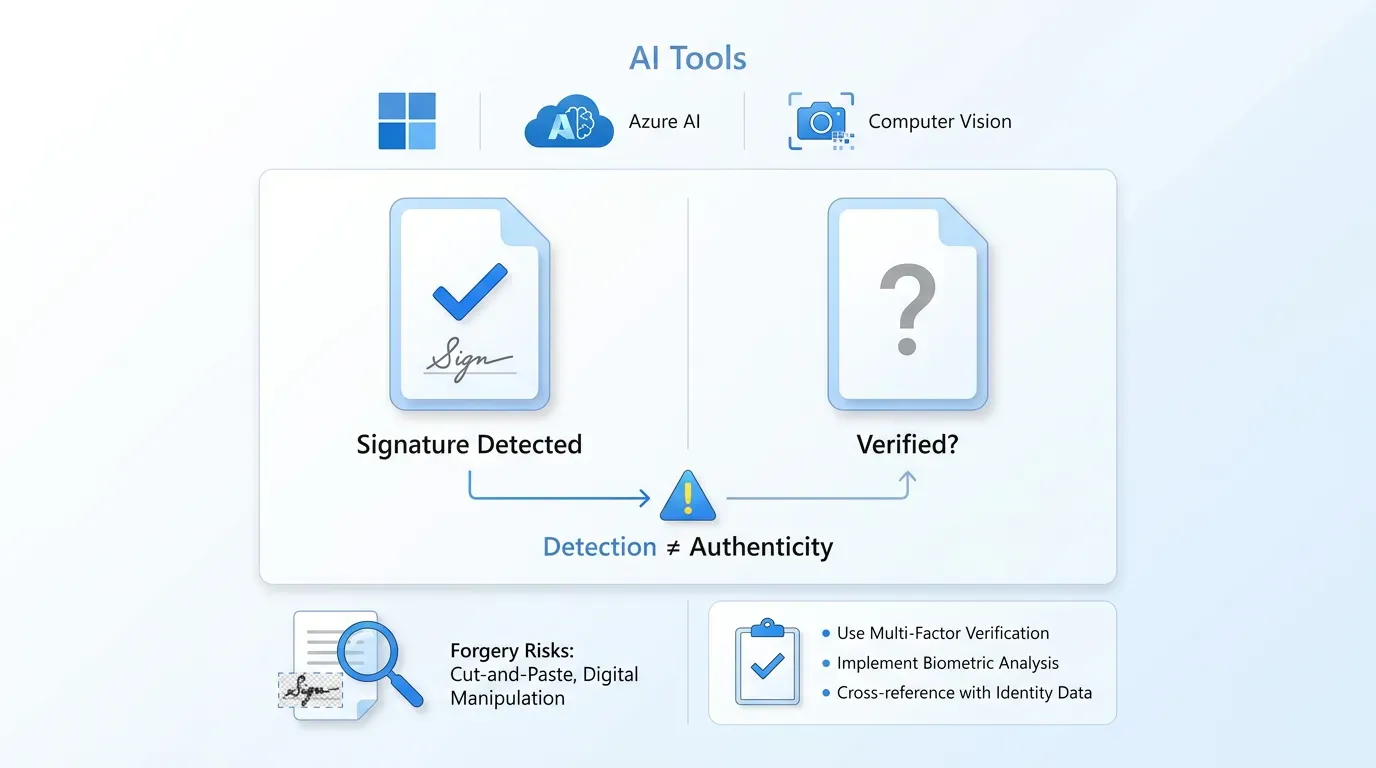
Not every AI tool performs full verification. Some only detect whether a signature is present, without evaluating its authenticity. Microsoft acknowledges that Azure AI Document Intelligence can detect signatures in documents and return whether a field is signed or unsigned, but it cannot verify if the signature is fake or compare it against a database.
That distinction is critical for teams evaluating tools. Detection and verification are two different capabilities:
For a deep dive into the strengths and limitations of detection versus verification - plus actionable checklists and tips on digital signature authenticity - consult How to Verify If a Digital Signature Is Authentic.
Microsoft further clarifies that its Document Intelligence and Computer Vision services do not offer built-in signature verification capabilities. So if your goal is catching copied signatures, detection alone won't get you there.
Even verification tools have boundaries. A high-quality scan of a genuine signature, pasted carefully onto a new document with matching resolution and formatting, can be difficult for image-only analysis to catch. This is why layered approaches matter.
Practical Steps for Teams That Handle Signed Documents
Knowing how the technology works is one thing. Putting it into practice within your department is another. Here's where things get concrete.
Build a Reference Signature Database
AI signature recognition depends on comparison. Without verified reference signatures on file, even the best algorithm has nothing to compare against.
-
Collect clean, high-resolution samples of each signer's signature during onboarding or contract setup
-
Store at least two or three reference samples to account for natural variation
-
Update references periodically, since signatures can shift slightly over time
Whether you're building your own reference bank or looking for a secure platform to manage signatures and ensure authenticity at scale, see the practical guide How can AI detect and prevent forged digital signatures? for best practices.
Layer AI With Digital Signature Workflows
Rather than relying solely on after-the-fact image analysis, consider preventing the problem upstream. Digital signature platforms create cryptographic records tied to the signer's identity, making it effectively impossible to copy and reuse a signature without detection.
Agrello, for instance, provides digital signature workflows that tie each signature to the signer's verified identity and the specific document. This eliminates the copy-paste vulnerability entirely, because the signature isn't just an image. It's a cryptographically sealed event.
Orbograph reports that the entire signature verification process can be automated by AI-powered systems, eliminating the need for manual examination. Combining that automation with a digital signature infrastructure gives teams both prevention and detection.
For a step-by-step explanation of how to automate digital signings with AI - including real-time identity checks and cryptographic sealing - refer to How do I generate a digital signature automatically with AI?.
Establish Clear Review Triggers
Even with AI tools in place, human oversight still has a role. Set up triggers that route flagged documents to a reviewer:
-
Any document where the AI confidence score falls below a defined threshold
-
Signatures that appear on document types not typically associated with that signer
-
Multiple documents submitted in a short window with identical-looking signatures
These triggers keep the process efficient without creating bottlenecks for routine approvals.
AI Signature Recognition at a Glance
AI signature recognition refers to the use of machine learning algorithms and image analysis to detect, extract, and verify signatures in scanned or digital documents. These systems compare submitted signatures against known reference samples, analyzing visual features like stroke patterns, line quality, and spacing to produce a confidence score indicating whether a signature is likely genuine, copied, or forged. For an accessible summary (with visuals and use cases), you can read Can AI create handwritten-style personalized signatures?.
What About Handwriting Recognition and OCR?
Some AI tools go a step further by attempting to read handwritten content in signatures. Zuva explains that its signature detection helps determine whether a document has been signed and identifies pages containing handwritten information. Zuva also clarifies that recognition refers to converting handwritten information to text, analogous to OCR on printed text.
This is useful for extracting signer names or dates written by hand, but it's a different function than verification. Think of it as reading what's there versus confirming who wrote it. Both capabilities can work together, but they serve different purposes in a fraud prevention workflow.
Nyckel offers a pretrained image model that predicts whether a signature is genuine or forged in seconds, using labels like Authentic, Counterfeit, Forged, and Genuine with an associated confidence score. Tools like this make AI signature recognition accessible even for teams without deep technical resources.
The growing availability of these tools means the real question for most teams isn't whether AI can recognize scanned or copied signatures. It's whether your current workflow takes advantage of what's already available.
Сonclusion
AI can recognize scanned and copied signatures, and the technology is becoming more accessible every year. Image analysis, pattern recognition, and machine learning algorithms give teams real tools for catching reused or manipulated signatures that would slip past a manual review.
But no single tool covers every scenario. The most reliable approach combines AI-powered verification with digital signature workflows that prevent signature reuse at the source. For department managers, HR teams, and operations professionals who review signed documents daily, understanding these layers is the first step toward building a process that's both efficient and trustworthy.