Overview
We will start with a quick refresher on digital signatures, then explore the regulations, the issuing process, and the business value. Real-world examples, including one with Agrello, show the concept in action. Finally, a step-by-step checklist helps you pick a provider and get certified within days.
By the end, you will know how to protect your agreements with a signature that stands up in any courtroom.
Digital signature vs. certified digital signature
Many people use the words electronic signature, digital signature, and certified digital signature interchangeably, yet they are distinct.
-
An electronic signature is any electronic acceptance of a document, even typing your name in an email.
-
A digital signature uses cryptographic keys to bind the signer’s identity to the document.
-
A certified digital signature layers an independently verified digital certificate onto the process, proving beyond doubt who signed and when.
For a deeper look at the technical differences and the security implications, read this guide on What is PaDES Signature.
In short, a regular digital signature answers the question “has the file changed?” A certified one also answers “who signed it and under which legal framework?”
This added assurance is what regulators and courts demand for high-value transactions.
The legal backbone: eIDAS, UETA, and more
Before you invest, it helps to know why certification is required in the first place. Regulations worldwide define which signatures are legally equivalent to pen-and-paper.
eIDAS in the European Union
-
eIDAS (EU Regulation 910/2014) creates three signature levels: electronic, advanced, and qualified.
-
A certified digital signature typically aligns with the “advanced” or “qualified” tiers, requiring identity verification and a qualified trust service provider (QTSP).
United States frameworks
-
The Uniform Electronic Transactions Act (UETA) and the ESIGN Act allow electronic signatures, but specific industries, like healthcare and finance, set higher bars.
-
Federal Information Processing Standards (FIPS) guide cryptographic algorithms for certified signatures used by government contractors.
Other regions
- Singapore’s Electronic Transactions Act, India’s IT Act, and Brazil’s ICP-Brasil share the common blueprint: certification via licensed certificate authorities.
For more detailed information on these frameworks and how they work across borders, check out Cross-border Digital Identity and E-signing in the Baltic States: A Practical Guide for SMEs.
Knowing which framework applies to your deals helps you choose the right provider and certificate type. Without that knowledge you might end up with a signature that is “digital” but not “certified” under the law that matters to you.
How a certified digital signature is issued

A certified signature is not just a special button in your PDF reader. It comes from a public key infrastructure (PKI) workflow that proves your identity before, during, and after you sign.
Role of Certificate Authorities (CAs)
Certificate Authorities act like notaries for the internet.
-
They confirm the applicant’s identity with passport checks, video verification, or corporate registry lookups.
-
They create a unique key pair: a private key held securely by you and a public key shared with anyone who needs to verify your signature.
-
They bind the keys to a digital certificate containing your name, email, company, and validity period.
Once issued, you can use that certificate to sign documents. Verifiers can confirm the signature by checking the CA’s public root certificate, guaranteeing the chain of trust.
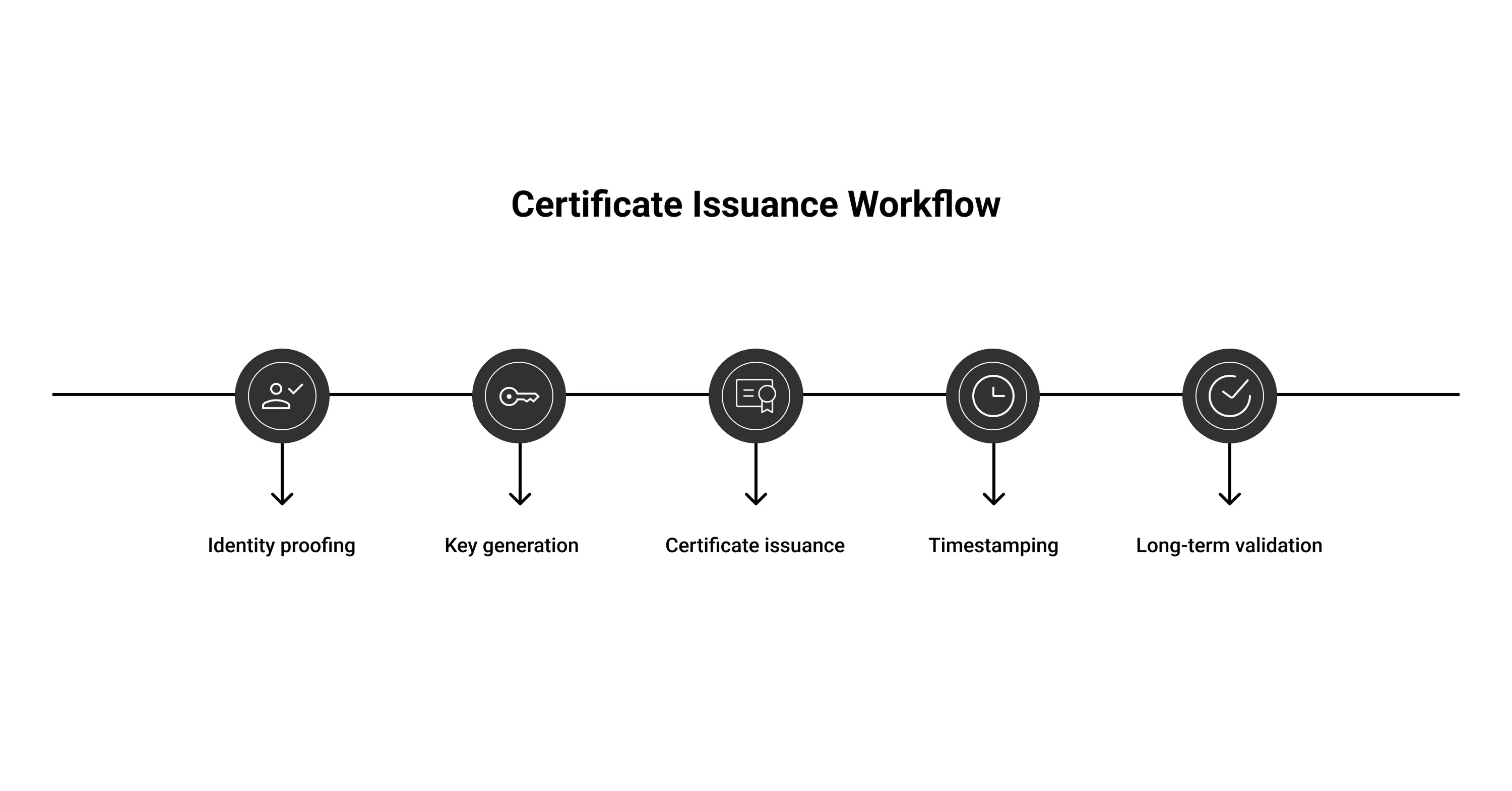
Validation steps at a glance
-
Identity proofing: government ID, selfie video, or face-to-face meeting.
-
Key generation and hardware storage, often on a secure USB token or cloud HSM.
-
Certificate issuance and installation in your signing software.
-
Timestamping with a trusted timestamp authority, ensuring non-repudiation.
-
Long-term validation (LTV) data embedded so the signature stays verifiable for many years.
-
A certified digital signature is essentially an entire security stack condensed into a click.
The takeaway: while the tech under the hood is complex, the user experience can be as simple as selecting your certificate and pressing “Sign.” For a comprehensive explanation of this workflow, see How Trust Works Online: Verified Digital Signatures.
Business benefits backed by data
Certified signatures are not just nice to have. They drive measurable gains.
-
Market growth: Analysts predict the global digital signature market will jump from USD 5.25 billion in 2022 to USD 40.23 billion by 2030, a compound annual growth rate of 29% as noted in a recent market forecast.
-
Legal sector adoption: A 2025 survey shows that 78% of law firms use e-signature tools and report higher fee collection rates.
-
Operational savings: The same study found 36% of firms save up to five hours a month on billing after moving to certified e-signatures.
Agrello users mirror those numbers. A Baltic property management company moved lease signings to Agrello’s cloud-hosted certified signatures and shortened contract cycles from seven days to under 24 hours, freeing staff to focus on tenant service instead of printing and scanning.
If you want to read more about how digital signatures boost business efficiency, check out The Evolution of Signing Processes: From Paper to Digital Signatures.
The message is clear: stronger signatures do not slow you down; they speed you up.
Real-world applications and case studies
Certified digital signatures shine wherever authenticity and compliance meet.
-
Bank loan agreements
A Nordic bank uses qualified signatures under eIDAS. Borrowers complete video KYC once, then sign loan documents online. The bank slashed paper costs and can securitize loans faster because investors trust the certification trail.
-
Pharmaceutical supply chain
A U.S. biotech firm signs FDA-regulated quality documents using FIPS 140-2 validated certificates. Auditors can trace every signature back to an individual scientist, shielding the company from data integrity fines.
-
Remote workforce contracting
When a UAE-based marketing agency hired freelancers globally, it chose Agrello’s advanced signatures tied to each contractor’s passport. Payment processors accepted the certified contracts as proof of work, accelerating payouts.
These examples illustrate that certification is more than a compliance checkbox; it directly influences speed to revenue.
Step-by-step: how to get your own certified digital signature
Ready to move from theory to action? Follow this straightforward path.
-
Map your legal requirements
-
Identify jurisdictions that govern your contracts.
-
Match them with required signature levels (advanced, qualified, etc.).
-
Select a trusted provider
-
Look for ETSI-accredited QTSPs in the EU or WebTrust-audited CAs in North America.
-
Review hardware options: USB token, smart card, or cloud key.
-
Complete identity verification
-
Expect a video call, document uploads, or face-to-face meeting.
-
Corporate applicants may need board resolutions or articles of incorporation.
-
Generate and store your keys
-
Hardware Security Modules (HSMs) give you flexibility and compliance.
-
For individuals, a token with built-in PIN protection suffices.
-
Install signing software
-
Many platforms, such as Agrello, bundle certificate management with an intuitive web interface.
-
Ensure the software embeds LTV data automatically.
-
Test on a low-risk document
-
Sign, verify, and validate the timestamp.
-
Share with a colleague to confirm cross-platform readability.
-
Roll out company-wide policies
For more guidance on getting set up, see What Level Signatures Can You Give on Agrello Platform.
Once you check off these steps, you can sign high-stakes agreements from anywhere with full legal assurance.
Choosing the right provider: questions to ask
A low price means little if the certificate fails a court review. Use this quick checklist.
-
Which laws does the provider’s certificate satisfy?
-
Is the CA’s root trusted by Adobe Acrobat, Microsoft, and Apple preview?
-
Does the platform support bulk signing, API integration, or mobile apps?
-
How easy is key recovery if an employee leaves?
-
What is the renewal process and cost after the first year?
Answering these questions guards against vendor lock-in and hidden fees.
For further information about provider features and what to consider, read Are Your Digital Contracts Secure? A Look Into E-signature Security.
What is certified digital signature?
A certified digital signature is a cryptographically generated mark on an electronic document that is tied to a verified digital certificate issued by a trusted Certificate Authority, proving the signer’s identity and intent, preserving document integrity, and meeting stringent legal standards such as eIDAS advanced or qualified levels.
Conclusion
A certified digital signature combines cryptography, identity proofing, and regulatory compliance in one click. With the right provider, you can secure contracts, impress auditors, and shorten deal cycles without adding friction. Whether you work in finance, law, or manufacturing, taking the small step to certification pays off in speed and confidence.