Professional business banner featuring a smiling executive beside the headline “What Is an Electronic Signature App and How It Simplifies Workflows,” illustrating digital document signing and workflow automation

What Is an Electronic Signature App and How It Simplifies Workflows

If your team still prints contracts, chases down wet signatures, and feeds pages through a scanner just to close a routine deal, you already know the bottleneck. The real question is how quickly you can eliminate it. This article breaks down what an electronic signature app actually does, why it matters for HR and sales teams drowning in paperwork, and how to pick one that fits a busy department without adding complexity. You'll also see where common tools differ and what to look for when your team is ready to move faster.

Content authorBy Toomas PihlPublished onReading time9 min read

What Exactly Is an Electronic Signature App?

An electronic signature app is software that lets people sign documents digitally, on a phone, tablet, or computer, without printing a single page. Instead of mailing or hand-delivering a form, the sender uploads a document, marks where signatures are needed, and sends a link. The signer clicks, signs, and the completed file is stored automatically.

Here's what a typical electronic signature app handles:

  • Document upload: drag in a PDF, Word file, or template

  • Signature placement: drop signature fields where each party needs to sign

  • Delivery and notifications: the signer receives an email or link, signs from any device

  • Tracking: the sender sees who signed, who hasn't, and when

  • Secure storage: completed documents are saved with a digital audit trail

A quick definition for clarity: an electronic signature app is a digital tool that replaces handwritten signatures on paper with legally recognized electronic signatures, allowing documents to be signed, sent, and stored entirely online.

Most countries recognize electronic signatures as legally binding. In the EU, the eIDAS regulation governs them. In the United States, the ESIGN Act and UETA provide the legal framework. So the concern about legality? It's been settled for years.

If you want a deeper dive into the meaning, legality, and main use cases for electronic signatures, see Electronic Signature Definition: Meaning, Legality & Use Cases.

This foundation matters because once you understand what the tool does, the next step is seeing where it fits into your daily operations.

How E-Signature Apps Replace Printing and Scanning in Real Workflows

Think about a typical HR onboarding flow. A new hire needs to sign an offer letter, an NDA, tax forms, and a benefits enrollment packet. Without a digital signing solution, someone on your team prints each document, mails or emails it, waits for the signed copy to come back, then scans it into a shared drive. Multiply that by ten new hires a month, and you've created a part-time job out of paper shuffling.

Sales teams face the same friction. A proposal goes out, the prospect prints it, signs it, scans it (poorly), and emails a blurry PDF back. If there's a revision, the cycle starts over.

An electronic signature app collapses all of that into a few clicks:

  • The HR coordinator uploads the onboarding packet, sets signing order, and sends it in one batch

  • The new hire opens the link on their phone, signs everything in minutes, and the completed files land in a shared folder

  • The sales rep sends a contract, gets a notification when it's viewed, and receives the signed version back the same afternoon

Where HR Teams Save the Most Time

HR departments deal with repetitive, high-volume documents. Employment agreements, policy acknowledgments, performance reviews. Using templates inside an e-signature app means you set up the document once and reuse it for every new case.

No more formatting errors from re-typing. No more chasing someone down the hallway. The app sends automatic reminders so you don't have to.

For more on the advantages of digitizing HR document signing processes, explore How Does AI Improve HR Document Signing Processes?.

Where Sales Coordinators See Faster Closes

Speed matters in sales. A contract sitting on someone's desk for three days is a contract that might never come back. When you send a document through an electronic signature app, the signer can complete it from their phone during a lunch break. Docusign, one of the most popular electronic signature apps available, built much of its reputation on this speed advantage, and the concept applies broadly across all modern e-signature tools.

The less friction between "yes" and "signed," the more deals close on time.

Now that the workflow benefits are clear, it's worth understanding what separates one electronic signature app from another.

Key Features to Look for in an Electronic Signature App

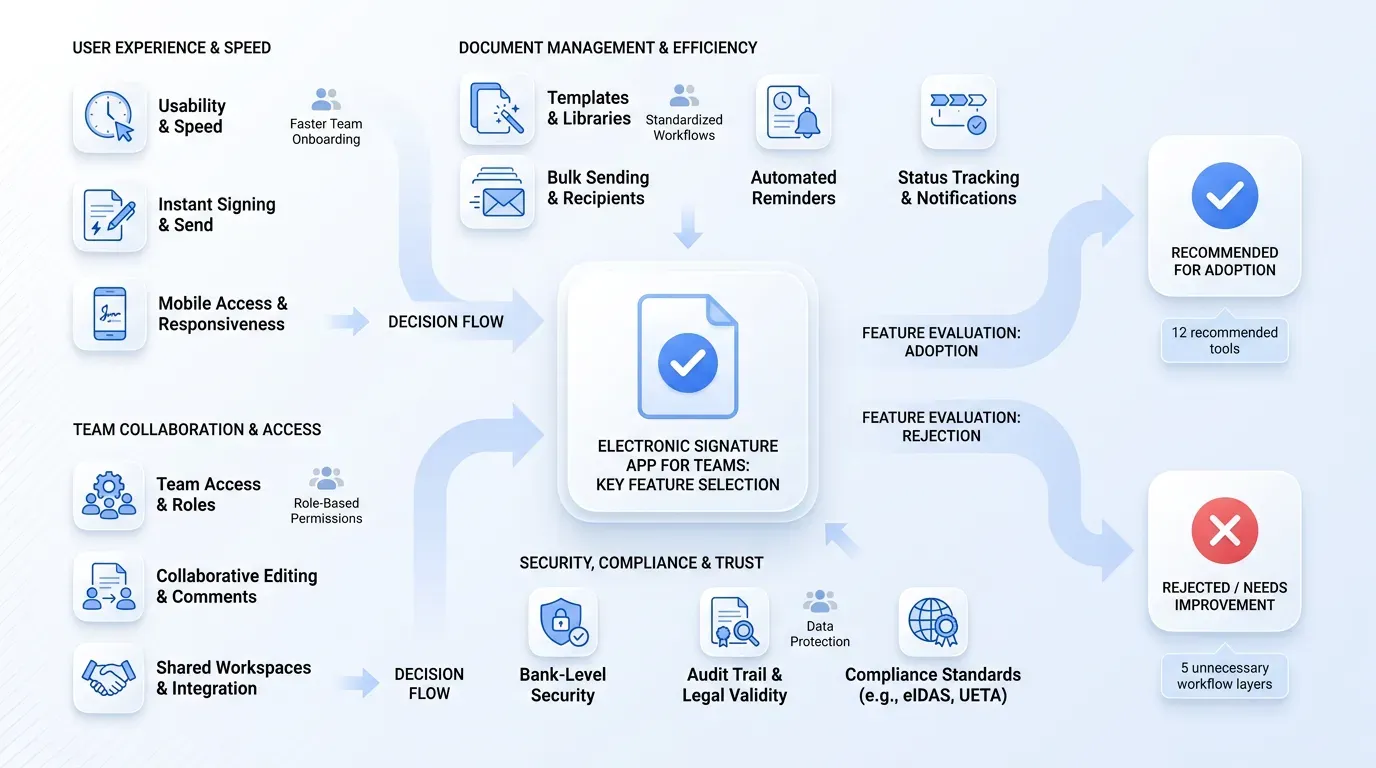
A structured SaaS illustration mapping key features for choosing an electronic signature app, featuring a central document icon with checkmark.

Not every signing tool works the same way. Some are built for enterprise legal teams with complex approval chains. Others are designed for smaller, faster-moving departments that just need documents signed without a learning curve.

Here's what matters most for teams that want simplicity and speed:

  • Templates: create reusable documents so you're not rebuilding from scratch every time

  • Bulk sending: send the same document to multiple signers at once

  • Mobile signing: signers should be able to complete documents from any device without downloading an app

  • Reminders and status tracking: automated nudges for unsigned documents, plus a dashboard that shows progress

  • Audit trail: a timestamped log proving who signed, when, and from where

  • Team access: multiple people in your department should be able to prepare and send documents

For a broad and current overview of available solutions, including their security and compliance strengths, read 12 Must-Have eSignature Tools for Teams and Enterprises.

Simplicity Over Feature Overload

Enterprise platforms sometimes pack in so many features that a department manager needs a training session just to send a basic contract. If your team isn't running complex legal negotiations, you don't need approval workflows five layers deep.

Tools like Agrello are built with exactly this kind of team in mind. Instead of burying useful features under layers of menus, Agrello keeps the signing process straightforward: upload, place fields, send, done. It's a practical fit for HR teams, sales coordinators, and operations groups that want to standardize their document workflows without onboarding headaches.

This matters because choosing the right level of complexity determines whether your team actually adopts the tool or quietly goes back to printing.

Popular Electronic Signature Apps and How They Compare

The market has several well-known options, each with a slightly different focus.

If you want an in-depth, security-focused comparison including alternatives for both small teams and enterprises, see Best Digital Signature Tool of 2025 (Security-Focused Comparison).

What Sets a Simple E-Signature App Apart

The tools above vary widely in pricing, interface complexity, and target user. For a growing company where multiple team members prepare and send documents daily, the deciding factors are usually:

  • How fast can a new team member start sending documents?

  • Does the pricing scale reasonably as the team grows?

  • Can the tool handle templates and bulk sends without requiring an admin certification?

When the goal is reducing paperwork and improving signing efficiency, a simpler electronic signature app often wins over a feature-heavy platform that only power users can navigate.

With the landscape covered, let's address the digital signature question that comes up constantly.

Electronic Signature vs. Digital Signature: What's the Difference?

People use these terms interchangeably, but they're not the same thing.

An electronic signature is any electronic indication of intent to sign. It can be a typed name, a drawn signature on a touchscreen, or a click-to-accept button.

A digital signature is a specific type of electronic signature that uses cryptographic technology to verify the signer's identity and ensure the document hasn't been altered. Think of it as a more secure, tamper-proof version. For most HR and sales workflows, a standard electronic signature is legally sufficient and much simpler to implement. Digital signatures are typically required in regulated industries or for government submissions. If your team is sending offer letters, NDAs, or sales contracts, an electronic signature app covers you.

Understanding this distinction helps you avoid over-buying security features you don't need while still meeting compliance requirements.

How to Get Your Team Started Without the Headache

Adopting a new tool doesn't have to mean a painful rollout.

Here's a practical path:

  1. Pick three to five document types your team sends most often (offer letters, contracts, policy forms)

  2. Build templates for each one inside your chosen electronic signature app

  3. Assign roles so the right people can send, but everyone doesn't need admin access

  4. Run a pilot week where the team uses the app for all new documents while keeping the old process as backup

  5. Review and adjust after two weeks: check completion times, signer response rates, and any friction points

Most teams see results almost immediately. Documents that used to take days come back in hours. Follow-up emails drop because the app handles reminders automatically.

The key is starting small, proving the value with real numbers, then expanding to more document types.

Сonclusion

An electronic signature app removes the printing, scanning, and manual follow-up that slows down HR onboarding, sales closings, and everyday operations. The technology is legally recognized, widely adopted, and simple enough that most teams can start seeing results within a day of setup.

The right tool depends on your team's size, document volume, and tolerance for complexity. For departments that value speed and simplicity over enterprise feature sets, choosing a focused, easy-to-use app makes the difference between a tool people actually use and one that collects digital dust. Start with your most common documents, build a few templates, and let the app handle the chasing.

Yes. In the United States, the ESIGN Act and UETA recognize electronic signatures as legally equivalent to handwritten ones. In the EU, the eIDAS regulation provides a similar legal framework. For standard business documents like contracts, offer letters, and NDAs, electronic signatures are fully enforceable. For practical details about global regulations and compliance, see [How do I create a legally binding e-signature?](https://www.agrello.io/articles/create-legally-binding-e-signature)

In most cases, no. The signer typically receives an email or link and signs directly in their web browser. Some platforms offer optional mobile apps for people who sign frequently, but requiring a download is rare for the recipient.

An electronic signature is a broad category covering any electronic method of indicating agreement, such as typing your name or drawing a signature on screen. A digital signature is a specific subset that uses cryptographic certificates to verify identity and detect tampering. Most business workflows only require a standard electronic signature.

Yes, most electronic signature apps support team accounts where several users can prepare, send, and track documents independently. Look for a plan that includes multiple sender seats so your HR coordinators, sales reps, or operations staff can all work from the same account.

Setup is usually fast. Most teams can create an account, upload their first template, and send a document for signing within 30 minutes. The biggest time investment is building your initial set of reusable templates, which pays off immediately once they're in place.

Schedule a Meeting

Book a time that works best for you and let's discuss your project needs.

You Might Also Like

Discover more insights and articles

Black-and-white promotional banner featuring a woman’s portrait beside the headline “Can AI Recognize Scanned or Copied Signatures?” illustrating AI-powered signature verification and document authentication technology

Can AI Recognize Scanned or Copied Signatures?

Someone copies a manager's signature from an old PDF, pastes it onto a new approval form, and submits it for processing. Nobody notices. It happens more often than most teams want to admit, and it creates real exposure for any company that relies on signed documents.

Professional smiling man beside handwritten signature sketches with headline about adding an electronic signature in Microsoft Word

How to Add an Electronic Signature in Word Easily

Still printing documents just to sign them by hand? If your team sends contracts, offer letters, or internal approvals through Microsoft Word, you already know how tedious the print-sign-scan cycle can be. Teams across HR, sales, legal, and operations still lose hours every week to manual signing workflows. At Agrello, we've worked with businesses streamlining high-volume document approvals and e-signature processes, giving us firsthand visibility into where Word-based signing workflows break down - and how to fix them efficiently.

Professional team collaborating on reusable digital signature templates and document workflow planning in a modern office

How to Create Reusable Digital Signature Templates

Every week, your team sends the same offer letter, NDA, or service agreement. Every week, someone rebuilds it from scratch, re-adds the signature fields, and hopes the formatting matches last time. That repetitive grind eats hours and invites mistakes.

Professional thinking about electronic signature software options with cloud and workflow sketches in the background

Best Electronic Signature Software for Small and Mid-Sized Teams

Choosing a digital signature tool shouldn't feel like buying enterprise software you'll never fully use. But for small and mid-sized teams, that's exactly what happens: you end up paying for features built for Fortune 500 companies when all you really need is a fast, reliable way to get contracts signed.