Smiling woman sitting at a desk in the office against a whiteboard with notes, hand placed text about step-by-step creation of a contract template in DocuSign

DocuSign Contract Template: Step-by-Step Guide (2025) New Meta

Every time you manually prep the same contract, you burn minutes that should go to real work. A reusable DocuSign template fixes that by dropping the agreement, fields, and routing rules in place with one click. Below is the exact playbook you need.

Content authorBy Toomas PihlPublished onReading time6 min read

Step-by-Step Overview

This guide walks you through six simple steps to create a reusable DocuSign contract template:

  1. Identify when a template is appropriate for recurring agreements

  2. Map variable fields to separate fixed text from editable data

  3. Build the template inside DocuSign with roles and routing

  4. Automate sending and reuse with built-in tools

  5. Scale using the DocuSign API for high-volume workflows

  6. Test, share, and maintain the template over time

By the end, you will have a ready-to-use DocuSign contract template that anyone on your team can launch in seconds without manual setup.

1. Decide When a Template Makes Sense

Templates shine when you send the same contract, to similar recipients, with only small edits. Before you open DocuSign, check whether your document fits that pattern.

  • Recurring documents: NDAs, sales agreements, SOWs, HR onboarding packs

  • High volume: more than 5 sends per month

  • Stable language: fewer than 10% wording tweaks per send

If your contract needs heavy rewriting each time, consider a clause library or Agrello’s flexible digital agreement editor instead. For everything else, move on to the next step.

By confirming the fit first, you avoid cluttering your account with “one-off” templates and keep your library tidy. For broad strategies around reusable contract workflows, see the guide on how to put your contracts on autopilot: a small business template playbook for 2025.

2. Map Out Variable Fields

A template lives or dies on how well you separate constant text from variables. Spend five minutes here and you will save hours later.

  • Identify fixed elements: legal clauses, payment terms, governing law

  • List variable data: recipient names, pricing, dates, company address

  • Decide field types: text, dropdown, date picker, formula

  • Sketch recipient roles: signer, approver, CC

For example, a sales contract might have “Client Name” (text), “Service Start Date” (date), and “Monthly Fee” (currency). Label them clearly so the next person understands.

If you want an in-depth explanation of mapping variables and setting up templates in other platforms, check out the article on how to create Agrello templates.

Once your variables are mapped, moving into DocuSign is simple because you know exactly what to tag.

3. Build the Template in DocuSign

Open DocuSign, head to Templates, then follow this sequence.

Add the Base Document

Drag in your PDF, Word file, or import from cloud drive. Give the template a clear name like “Master SaaS Agreement v3” so versioning stays obvious.

Define Roles and Routing

  • Role 1: Client Signer

  • Role 2: Internal Counter-Signer

  • Role 3: Finance CC

Assign a default routing order (1, 2, 3) or choose parallel routing if both signers can sign concurrently.

Tag Fields

Place variable fields exactly where they appear in the document.

  • Use text tags for names and fees

  • Date field for the effective date

  • Initials for each page if required by compliance

Conditional logic: Show the “Discount %” field only if “Pricing Tier” equals Enterprise. These small rules keep the signer experience clean.

If you're looking for practical tips and business advantages, the post about how contract templates speed up business may provide additional inspiration.

Finish by saving the template. You now have a working draft.

This step locks in the boilerplate and positions each variable, creating a canvas that even a new teammate can use without guidance.

4. Automate Reuse and Routing

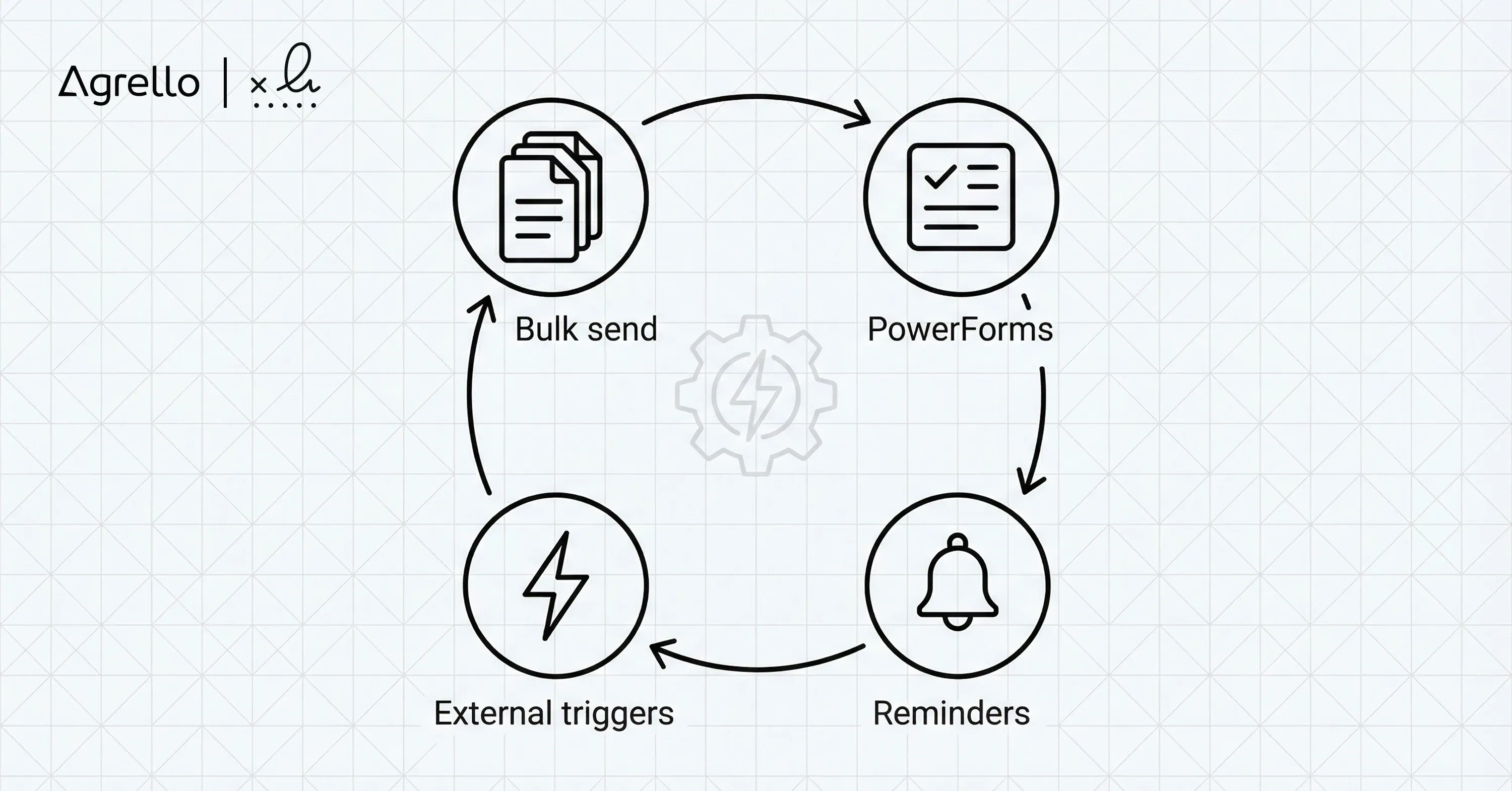
A black and white line diagram shows an automation cycle with four stages — Bulk send, PowerForms, Reminders, and External triggers — connected by arrows into a closed circle with a gear icon in the center

Templates save time, but automation multiplies it. DocuSign offers several built-in levers.

  • Bulk Send: upload a CSV of recipient emails and variable data, then launch hundreds of envelopes at once

  • PowerForms: create a URL where anyone can self-serve the contract

  • Reminders and expirations: set gentle nudges every 3 days and auto-void after 30

If you need deeper integration, Agrello can serve as an external trigger, pushing contract data through Zapier or Make into DocuSign, giving you a unified digital signature workflow across tools.

The goal is simple: your team clicks once, everyone signs, nobody chases.

For more approaches to combining e-signing with broader office and document automation, see the Agrello overview on document and process automations.

5. Generate Templates via the DocuSign API

For product teams or SaaS businesses, manual clicks do not scale. The DocuSign REST API lets you create and populate templates programmatically.

Create the Template Object

POST /v2.1/accounts/{accountId}/templates with:

  • name

  • roles array

  • documents array (Base64 encoded)

Send an Envelope From the Template

POST /v2.1/accounts/{accountId}/envelopes with:

  • templateId

  • templateRoles (map data to each role)

  • status: “sent”

Tips for Smooth API Work

  • Use server-generated tabs to inject data instead of client-side tagging

  • Throttle requests to respect 1,000 calls per hour default limit

  • Log envelopeId responses for easy audit trails

When your app spins up 50 agreements per minute, the template keeps every contract consistent while the API handles the volume.

If you want to see how integration strategies work more broadly, read about document automation integration strategies.

6. Test, Share, and Maintain

Even perfect setups need polishing.

  • Dry run: send to a colleague’s personal email to catch misaligned tags

  • Version control: duplicate the template before big edits so you can roll back

  • Archive old versions: delete or disable to avoid accidental sends

  • Train the team: record a 2-minute screen share or write a wiki entry

A quarterly review keeps clauses current with legal changes and pricing updates.

For more ideas on document generation at scale, visit the post on bulk creation of documents.

By closing the loop with testing and upkeep, your docusign contract template will keep saving time for years.

What is DocuSign Contract Template?

A DocuSign contract template is a reusable blueprint that stores your contract file, recipient roles, signature and data fields, routing order, and automation rules so you can send a complete, ready-to-sign envelope with a single click or API call.

Conclusion

Creating a docusign contract template is straightforward once you map the variables, tag the fields, and wrap automation around the process. With the template in place, every new agreement feels like a few clicks instead of a mini-project. That speed matters because electronic signatures are booming: the market is projected to hit $35.71 billion by 2031, growing 34.6 % each year. Software-based solutions already command 58.44 % of the digital signature space, so sharpening your template game today keeps you ahead of the curve tomorrow.

Feel free to adapt this blueprint to your stack, whether that is pure DocuSign, an Agrello-powered smart contract flow, or a custom API integration. Your future self will thank you.

Most commercial plans allow unlimited templates, but performance stays higher when you archive unused versions and keep the active list under 200.

Yes. Use Conditional Tabs to reveal or hide text blocks, entire pages, or signature fields when a signer selects a specific checkbox or dropdown value.

No. A template is only a shell. Envelope consumption happens when you send, not when you create or store templates.

Set the routing order to “Sequential” and leave the numbers blank. When you launch the envelope you can rearrange recipients before sending.

Install the DocuSign for Salesforce integration, map your template fields to Salesforce fields once, then click “Send with DocuSign” from any record to auto-populate and send.

Schedule a Meeting

Book a time that works best for you and let's discuss your project needs.

You Might Also Like

Discover more insights and articles

Close-up of professional woman with text “How do electronic signatures work?” representing digital signing process and e-signature technology

How do electronic signatures work?

You have probably signed a digital document recently - clicked a link, typed your name, or scribbled a signature and pressed “Finish.” It felt quick and effortless. But for managers responsible for important contracts, that simplicity can raise a key question: what actually happened behind the scenes? This article explains how electronic signatures secure documents, verify identity, and create a legally reliable record - in clear, non-technical terms.

Professional woman using digital signature software to quickly sign and send documents online

What’s the fastest way to sign and send documents online?

Paperwork bottlenecks quietly drain productivity in growing companies. If you still print, sign, scan, and email documents, you are wasting hours on a process that should take seconds. This guide shows how to modernize approvals with secure digital tools, mobile signing, and an automated digital signing workflow that works without heavy IT support.

Smiling professional woman signing a document digitally, illustrating how to create a digital signature in Microsoft Word

How to create a digital signature in Microsoft Word

Printing a document just to sign and scan it back is unnecessary. Microsoft Word lets you approve contracts and internal documents directly on your screen using built-in signature features. This guide shows how to create a digital signature in Word, add signature lines, apply document protection, and manage multiple signers. It also explains when Word’s native tools are enough and when a certified external solution is needed for legally critical documents.

Business professionals discussing document security as AI tools detect and prevent forged digital signatures

How can AI detect and prevent forged digital signatures?

You have likely signed dozens of contracts this year without touching a pen. While this speed is great for business, it creates a nagging worry for department heads and process owners. If you can sign a document in seconds with a click, how hard is it for a fraudster to do the same in your name? This article breaks down exactly how artificial intelligence acts as a digital gatekeeper for your contracts. We will look at how AI moves beyond basic security checks to analyze behavior, spot visual tampering, and verify identity in real time. You will learn how modern tools protect your HR, Sales, and Operations documents without requiring a massive IT overhaul.