Overview
This article explains what an electronic signature really is, how it differs from a digital signature, and when each one is legally and practically appropriate. You will see which laws give e-signatures legal force, where they are most commonly used, and how to choose the right signing platform - from mainstream tools like Adobe Sign and DocuSign to privacy-focused options such as Agrello. By the end, you will know exactly when a simple e-signature is enough and when stronger cryptographic protection is required.
What is an Electronic Signature?
An electronic signature is any electronic symbol, sound, or process that a person attaches to a document to show intent to sign.
-
Clicking an “I accept” button
-
Typing your name at the end of an email contract
-
Drawing your handwritten signature with a finger on a phone screen
All three examples count. What matters is the signer’s intent and the ability to link the signatory to the document.
A quick note on terminology. The NIST glossary observes there is no single agreed definition of “electronic signature” and even recommends the term “digital signature” for consistency. Regulators, however, still use “electronic signature” widely, so you will see both terms in daily business.
At its core, then, an electronic signature is a broad, technology-agnostic concept focused on intent rather than on a specific technical process.
If you want a deeper dive on the foundations, check the Electronic Signature 101 guide.
Electronic Signature: Simple Legal Definition
An electronic signature is a legally recognized way to express intent to sign a document using any electronic method - such as a typed name, a drawn signature, or a click - provided the signer can be identified and the record can be kept.
Electronic vs. Digital Signature
Electronic and digital signatures sound interchangeable, yet there is a key difference. Digital signatures are a subset of electronic signatures that use public-key cryptography. The signature is created with a private key, then verified with a public key. This math provides:
Because of those guarantees, many jurisdictions consider digital signatures the “advanced” or “qualified” tier of e-signing.
Electronic signatures, in contrast, can be as simple as clicking a box. They are easier to use but may require extra evidence - like an email audit trail - to meet court scrutiny.
If you’re interested in the technical underpinnings, discover more in this explanation of creating digital signatures.
In practice, most modern platforms, including Agrello, wrap the advanced cryptography of digital signatures in a slick interface, giving you both ease and higher assurance.
All digital signatures are electronic signatures, but not every electronic signature is a digital one. Choose the level that matches your risk.
Regulatory Frameworks That Make E-Signatures Legal

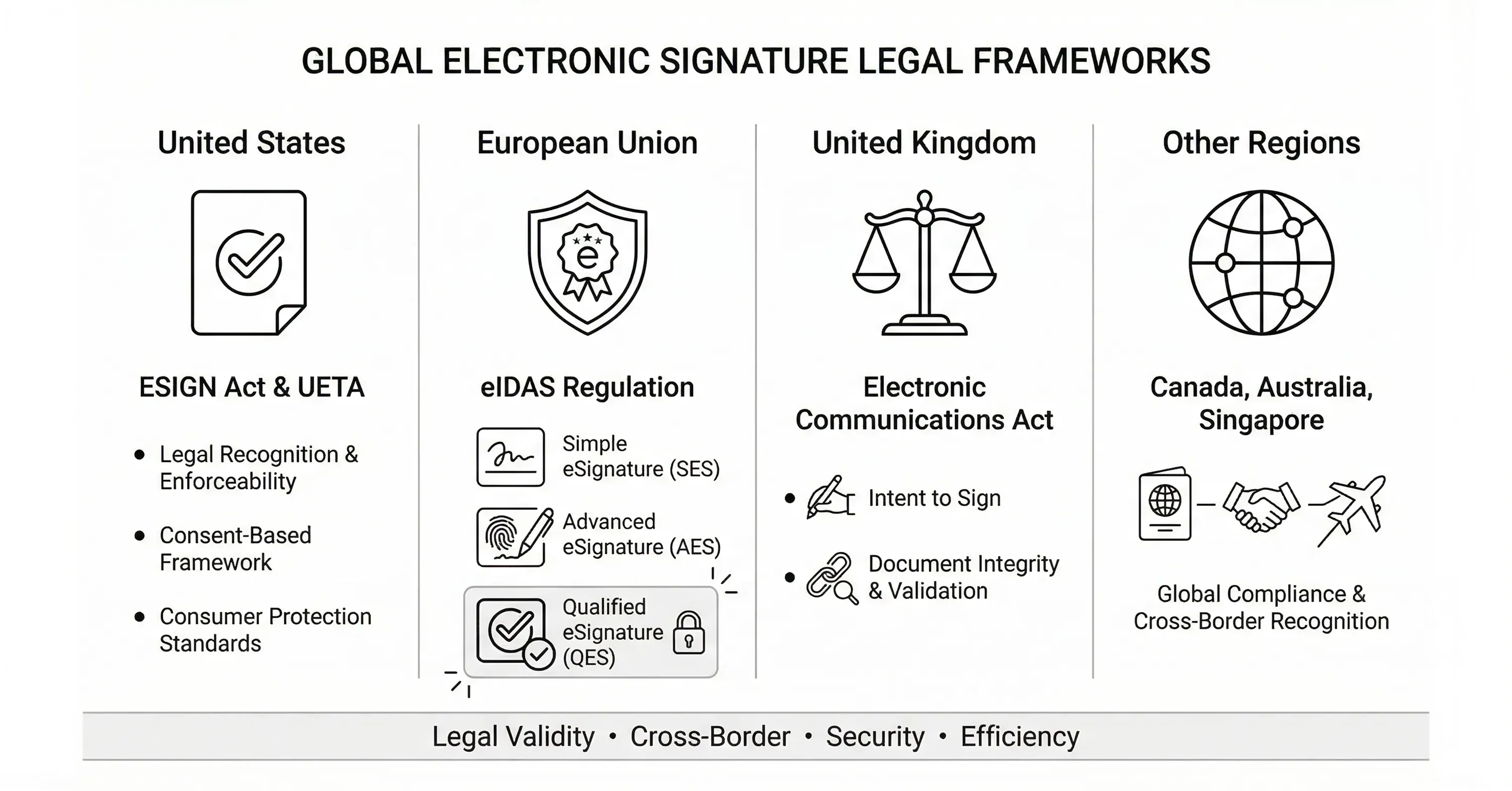
E-signatures have teeth because lawmakers said so. Here are the big players.
- United States: ESIGN Act (2000) and UETA
Both acts confirm that a signature, contract, or record cannot be denied legal effect solely because it is electronic.
- European Union: eIDAS Regulation
eIDAS defines three levels - simple, advanced, and qualified. Qualified electronic signatures, based on digital certificates from trusted service providers, carry the same standing as handwritten signatures.
If you need a practical overview on handling eIDAS in the EU, check out What Should You Know About eIDAS When E-signing EU Business Contracts.
- United Kingdom: Electronic Communications Act and common-law rulings
UK courts accept electronic signatures when intention and integrity are provable.
Canada’s PIPEDA, Australia’s Electronic Transactions Act, and Singapore’s ETA provide similar recognition.
When working across borders, verify the stricter rule applies. For example, real-estate deeds in some US states still require wet ink, while an EU public procurement contract might demand a qualified signature issued on an EU-certified smart card.
Legality is already on your side, as long as you match the signature level to the document type and jurisdiction. For a broader perspective on the legal basis, see How Trust Works Online: Legal Basis of E-signatures.
How Big Is the E-Signature Market?
Electronic signing moved from nice-to-have to mission-critical, especially after 2020. The numbers prove it.
Rapid growth signals broader adoption across industries and a healthy ecosystem of challengers bringing new ideas - AI assisted pre-fill, identity wallets, or blockchain notarization - into the mix.
For more insights on key trends and predictions, see E-signing Evolution: Key Trends and Predictions for 2024.
Common Use Cases
E-signatures are already standard in many workflows. Here are the top scenarios.
-
Sales and procurement: Quotes, purchase orders, NDAs
-
HR onboarding: Offer letters, policy acknowledgments, leave requests
-
Real estate: Lease agreements, disclosures, property management
-
Finance: Loan applications, internal approvals, KYC forms
-
Healthcare: Patient intake, consent forms, telemedicine prescriptions
-
Government services: Permit applications, tax filings, social benefits
A research team recently tested a prototype that lets citizens sign with government-issued identity wallets. The solution was evaluated with 114 participants and showed high trust, hinting at a new wave of citizen-centric e-sign platforms.
Wherever a signature is required, an electronic version trims days of delay and stacks of paper.
Benefits and Limitations
E-signatures solve real problems, yet they are not magic. Knowing both sides helps set expectations.
Benefits:
-
Speed: Documents return in minutes, not days
-
Cost: No printing, shipping, or manual filing
-
Security: Access logs, tamper proof seal, and digital signature options
-
Convenience: Works on any device, anywhere
-
Auditability: Automatic trail for compliance audits
Limitations:
-
Identity assurance varies by method; a simple typed name may be weak
-
Some jurisdictions or document types still need wet ink
-
Long-term validation requires robust storage and certificate management
-
User adoption gaps remain for the less tech-savvy
A platform like Agrello addresses several of these gaps with built-in decentralized identity, letting signers prove who they are once and reuse that proof across contracts.
How to Choose an E-Signature Solution
Selecting software can feel overwhelming. Use this checklist.
Legal fit
- Does the provider meet your compliance needs (eIDAS, SOC 2, HIPAA)?
Signature levels
- Simple, advanced, qualified, or all three?
Identity options
- Email OTP, government ID, identity wallets, or biometric?
Integrations
- CRM, ERP, or custom API access for automation
User experience
- Mobile friendliness, bulk send, template library
Pricing and scale
- Volume discounts, free tier for occasional use
Storage and longevity
- Long-term validation, certificate rollover, blockchain anchoring
For practical advice and a hands-on guide, see the Electronic Signing overview page.
Digital signature capability is essential for high-value contracts. Verify the vendor uses trusted cryptographic standards and timestamping. Agrello, for example, layers decentralized identity and X.509 certificates so signatures remain verifiable decades later, even if the service ceases operation.
Implementation Tips
Rolling out e-signatures across a company involves more than buying licenses.
-
Start with low-risk documents to build confidence.
-
Train staff on which signature level fits which document.
-
Update policy handbooks to reference electronic signatures explicitly.
-
Set up templates to keep branding consistent and reduce errors.
-
Monitor audit trails regularly to spot anomalies.
A phased roll-out ensures adoption sticks and reduces pushback from departments still fond of paper.
Conclusion
Electronic signatures turn approval cycles into a quick, secure flow that meets modern legal standards. While the umbrella term covers everything from a typed name to an advanced digital signature backed by cryptography, the right choice hinges on document sensitivity and jurisdiction. Regulations such as ESIGN and eIDAS provide a solid legal backbone, and a fast-growing market ensures a wealth of tools, from industry giants to agile innovators like Agrello. Armed with the definitions, laws, and checklists above, you can bring certainty and speed to your next agreement without hunting for a pen.