Woman reviewing signed documents with text about secure storage and management of e-signed documents, representing digital document security solutions.

What's the Safest Way to Store and Manage Signed Documents?

You just got a contract signed. It's locked in, legally binding, and ready to file away. But where exactly does it go, and who can access it six months from now when someone needs it for an audit? More importantly, will you be able to find the right version quickly, prove its authenticity, and show a clear record of who signed and accessed it?

Content authorBy Toomas PihlPublished onReading time9 min read

What This Article Covers

Signed documents carry real legal and financial weight, yet most teams still treat storage as an afterthought. A folder on a shared drive, an email attachment buried in someone's inbox, a desktop download no one remembers, or a filing cabinet without any real structure. That casual approach creates risk. When documents are hard to find, poorly protected, or accessible to too many people, even a simple agreement can turn into an operational, legal, or compliance problem.

This article walks through the core pillars of secure contract storage: encryption, access control, retention policies, and audit readiness. It also explains why backups, retrieval speed, and systemized document organization matter just as much as security itself. By the end, you'll have a clear framework for keeping signed documents safe, organized, and easy to retrieve without overcomplicating your workflow.

Why Signed Document Security Deserves Serious Attention

Once a document carries a digital signature or a wet-ink signature that's been scanned, it becomes a binding record. Losing it, leaking it, or failing to produce it during an audit isn't just embarrassing. It can be expensive.

The risks aren't hypothetical. According to Thales' 2023 Cloud Security Study, 39% of businesses experienced a data breach in their cloud environment that year, up from 35% the prior year. And while more sensitive data moves to the cloud, protection hasn't kept pace: 75% of businesses said more than 40% of their cloud-stored data is sensitive, yet only 45% of that sensitive data is actually encrypted.

That gap between what's stored and what's protected is exactly where signed documents become vulnerable.

Encryption: The Non-Negotiable Foundation

Encryption is the single most important layer of protection for any signed document. Without it, files sitting on a server or moving between users are essentially readable by anyone who gains access. For a practical overview of encryption standards for digitally signed agreements, see What’s the easiest way to create a secure e-signature online?.

What Encryption Should Look Like in Practice

Strong encryption covers two stages:

  • At rest: Files stored on a server or cloud platform should be encrypted using AES-256 or equivalent standards, meaning even if someone breaches the storage layer, the data remains unreadable.

  • In transit: Any time a document is shared, downloaded, or synced, TLS encryption should protect the transfer. This prevents interception during movement.

It's worth noting that only 34% of attorneys using cloud storage confirm they use software guaranteeing SSL encryption before uploading. That number is low for a profession built on confidentiality, and it highlights how often encryption gets assumed rather than verified.

Key Control Matters as Much as Encryption Itself

Encrypting data is only half the equation. Real control depends on how encryption keys are managed. Both ENISA’s 2025 technical guidance and NIST key management guidance stress that organizations should tightly control how keys are generated, stored, distributed, and accessed.

If your storage provider manages the keys with little visibility on your side, you are trusting a third party with a critical layer of document security. That is why key ownership and auditability should be part of any serious vendor review.

Access Control: Not Everyone Needs to See Everything

Encryption protects documents from outsiders. Access control protects them from the wrong insiders. When signed contracts live in a shared drive with blanket permissions, any team member can view, copy, or accidentally delete critical files.

Role-Based Access in Action

The fix is straightforward: assign access based on roles, not convenience.

  • View-only access for team members who need to reference a contract but not modify it

  • Edit access limited to document owners or administrators

  • Download restrictions for sensitive agreements like NDAs or executive compensation contracts

  • Time-limited access for external collaborators, auditors, or temporary staff

This structure prevents accidental changes and creates clear accountability for who touched a document and when. You can dive deeper into team-based access, digital signatures, and maintaining control in How do I create a legally binding e-signature?.

Authentication Adds Another Layer

Pairing access control with strong authentication closes the gap further. Multi-factor authentication (MFA) ensures that even if login credentials are compromised, an additional verification step blocks unauthorized entry.

For growing companies where multiple departments handle contracts, this combination of role-based permissions and MFA keeps things tight without slowing people down.

Retention Policies: Know What to Keep and For How Long

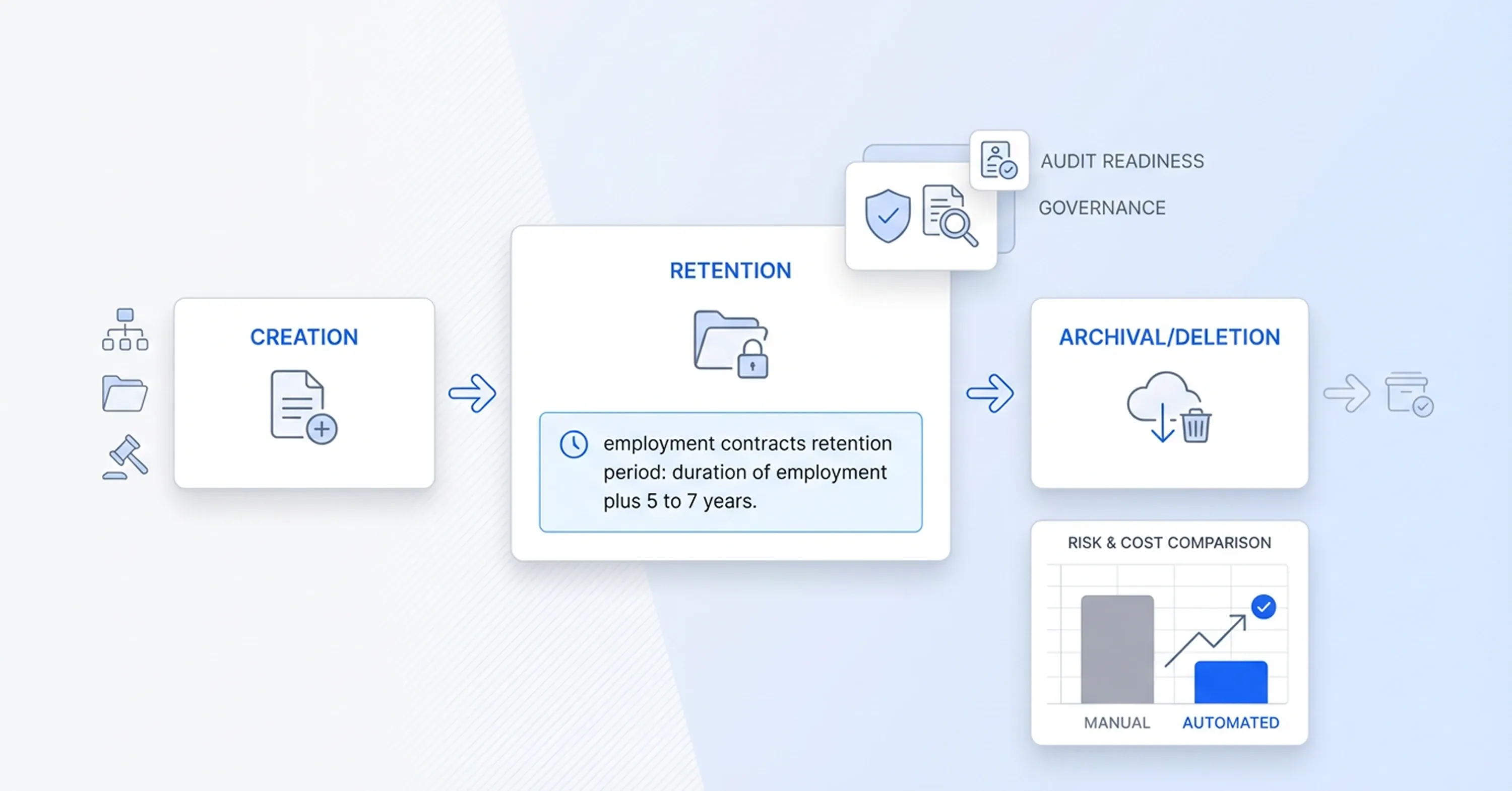
Diagram of document lifecycle management showing creation, retention policies, archival or deletion, and compliance with audit readiness and governance.

Storing every document forever sounds safe, but it actually increases risk. More data means a larger attack surface, higher storage costs, and more confusion when someone needs to find a specific agreement.

Building a Practical Retention Schedule

A retention policy defines how long each type of signed document should be kept and what happens when that period ends. Here's a simple starting framework:

  • Employment contracts: retain for the duration of employment plus a defined period after termination (often 5 to 7 years, depending on jurisdiction)

  • Vendor and service agreements: retain for the contract term plus any applicable statute of limitations

  • NDAs: retain for the confidentiality period specified in the agreement, plus a buffer

  • Client contracts: align with industry regulations and your legal team's guidance

The key is documenting these rules so they're followed consistently across departments, not left to individual judgment. For tips on keeping your contract management system organized and compliant, see Organize and Track Business Contracts.

Automated Deletion and Archiving

Manual retention management breaks down as document volume grows. Look for storage solutions that support automated archiving and scheduled deletion based on document type or date. This keeps your repository clean and compliant without requiring someone to manually review files each quarter.

Retention policies also demonstrate governance maturity during audits, which brings us to the next critical piece.

Audit Readiness: Proving What Happened and When

Audits don't just ask whether you have a signed contract. They ask when it was signed, by whom, whether it was modified afterward, and who accessed it. If you can't answer those questions quickly and with evidence, you have a problem.

What an Audit Trail Should Capture

A proper audit trail for signed documents logs:

  • Signature timestamps: the exact date and time each party signed

  • User identity: verified identification of each signer

  • Access history: a record of every view, download, or share event

  • Modification tracking: any changes made to the document after signing, including version history

  • IP addresses and device information: for additional verification if disputes arise

Platforms built for document management, like Agrello, generate these audit trails automatically when documents are signed and stored through the system. That removes the manual burden and ensures nothing gets missed. With a digital signature workflow, each signing event is captured with cryptographic proof, making it far easier to demonstrate authenticity during an audit. For a detailed look at building, maintaining, and proving your audit trail, check out How do electronic signatures work?.

Organizing for Retrieval Speed

Audit readiness isn't just about having data. It's about finding it fast. A few structural habits make a big difference:

  • Use consistent naming conventions (e.g., "ClientName_ContractType_Date")

  • Tag documents with metadata like department, contract type, and expiration date

  • Maintain a centralized repository rather than scattering files across drives, inboxes, and local folders

When an auditor or legal team asks for a specific contract, you should be able to locate it in seconds, not hours.

Backups: Your Safety Net When Everything Else Fails

Even with encryption, access control, and audit trails, hardware failures, accidental deletions, and ransomware attacks still happen. Backups are the last line of defense.

Surprisingly, only 20% of attorneys reported making regular local data backups alongside their cloud storage. That's a low number for professionals handling sensitive, legally binding documents.

A solid backup strategy includes:

  • Automated daily or weekly backups depending on document volume

  • Geographic redundancy: backups stored in a separate physical location or cloud region

  • Regular restoration tests to confirm backups actually work when needed

  • Versioning so you can recover a specific prior state of a document, not just the latest copy.

Backups don't replace good security, but they make sure a single failure doesn't wipe out your records.

The Safest Way to Store Signed Documents: A Quick Summary

The safest way to store and manage signed documents is to use a cloud-based platform with AES-256 encryption both at rest and in transit, role-based access controls supported by multi-factor authentication, documented retention policies with automated enforcement, a complete audit trail that captures signatures, timestamps, and access history, and regular encrypted backups with geographic redundancy.

Just as important, that system should make documents easy to retrieve, verify, and manage over time. Secure storage is not only about preventing unauthorized access. It is also about preserving document integrity, proving authenticity, and making sure the right people can find the right file quickly when legal, compliance, or operational questions come up.

Conclusion

Secure contract storage is not just an admin task. It is a control system for protecting legally binding records, reducing compliance risk, and making sure your business can prove exactly what happened, when, and to whom. Encryption, role-based access, retention rules, audit trails, and backups are not optional extras. Together, they are what turn document storage from a weak point into a reliable business process.

The good news is that strong document security does not have to be complicated. Start with the basics: encrypt every file, restrict access by role, define retention policies clearly, and keep a complete record of signatures, access, and changes. Do that consistently, and you will not only store signed documents more safely. You will build a system that is easier to trust, easier to manage, and far easier to defend during audits, disputes, or compliance reviews.

Shared drives typically lack granular access control and audit logging. Anyone with folder access can view, copy, or delete files, and there's no record of who did what. This creates legal exposure and makes audit compliance difficult.

Retention periods depend on the contract type and applicable regulations. Employment agreements are often kept 5 to 7 years after termination. Vendor contracts should be retained through the contract term plus the relevant statute of limitations. Your legal team should define specific timelines for each document category.

Cloud storage can be very secure, but only when properly configured. Encryption, access controls, MFA, and audit trails are all necessary. The platform alone isn't enough; how you configure and manage it determines the actual security level.

Yes. Cloud providers can experience outages, data corruption, or breaches. Maintaining local or secondary cloud backups ensures you have a recovery path that doesn't depend entirely on a single provider.

An audit-ready document has a complete trail showing when it was signed, by whom, every access event, and any modifications. It should be stored with consistent naming, tagged metadata, and be retrievable within minutes from a centralized repository.

Schedule a Meeting

Book a time that works best for you and let's discuss your project needs.

You Might Also Like

Discover more insights and articles

Man signing a document with illustration of cloud workflow, representing automatic document sending for e-signature and digital signing process.

How Can I Send Documents for E-Signing Automatically?

Every week, your team sends the same contracts, NDAs, and approval forms. Someone downloads a template, fills in the names, attaches it to an email, and waits. Multiply that by dozens of documents, and you've built a bottleneck nobody asked for.

Team reviewing documents with overlay text about verifying if a digital signature is authentic.

How to Verify If a Digital Signature Is Authentic

You just received a signed contract, and now you're staring at a little icon or banner in your PDF reader wondering: is this signature actually real? You're not alone. With the global digital signature market valued at USD 9.85 billion in 2025, more documents than ever carry digital signatures, and knowing how to verify digital signature authenticity has become a daily workplace skill.

Professional man with glasses working on digital documents with text about creating a professional e-signature design.

How to Create a Professional E-Signature Design

Every contract, proposal, and agreement your team sends carries your brand's reputation. When a client opens a document and sees a messy, inconsistent signature block, it quietly chips away at trust before they even read the terms.

Professional using document automation tools to add a digital signature to a PDF automatically.

How to Add a Digital Signature to a PDF Automatically

Still relying on print, sign, scan, and email workflows for PDFs? That outdated process slows teams down, increases administrative work, and creates avoidable friction in everyday document handling. Automatic PDF digital signing offers a faster and more secure alternative. With the right setup, businesses can apply compliant signatures to documents in seconds, reduce manual errors, and keep files verifiable for years. For teams managing contracts, HR paperwork, or internal approvals, automated signing turns a repetitive task into a streamlined workflow that saves both time and effort.