Man signing a document with illustration of cloud workflow, representing automatic document sending for e-signature and digital signing process.

How Can I Send Documents for E-Signing Automatically?

Every week, your team sends the same contracts, NDAs, and approval forms. Someone downloads a template, fills in the names, attaches it to an email, and waits. Multiply that by dozens of documents, and you've built a bottleneck nobody asked for.

Content authorBy Toomas PihlPublished onReading time10 min read

What This Guide Covers

This article breaks down how to automate document dispatch for e-signatures in a practical, scalable way. You'll see how triggers, templates, integrations, and workflow builders can replace repetitive manual sending, so contracts, NDAs, onboarding forms, and approvals reach the right people faster and with fewer errors. Instead of relying on someone to prepare, send, and track every document by hand, automation turns the process into a structured workflow. A deal closes, a candidate accepts an offer, or a request gets approved, and the right document is generated, populated, and sent automatically to the correct signers in the right order. Whether you manage HR, sales, operations, or internal approvals, this guide gives you a clear framework for building faster, cleaner, and more reliable signing workflows. We'll cover how to choose the right tools, set up triggers, create reusable templates, connect your existing systems, and measure the impact of automation over time.

What Is E-Signature Automation?

E-signature automation is the process of using triggers, templates, and integrations to send documents for digital signature without manual effort. Instead of preparing and sending each document individually, the system handles the entire workflow automatically based on predefined rules. When a specific event occurs, such as a deal moving to “closed,” a new employee being onboarded, or a request being approved, the platform instantly generates the correct document, fills it with the required data, assigns the appropriate signers, and sends it out in the right sequence. No downloading, editing, or emailing required. At its core, e-signature automation turns document sending from a manual task into a repeatable, scalable process. It reduces human error, ensures consistency across documents, and creates a clear, trackable flow from document creation to final signature, making it especially valuable for teams handling high volumes of contracts and approvals.

Why Automating E-Signature Dispatch Matters Right Now

Manual document handling costs more than most teams realize. It eats time, introduces errors, and slows deals that could have closed days earlier.

The numbers back this up. E-signature adoption is accelerating fast: the electronic signature software market was valued at US$3.3 billion in 2022 and is projected to reach US$35.7 billion by 2030, growing at a 34.2% CAGR. Meanwhile, the broader digital signature market is expected to expand by US$45.8 billion between 2024 and 2028. Organizations aren't just adopting e-signatures; they're automating the entire sending process around them.

The ROI is tangible. Companies using e-signature automation report an average 15-day faster contract turnaround and a 37% increase in productivity. On the cost side, e-signatures save an average of USD 36 per agreement by cutting printing, mailing, and storage expenses. For teams sending hundreds of documents per month, those savings compound quickly.

Understanding the business case makes the setup steps feel less like a project and more like an investment. Here's how to build it step by step.

Identify Your Most Repetitive Document Workflows

Before you configure anything, list the documents your team sends regularly. The best candidates for e-signature automation share a few traits:

  • They follow a predictable pattern (same template, same fields, recurring recipients)

  • They're triggered by a specific event (new hire, closed deal, vendor approval)

  • Delays in sending them slow down revenue or operations

Common Use Cases

  • Sales contracts: Sent once a prospect says yes. Triggered by a CRM stage change.

  • NDAs: Dispatched before any sensitive information is shared. Triggered by a new vendor or partner record.

  • HR onboarding packets: Sent the moment an offer is accepted. Triggered by an HRIS status update.

  • Internal approvals: Budget requests, policy acknowledgments, or change orders routed to managers automatically.

Start with one or two high-volume workflows. Getting those right gives you a repeatable model for everything else.

Choose an E-Signature Platform That Supports Automation

Not every e-signature tool handles automated dispatch equally well. Some are built for simple, one-off signing, while others are designed for structured workflows with triggers, API access, and native integrations. That difference matters once document volume starts to grow. Basic tools may support digital signing, but they often still require someone to prepare, send, and track each document manually. More advanced platforms make it possible to generate documents automatically, populate fields from existing systems, and trigger sends based on real business events.

Choosing the right tool is not just about collecting signatures faster. It is about building a workflow that reduces manual effort, improves accuracy, and scales more easily with your business.

When evaluating platforms, focus on these capabilities:

  • Template libraries with reusable fields and roles

  • Trigger-based sending via API or built-in workflow rules

  • Integration support for your CRM, HRIS, or project management tools

  • Bulk send options for high-volume scenarios

  • Audit trails and status dashboards for visibility

Agrello, for example, is designed for teams that need straightforward digital signature workflows without heavy IT overhead. It lets you set up templates, assign signing roles, and connect to existing tools so documents go out without manual intervention.

If you're interested in the broader context and long-term tech trends, it's worth exploring how e-signing fits into the evolving landscape of office workflow automation - take a look at AI Agents and the Future of Office Automation: Where Does E-Signing Fit?.

It's also worth noting that 86% of IT decision-makers have invested in e-signature software in the past year, and 85% plan to continue investing in the next 12 to 18 months. The market is mature enough that you have real choices. Pick the platform that fits your team's size, budget, and integration needs.

Build Reusable Templates with Dynamic Fields

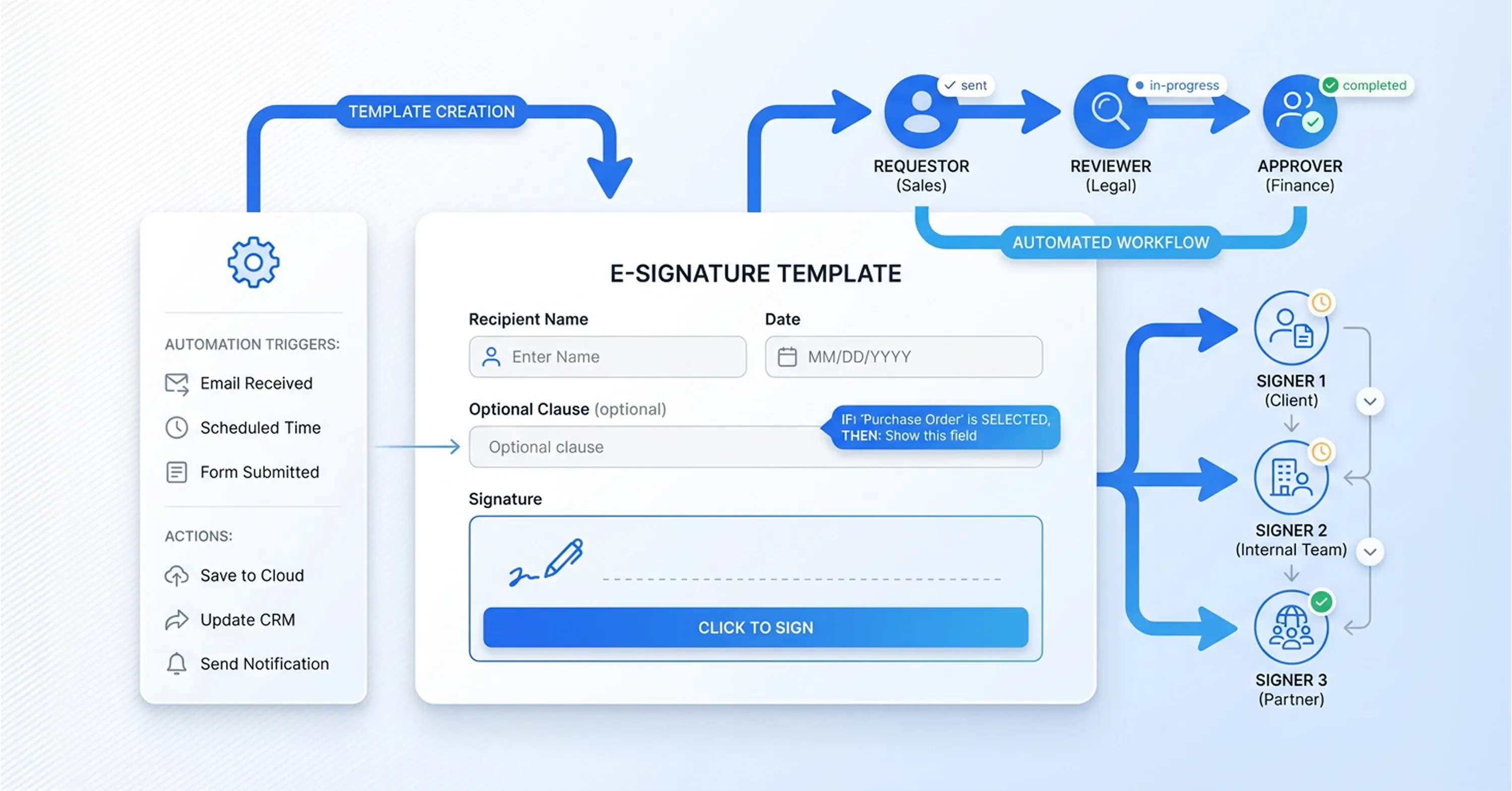
Diagram of automated e-signature workflow showing template creation, approval process, multiple signers, and digital document signing system.

Templates are the backbone of e-signature automation. A well-built template means no one has to re-create a document from scratch each time.

How to Structure a Template

  • Start with your finalized document (contract, NDA, approval form)

  • Replace variable data with dynamic fields: recipient name, date, company, role, dollar amount

  • Assign signer roles (e.g., "Client," "Manager," "HR Director") so the system knows who signs where

  • Set the signing order if sequential approval is required

Tips for Clean Templates

  • Keep formatting simple. Complex layouts sometimes break across devices.

  • Use conditional fields if your platform supports them. For example, show a commission clause only when the contract type is "Sales."

  • Label every field clearly so signers aren't confused about what goes where.

If you're looking for real-world guidance on mapping variables and establishing template-driven workflows, How to Create a docusign contract template Step-by-Step offers a practical overview.

Once your templates are solid, they become the reusable building blocks that every automated workflow pulls from.

Set Up Triggers to Send Documents Automatically

This is where e-signature automation truly clicks. A trigger is an event that tells the system, "Send this document now."

Triggers can live in several places:

  • Inside your e-signature platform: Some tools let you define rules like "When a new contact is added to Group X, send Template Y."

  • Inside your CRM or HRIS: Salesforce, HubSpot, BambooHR, and similar tools can fire a document send when a record hits a specific status.

  • Inside an integration tool: Zapier, Make (formerly Integromat), or Power Automate connect apps that don't talk to each other natively.

For best practices on embedding e-signatures directly into your daily flows, including trigger-based sending and smart automation, check out Harnessing e-Signatures for a Smooth Operational Flow.

Example Trigger Setups

  • A deal moves to "Verbal Yes" in your CRM → the sales contract is auto-sent for e-signing

  • A new employee record is created in your HRIS → the onboarding packet goes out within minutes

  • A procurement request is approved in your project tool → the vendor NDA is dispatched automatically

The key is mapping each trigger to a specific template and recipient. Document who receives what, when, and in what order.

Connect Your Existing Tools Through Integrations

Most teams don't want to replace their entire tech stack. Good e-signature automation plugs into what you already use.

Here's what a typical integration map looks like:

  • CRM (HubSpot, Salesforce, Pipedrive) → triggers contract sends based on deal stage

  • HRIS (BambooHR, Personio, Workday) → triggers onboarding documents on hire

  • Project management (Asana, Monday.com, Notion) → triggers approval forms on task completion

  • Cloud storage (Google Drive, SharePoint, Dropbox) → stores signed copies automatically

To get a feel for how a modern document integration process can work end-to-end, see What’s the fastest way to sign and send documents online? for integration tips and the speed benefits of automation.

If your e-signature platform doesn't offer a direct integration, middleware tools like Zapier fill the gap. You create a "zap" that watches for the trigger event in one app and sends the document through your signing platform.

This connected approach means no one has to copy-paste data between systems or remember to send a follow-up. The workflow handles it.

Test, Monitor, and Refine Your Workflows

Automation doesn't mean "set and forget." Before going live, run each workflow with test data.

  • Confirm the right template is pulled

  • Verify dynamic fields populate correctly

  • Check that signers receive the document in the correct order

  • Make sure signed copies land in the right storage folder

After launch, monitor these metrics:

  • Completion rate: What percentage of sent documents get signed?

  • Average time to signature: Are recipients signing faster than before?

  • Error rate: How often do documents go out with wrong data or to the wrong person?

  • Bottleneck points: Where do documents stall in the signing sequence?

Organizations like Flowserve have seen real results from this kind of optimization: saving USD 2,000 per contract and cutting legal fees by 40% after adopting automated e-signatures. The South Carolina Department of Health saved USD 4.0 million and eliminated 2.85 million paper documents annually. These gains come from continuous refinement, not just initial setup.

Conclusion

Automating document dispatch for e-signatures is no longer just a way to save time. It is a practical way to build faster, more reliable, and more scalable operations. By removing manual sending from the process, teams reduce delays, avoid common errors, and create a smoother experience for employees, clients, and partners. The real value is not only speed, but consistency. The right document goes out on time, the correct data is filled in automatically, signers follow the right order, and every step is easier to track. What used to depend on manual effort becomes a repeatable workflow your team can trust.

The best way to start is with one or two high-volume document types, test the workflow carefully, and then expand from there. Teams that automate e-signature dispatch are not just improving efficiency. They are building a stronger document process that supports growth, accuracy, and faster execution.

High-volume, template-based documents are ideal. Sales contracts, NDAs, offer letters, vendor agreements, and internal approval forms are the most common. If you send the same type of document more than a few times per week, it's a strong candidate for automation.

Not necessarily. Many modern e-signature platforms offer no-code workflow builders with drag-and-drop interfaces. Integration tools like Zapier also require no coding. That said, more complex setups involving APIs or custom CRM logic may need some technical support.

A trigger is an event in a connected system that tells your e-signature platform to send a document. For example, when a CRM deal moves to "Closed Won," the trigger fires and the system sends the corresponding contract to the client for signing. Triggers can be based on status changes, form submissions, date conditions, or manual button clicks.

Yes. Electronic signatures are legally recognized in most jurisdictions under laws like the U.S. ESIGN Act, the EU eIDAS regulation, and similar legislation worldwide. Automated dispatch doesn't change the legal validity, as long as the signer consents and the platform maintains a proper audit trail.

Absolutely. Most e-signature platforms support sequential signing workflows. You define the order, such as employee first, then manager, then legal, and the system routes the document through each step automatically. The next signer is notified only after the previous one completes their signature.

Schedule a Meeting

Book a time that works best for you and let's discuss your project needs.

You Might Also Like

Discover more insights and articles

Woman reviewing signed documents with text about secure storage and management of e-signed documents, representing digital document security solutions.

What's the Safest Way to Store and Manage Signed Documents?

You just got a contract signed. It's locked in, legally binding, and ready to file away. But where exactly does it go, and who can access it six months from now when someone needs it for an audit? More importantly, will you be able to find the right version quickly, prove its authenticity, and show a clear record of who signed and accessed it?

Team reviewing documents with overlay text about verifying if a digital signature is authentic.

How to Verify If a Digital Signature Is Authentic

You just received a signed contract, and now you're staring at a little icon or banner in your PDF reader wondering: is this signature actually real? You're not alone. With the global digital signature market valued at USD 9.85 billion in 2025, more documents than ever carry digital signatures, and knowing how to verify digital signature authenticity has become a daily workplace skill.

Professional man with glasses working on digital documents with text about creating a professional e-signature design.

How to Create a Professional E-Signature Design

Every contract, proposal, and agreement your team sends carries your brand's reputation. When a client opens a document and sees a messy, inconsistent signature block, it quietly chips away at trust before they even read the terms.

Professional using document automation tools to add a digital signature to a PDF automatically.

How to Add a Digital Signature to a PDF Automatically

Still relying on print, sign, scan, and email workflows for PDFs? That outdated process slows teams down, increases administrative work, and creates avoidable friction in everyday document handling. Automatic PDF digital signing offers a faster and more secure alternative. With the right setup, businesses can apply compliant signatures to documents in seconds, reduce manual errors, and keep files verifiable for years. For teams managing contracts, HR paperwork, or internal approvals, automated signing turns a repetitive task into a streamlined workflow that saves both time and effort.