A smiling woman writing on a whiteboard next to a headline about 12 must-have eSignature tools for teams and enterprises.

12 Must-Have eSignature Tools for Teams & Enterprises (2025)

A single contract stuck in someone’s inbox can stall deals, revenue, and customer trust. Strong esignature tools erase those bottlenecks, letting teams move documents from draft to “signed and done” in minutes - without printing or chasing anyone for a wet signature. Below you will find a hand-picked list of 12 solutions that cover templates, automated workflows, compliance, and integrations large organizations rely on every day.

Content authorBy Toomas PihlPublished onReading time6 min read

What you’ll learn

We start with a quick reality check on why digital agreement workflows matter right now, then walk through each tool’s biggest strengths, ideal use case, and standout features. You will see how leading platforms compare on security, automation, and value, and where newer players like Agrello fit in. By the end, you will know exactly which options deserve a closer look for your specific team or enterprise.

Why enterprises are doubling down on eSignatures

The electronic signature market was valued at $3.3 billion in 2022 and is barreling toward $35.7 billion by 2030, a compound annual growth rate of 34.2 %. That hockey-stick curve is fueled by three hard facts:

  • Clients now expect to sign anything, anywhere, on any device.

  • Regulators worldwide recognize digital signature workflows as legally binding.

  • Integrated contract life-cycle management (CLM) slashes operating costs. A Forrester study found DocuSign CLM delivers a 449% ROI while cutting contract-generation time by 90%.

For additional context on contract management return on investment and efficiency, see this post about what is contract management.

With numbers like those, picking the right platform is a strategic move, not just an IT purchase.

The 12 esignature tools every growing organization should evaluate

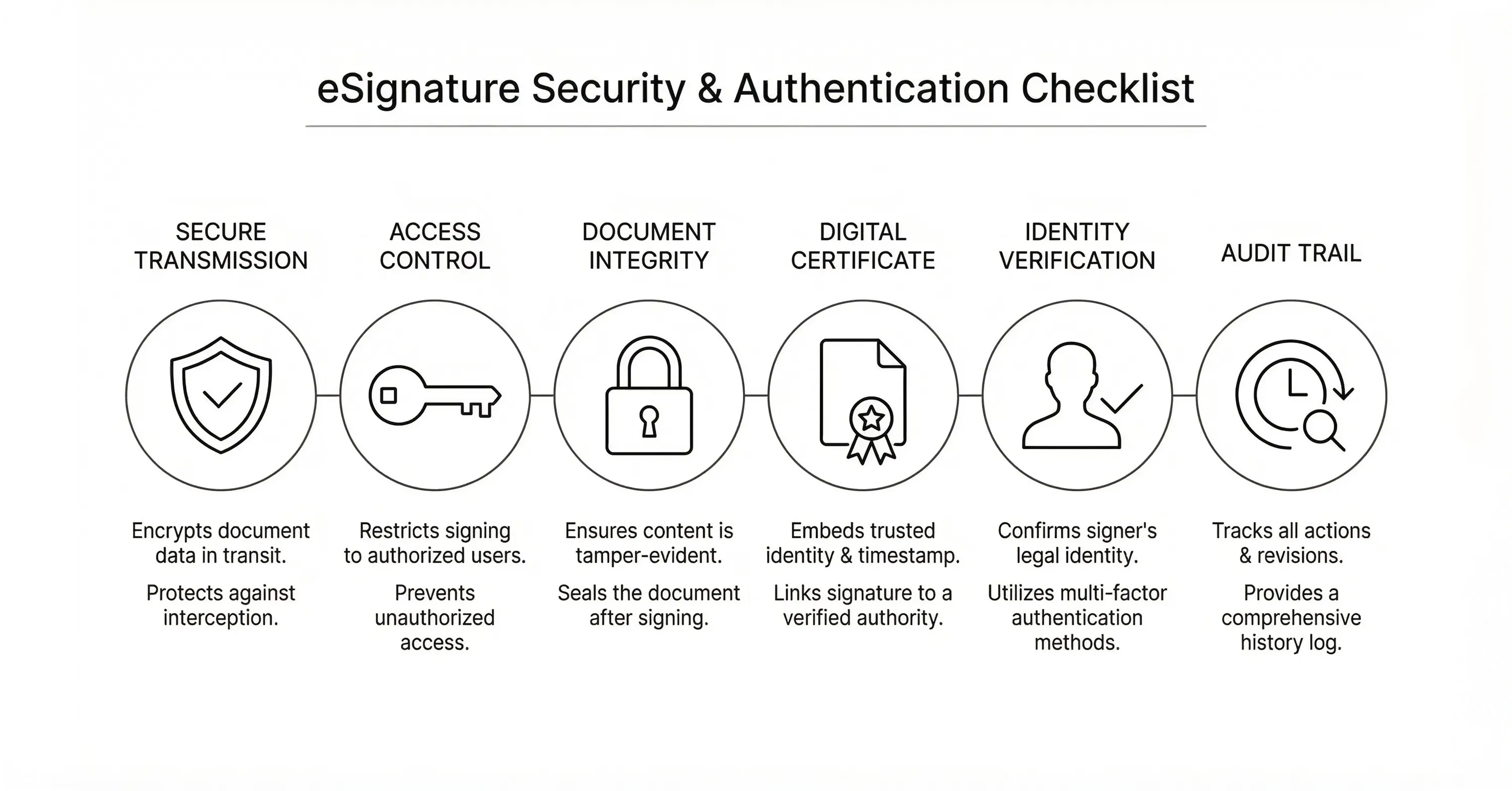
A black-and-white infographic showing an eSignature security and authentication checklist with icons for secure transmission, access control, document integrity, digital certificates, identity verification, and audit trails

The platforms below represent the top eSignature solutions on the market today, selected for security, scalability, compliance, and enterprise readiness.

1. Agrello

Agrello blends slick user experience with advanced digital signature compliance.

  • Templates: Drag-and-drop clauses to spin up contracts in seconds.

  • Automations: Smart reminders chase late signers automatically.

  • Compliance: Qualified eIDAS signatures and secure ID verification.

  • Standout: Voice-guided signing, perfect for users who prefer an audible walkthrough.

Teams that need European qualified signatures without heavyweight CLM complexity will appreciate Agrello’s balance of power and simplicity.

2. Adobe Acrobat Sign

Adobe’s heritage in PDF forms gives this tool deep document-editing muscle.

  • Templates: Create reusable forms and auto-populate fields from CRM data.

  • Workflows: Route agreements for multi-step approvals inside Microsoft 365, Salesforce, or ServiceNow.

  • Compliance: Supports FedRAMP Moderate, eIDAS, and HIPAA.

  • Standout: Built-in Acrobat PDF editor means zero toggling between apps.

If document formatting fidelity is mission-critical, Acrobat Sign is hard to beat.

3. DocuSign

The most recognized name in the category still leads on enterprise breadth.

  • Templates: Robust library plus conditional logic for branching fields.

  • Workflows: Visual builder to map, test, and deploy agreement paths.

  • Automations: Real-time status fed into Slack, Teams, or CRM dashboards.

  • Compliance: Over 350 industry standards including ISO 27001 and FedRAMP High.

Large organizations seeking proven scale and an enormous integration ecosystem usually start here.

4. Dropbox Sign (formerly HelloSign)

Dropbox Sign targets small to mid-size companies that value quick setup.

  • Templates: Save frequently used agreements with custom branding.

  • Workflows: Sequential or parallel signing with click-to-add approvers.

  • Automations: Auto-save fully executed PDFs to Dropbox folders.

  • Standout: Seamless Dropbox file picker shortens learning curve.

If you already live in Dropbox, this is the lightweight option that feels native.

5. Nitro Sign

Nitro bundles eSignatures with its PDF productivity suite.

  • Templates: One-click application to any uploaded PDF.

  • Workflows: Simple signer order and reminder triggers.

  • Automations: Automatic audit trails for every document.

  • Standout: All-inclusive pricing, no envelope limits.

Cost-conscious procurement teams often find Nitro Sign’s flat pricing refreshing.

6. OneSpan Sign

Security is OneSpan’s calling card.

  • Templates: Create once, deploy anywhere, enforce field validation.

  • Workflows: SMS coding, knowledge-based authentication, or biometric checks.

  • Compliance: Supports global bank-grade regulations like PSD2.

  • Standout: Secure mailboxes to protect sensitive financial agreements.

Banks and insurance carriers typically shortlist OneSpan early.

7. PandaDoc

A favorite among sales teams for deal-closing flair.

  • Templates: Content library lets reps mix slides, pricing tables, and clauses.

  • Workflows: In-document chat to resolve redlines on the spot.

  • Automations: Pull pricing and customer data straight from HubSpot.

  • Standout: Real-time analytics show when prospects open or linger on pages.

If presentation matters as much as the signature itself, PandaDoc delivers.

8. RightSignature (Citrix)

RightSignature focuses on simplicity and Citrix workspace integration.

  • Templates: Upload any DOC, PDF, or image and assign signer fields.

  • Workflows: Bulk send up to 100 recipients in one batch.

  • Compliance: UETA, ESIGN Act, and GDPR.

  • Standout: Hand-drawn signature option for a pen-and-paper feel.

Citrix shops appreciate the seamless login and administration.

9. Sertifi

Hospitality and travel companies often land on Sertifi for payments plus signatures.

  • Templates: Pre-built PCI-compliant credit-card authorization forms.

  • Workflows: Combine eSignature with secure payment capture in one link.

  • Automations: Auto-charge deposits when agreement is signed.

  • Standout: Specialized fraud tools for chargeback protection.

Any business collecting payments alongside agreements should put Sertifi on the radar.

10. SignEasy

Mobile-first experience for users on the go.

  • Templates: Save frequently signed docs to iOS or Android app.

  • Workflows: In-person signing mode for trade shows or job sites.

  • Automations: Google Workspace add-ons fill and send without leaving Gmail.

  • Standout: Works offline, then syncs when back online.

Field sales or service teams will love SignEasy’s always-available approach.

11. SignNow

SignNow packs serious enterprise punch at a mid-market price.

  • Templates: Conditional fields and reusable macro placeholders.

  • Workflows: Role-based routing, team workspaces, and multiple approvers.

  • Automations: API triggers push signed docs to SharePoint or SFTP.

  • Standout: Unlimited templates on every plan.

Organizations needing scale without the premium sticker price should test SignNow early.

12. Zoho Sign

Part of the broader Zoho business suite.

  • Templates: Merge data from Zoho CRM, Books, or People into contracts.

  • Workflows: Blueprint builder for complex internal approvals.

  • Compliance: Supports Certificate Authority signatures in 40+ countries.

  • Standout: Pay-as-you-go document credits for seasonal usage.

If you already run on Zoho apps, Sign is the intuitive extension of that ecosystem.

Each of these platforms can create a legally binding digital signature. For a fundamental breakdown of eSignature technology, check out Electronic Signature 101. Your short list should hinge on deeper factors - compliance requirements, integrations, template sophistication, and of course budget.

What Is an eSignature Tool?

An eSignature tool is cloud software that lets individuals or businesses prepare, send, and legally sign documents online. The platform typically provides templates, identity verification, automated reminders, and tamper-evident audit trails so agreements stay secure, compliant, and fast.

Conclusion

Choosing the right esignature tools is less about a logo and more about how deeply the platform fits your existing tech stack, compliance profile, and workflow habits. Whether you lean toward a heavyweight like DocuSign, a design-centric option like PandaDoc, or an agile, qualified eIDAS provider such as Agrello, each of the 12 solutions above can modernize how your team closes agreements - so work keeps moving and deals never stall.

If you're interested in how digital signing and integrations are evolving, read E-signing evolution: Key trends and predictions for 2024.
Yes, most major economies recognize electronic signatures as legally binding. The ESIGN Act covers the United States, eIDAS applies across the EU, and many other regions have similar regulations.

Digital signatures embed cryptographic seals and detailed audit logs that track every action. Paper signatures rely on visual inspection alone, so electronic versions often provide stronger evidence in court.

Platforms with built-in CLM like DocuSign, Adobe Acrobat Sign, or Agrello’s workflow designer handle multi-step routing, conditional approvals, and integration triggers effectively.

Yes. Sertifi, PandaDoc, and Zoho Sign offer optional payment modules so customers can sign and pay within the same secure session.

Benefits vary, yet organizations using DocuSign CLM reported a 449 % ROI and a 90 % faster contract-creation time in the Forrester TEI study, illustrating the massive efficiency gains available.

Schedule a Meeting

Book a time that works best for you and let's discuss your project needs.

You Might Also Like

Discover more insights and articles

Close-up of professional woman with text “How do electronic signatures work?” representing digital signing process and e-signature technology

How do electronic signatures work?

You have probably signed a digital document recently - clicked a link, typed your name, or scribbled a signature and pressed “Finish.” It felt quick and effortless. But for managers responsible for important contracts, that simplicity can raise a key question: what actually happened behind the scenes? This article explains how electronic signatures secure documents, verify identity, and create a legally reliable record - in clear, non-technical terms.

Professional woman using digital signature software to quickly sign and send documents online

What’s the fastest way to sign and send documents online?

Paperwork bottlenecks quietly drain productivity in growing companies. If you still print, sign, scan, and email documents, you are wasting hours on a process that should take seconds. This guide shows how to modernize approvals with secure digital tools, mobile signing, and an automated digital signing workflow that works without heavy IT support.

Smiling professional woman signing a document digitally, illustrating how to create a digital signature in Microsoft Word

How to create a digital signature in Microsoft Word

Printing a document just to sign and scan it back is unnecessary. Microsoft Word lets you approve contracts and internal documents directly on your screen using built-in signature features. This guide shows how to create a digital signature in Word, add signature lines, apply document protection, and manage multiple signers. It also explains when Word’s native tools are enough and when a certified external solution is needed for legally critical documents.

Business professionals discussing document security as AI tools detect and prevent forged digital signatures

How can AI detect and prevent forged digital signatures?

You have likely signed dozens of contracts this year without touching a pen. While this speed is great for business, it creates a nagging worry for department heads and process owners. If you can sign a document in seconds with a click, how hard is it for a fraudster to do the same in your name? This article breaks down exactly how artificial intelligence acts as a digital gatekeeper for your contracts. We will look at how AI moves beyond basic security checks to analyze behavior, spot visual tampering, and verify identity in real time. You will learn how modern tools protect your HR, Sales, and Operations documents without requiring a massive IT overhaul.