Why Electronic Signature Formats Matter
Before looking at the specific acronyms, it helps to understand why these distinctions exist. In the European Union, the eIDAS regulation governs electronic identification and trust services. It sets the rules that give digital signatures the same legal standing as wet-ink signatures.
To meet these high standards, technical bodies developed specific formats that ensure a signature is more than just an image pasted on a page. These formats bind the digital identity of the signer to the document itself. This cryptographic bond ensures that if anyone alters the document after signing, the signature becomes invalid immediately.
Choosing the correct format impacts three critical areas of your business:
-
Long-term validity: Ensuring a contract signed today can still be verified in ten years.
-
Compatibility: Ensuring the recipient can actually open and read the signed file.
-
Compliance: Meeting specific legal requirements for government filings or cross-border trade.
To explore how these regulations affect your business and e-signing experience, see What should you know about eIDAS when e-signing EU business contracts.
We will start by examining the most common format used in general business operations.
PAdES: The Standard for Human-Readable Contracts
PAdES stands for PDF Advanced Electronic Signature. As the name suggests, this format is designed specifically for PDF documents. If your team handles employment contracts, sales agreements, or non-disclosure agreements, PAdES is likely the format you are already using or should be using.
The strength of PAdES lies in its ability to embed the signature directly inside the PDF file. According to technical documentation on eIDAS standards, this allows the signed document to remain readable with any standard PDF viewer while maintaining full legal value. You do not need specialized software to verify the signature because the verification data is self-contained within the file itself.
This format offers distinct advantages for operational teams:
-
Simplicity: The recipient sees the document exactly as you intended.
-
Portability: The signature travels with the PDF, so you can email it or archive it easily.
-
Visual Confirmation: It typically displays a visual representation of the signature on the page, which is reassuring for non-technical stakeholders.
PAdES is not just about convenience; it also secures the document for the long haul. It extends native PDF signing capabilities based on ISO 32000 with advanced features. For example, it supports "Baseline Levels" (like B-LTWA) that allow for escalating validation over time. This ensures signatures remain verifiable for decades by archiving certificate chains and timestamps according to industry experts.
For most daily business tasks where a human needs to read and sign a document, PAdES is the gold standard. Platforms like Agrello utilize these standards to ensure that when you send an HR contract or a sales proposal, the final output is a compliant, universally readable PDF that requires no extra technical effort from your team. For additional technical detail on PAdES, see What is PAdES Signature.
Now that we have covered the visual side of signing, let’s look at how systems handle structured data.
XAdES: The Choice for Structured Data and Automation

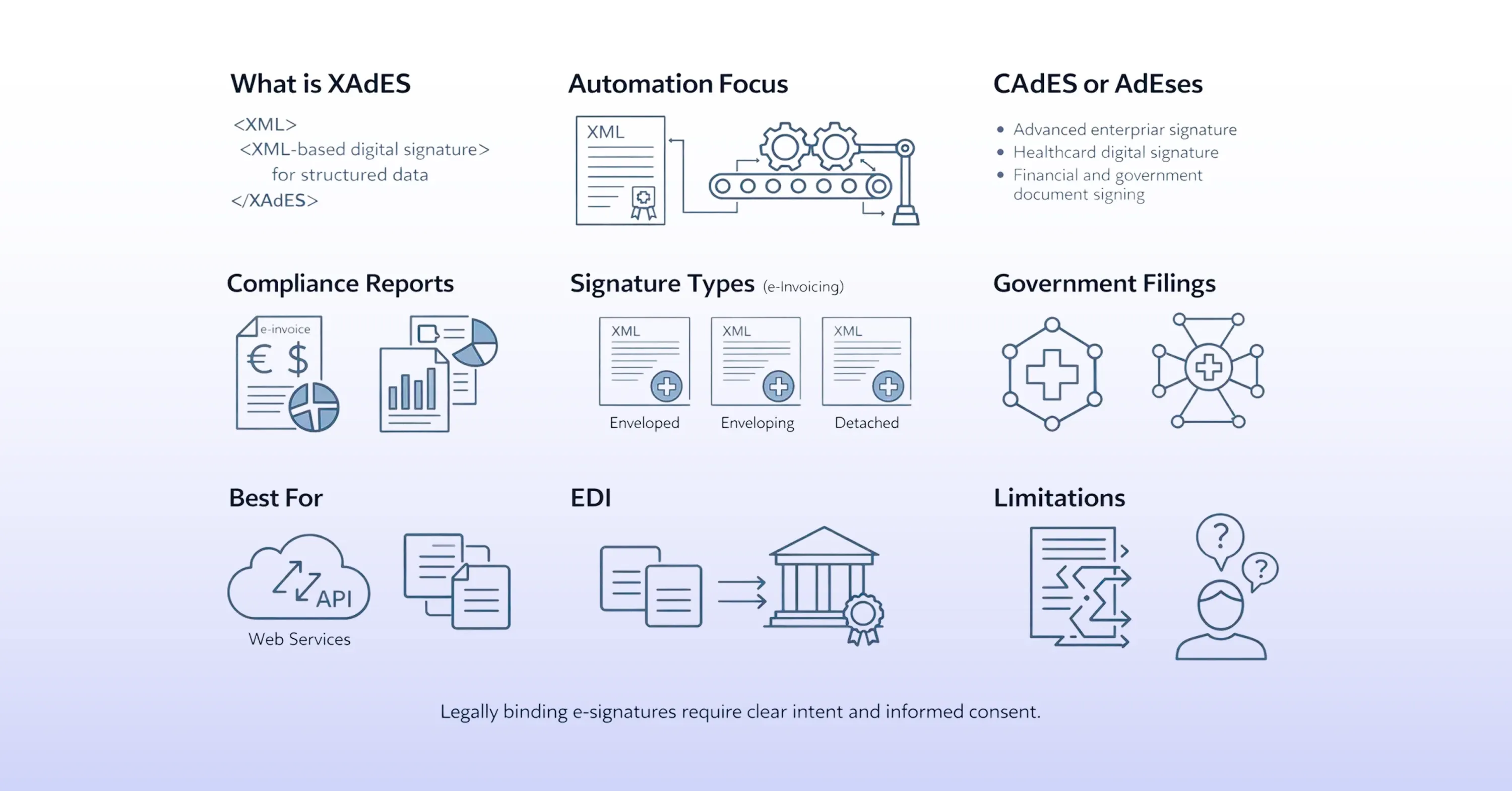
While PAdES is great for humans, computers often prefer a different language. This is where XAdES, or XML Advanced Electronic Signature, comes into play. This format is based on XML and is optimized for XML documents.
XAdES is prevalent in sectors where data needs to be processed automatically without human intervention. It embeds signatures directly into the XML structure using XML Digital Signature (XMLDSig). Sources indicate that this makes it the preferred choice for web services, EDI (Electronic Data Interchange), and government filings where structured data is key.
You will typically encounter XAdES in these scenarios:
-
e-Invoicing: Many European countries require invoices to be submitted in specific XML formats.
-
Financial Reporting: Banks and fintech companies often exchange signed data streams.
-
Healthcare: Transferring patient data between systems securely.
XAdES is highly flexible. It can be embedded (enveloped) within the data it signs, contain the data within itself (enveloping), or reference external data entirely (detached). This flexibility makes it ideal for SOAP web services and e-invoicing applications as noted in technical guides. For a closer examination of XAdES and how it compares to ASiC, see What is ASiC container and XAdES signature.
However, for a functional manager in HR or Sales, XAdES is rarely the right choice for a standard contract. The file is a text-based code structure rather than a visual document. If you sent a candidate an XAdES file, they likely wouldn't know how to read it.
But what happens when you have multiple files, like a contract, a spreadsheet, and an image, that all need to be signed together?
ASiC: Bundling Documents Securely
Sometimes a single PDF or XML file isn't enough. You might have a project bid that includes a proposal, technical drawings, and a compliance spreadsheet. Signing them individually is tedious and risks separating the files later. This is where ASiC (Associated Signature Container) becomes useful.
ASiC is essentially a specialized container format, similar to a ZIP file, that bundles document content, digital signatures, and security credentials into a single package. Experts explain that this keeps electronic documents and signature data inseparable while enhancing portability and verification.
There are two main variations of ASiC you might encounter:
This format is particularly useful for public tenders or complex procurement processes. Instead of sending five separate emails with five separately signed attachments, you create one ASiC container. This ensures that the recipient receives the entire package exactly as it was signed, with no missing pieces.
While less common than PAdES for everyday agreements, ASiC solves the specific problem of maintaining the integrity of a multi-file package. If you want to see practical platform features related to ASiC, check Agrello versus ASiC: The benefits of preview functionality.
A Note on CAdES and Technical Transactions
There is a fourth format you might see mentioned in technical documentation called CAdES (CMS Advanced Electronic Signature). While PAdES handles PDFs and XAdES handles XML, CAdES is designed for binary data.
CAdES includes profiles like CAdES-X Long Term for extended validity. It incorporates complete validation data to handle certificate revocation lists or OCSP responses as described here. This makes it suitable for non-visual data exchanges, such as API-driven transactions in supply chain management.
For the average mid-market functional manager, you will almost never need to manually select CAdES. It usually operates in the background of banking systems or software updates. It is worth knowing it exists, but it rarely impacts the day-to-day signing of contracts.
How to Choose the Right Format
With the definitions out of the way, the decision usually comes down to the nature of the document and who needs to read it.
If your primary goal is to have a human read and agree to a text document, PAdES is the answer. It is universally compatible and visually reassuring. For 90% of HR, Sales, and Legal operations, this is the format you will use. Tools like Agrello simplify this by defaulting to PAdES for standard document workflows, ensuring you don't have to worry about the technical settings.
If you are dealing with automated systems, government tax portals, or machine-to-machine transactions, XAdES is likely the requirement. This is usually determined by the IT specification of the receiving system rather than your personal preference.
If you need to sign a collection of disparate files and ensure they stay together, ASiC is your best option.
For a broader picture of the available e-signature technologies and how they fit your workflow, visit E-signature technology explained.
Summary of e-signature formats explained:
-
PAdES: Best for PDFs, contracts, and visual documents.
-
XAdES: Best for XML data, invoices, and automated reporting.
-
ASiC: Best for bundling multiple files into one signed package.
Understanding these differences ensures that your team remains compliant and efficient. You avoid the frustration of rejected files and ensure that your critical business agreements remain valid for years to come.
Key Definitions for EU Signature Formats
PAdES (PDF Advanced Electronic Signature) is the standard strictly for PDF files, embedding the signature within the document so it is readable by any standard viewer. XAdES (XML Advanced Electronic Signature) is designed for XML data and is used primarily in automated workflows like e-invoicing. ASiC (Associated Signature Container) functions like a digital zip file, bundling multiple documents and signatures into a single, portable container to keep them inseparable.
Conclusion
Navigating the technical landscape of digital signatures does not require a degree in computer science. By understanding the three main players - PAdES for documents, XAdES for data, and ASiC for bundles - you can make informed decisions that keep your business compliant. For most operational teams, sticking to PAdES ensures your contracts are secure, legally binding, and accessible to everyone involved. Choosing the right format today safeguards your company’s agreements for the future.