How Signing Order Works in an Electronic-Signature Workflow

Content authorToomas PihlPublished onReading time12 min read
Title:
How Signing Order Works in an Electronic-Signature Workflow

Meta description:
Learn how to structure signing workflows to reduce contract delays and prevent costly routing errors in your busin

Signing order is the rule that decides when each recipient gets invited to sign. Use sequential routing when one signature depends on another and parallel routing when signatures are independent. A delay pauses only dependent steps. A decline triggers whatever exception path you configured before sending.

Signing order follows business dependencies

The right signing order is the one that mirrors how your approvals actually depend on each other. If the manager's signature is meaningless until the employee has accepted the terms, that's a dependency and it needs sequential routing. If three people are each confirming something separate, making them queue up just adds days for no reason.

Two failure paths deserve attention before you send anything. A delay stalls every recipient downstream of the slow signer, while parallel recipients keep moving. A decline stops the workflow at whatever point your platform's configured exception rule takes over.

The stakes here are practical. In a Kronos and Human Capital Institute survey of 350 US HR leaders, about 40 percent of onboarding activity was paperwork completion. That share is large enough that routing design, not document design, is where most of the recoverable time sits.

Key workflow terms prevent routing mistakes

Routing mistakes almost always trace back to two words being used loosely: signer and recipient. They aren't the same thing, and platforms treat them differently.

Here's the vocabulary that keeps a workflow configuration honest:

  • Sender: the person who prepares the agreement and sets the order.

  • Recipient: anyone who receives the agreement, whether they sign or not.

  • Signer: a recipient whose action is required for completion.

  • Signing order: the sequence in which invitations are released.

  • Routing step: one position in that sequence, which can hold one recipient or several.

  • Completion: the state where every required action is done.

  • Reminder and decline: the automated nudge and the refusal to sign.

One distinction matters more than the rest. Signing order controls invitation timing. Under Article 25 of the eIDAS Regulation, an electronic signature can't be denied legal effect purely because of its electronic form, and nothing in that article ranks signatures by sequence. So if you're routing the company last because you believe that makes its signature carry more weight, you're solving a problem that doesn't exist.

Three routing models serve different needs

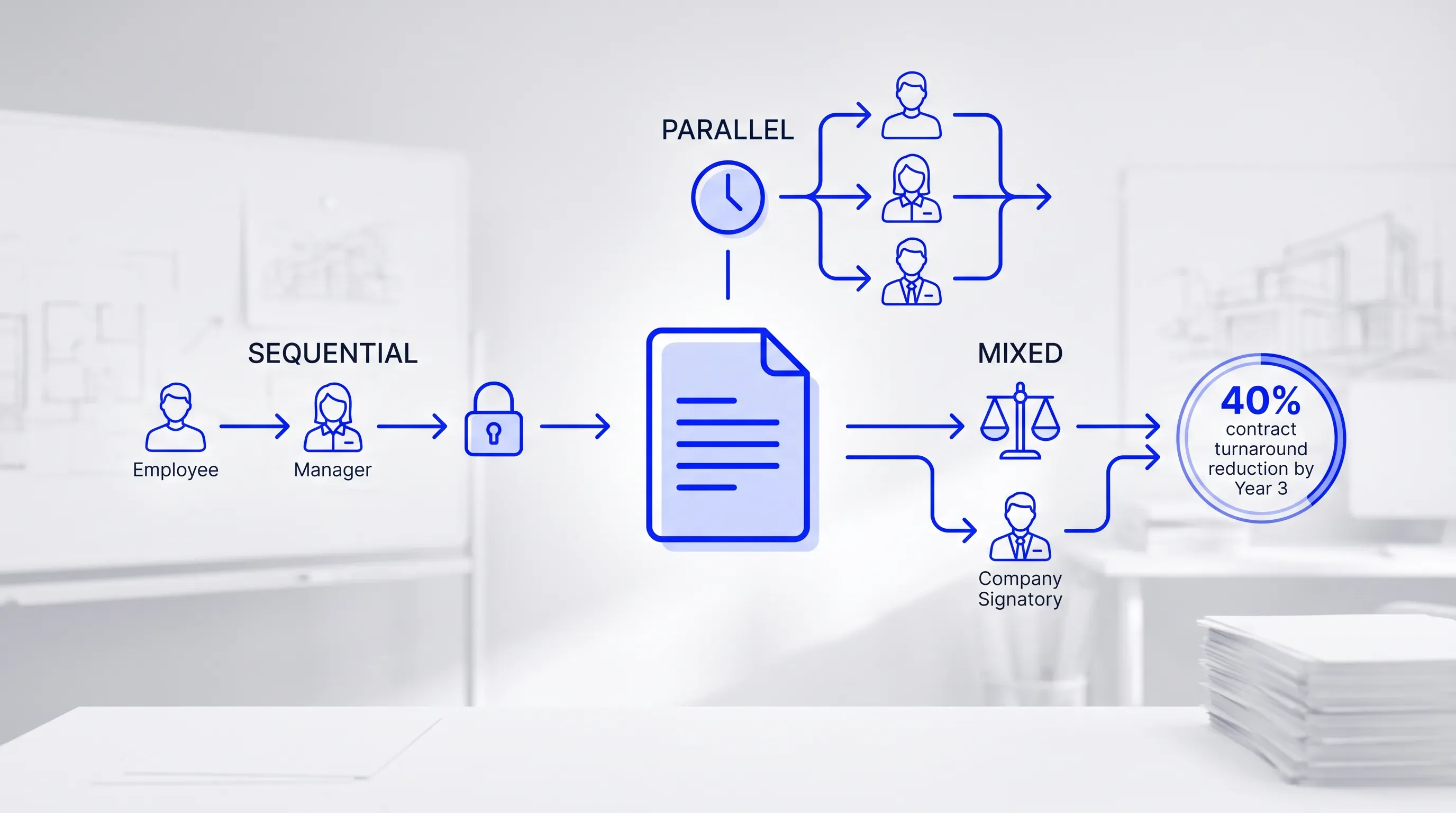
Diagram comparing three document signing order models - sequential, parallel, and mixed- for an HR agreement involving an employee, manager, and company signatory.

There are three models, and the same HR agreement can run through any of them with different results. Take a standard employment amendment involving an employee and their manager along with a company signatory. Sequential routing gives you the tightest control and the slowest clock. Parallel routing gives you speed and gives up the review chain. Mixed routing sits between them.

Speed and control trade against each other in a way you can measure. Every sequential step adds one full wait cycle, because nobody downstream sees the document until the person ahead of them finishes. Gartner Peer Insights product listings describe signing order configuration as a standard capability across electronic signature platforms, which tells you something useful: the models aren't proprietary, so choosing between them is a process decision rather than a vendor decision.

That's worth holding onto. If routing logic is available everywhere, the differentiator in your workflow is whether you mapped the dependencies correctly before configuring anything.

Sequential routing preserves dependencies

Route the employee first and the manager second when each signature genuinely depends on the one before it. The manager can't confirm an arrangement the employee hasn't accepted yet, and the company countersignature closes a document that's already agreed.

Formal review chains are where this model earns its cost. Fixed-term contracts are a good example, because New Zealand and South Africa require them to be in writing and signed by both parties, according to SHRM's guidance on global fixed-term rules. When a document type carries that kind of formality, a visible chain of who agreed to what and in what order is worth the extra days.

Where sequential routing hurts is when it's applied by default. If two of your three signers have nothing to do with each other, queuing them turns a one-day workflow into a three-day one and gives you nothing back.

Cut contract signing time by 60%

See how Agrello can automate your contract workflows from creation to e-signature in one free consultation.

Parallel routing prioritizes speed

Send the invitation to every signer at the same time when no signature depends on another. All three act whenever they're free, and the agreement completes when the last one finishes rather than when the chain finishes.

Independent acknowledgments are the natural fit. Annual policy confirmations and receipt of a handbook update, where each person is attesting only for themselves. Ben Peterson, CEO of the HR software company BambooHR, told SHRM that instead of leaving a stack of papers waiting, employers should send documents out beforehand for electronic signature. That advice only works at scale if the sending isn't gated behind someone else's inbox.

The limit is straightforward. If your manager reviews what the employee accepted, parallel routing removes the review entirely, because the manager signs against a version they have not compared. Speed here costs you the audit logic you thought you had.

Mixed routing balances speed and control

Mixed routing puts the employee and the manager in the same step, then releases the agreement to the company signer only after both have finished. One routing step holds two people and the next holds one, so the dependency you actually care about is the only one enforced.

This is the model for most HR agreements, and it's underused because configuring two people into a single step is counterintuitive when the interface presents an ordered list. The gain is arithmetic: you collapse two wait cycles into one while keeping the final countersignature gated.

Contract turnaround improvements of this kind are documented. A Forrester Total Economic Impact study of LinkSquares CLM found the composite organization reduced ancillary contract turnaround by 40 percent by Year 3 through automated intake and execution. Much of that gain comes from removing waits nobody needed, which is exactly what mixed routing does at the routing-step level.

Recipient roles determine who must act

Not everyone on the recipient list needs to sign, and assigning the wrong role is the fastest way to stall a workflow. Four roles cover almost every HR agreement.

  1. Workflow owner: the sender who prepares fields and sets order.

  2. Required signer: completion depends on this person, so their delay blocks anyone downstream.

  3. Reviewer or commenter: reads and can flag issues without signing, which means the workflow doesn't wait for them unless you make it.

  4. Copied recipient: receives the final document and takes no action at all.

Your manager is the one to think hardest about. In HR workflows the manager approves and signs, which means one person occupies two roles in a single step. Deloitte's international employment law guide notes that in the majority of countries a written employment contract is mandatory, and where it is, the manager's approval and the employer's binding signature are separate acts that remain two distinct steps. Decide which one the manager is performing before you build the routing, because the role you pick determines whether their absence blocks completion.

Delays and declines need defined responses

Exception handling belongs in the configuration. Every routing decision you make also decides, implicitly, what happens when someone doesn't act or refuses to. Making that explicit before sending is the difference between a workflow that recovers on its own and one that requires you to chase people.

The two exceptions behave differently. A delay is a timing problem with a mechanical fix through reminders and deadlines. A decline is a substance problem because someone disagrees with the document, and no reminder solves that.

The European Commission's eSignature guidance recommends balancing the cost of implementation against risk of losing a legal challenge when selecting signature types. The same calculation applies to exception rules. Configuring a reassignment policy takes ten minutes once, and skipping it costs you an unrecoverable week on the one agreement that stalls at quarter-end.

Cut contract signing time by 60%

See how Agrello can automate your contract workflows from creation to e-signature in one free consultation.

A delayed signer can block dependents

A slow signer blocks only the recipients who sit behind them in the sequence, which is why the delay in a mixed workflow costs less than the same delay in a fully sequential one. Parallel recipients in the same step keep going regardless.

Four controls reduce the damage. Automated reminders on a fixed interval work with a document expiry deadline. A reassignment policy names who can sign in someone's place, and an escalation contact covers when the deadline passes. Set them at send time.

The Forrester analysis of Workday Prism Analytics found the composite organization reduced initial onboarding time by 10 percent per employee by replacing manual check-ins and email follow-ups with real-time visibility into where things stalled. That figure comes from visibility alone. Which suggests that most of what you lose to delay is lost to not knowing about the delay.

A decline stops unsafe completion

A decline halts the workflow immediately so that no downstream signer adds their name to a document someone has already rejected. That's the whole purpose of the decline function, and it's why declines stand apart from delay.

Your response has four steps. Capture the stated reason and read any comments left on specific clauses. Decide whether to correct the document or cancel it outright, and restart with a fresh version if you correct it. Never edit and resend under the same envelope, because that breaks the link between what was reviewed and what was signed.

Platforms differ in how they implement this. Some void the entire envelope on a single decline, others hold it in a suspended state pending sender action. Gartner Peer Insights describes OneSpan Sign as supporting audit trails for all signature transactions, which is the capability that makes a decline reviewable afterward. Check your own platform's decline behavior before you rely on it.

Audit evidence should reconstruct the workflow

Good audit evidence lets someone who wasn't there rebuild the entire sequence from the record alone. That means a timestamp tied to an identifiable person for every action each recipient took, from receiving the invitation through to completion.

Two things get conflated here. Workflow evidence shows what happened and when. Proof of enforceability and signer authority is a separate question about whether the signature binds the parties at all.

The distinction shows up in the technical standards. ETSI TS 101 733 defines a time-mark as information in an audit trail from a trusted service provider binding a datum to a particular time, which it treats as a component of signature validation rather than the whole of it. Read that carefully and the implication for HR is clear: your audit log proves process integrity. The question of whether the manager who signed had authority to bind the company gets settled by your delegation policy.

A checklist prevents routing failures

Run through this before you press send, because every item on it is cheaper to fix in configuration than after an exception.

  • Required signers, and whether each one is truly required or just informed.

  • Dependencies between them, written out as "X cannot sign until Y has."

  • Role per recipient, with dual roles flagged.

  • Routing model chosen from the dependency map rather than habit.

  • Field placement checked for every signer, not just the first.

  • Reminder interval and document deadline.

  • Decline path, including who gets notified and who authorizes a restart.

  • Authentication method per signer.

  • Jurisdictional requirements for this document type.

  • Final-copy distribution list and audit-record retention period.

Retention deserves a number rather than a shrug. The eIDAS technical framework includes a qualified certificate retention period statement, with the European Commission's Digital Signature Service documentation showing a 10-year retention value in its certificate examples. Employment records frequently outlive the certificates that signed them, so align your archive policy to the longer of the two rather than to whatever your platform defaults to.

Routing logic does not prove legality

Choosing the right routing model gives you an efficient workflow. Validity of the signature and authority of the signer stay outside what routing can settle. Those are separate tests, and no amount of well-designed sequencing satisfies them.

Form requirements vary by country and by document type in ways that catch people out. Germany's Act on Evidence has required employers to record essential employment terms in writing, and Deloitte's analysis notes that fixed-term contracts under Section 14(4) of the Part-Time and Fixed-Term Employment Act still demand strict written form or a qualified electronic signature. A perfectly routed workflow using a simple electronic signature fails that requirement completely.

So treat signature method as a compliance input to your workflow design. Check the applicable employment rules for each jurisdiction you hire in, then build the routing around the signature level that document type already demands.

Configure controlled routing with Agrello

If you want to put this into practice, Agrello is a document management and e-signing platform built for exactly the configuration decisions covered above, from adding recipients to keeping audit evidence in one place.

According to its listing on the Estonian government's DigiExpo directory, Agrello lets you sign documents using your national e-ID or Agrello's international advanced electronic signature, and the same listing notes secure spaces for inviting partners to review and sign drafts. Available signature methods, and the plan features that come with them, depend on your subscription and your country, so verify the current signatures and pricing pages before committing to a workflow design that assumes a specific method.

Start by mapping one real HR agreement: list its signers and write out the dependencies between them in a template you can reuse.

Cut contract signing time by 60%

See how Agrello can automate your contract workflows from creation to e-signature in one free consultation.

Use a test document with internal recipients before you send a live agreement. Confirm that each invitation arrives at the intended step and that required fields appear for the right person. Also check the reminder schedule and final-copy distribution. Handle the test record under your organization’s retention policy.

Treat a sent envelope’s routing order as fixed unless your platform documents a controlled edit feature. If a change is needed, cancel or void the incomplete workflow, record why, then send a fresh version with the corrected order. This keeps the audit trail tied to the document each person reviewed.

No. Match authentication to the signer’s authority and the document’s legal requirements. A company signatory who binds the employer can require stronger identity checks than an employee who acknowledges receipt. Confirm that the chosen method meets the rules in each jurisdiction relevant to the agreement.

Use the reassignment process you set before sending, rather than manually substituting another person. Verify that the replacement has authority to act. Preserve the reason for the change in the workflow record. If reassignment isn’t allowed, restart the agreement through the approved process.

Keep the completed document and its audit record together in an access-controlled archive. Retain every recorded workflow event needed to reconstruct who received, viewed, signed, declined, or reassigned the agreement. Set the retention period from applicable employment-record rules and signature requirements, rather than a platform’s default deletion setting.

Schedule a Meeting

Book a time that works best for you and let's discuss your project needs.