Title:
How can digital signatures reduce office admin time?

Meta description:
Learn how can digital signatures reduce office admin time? You reclaim a full work week each year when you move your docu

How can digital signatures reduce office admin time?

Digital signatures cut document signing and handling time by up to around 60 percent because they remove the manual steps wrapped around the signature itself, from printing to filing. The surrounding admin is the slow part, and those hours disappear when the whole process moves online.

Content authorBy Toomas PihlPublished onReading time11 min read

How much admin time do digital signatures save?

Digital signatures save you most of the time you spend handling a document because the surrounding admin takes longer than the signature itself. The signature is fast either way. What eats your week is the print run and the follow-up work that continues into the folder hunt three months later. Estonia ran this experiment at national scale, and according to e-Estonia, each citizen saves an average of five working days a year by signing documents digitally instead of on paper. That is one person who handles ordinary admin and gets back a full work week. Now apply that to someone who prepares and sends documents for a living rather than a few times a year. If five days is the baseline for a regular citizen, the person running contracts and approvals for a growing team stands to reclaim far more, because the manual steps repeat for every signer and every revision they handle.

Where does admin time actually go?

Admin time leaks across four predictable stages, and the signature is the smallest of them. A paper document has to be prepared for a physical signature, and the rest of the process becomes a chase that ends in a folder you hope to find again. Each stage looks minor on its own. Stacked together and repeated across a month of contracts, they add up to real hours. McKinsey Global Institute estimated that knowledge workers spend about one day each work week searching for and gathering information, and document retrieval is a direct part of that drain. So before you can fix the waste, you have to see where it sits. The four stages below each carry friction you'll recognize the moment you read them, because you've done all of them by hand this week.

How much time does printing and scanning waste?

The paper-to-upload cycle adds several minutes of pure handling per document, and it depends on equipment that fails at inconvenient times. You make the printer trip, then turn the signed pages into an uploaded file. The European Commission notes that paper-based signing carries the time and costs of printing along with the paper handling that follows. Here's the part that turns minutes into hours: that round trip repeats for every signer on the document and again for every revision. A two-party contract with one correction means you run the whole cycle four times for a single agreement.

Why do manual follow-ups eat the most time?

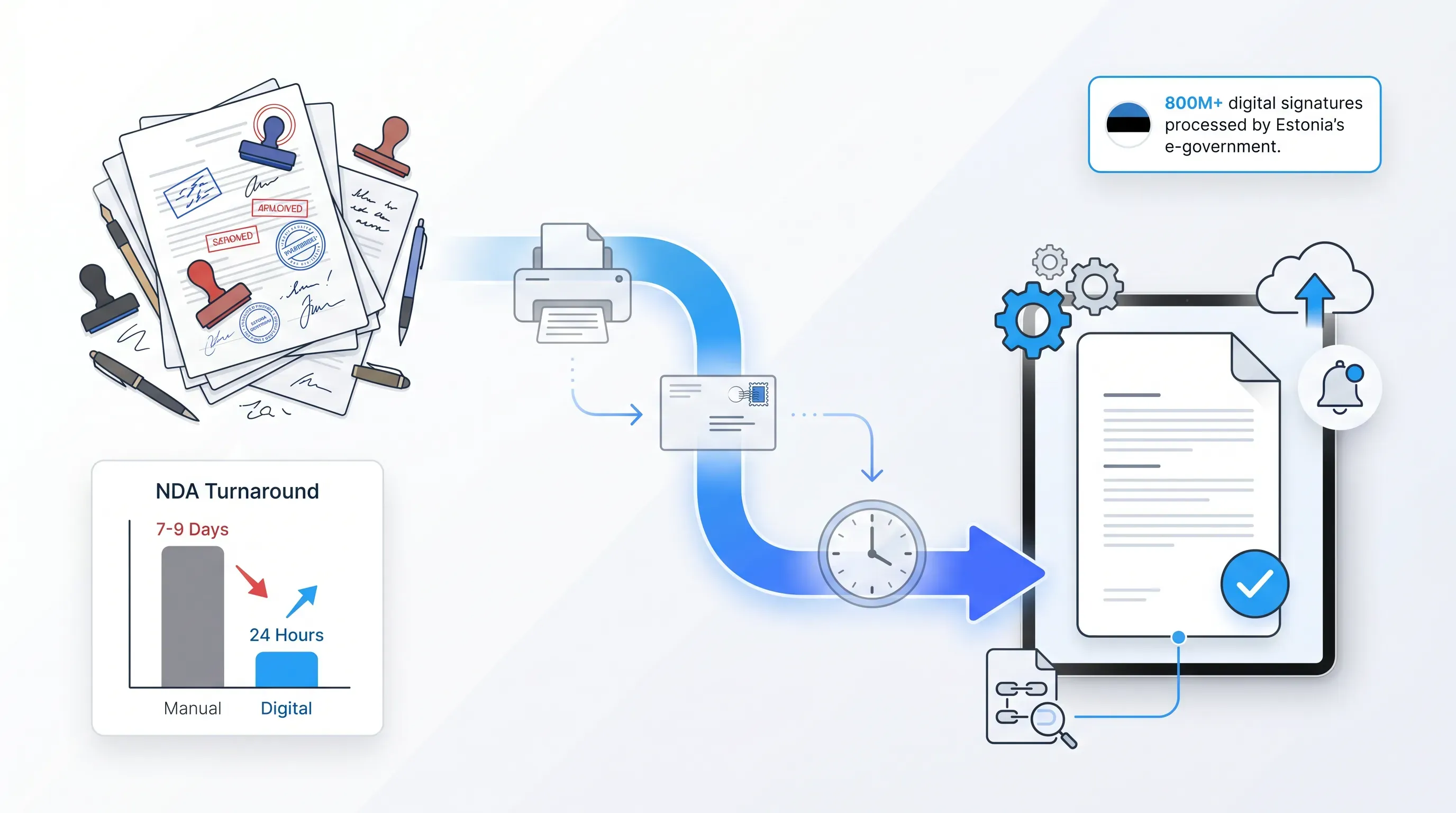
Chasing signers is the single largest hidden time cost because it stretches a five-minute task across an entire week. You have to remember who hasn't signed and keep writing reminders until the document comes back. A Forrester study of LinkSquares customers found one company's NDA turnaround was seven to nine working days before automation, much of it spent emailing and chasing versions. Most people underestimate this cost because the active work is tiny. The reminder takes a minute to write. The mental load of tracking five open documents at once and the days of dead waiting between each nudge are where the real time goes.

How long does filing and retrieval take?

Filing and retrieval costs you a couple of minutes per document upfront and far more when you need that document back months later. You file the document and hope the naming convention holds. Then an audit or a dispute lands and you go digging. The McKinsey Global Institute figure of one day each work week lost to searching for information captures this exactly. If you've ever spent twenty minutes hunting for one signed contract across a shared drive and a cabinet, you already know the upfront filing minute was the cheap part. The expensive moment is the retrieval, and it arrives when you have the least time to spare.

How do digital signatures remove each step?

A flat illustration showing the transition from a cluttered paper document to a streamlined digital document, with icons representing automation.

Digital signatures collapse all four stages into one online flow, so the document moves through the process without printouts or manual chasing. You send a link instead of a printout. The signer signs on screen. The platform handles the reminders and the storage on its own. Estonia's e-government data shows the system there has now processed over 800 million digital signatures, and each has the same legal weight as a handwritten one, which makes the system a full replacement for the paper process. The before-and-after maps cleanly onto the four stages you just saw. Each manual step has a digital counterpart that takes seconds instead of minutes, and the three sections below walk through them in the same order so you can see exactly what disappears.

No printing, no scanning, no posting

The print-sign-scan cycle is replaced by a single link. The signer opens it, signs on screen, and the completed document returns to you automatically with no equipment involved. The printer queue and scanner drop out of the process, along with the envelope and stamp. The European Commission describes electronic signing as a way to enable the full digitalisation of business processes and remove the paper handling entirely. The detail that matters for your day: because the file comes back already named and stored, the revision problem from the manual cycle vanishes too. A correction means you resend a link instead of running four more round trips to the printer.

Automated reminders replace chasing

The platform sends the reminders for you on a schedule and shows real-time signing status, so you stop tracking and nudging signers by hand. You see at a glance who has signed and who hasn't, and the system follows up without you writing a word. Remember the Forrester case where NDA turnaround ran seven to nine working days? After automation, the same company processed them within 24 hours. The system lifts the chasing off your plate, which is the exact cost most people underestimate. The week of dead waiting between nudges collapses because the platform never forgets and never has to wait for you to remember.

Signed documents file themselves

Signed documents save automatically to searchable cloud storage with a verifiable audit trail, so retrieval takes seconds instead of a folder hunt. There's no naming step and no filing decision to get wrong. When the audit or dispute arrives, you search and the document appears, complete with a record of who signed and when. The European Commission points to bulky, physical storage space and difficulty searching as core drawbacks of paper. Flip that, and the expensive retrieval moment from earlier stops being expensive. The document you'd have dug twenty minutes for is now a two-word search, and the audit trail answers the dispute before it escalates.

What everyday workflows save the most time?

Repetitive and high-volume document tasks deliver the biggest admin savings, because the manual steps multiply there. A one-off signature saves you a few minutes. A workflow you run twenty times a month saves you those minutes twenty times over, plus all the chasing and filing attached to each one. Estonia estimates it saves at least 2% of GDP annually through the collective use of digital signatures, which is what scale looks like when you remove friction from a process that runs constantly. The same logic works inside a single company. The workflows that hurt most on paper are the ones you repeat, and they're the ones that pay back fastest when you switch. The three below are the everyday cases where you'll feel the difference inside your first week.

Employee onboarding and HR forms

Digital signatures let you send and sign onboarding paperwork before a new hire's first day, so a printed packet becomes a few minutes of online work. Contracts and HR paperwork go out as one flow. Ben Peterson, CEO of HR technology company BambooHR, put it plainly: rather than a stack of papers waiting for a signature, send them out beforehand for electronic signature. The payoff is a faster first morning: when the forms are signed before day one, the new hire's first morning is spent on the job rather than on a clipboard, and your onboarding admin shrinks to sending a link and watching the status fill in.

Client contracts and NDAs

A client NDA or contract emailed for digital signature can come back the same hour instead of waiting days for post or scanned replies. That speed protects deal momentum, which fades fast once a signature stalls. The Forrester study of LinkSquares customers recorded an average NDA turnaround dropping to nine working hours after the move to digital, down from over a week. Here's what that means for you specifically: a deal that loses energy across a five-day signing gap falls apart before the signature arrives. Closing the same agreement before lunch keeps the client engaged while they still want to sign, and removes the follow-up emails you'd otherwise be writing all week.

Bulk and repeat agreements

Bulk sending and reusable templates let one person dispatch dozens of identical agreements at once instead of preparing each one by hand. This is where the largest aggregate savings show up, because the per-document work stops scaling with volume. You build the template once, then send fifty. The European Commission notes that digital signing removes the time and costs of repetitive paper handling at every step. The practical shift is this: on paper, fifty vendor agreements means fifty print-sign-scan cycles and fifty filing decisions. With templates and bulk send, it's one setup and fifty automatic returns, which is why high-volume teams feel the change more than anyone else.

How to estimate your own savings

You can estimate your savings with a simple multiplication you run on your own numbers. Add up the minutes you spend per document on paper handling and follow-up, then multiply by your monthly document volume. Compare that total against a digital flow that runs close to zero on those same steps. The result is your monthly reclaimed time.

Here's the method, step by step:

  1. Count the minutes one document takes you across paper handling and follow-up combined. Be honest about the chasing, since that's the step people lowball most.

  2. Multiply by how many documents you send for signature in a month.

  3. Multiply that monthly figure by twelve for an annual number.

  4. Set it against the near-zero digital equivalent to see what you get back.

For a sanity check, anchor it to a known figure. Estonia's data shows digital signing returns an average of five working days a year to an ordinary citizen. If your job is to handle documents all day, your personal number will land well above that baseline, which is the case you can take to a manager with confidence.

Start saving admin time with Agrello

The natural next step is to put your everyday workflows into one digital flow and stop running the manual steps by hand. Agrello is an Estonian e-signature and contract management platform built for small and medium-sized businesses, and its features map directly onto the admin steps this article has been pulling apart.

The document automation and bulk contract creation handle the print-and-prepare stage, so fifty agreements take one setup instead of fifty. Automated signing flows take over the chasing with reminders and status updates while you work on something else. Cloud-based storage files every signed document automatically with an audit trail, which turns the old folder hunt into a quick search. Agrello cites up to a 60 percent reduction in signing time, the same figure this article opened with, because the savings come from the steps around the signature itself.

Try it on the workflow that costs you the most right now, whether that's onboarding packets or client NDAs, and measure the minutes you get back against the numbers you just calculated.
Yes, digital signatures can replace handwritten signatures when they meet the legal requirements for the contract and jurisdiction. In the EU, the eIDAS Regulation recognizes electronic signatures, with higher evidence standards for advanced and qualified signatures. For high-risk contracts, confirm the required signature level before sending.

Start with documents that repeat often and block the next step when signatures are late. Good candidates include approvals tied to revenue or start dates. Track one month of volume and turnaround time, then digitize the document type with the largest total delay first.

A signed digital document should keep an audit trail that shows who signed and when. It should also preserve the final file and the signing history. These records help prove the document wasn’t changed after signature and reduce back-and-forth during audits or disputes.

Yes, digital signatures work for external signers if the platform lets them open a secure link and complete any identity checks required for that document. Tell signers what to expect before you send it. This reduces delays caused by blocked emails or confusion about verification steps.

Avoid a digital signature when a law or counterparty requires wet ink, notarization, or a specific signing process. Requirements differ by document type and location. Check the rule before sending, because the wrong signature format can delay acceptance even if the signer completed the document correctly.

Schedule a Meeting

Book a time that works best for you and let's discuss your project needs.

You Might Also Like

Discover more insights and articles

Title:
Digital Signature Software: A Complete Guide for Businesses

Meta description:
Choose digital signature software that fits your workflow, so you sign faster and protect business documents.

Art

Digital Signature Software: A Complete Guide for Businesses

This article explains what digital signature software is and how it works for secure document signing. It walks through the features that matter and the compliance and security standards worth checking, then gives you a simple way to choose a tool that fits how your business already runs.

Title:
Best E-Signature Software for Fast Contract Signing in 2026

Meta description:
Compare e signature software options to find the right tool for your workflow so you can sign agreements faster.

Best E-Signature Software for Fast Contract Signing in 2026

This article compares the e signature software options that businesses are using in 2026 to close contracts faster. You'll see side-by-side breakdowns of the leading platforms and the features that actually shave days off turnaround, with clear recommendations by team function.

Title:
How to get a free or trial e-signature certificate online

Meta description:
See how to get a free or trial e-signature certificate online so you can secure business agreements quickly.

Articl

How to get a free or trial e-signature certificate online

You can get a free or trial e-signature certificate online through four routes: a free tier from an e-signature vendor, a time-limited trial from a paid platform, a government-issued digital ID like Smart-ID or Mobile-ID, or a self-signed test certificate. Each carries different legal weight under eIDAS.

Professional business banner featuring a smiling executive beside the headline “What Is an Electronic Signature App and How It Simplifies Workflows,” illustrating digital document signing and workflow automation

What Is an Electronic Signature App and How It Simplifies Workflows

If your team still prints contracts, chases down wet signatures, and feeds pages through a scanner just to close a routine deal, you already know the bottleneck. The real question is how quickly you can eliminate it. This article breaks down what an electronic signature app actually does, why it matters for HR and sales teams drowning in paperwork, and how to pick one that fits a busy department without adding complexity. You'll also see where common tools differ and what to look for when your team is ready to move faster.