A man looking thoughtfully upward with sketched blue clouds in the background next to the title about choosing a digital signature service

How to Choose the Best Digital Signature Service for Your Organization (2025)

Signing on paper is slow and risky, and choosing a digital signature tool can feel just as overwhelming. This guide gives you a simple, clear process to compare solutions, stay compliant, and save time across your organization.

Content authorBy Toomas PihlPublished onReading time8 min read

Overview

Choosing a digital signature service shouldn’t feel like navigating a maze of acronyms and complex tools. This guide breaks the process into seven simple, practical steps that help you stay compliant, strengthen security, and streamline every workflow - from HR forms to high-value contracts. By the end, you’ll know exactly what to look for in a platform that saves time, cuts costs, and delivers a signing experience everyone trusts.

1. Check Legal and Compliance Requirements First

Every signature is ultimately a legal promise. If it fails to hold up in court, nothing else matters.

Before calling vendors, gather a small task force from legal, compliance, and IT. Their job: list every regulation the organization must follow.

  • eIDAS for businesses operating in the EU

  • UETA and ESIGN for U.S. entities

  • Industry-specific rules such as FDA 21 CFR Part 11 or HIPAA

  • Local trust frameworks for qualified electronic signatures (QES)

A striking example: Lithuania’s rapid rise in QES adoption. 32% of Lithuanian adults used qualified electronic signatures in 2022, up from just 6 % in 2014. That jump happened only because the solutions met strict national ID guidelines.

Conclude by creating a “must-have compliance” checklist. Share it with every vendor you plan to evaluate.

Choosing tools that tick every legal box up front spares you costly audits later and sets a firm foundation for the next steps. For a deeper understanding of eIDAS compliance in the EU, see What should you know about eIDAS when e-signing EU business contracts.

2. Define Your Use Cases and Volume

Compliance gives you a floor, but daily workflows set the ceiling. Clarify where and how signatures will be used:

  • Internal HR forms, onboarding packets, vacation requests

  • Customer-facing sales contracts or service agreements

  • High-value transactions that need qualified or advanced signatures

  • Mobile-first scenarios, such as field technicians using tablets

Estimate monthly document volume and peak loads. A small nonprofit sending 200 agreements per month needs a different package than a bank processing 50,000 mortgage files.

Map Stakeholders

List who signs, who receives, and who monitors:

  • Employees

  • Clients or partners

  • Counter-signing executives

  • Auditors

A simple matrix links each stakeholder to the signature type required. This clarity prevents overpaying for features you will never use.

When Agrello worked with a mid-size law firm, mapping revealed that only 10 out of 40 forms required QES; the rest worked with advanced e-signatures. The firm downsized its license level and cut annual costs by 27%.

Now that you know the “what” and “how many,” you can weigh security options. If you're new to the types and use cases for e-signatures, start with What are e-signatures?.

3. Evaluate Security and Authentication Methods

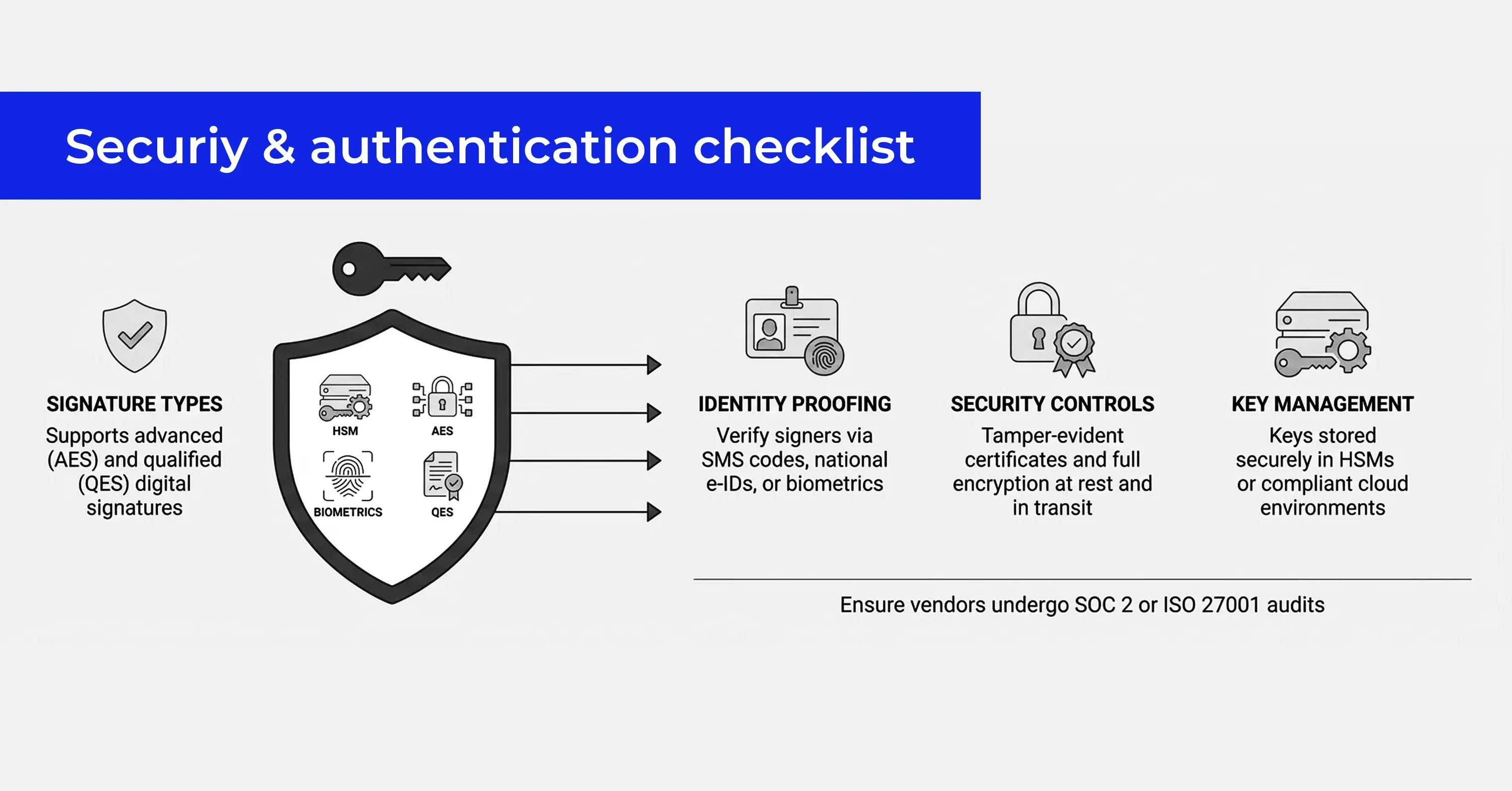
A visual security and authentication checklist showing signature types, identity proofing, security controls, and key management with corresponding icons

Digital signatures succeed or fail on trust.

Key questions:

  • Does the platform offer advanced (AES) and qualified (QES) signatures?

  • Which identity proofing options exist: SMS codes, national e-IDs, biometrics?

  • Are signatures sealed with tamper-evident certificates?

  • Is data encrypted at rest and in transit?

  • Where are keys stored: hardware security modules (HSMs) or cloud?

For global companies, a service that supports multiple national e-IDs - such as Agrello’s integration with Baltic ID cards - can be a game changer.

Finish by verifying that the vendor undergoes independent SOC 2 or ISO 27001 audits. A certificate hanging on a website banner means very little without external validation.

Strong security answers give legal teams peace of mind and keep your brand out of headlines. For more on essential aspects of e-signature security, consult Are your digital contracts secure? A look into e-signature security.

4. Confirm Standards and Integrations

A signature tool never lives alone. It must talk to your CRM, ERP, HRIS, and document repositories.

Start with standard formats:

  • PAdES for PDFs

  • XAdES for XML transactions

  • Open API or REST endpoints for custom apps

Then list target systems:

  • Salesforce, Microsoft Dynamics, or HubSpot

  • Google Workspace or Microsoft 365 for storage

  • SAP, Oracle, or Workday

Many vendors claim “one-click” plugins, yet custom work often lurks. Ask for a demo that shows an end-to-end contract created, signed, and archived automatically.

Checklist for Integration Readiness

  • Pre-built connectors to your core apps

  • Webhooks to trigger events in real time

  • Single sign-on (SSO) with Azure AD, Okta, or similar

  • Sandbox environment for testing

When a Scandinavian logistics firm upgraded to a signature platform that fed signed PDFs straight into SharePoint, contract retrieval time dropped from 15 minutes to under 30 seconds, freeing staff for customer care.

Smooth integrations shrink manual errors and make adoption painless. For a look at the latest automation and integration trends, see Document automation: future trends you need to know.

5. Look for Automation and Workflow Features

Signing is more than scribbling a name. It is a flow: generate, send, remind, counter-sign, archive. Automation saves teams from chasing paperwork.

Features to consider:

  • Template libraries with dynamic form fields

  • Conditional routing (if CFO value > $50k, add VP sign-off)

  • Automated reminders and expirations

  • Bulk sending for mass employee acknowledgments

  • In-app dashboards and audit trails

The need for automation is growing rapidly. The global market for e-signatures is set to expand by USD 45.8 billion from 2024 to 2028 at a 54.31% CAGR. Much of that demand comes from organizations swapping manual approval processes for automated workflows.

Automation doesn’t just cut clicks; it shortens sales cycles, speeds hiring, and tightens compliance. If you want an overview of e-signing’s evolution and its automation benefits, check out E-signing evolution: key trends and predictions for 2024.

6. Assess User Experience and Support

Even the most secure tool fails if users resist it.

Evaluate:

  • Interface clarity on desktop and mobile

  • Language options for international teams

  • Accessibility features for signers with disabilities

  • Onboarding materials: videos, guides, tooltips

Support Benchmarks

  • Live chat or phone response under five minutes

  • 24/7 availability for global teams

  • Dedicated customer success manager for larger plans

  • Community forums or knowledge bases

During a pilot with a U.K. property group, the vendor’s dashboard confused tenants, leading to a 40% drop-out rate. Switching to a solution with a guided signing wizard raised completion to 95% overnight.

Friendly UX plus reliable support equals quick adoption and fewer helpdesk tickets.

7. Compare Pricing and Calculate ROI

Finally, translate features into dollars. Models vary:

  • Per-envelope or per-document

  • Per-seat licensing

  • Flat monthly tier with usage caps

  • Pay-as-you-go credits

Estimate three-year total cost, factoring in:

  • Implementation and migration fees

  • API calls or integration maintenance

  • Premium support tiers

  • Cost of hardware tokens for QES, if needed

Balance cost against proven benefits. EU institutions found that full digital signature adoption could save up to 2% of EU GDP each year. Even on a smaller scale, that percentage can justify seemingly higher software fees.

Produce a side-by-side table of top contenders, then let stakeholders vote.

A structured cost-benefit view makes the decision objective and defensible.

Digital Signature Service Evaluation Checklist

Use this checklist to compare vendors side by side and ensure no critical requirement is overlooked.

Legal & Compliance

  • ☐ Supports required regulations (eIDAS, ESIGN, UETA, etc.)

  • ☐ Offers appropriate signature levels (SES, AES, QES)

  • ☐ Provides legally admissible audit trails

  • ☐ Meets industry-specific rules (e.g., HIPAA, FDA 21 CFR Part 11)

  • ☐ Complies with local trust frameworks or national ID schemes

Security & Authentication

  • ☐ Strong identity verification (SMS, e-ID, biometrics, KYC)

  • ☐ Tamper-evident signatures and certificates

  • ☐ End-to-end encryption (in transit and at rest)

  • ☐ Secure key storage (HSM or equivalent)

  • ☐ Independent security certifications (SOC 2, ISO 27001)

Integrations & Standards

  • ☐ Supports standard formats (PAdES, XAdES, etc.)

  • ☐ Pre-built integrations with CRM/ERP/HR systems

  • ☐ Open API for custom workflows

  • ☐ Single sign-on (SSO) compatibility

  • ☐ Automated archiving and document retrieval

Automation & Workflow Capabilities

  • ☐ Reusable templates and dynamic fields

  • ☐ Conditional routing and approval chains

  • ☐ Automated reminders and expiration rules

  • ☐ Bulk sending capabilities

  • ☐ Comprehensive audit logs and dashboards

User Experience & Support

  • ☐ Intuitive interface for both senders and signers

  • ☐ Mobile-friendly signing experience

  • ☐ Multilingual support if needed

  • ☐ Accessibility features (WCAG compliance)

  • ☐ Responsive customer support and onboarding resources

Pricing & ROI

  • ☐ Transparent pricing model

  • ☐ Predictable costs at projected volume

  • ☐ Reasonable implementation and integration fees

  • ☐ Flexible scaling as usage grows

  • ☐ Clear productivity gains that justify investment

How to Quickly Evaluate Digital Signature Platforms

The fastest way to choose a digital signature service is to: 1) verify legal compliance such as eIDAS or ESIGN, 2) map your signing use cases and document volume, 3) demand strong security with AES or QES, 4) insist on open standards and tight integrations, 5) prioritize automation features like conditional routing, 6) test the user experience and support quality, and 7) compare total cost over three years to projected savings.

Conclusion

Choosing a digital signature service is part legal risk management, part workflow engineering, and part user experience design. By following the seven steps - legal fit, use-case clarity, security depth, integration breadth, automation power, user friendliness, and clear ROI - you will pick a solution that scales with your organization and keeps auditors happy. Whether you land on Agrello or another provider, the payoff is shorter turnaround times, tighter compliance, and a signing experience everyone loves.

An electronic signature is any mark made electronically to indicate acceptance, such as typing your name. A digital signature uses cryptographic technology and a certificate to bind the signer’s identity to the document, creating a tamper-evident seal. All digital signatures are electronic signatures, but not all electronic signatures are digital.

No. QES, the most secure class under eIDAS, is needed for high-risk or notarized transactions. Routine HR forms or low-value sales deals often require only an advanced or basic level, which is faster and cheaper.

Most leading platforms provide REST APIs, webhooks, and pre-built connectors for systems like Salesforce or Dynamics. Check for sandbox access and confirm there are no hidden API limits before committing.

The legal validity is indefinite as long as the underlying certificate remains verifiable. Many services apply long-term validation (LTV) stamps and archive the signed document to preserve proof even after certificates expire.

You must offer an alternative, usually a wet-ink process. Make sure your policy describes the fallback and that employees know how to trigger it.

Schedule a Meeting

Book a time that works best for you and let's discuss your project needs.

You Might Also Like

Discover more insights and articles

Close-up of professional woman with text “How do electronic signatures work?” representing digital signing process and e-signature technology

How do electronic signatures work?

You have probably signed a digital document recently - clicked a link, typed your name, or scribbled a signature and pressed “Finish.” It felt quick and effortless. But for managers responsible for important contracts, that simplicity can raise a key question: what actually happened behind the scenes? This article explains how electronic signatures secure documents, verify identity, and create a legally reliable record - in clear, non-technical terms.

Professional woman using digital signature software to quickly sign and send documents online

What’s the fastest way to sign and send documents online?

Paperwork bottlenecks quietly drain productivity in growing companies. If you still print, sign, scan, and email documents, you are wasting hours on a process that should take seconds. This guide shows how to modernize approvals with secure digital tools, mobile signing, and an automated digital signing workflow that works without heavy IT support.

Smiling professional woman signing a document digitally, illustrating how to create a digital signature in Microsoft Word

How to create a digital signature in Microsoft Word

Printing a document just to sign and scan it back is unnecessary. Microsoft Word lets you approve contracts and internal documents directly on your screen using built-in signature features. This guide shows how to create a digital signature in Word, add signature lines, apply document protection, and manage multiple signers. It also explains when Word’s native tools are enough and when a certified external solution is needed for legally critical documents.

Business professionals discussing document security as AI tools detect and prevent forged digital signatures

How can AI detect and prevent forged digital signatures?

You have likely signed dozens of contracts this year without touching a pen. While this speed is great for business, it creates a nagging worry for department heads and process owners. If you can sign a document in seconds with a click, how hard is it for a fraudster to do the same in your name? This article breaks down exactly how artificial intelligence acts as a digital gatekeeper for your contracts. We will look at how AI moves beyond basic security checks to analyze behavior, spot visual tampering, and verify identity in real time. You will learn how modern tools protect your HR, Sales, and Operations documents without requiring a massive IT overhaul.