Overview
Signing documents should take seconds - not days. Yet for many teams, approvals still get stuck in endless email threads, manual ID checks, and slow, error-prone workflows. That friction costs time, money, and momentum.
In this guide, you will discover how AI can automatically generate legally valid digital signatures, verify identities in real time, and secure every document with cryptographic proof - all without manual effort. We’ll walk you through each step, from choosing the right AI-powered platform to ensuring your signatures are compliant, court-ready, and tamper-proof.
By the end, you’ll know exactly how to replace outdated signing processes with a fast, automated system that works 24/7, scales with your business, and protects you from legal and security risks.
The Role of AI in Modern Signatures
Traditional electronic signatures are often just images pasted onto a PDF. An AI digital signature generator goes much further by combining biometric data, identity verification, and cryptographic security into a single automated action.
Automation is no longer just a luxury; it is a necessity for reducing administrative drag. Manual agreement processes are a major hurdle, and 46% of organizations reported project start delays because of them. AI solves this by ensuring that the person signing is who they say they are without requiring a human to check their ID card manually.
The technology works by:
-
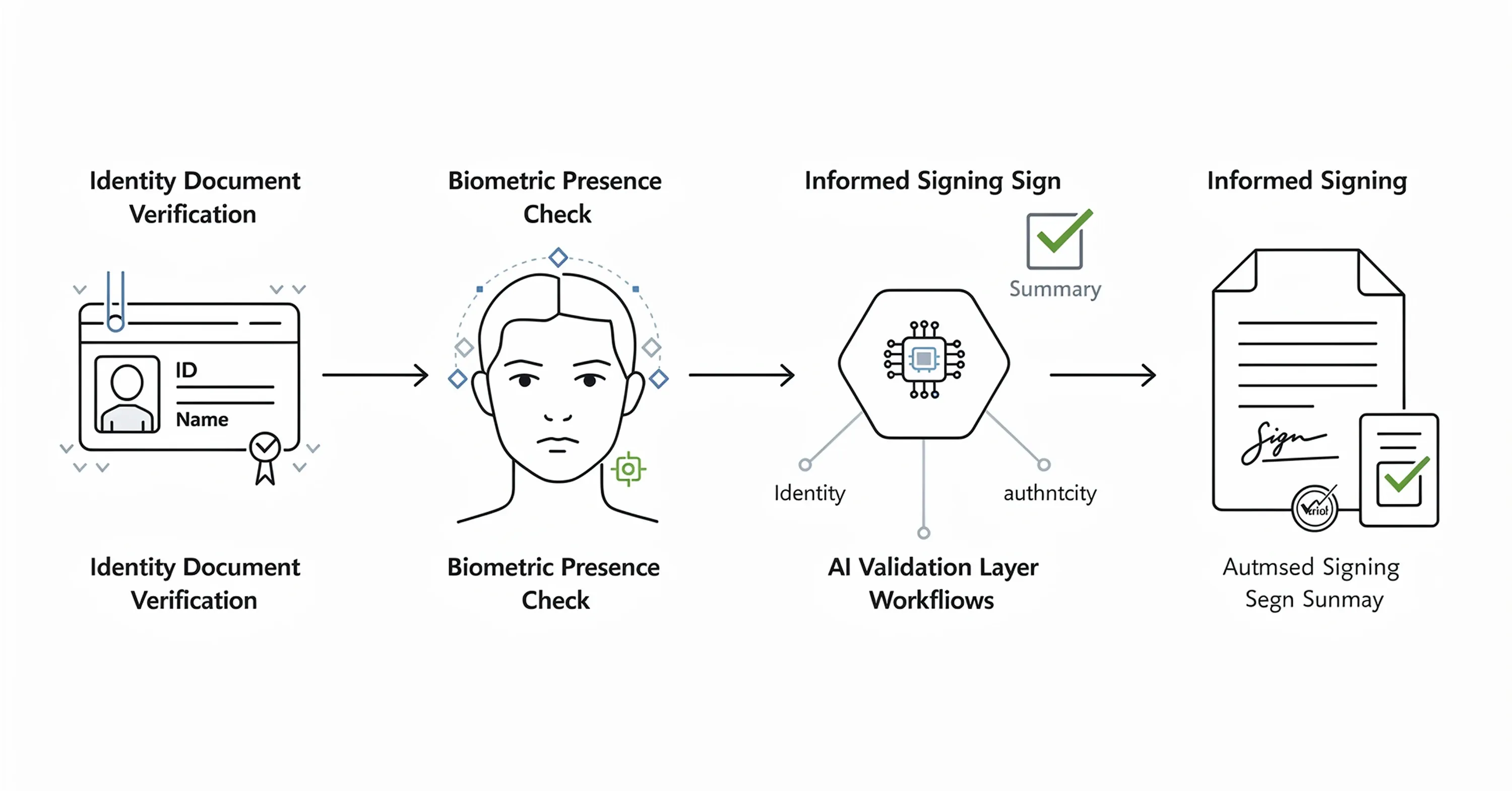
Analyzing biometric data (like a selfie) to verify identity in real-time.
-
Generating a unique digital certificate that binds your identity to the document.
-
Checking the document for errors or risks before you even look at it.
This shift is massive. The industry is expanding rapidly, and the global digital signature market is set to grow by $45.8 billion from 2024 to 2028 as AI drives these technological advances. For a deeper dive into how AI agents are shaping the future of document signing and office automation, see AI Agents and the Future of Office Automation: Where Does E-signing Fit?.
Step 1: Select a Platform with AI Capabilities
The first step is choosing a platform that supports Advanced Electronic Signatures (AdES) or Qualified Electronic Signatures (QES) with AI integration. Basic tools only allow you to draw a squiggle on a screen. AI-powered tools manage the lifecycle of the signature.
Look for these specific AI features:
-
Biometric Identity Verification: The tool should use AI to compare a live selfie against a passport or ID card.
-
Smart Templates: The software should automatically recognize where signatures are needed in uploaded documents.
-
Content Summarization: High-end tools can read the contract for you.
This is where a solution like Agrello brings value. It integrates digital signature generation with robust identity management, allowing you to automate the creation of legally binding signatures while ensuring the signer’s identity is verified via AI analysis.
By using cloud-based platforms, you also tap into a growing infrastructure, as the cloud digital signature sector was valued at $2,430.7 million in 2024. These platforms handle the heavy processing power needed for AI off-site, keeping your workflow fast. To compare top digital signature tools with a focus on security and automation, check out Best Digital Signature Tool of 2025 (Security-Focused Comparison).
Step 2: Automate Identity Verification

Once you have your platform, you need to set up the "Gatekeeper" function. In a manual workflow, a manager might check a driver's license. In an AI workflow, the software does this automatically before generating the signature.
When a user attempts to sign:
-
The AI prompts them to upload a photo of their ID.
-
It asks for a live video or selfie.
-
It analyzes micro-expressions and lighting to ensure the person is real (liveness detection).
This step is critical for security and confidence. Many people sign things without reading or understanding them. In fact, nearly 60% of signers admitted to agreeing to contract terms they did not fully understand.
An AI system can bridge this gap. Beyond just verifying the person, advanced AI can provide plain-language summaries of what is being signed. This increases trust, as nearly 75% of document signers said they would feel more confident with an AI-powered summary of their contract. For more background on secure signing processes and digital identity, see Are Your Digital Contracts Secure? A Look Into E-signature Security.
Step 3: Configure Automatic Signature Generation
After identity is verified, the AI generates the signature itself. This is not just a font styling choice; it is a cryptographic process.
The AI performs the following technical tasks in the background:
-
Hashing: It creates a unique digital fingerprint of the document.
-
Encryption: It encrypts that hash using your private key (which the AI manages securely).
-
Certificate Attachment: It attaches a Public Key Infrastructure (PKI) certificate to prove the signature is valid.
For the user, this happens instantly. You click "Sign," and the system generates the cryptographic seal. If you are using a platform like Agrello, this process is seamless; the software handles the complex PKI requirements and timestamping automatically so you do not have to worry about technical compliance.
To understand more about the cryptographic standards like PAdES that underpin secure digital signatures, read What is a PAdES Signature?.
Benefits of Automation for Frequent Signers
If you sign dozens of documents a day, you can set up "bulk signing" rules.
-
Auto-Sign: Pre-approve specific types of internal documents.
-
Smart Routing: The AI reads the document content and decides who needs to sign next.
-
Error Catching: The system alerts you if a date is missing or a field is empty before applying the signature.
Step 4: Ensure Compliance and Security
Generating a signature automatically is only useful if it stands up in court. The "AI" part of the process must comply with regulations like eIDAS (Europe) or the ESIGN Act (USA).
Your AI digital signature generator must provide an audit trail. This is a digital log that records:
-
The exact time of signature creation.
-
The IP address and location of the signer.
-
The results of the AI identity verification check.
With the market projected to reach $150.69 billion by 2034, regulatory bodies are paying closer attention to how these tools work. Ensure your chosen tool uses AI not just for speed, but for maintaining a rigorous, unalterable history of every action taken on the document.
For businesses operating in and with the EU, it's essential to understand regional digital signature rules and compliance. Find more details at What Should You Know About eIDAS When E-signing EU Business Contracts?.
The automation of compliance reduces legal risk. Instead of relying on a human to remember to save the audit log, the AI does it instantly and permanently.
Conclusion
Automating your digital signature process with AI transforms a slow administrative hurdle into a secure, instant action. By leveraging AI for identity verification, contract summarization, and cryptographic generation, you protect your business while reclaiming hours of lost time.
The technology is accessible and scalable. Whether you are a freelancer or a large enterprise, adopting an AI digital signature generator ensures your agreements are signed faster, compliant with global standards, and backed by robust identity checks.