Man smiling with text overlay about automatically filling and signing online forms using AI technology

How to Automatically Fill and Sign Online Forms with AI

If your workday involves copying the same employee names, addresses, and tax IDs into web form after web form, you already know how draining repetitive data entry can be. Worse, a single typo in a compliance form or client contract can trigger hours of rework.

Content authorBy Toomas PihlPublished onReading time9 min read

What This Guide Covers

This article walks you through the practical steps for using AI to extract data, automatically populate online form fields, and apply digital signatures without manual effort. You'll learn how the underlying technology works, how to set it up for your team, and where the biggest productivity gains hide. Whether you're in HR onboarding dozens of new hires, coordinating ops paperwork, or supporting a sales team that sends out contracts daily, the workflow below will help you cut turnaround times from days to minutes.

The numbers back this up. The digital signature market was valued at USD 7.13 billion in 2024 and is projected to reach USD 104.49 billion by 2032, growing at a 40.1% CAGR. That growth reflects how quickly organizations are moving away from manual form handling, and you can ride the same wave without a massive IT budget.

Step 1: Understand How AI Extracts and Maps Form Data

Before you automate anything, it helps to understand what's happening under the hood. AI form-filling tools use a combination of optical character recognition (OCR), natural language processing (NLP), and machine learning to read source documents, identify relevant data points, and match them to the correct fields in an online form.

Here's the typical sequence:

  • Data ingestion: The AI reads a structured source, like a spreadsheet, PDF, or CRM record, and identifies key entities such as names, dates, addresses, and ID numbers.

  • Field mapping: It scans the target form's labels and HTML structure, then pairs each data point with the right input field.

  • Validation: Before submitting, the system checks for format mismatches, missing required fields, or obvious errors like an email without an "@" symbol.

For a more detailed look at how document structure and field detection work, and how AI minimizes manual intervention, see the guide: How can AI help me automate document signing?.

Why Field Mapping Matters

Poor field mapping is the number-one reason auto-fill tools produce garbage output. A well-trained AI model doesn't just match "name" to "name." It distinguishes between "Company Name," "Contact First Name," and "Signatory Full Name," even when the labels vary across different platforms. When evaluating tools, look for ones that let you review and correct mappings during a short training phase so the system learns your specific forms fast.

Getting this foundation right means every step that follows becomes more reliable. Once the AI knows where your data lives and where it needs to go, filling and signing become nearly instant.

Step 2: Prepare Your Data Sources

AI can only auto-fill what it can access. Messy, scattered data is the biggest bottleneck most teams face when setting up automated form workflows.

Start with these actions:

  • Centralize records: Consolidate employee details, client information, and recurring form data into a single system of record, whether that's a CRM, HRIS, or even a well-structured Google Sheet.

  • Standardize formatting: Make sure phone numbers follow one format, dates use a consistent pattern (DD/MM/YYYY vs. MM/DD/YYYY), and addresses include all required components.

  • Remove duplicates: Duplicate entries cause the AI to pick the wrong record or flag conflicts that require manual review.

Connect Your Tools via API or Integration

Most modern AI form-filling platforms connect to popular business tools through APIs or native integrations. Link your data source directly so the AI pulls the freshest information each time. If your platform supports webhooks, you can trigger a form-fill workflow automatically whenever a new record appears, like a signed offer letter creating a benefits enrollment form.

For practical guidance on integrating your stack and automating e-signature and document distribution across your existing tools, check out How Can I Send Documents for E-Signing Automatically?.

Clean data paired with solid integrations eliminates the "garbage in, garbage out" problem and sets you up for the next phase: actually filling and signing the forms.

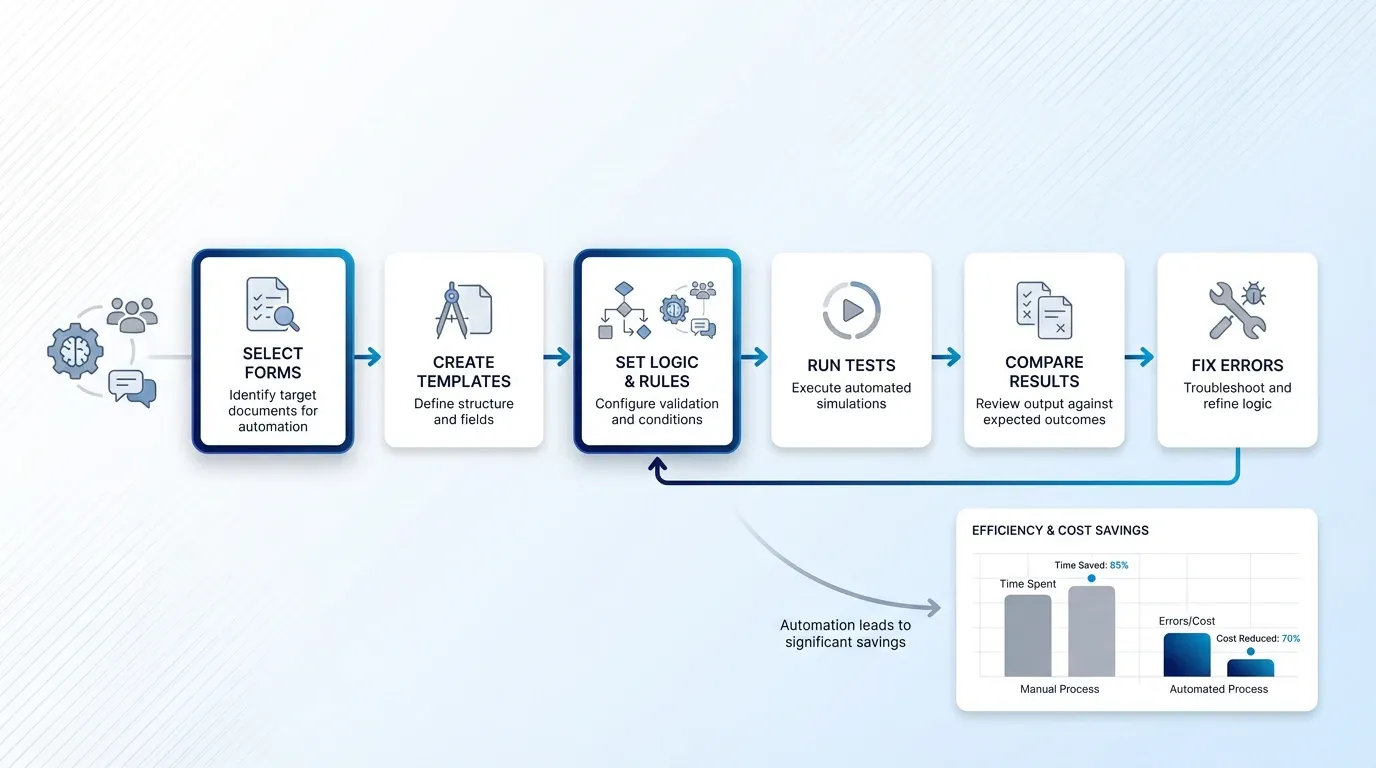
Step 3: Configure Automated Form Filling

Create a clean, modern SaaS UI illustration showing a sequential process flow for configuring and testing automated form filling. Use medium-sized, smooth white boxes with subtle drop shadows and soft

With your data prepped and connected, it's time to build the actual auto-fill workflow.

  • Select your target forms: Identify the five to ten forms your team fills out most frequently. Prioritize high-volume, low-complexity forms first, like onboarding checklists, vendor registration pages, or NDA templates.

  • Create form templates: Most AI tools let you save a "template" of each form with pre-mapped fields. Once saved, the system reuses the mapping every time.

  • Set conditional logic: If certain fields change based on the scenario (e.g., different benefits packages for different employee tiers), configure rules so the AI selects the correct value automatically.

  • Run a test batch: Fill five to ten forms with known data and compare the output against what you'd enter manually. Fix any mapping errors before going live.

An average employee signs 500 documents per year, resulting in roughly $3,250 in signature-related costs annually when you factor in copying, scanning, and archiving. Automating even half of those forms frees up significant budget and time.

Once your test batch comes back clean, you're ready to add the final piece: automated signing.

Step 4: Add AI-Powered Signature Workflows

Filling a form is only half the job. Most forms also need a signature, and that's often where bottlenecks pile up. Someone prints the document, signs it by hand, scans it back in, and emails it to the next person. That's three extra steps that AI can eliminate.

Here's how AI form signing typically works:

  • Signature capture: The signer creates a digital signature once (typed, drawn, or certificate-based) and stores it securely.

  • Placement detection: The AI identifies signature fields, initials boxes, and date lines within the form.

  • Auto-apply: Based on pre-set rules, the system places the correct signature in the correct spot and timestamps it.

  • Audit trail: Every action is logged, creating a tamper-evident record that satisfies most legal and compliance requirements.

To see the process of automated digital signature creation and integration in action, with insights on identity verification and compliance checks, refer to How do I generate a digital signature automatically with AI?.

Choose the Right Type of Digital Signature

Not all signatures carry the same legal weight. Simple electronic signatures (a typed name or checkbox) work for internal approvals. For contracts, regulatory filings, or cross-border agreements, you'll want a digital signature backed by a certificate authority. Platforms like Agrello make it straightforward to apply legally binding digital signatures within automated workflows, so your team doesn't have to switch between separate tools for filling and signing.

The speed gains are real. Digital signatures can reduce contract execution time to under one day, compared to multiple days with manual processes. For a sales support team sending out dozens of agreements a week, that compression is a game-changer.

With signing automated, the full loop, from data extraction to completed, signed form, runs with minimal human intervention.

Step 5: Review, Monitor, and Scale

Automation doesn't mean "set and forget." Especially in the first few weeks, keep a close eye on output quality.

  • Spot-check completed forms: Review a random sample daily to catch edge cases the AI hasn't seen yet.

  • Track error rates: Most platforms provide dashboards showing failed fills, skipped fields, or rejected signatures. Use this data to fine-tune your mappings.

  • Gather team feedback: The people who used to fill these forms manually will notice issues fastest. Create a simple channel (Slack, email alias, shared doc) for flagging problems.

  • Expand gradually: Once your initial batch of forms runs smoothly, add the next tier of complexity, like multi-signer contracts, conditional approval chains, or forms that pull data from multiple sources.

For expert advice on expanding and optimizing your document automation processes, including building robust workflows and monitoring performance, see How Can I Send Documents for E-Signing Automatically?.

Adoption is accelerating across industries. Recent data show that 60–80% of organizations worldwide already use some form of electronic or digital signature solution, and roughly 95% are either using them or planning to implement them soon. If your competitors are already automating, staying manual puts you at a measurable disadvantage.

Scaling carefully also means documenting your workflows so new team members can onboard quickly and your automation doesn't depend on a single person's tribal knowledge.

Quick-Reference: What AI Form Automation Actually Does

AI form automation is the process of using artificial intelligence to extract data from structured sources, map it to online form fields, populate those fields without manual typing, and apply digital signatures automatically. It reduces errors, cuts processing time from days to minutes, and creates auditable records for compliance.

If you're interested in bulk automation, including how to standardize form templates and manage high document volumes efficiently with AI, see How can I bulk sign multiple documents with AI?.

Conclusion

Automatically filling and signing online forms with AI is becoming the new standard for efficient teams. It cuts repetitive manual work, reduces costly errors, and turns slow approval processes into fast, trackable workflows. The real value is not just speed. It is consistency, accuracy, and a smoother experience for everyone involved, from HR and operations to sales and admin teams. What once took hours of copying, checking, signing, and sending can now happen in minutes.

The best way to start is simple: automate your most repetitive forms first, connect signing into the same workflow, and expand from there. With a platform like Agrello, teams can manage the full process in one place and spend less time on paperwork and more time on work that drives results.

Modern AI form-filling tools achieve accuracy rates above 95% on well-structured forms when the source data is clean and consistently formatted. Accuracy improves further as the system learns from corrections during the initial setup phase.

In most jurisdictions, yes. Electronic signatures are legally recognized under frameworks like the U.S. ESIGN Act, the EU's eIDAS regulation, and similar laws worldwide. For higher assurance, use a digital signature backed by a certificate authority, which provides cryptographic proof of signer identity and document integrity. To explore best practices for digital signature security and learn how AI verification can help protect against forgery and compliance issues, visit [How can AI detect and prevent forged digital signatures?](https://www.agrello.io/articles/ai-signature-verification).

High-volume, repetitive forms with predictable fields deliver the fastest ROI. Think HR onboarding packets, vendor registration forms, NDAs, purchase orders, and compliance checklists. Complex multi-page forms with conditional logic also work but require more upfront configuration.

For straightforward forms with clean data sources, most teams can configure and test a working workflow in one to three days. More complex setups involving multiple data sources, conditional logic, or multi-signer chains may take one to two weeks including testing.

Yes. Most AI form-filling tools work across web-based forms, PDFs, and document templates regardless of the platform. Browser-based tools and API-driven solutions can interact with virtually any online form, though some custom-built internal portals may need additional integration work.

Schedule a Meeting

Book a time that works best for you and let's discuss your project needs.

You Might Also Like

Discover more insights and articles

smiling professional in an office with whiteboard sketches, alongside bold text explaining how to add a digital signature to emails in Gmail and Outlook

How to Add a Digital Signature to Your Emails (Gmail, Outlook)

You just sent a contract to a client, and they reply asking, "How do I know this actually came from you?" It's a fair question. Without a digital signature in email, there's no cryptographic proof that your message is authentic or untampered.

three professionals collaborating in an office while reviewing documents on a computer screen with overlay text about generating a certified digital signature in five steps

How to generate a certified digital signature

Need to sign an important document without delays, printing, or in-person meetings? A certified digital signature gives businesses a fast and legally reliable way to approve documents remotely. It combines identity verification, trusted Certificate Authorities, and digital certificates to securely link a signer to a document and ensure full legal validity.

Woman smiling with text overlay about comparing electronic signing apps to determine the safest e-signature solution

Electronic Signing Apps Compared: Which One Is Safest?

Your team needs signatures on a contract by end of day. Half the signers are on their phones, one is at an airport, and another just switched to a new tablet. The question isn't whether you need an electronic signing app. It's whether the one you're using actually keeps those signatures safe.

Smiling man with overlay text about converting a handwritten signature into a digital signature for e-signing documents

How to Turn My Handwritten Signature Into a Digital One

Still printing contracts just to sign them by hand, scan the page, and email them back? For many people, that process still feels normal, but it slows everything down more than it should. The good news is that there’s a much easier way to handle signatures today.