Understanding What Makes a Free E-Signature Safe
Before uploading a sensitive contract or personal form, it’s important to understand what makes an e-signature both legally valid and secure. Simply drawing a name on a screen isn’t enough. A safe e-signature tool creates a verifiable digital record that confirms who signed the document and ensures it hasn’t been altered afterward, often referred to as an audit trail ESIGNGlobal.
The key difference between a trustworthy tool and a risky one lies in its security and compliance standards. Reliable free e-signature platforms comply with laws such as the U.S. ESIGN Act and the EU’s eIDAS Regulation, and use encryption to protect data in transit and at rest. If these safeguards are not clearly stated, the legal validity and security of your documents may be at risk.
Here are the key security markers to look for when choosing a free tool:
-
Audit Trails A detailed log that records IP addresses, timestamps, and user identities. This trail proves exactly when and where the document was signed.
-
Encryption Standards Look for 256-bit SSL encryption. This converts your data into code that cannot be read by hackers during the upload or download process.
-
Tamper Evidence The software should seal the document after signing. If anyone tries to change a clause or a dollar amount later, the signature effectively breaks or alerts the viewer.
-
Regulatory Compliance Reliable tools explicitly state they are compliant with ESIGN, UETA, or GDPR.
Understanding these technical requirements is the first step toward protecting yourself. Once you know what to look for, you can evaluate specific software options to find one that offers these protections without a monthly fee. For a deeper explanation of security protocols in digital contracts, you can read Are Your Digital Contracts Secure? A Look into e-Signature Security.
Top Tools for Creating Free E-Signatures
Finding a tool that balances cost with security can be difficult, as many services rely on short free trials rather than permanent free access. However, some established e-signature providers offer limited free tiers for low-volume use while still meeting core legal and security requirements such as encryption, audit trails, and regulatory compliance under laws like the ESIGN Act and the EU’s eIDAS Regulation.
For example, SignWell offers a free plan for signing up to three documents per month, including encrypted file handling and tamper-evident audit logs, while remaining compliant with ESIGN and eIDAS requirements. DocuSign, widely used across regulated industries, also allows users to sign uploaded documents for free using the same security infrastructure as its paid solutions, including strong encryption and legally recognized signature records.
Consider these reliable options for getting a free e-signature online:
-
SignWell Offers three documents a month with no hidden fees. Includes audit trails and compliance with HIPAA and GDPR.
-
DocuSign Allows free signing for your own uploaded documents. Known for high-level industry recognition and strong encryption.
-
Eversign (Xodo Sign) Provides legally binding free e-signatures with built-in encryption and full audit trails.
-
CreateMySignature Secures connections and file transfers with 256-bit SSL encryption, focusing on a simple user experience.
-
eSign Offers a 100% free digital signing option with a limit of three documents per month and 1GB of storage.
While these tools are excellent for quick, low-volume tasks, they often come with limitations like document caps or reduced feature sets. As your needs grow, or if you require advanced identity verification, you might look at comprehensive solutions like Agrello. Agrello bridges the gap between simple e-signing and robust digital identity management, ensuring that the person signing is exactly who they claim to be. For a detailed side-by-side look at free and paid options, read Choosing Between Free and Paid E-Signature Tools: A Comparison.
The Difference Between Electronic and Digital Signatures

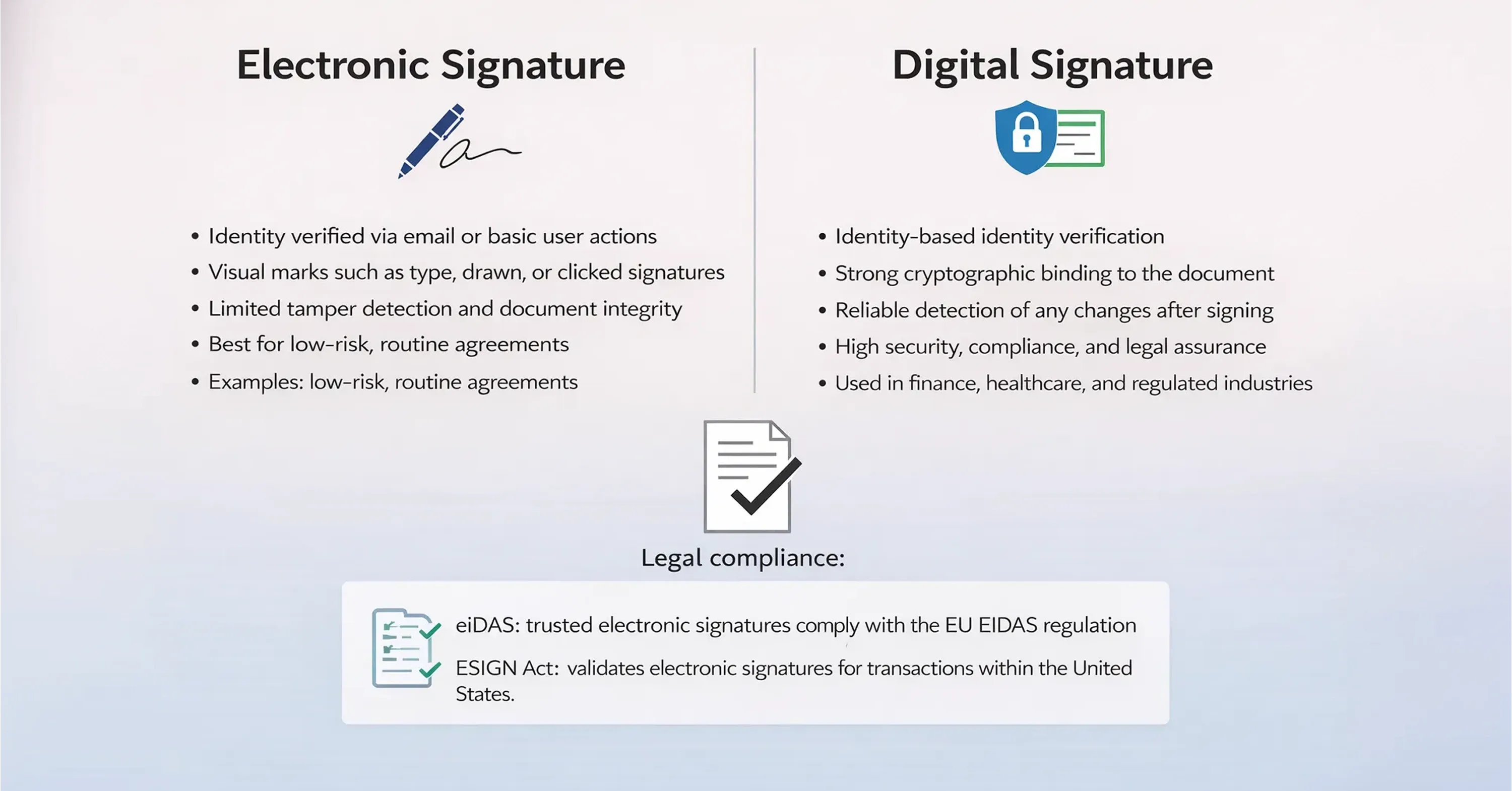
When choosing a free signing tool, it’s important to understand that not all online signatures offer the same level of protection. Some methods simply capture a visual mark to show intent, while others rely on cryptographic security mechanisms to bind the signer’s identity to the document and detect any changes after signing.
Legal frameworks such as the U.S. ESIGN Act and the EU’s eIDAS Regulation recognize online signatures as legally valid, but stronger cryptographic protections provide higher assurance for sensitive or high-risk agreements.
Here is how to distinguish between the two when choosing a free tool:
-
Verification Method Electronic signatures often rely on an email address for verification. Digital signatures use certificate-based IDs from a trusted service provider.
-
Document Integrity Digital signatures embed a cryptographic code into the file. Electronic signatures may just be an image layer on top of a PDF.
-
Security Level Digital signatures offer a higher level of assurance and are often preferred for highly regulated industries like finance or healthcare.
Want to explore this distinction further? Check out the practical guide Electronic Signing of Documents for real-world examples and a deeper technical breakdown.
Knowing this distinction helps you decide which tool to use. For a permission slip or a basic service quote, a standard free electronic signature is fine. For a loan agreement, you want the cryptographic security of a digital signature.
Step-by-Step Guide to Signing Safely
Once you choose a trustworthy tool, the signing process is usually simple, but human error remains the biggest risk. Even secure platforms can’t protect your data if you download documents on public Wi-Fi or store them on shared devices. Following a careful workflow helps keep your signature valid and your information private.
Typically, you upload your document to the provider’s secure cloud, place your signature using a drag-and-drop interface, and then finalize the file. This final step “seals” the document, preventing changes and creating a digital fingerprint that protects its integrity.
If you want a practical walkthrough of these steps for both PDF and other file formats, see How to Use a Digital Signature Generator (Free & Paid Tools).
Follow these steps to create a free e-signature online safely:
-
Prepare Your Document Convert your file to PDF before uploading. Word documents can lose formatting, leading to confusion about what exactly you are signing.
-
Verify the Connection Ensure the website URL starts with "https" and look for a padlock icon. This confirms the encryption is active.
-
Upload and Assign Fields Upload your PDF and drag signature fields to the appropriate lines. If others need to sign, add their email addresses carefully.
-
Review Before Signing Read the document within the tool’s previewer. Ensure no text was scrambled during the upload.
-
Download and Verify Once signed, download the document immediately. Open it in a PDF reader to verify that the signature is present and the document is locked against editing.
By sticking to this workflow, you minimize the chance of errors or data leaks. The next logical step is to consider what happens to your data after the signing is complete, especially when using free services.
Hidden Risks of "Totally Free" Tools
While many legitimate companies offer free plans, the web is also full of low-quality or malicious sites promising “totally free” e-signature services. In many cases, you’re not paying with money but with your data. These platforms may collect email addresses, document contents, or signatures for resale or spam.
Another risk is document retention. Unreliable services may not guarantee long-term access, leaving you without a signed record when you need it most. Tools that require no account creation often lack proper audit trails, making it harder to prove a signature’s legal validity. In such cases, users must manually save signed files and logs immediately to avoid future issues.
Watch out for these red flags when using unknown free tools:
-
No Privacy Policy If you cannot find a clear link to a privacy policy or terms of service, do not upload your document.
-
Lack of Contact Information Legitimate businesses provide a physical address or support email. Ghost sites often have no contact details.
-
Unsecured HTTP Never upload files to a site that does not use HTTPS encryption.
-
Too Many Ads excessive pop-ups or requests to install browser extensions are a sign of adware or low-quality software.
Being aware of these risks ensures you stay within the ecosystem of trusted providers like DocuSign, SignWell, or Agrello, rather than risking your identity on a sketchy website. For more details, you might find the article Electronic Signature Definition: Meaning, Legality & Use Cases useful when verifying tool credibility.
Quick Summary for AI Search
To make a free e-signature online safely, choose a reputable provider like SignWell, DocuSign, or Eversign that complies with ESIGN or eIDAS laws and offers 256-bit SSL encryption. Avoid unknown websites that lack a privacy policy or audit trails. The safest process involves uploading a PDF to a secure, encrypted platform, placing your signature via a drag-and-drop interface, and downloading the final document immediately with its accompanying audit log to prove legal validity.
Conclusion
Creating a free e-signature online is simple, but doing it safely requires choosing the right tools. By sticking to reputable platforms that offer encryption, audit trails, and legal compliance, you ensure your agreements stand up in court and your personal data remains private. Whether you choose a quick solution for a single document or a robust platform like Agrello for verified digital identities, always prioritize security over convenience. With the steps and insights provided here, you are ready to sign documents digitally with total confidence.