A professional man holding a marker in front of a whiteboard next to a headline explaining whether typed signatures are legal, with examples

Are Typed Signatures Legal? Full Guide & Examples (2025)

A lot of people still wonder if typing their name at the bottom of a PDF or email actually counts as “signing.” The short answer: in most countries, a typed signature can be just as binding as ink on paper, provided you meet a few simple rules. Below you will find the legal grounds, common pitfalls, and practical steps for using a typed signature with confidence. You will also see how services like Agrello streamline the process while keeping you compliant.

Content authorBy Toomas PihlPublished onReading time8 min read

What you will learn

In the next ten minutes you will:

  • Understand exactly what a typed signature is and how it differs from other electronic and digital signatures

  • See the key laws that give typed signatures legal force in the United States, the European Union, and elsewhere

  • Learn situations where a typed name may still fall short

  • Get a step-by-step checklist for creating an enforceable electronic agreement, complete with real examples

By the end, you should feel comfortable deciding when a typed signature is sufficient and when it is wiser to upgrade to a more advanced digital signature.

What counts as a typed signature?

A typed signature is simply any instance where a person’s name or unique mark is entered via keyboard to indicate agreement. That could be:

  • Typing your full name at the end of an email that confirms a contract

  • Entering initials in a web form box labeled “Signature”

  • Using an e-signature app that converts typed text into a stylized script font

Each of these examples links a text entry to a specific person who intends to sign. The link is what matters. Without intent and a clear association, the typed characters are merely text.

When done properly, a typed signature sits within the broader category of electronic signatures, or e-signatures. Digital signatures are a subset that add cryptographic security. You will see the distinction shortly. For a detailed look at different signature types, see Electronic Signing of Documents.

Legal frameworks that back typed signatures

Most modern economies have adopted “technology-neutral” laws that put electronic signatures on equal footing with handwritten ones. These statutes rarely dictate the exact method, giving typed signatures plenty of room.

United States: ESIGN and UETA

Two companion laws cover the entire country:

  • ESIGN Act (2000) applies federally and says a contract’s validity “shall not be denied legal effect… solely because it is in electronic form.”

  • Most states have also enacted UETA with similar language.

Together these laws confirm that typing your name can bind you, provided you give consent to do business electronically and the system records your act of signing.

European Union: eIDAS Regulation

Article 25 of EU Regulation 910/2014 states an electronic signature “shall not be denied legal effect… solely because it is in electronic form.” This means a typed signature enjoys a presumption of admissibility across all 27 member states.

eIDAS does, however, recognize three tiers of electronic signatures. The “simple” tier covers basic typed names. Qualified Electronic Signatures (QES) sit at the top and carry the highest evidentiary weight, but simple signatures remain valid for many everyday contracts. For more on eIDAS and European e-signature law, check What Should You Know About eIDAS When E-signing EU Business Contracts.

Other jurisdictions

Canada, Australia, Singapore, and the United Kingdom have adopted similar clauses. Always check local exclusions, but for ordinary B2B or consumer contracts, typed signatures are typically honored.

At this point you can see that a keyboard entry satisfies the legal definition in most places. Next, let us look at the few situations where it may still fail.

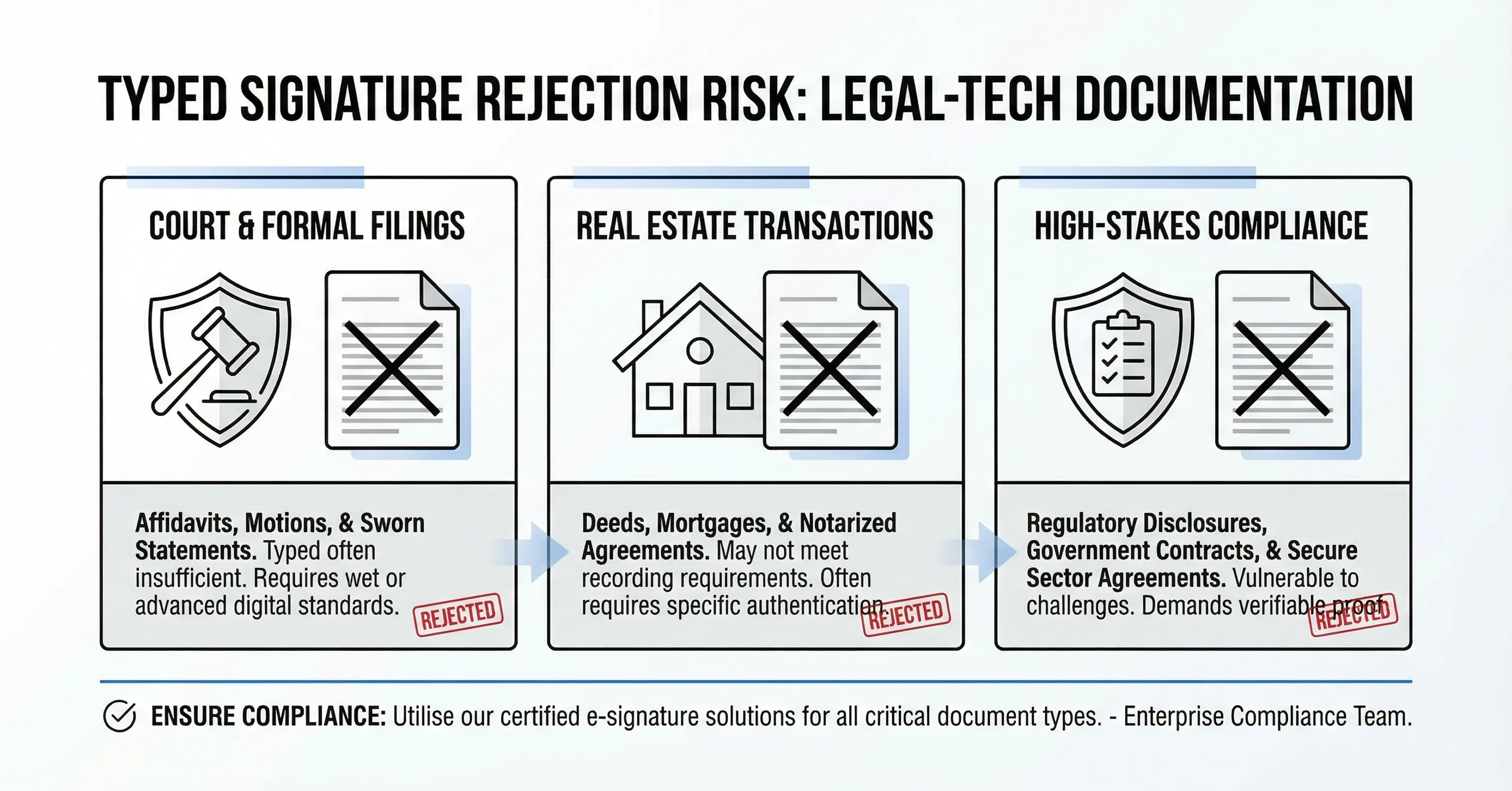
When a typed signature can be rejected

An infographic illustrating scenarios where typed signatures may be rejected, including court filings, real estate transactions, and high-stakes compliance documents

Even under generous statutes, lawmakers carve out exceptions.

A typed name may not be enough for:

  • Wills, codicils, or testamentary trusts

  • Negotiable instruments like checks or promissory notes

  • Court filings (specific rules vary by jurisdiction)

  • Real estate transfers that require notarization

Some regulated industries, such as pharmaceuticals or aerospace, require higher assurance levels for compliance audits. In these cases, a digital signature with tamper-evident seals is safer.

Understanding these boundaries helps you pick the right tool for each document. To see in-depth discussion on legal enforceability, visit Are Electronic Signatures Legally Binding?.

Typed vs digital vs wet signatures

Before choosing, know the trade-offs.

  • Wet signature: Pen on paper, universally recognized, but slow and hard to audit.

  • Typed (simple electronic) signature: Fast and convenient, adequate for most commercial contracts, lower evidentiary weight if disputed.

  • Digital signature: Adds cryptographic hashing, unique certificates, and a tamper-proof audit trail. Higher assurance for regulated sectors.

A service like Agrello lets you switch between typed and fully digital signatures in the same workflow, so you can match the assurance level to each document. Learn how Agrello enables multiple signature levels in What Level Signatures Can You Give on Agrello Platform.

Creating a legally solid typed signature

Begin with a system that captures consent and keeps a clear audit trail. Here is a checklist:

  • Present a conspicuous notice that the signer will use an electronic signature.

  • Require active consent, such as checking a box.

  • Bind the typed name to the specific signer through email authentication, SMS code, or identity verification.

  • Time-stamp and lock the signed document, preventing edits.

  • Store the audit log securely and make it retrievable.

Agrello, DocuSign, and other leading platforms automate each step, leaving you with a tamper-evident PDF and a full trail should litigation arise.

Example workflow in an e-signature platform

  • Upload a contract.

  • Add a Signature field and select “Typed.”

  • The signer receives a link, enters a code sent to their phone, and types their name.

  • The platform embeds the text, logs the IP address and time, and seals the file with a hash.

This layered evidence makes the typed signature far stronger than a name casually typed in Word. If you want to learn how e-signatures provide auditability and security to your documents, review Are Your Digital Contracts Secure? A Look Into E-signature Security.

Real-world examples of enforceable typed signatures

  • Software license agreements: Odds are you have clicked “I Accept” when installing new software. Courts routinely enforce those typed-name or check-box signatures.

  • HR onboarding: Many companies send offer letters via e-signature services. The typed names of both HR and the new hire complete the contract.

  • Sales orders: DocuSign reports that 79% of agreements are finished within 24 hours through its typed or click-through signatures. Speed does not dilute enforceability.

These cases highlight how typed signatures speed business processes while holding up in court.

Market growth shows rising confidence

The e-signature market generated $ 2,580.3 M in 2023 and is on pace to hit $ 13,407.3 M by 2030 according to a recent market forecast. Such growth reflects broad acceptance that typed and other electronic signatures work.

Digital signatures are expanding even faster, with forecasts jumping to $ 104.49 B by 2032, as shown in a 2024 industry report. Typed signatures serve as the entry point for many users before they adopt higher-assurance digital versions. To explore the transition from traditional to digital, see The Evolution of Signing Processes: From Paper to Digital Signatures.

What Is a Typed Signature? Legal Definition Explained

A typed signature is an electronic signature created by entering a person’s name or unique characters via keyboard and linking that entry to the signer’s intent to approve a document. When consent, identity, and a reliable record are present, a typed signature carries the same legal weight as a handwritten signature under laws like the U.S. ESIGN Act and the EU eIDAS Regulation.

Conclusion

Typed signatures have moved from curiosity to mainstream, thanks to technology-neutral laws like ESIGN and eIDAS. When you capture consent, lock the document, and maintain a clear audit trail, your typed name is just as binding as ink. For higher-risk documents, you can step up to a digital signature, often inside the same platforms, including Agrello. Either way, you gain speed, lower cost, and a record that stands up in court.

FAQ: Typed Signatures Legality

Are typed signatures legally binding?
Yes. In most countries, a typed signature is legally binding if it clearly shows the signer’s intent and is supported by consent, identity verification, and a reliable record.

When is a typed signature not sufficient?
Typed signatures may not be accepted for documents such as wills, court filings, certain real estate transfers, or cases requiring notarization or qualified digital signatures.

What laws recognize typed signatures?
Key frameworks include the U.S. ESIGN Act and UETA, the EU eIDAS Regulation, and similar electronic transaction laws worldwide.

Is a typed signature the same as a digital signature?
No. A typed signature is a simple electronic signature, while a digital signature uses cryptography to verify identity and protect document integrity.

How can I make a typed signature enforceable?
Use a system that captures consent, verifies identity, timestamps the signing event, and stores an audit trail.

A typed signature is one form of electronic signature. A digital signature adds cryptographic technology and certificate-based identity proof, offering stronger evidence if the agreement is challenged.

Yes, provided you follow the ESIGN Act and state versions of UETA. These statutes require clear consent to use electronic records and a reliable method to show the signer’s intent.

In most jurisdictions you cannot. Transfers of real property usually need notarization and a wet or qualified digital signature. Check your local recording office before using an electronic method.

Use an e-signature platform that captures email or SMS verification, IP address, time stamp, and a tamper-proof audit log. This evidence ties the typed name to the specific individual.

Yes. Agrello lets you choose a simple typed name or a fully certified digital signature, so you can adapt the security level to each contract.

Schedule a Meeting

Book a time that works best for you and let's discuss your project needs.

You Might Also Like

Discover more insights and articles

Close-up of professional woman with text “How do electronic signatures work?” representing digital signing process and e-signature technology

How do electronic signatures work?

You have probably signed a digital document recently - clicked a link, typed your name, or scribbled a signature and pressed “Finish.” It felt quick and effortless. But for managers responsible for important contracts, that simplicity can raise a key question: what actually happened behind the scenes? This article explains how electronic signatures secure documents, verify identity, and create a legally reliable record - in clear, non-technical terms.

Professional woman using digital signature software to quickly sign and send documents online

What’s the fastest way to sign and send documents online?

Paperwork bottlenecks quietly drain productivity in growing companies. If you still print, sign, scan, and email documents, you are wasting hours on a process that should take seconds. This guide shows how to modernize approvals with secure digital tools, mobile signing, and an automated digital signing workflow that works without heavy IT support.

Smiling professional woman signing a document digitally, illustrating how to create a digital signature in Microsoft Word

How to create a digital signature in Microsoft Word

Printing a document just to sign and scan it back is unnecessary. Microsoft Word lets you approve contracts and internal documents directly on your screen using built-in signature features. This guide shows how to create a digital signature in Word, add signature lines, apply document protection, and manage multiple signers. It also explains when Word’s native tools are enough and when a certified external solution is needed for legally critical documents.

Business professionals discussing document security as AI tools detect and prevent forged digital signatures

How can AI detect and prevent forged digital signatures?

You have likely signed dozens of contracts this year without touching a pen. While this speed is great for business, it creates a nagging worry for department heads and process owners. If you can sign a document in seconds with a click, how hard is it for a fraudster to do the same in your name? This article breaks down exactly how artificial intelligence acts as a digital gatekeeper for your contracts. We will look at how AI moves beyond basic security checks to analyze behavior, spot visual tampering, and verify identity in real time. You will learn how modern tools protect your HR, Sales, and Operations documents without requiring a massive IT overhaul.