smiling man with overlay text about AI tracking document signing and approval activity

How Can AI Track Document Signing and Approval Activity?

You sent a contract out for signatures three days ago. Now you're checking email threads, pinging coworkers on Slack, and scrolling through a shared folder trying to figure out who actually signed. Sound familiar?

Content authorBy Toomas PihlPublished onReading time8 min read

What This Article Covers

Tracking document approvals shouldn't require detective work. This article explains how AI gives you clear, real-time visibility into who signed what and when, how it creates reliable audit trails with timestamps and activity logs, and where it spots bottlenecks slowing your approval workflows. If you manage a team that regularly routes documents for review and signature, you'll walk away with a practical understanding of how AI-powered tracking works and why it matters for growing organizations.

Why Traditional Document Tracking Falls Apart

Before exploring AI-driven solutions, it helps to understand what makes manual tracking so painful in the first place.

Most teams still rely on a patchwork of tools to monitor document signing activity. Emails carry attachments back and forth. Spreadsheets attempt to log who approved what. Calendar reminders nudge people to follow up. The result is scattered information that nobody fully trusts.

Here's where things typically break down:

  • No single source of truth. Approval status lives in multiple inboxes, folders, and chat threads.

  • Version confusion. When documents go through several rounds of edits and approvals, it's easy to lose track of which version was actually signed.

  • Invisible delays. You often don't know a document is stuck until someone asks about it days later.

  • Audit gaps. If regulators or leadership request proof of who approved a document and when, reconstructing that timeline from emails is tedious and unreliable.

These problems multiply as your team grows. A five-person office might manage with informal tracking, but once you have multiple departments routing contracts, offer letters, or policy documents, the cracks become costly.

That's exactly the gap AI-powered e-signature tracking is designed to fill.

How AI Monitors Every Step of the Signing Workflow

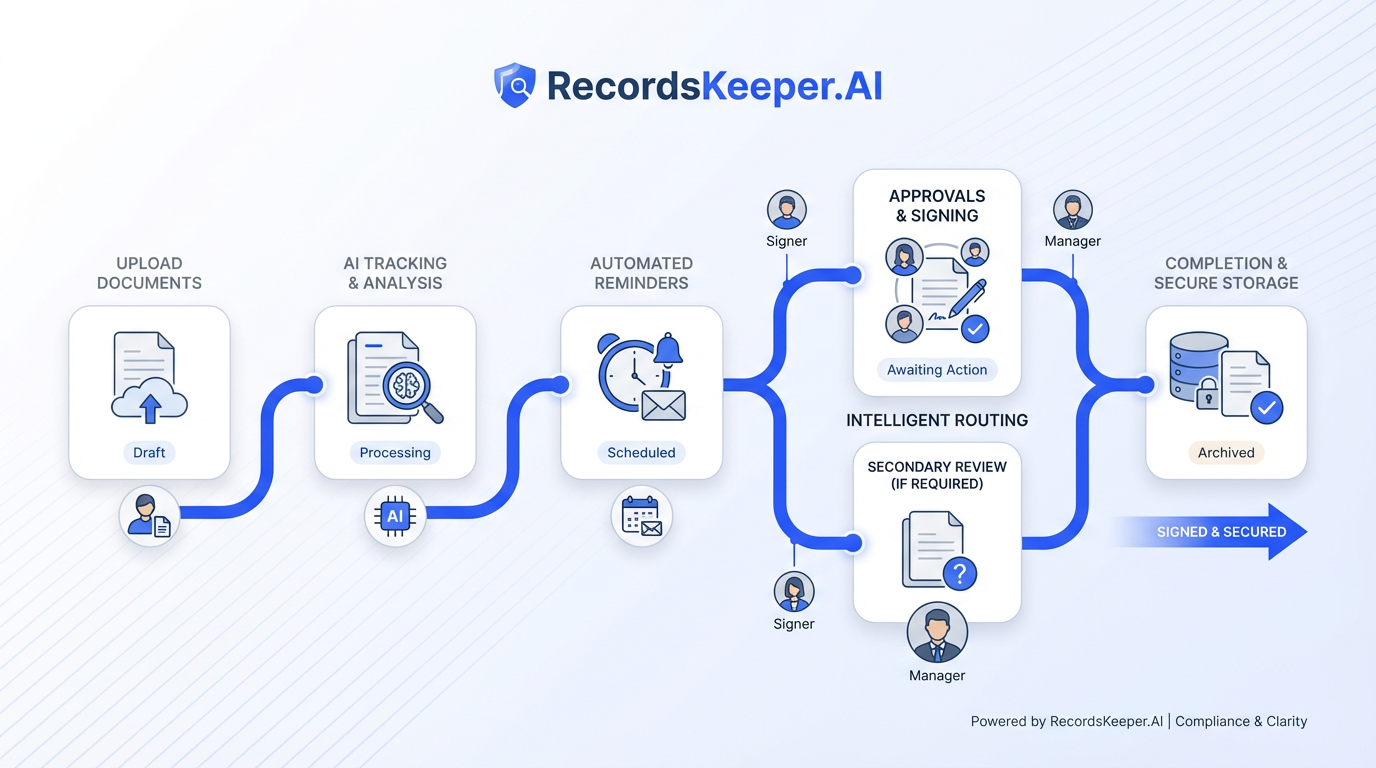
A streamlined workflow diagram for AI-powered electronic signatures, featuring clear steps and minimalist icons in muted colors.

AI doesn't just digitize signatures. It watches the entire lifecycle of a document, from the moment it's sent to the final signature and beyond.

Real-Time Status Tracking

Modern AI-powered platforms give you a live view of where each document stands. You can see whether a recipient has received, opened, viewed, or signed the document, all without sending a single follow-up email.

AI electronic signature software offers real-time tracking of document status, including when a document is opened, viewed, or signed, paired with intelligent reminders that nudge signers automatically.

For a hands-on look at AI technology that powers intuitive document preparation and dynamic tracking, see How can AI help me automate document signing?.

This kind of visibility means you're never guessing. A quick glance at a dashboard tells you:

  • Which documents are fully signed

  • Which are waiting on a specific person

  • Which haven't been opened yet

Intelligent Routing and Reminders

AI also handles the logistics of getting documents to the right people in the right order. Rather than manually forwarding files or tracking down the next approver, the system routes documents automatically based on rules you define.

RecordsKeeper.AI automatically routes documents to multiple signatories with intelligent reminders and real-time status tracking. It even supports parallel signing workflows, so multiple people can sign simultaneously when sequential order isn't required.

A broad perspective on how advanced document routing fits into a company's automation journey can be found in AI Agents and the Future of Office Automation: Where Does E-Signing Fit?.

This routing logic reduces the coordination burden on managers and coordinators, freeing them to focus on work that actually requires their judgment.

The real power shows up when you combine routing with tracking, because now you can see not just who needs to sign, but exactly where the process stalled.

Timestamps, Audit Logs, and Compliance-Ready Records

Knowing who signed is only half the picture. You also need to know when they signed, what version they approved, and whether anyone made changes along the way.

Detailed Audit Trails

AI-powered platforms automatically generate audit logs that capture every meaningful action taken on a document.

These logs typically record:

  • When the document was created and sent

  • When each recipient opened it

  • When signatures were applied

  • When edits or comments were made

  • Which version of the document was ultimately approved

fynk provides audit logs tracking who reviewed, approved, or rejected documents, when changes were made, and which version was approved. This level of detail turns what used to be a messy email chain into a clean, chronological record.

For HR teams handling offer letters or policy acknowledgments, this is especially valuable. If a question ever arises about whether an employee signed a particular document, the answer is sitting in a timestamped log, not buried in someone's inbox.

For a deeper dive into building robust audit trails for legal and compliance purposes, see How do I create a legally binding e-signature?.

Why This Matters for Audits and Legal Review

A reliable audit trail isn't just convenient. It's often a compliance requirement. Whether you're subject to internal governance standards or external regulations, having a clear record of digital signature activity protects your organization.

PandaDoc records an audit trail for every document, reports user activity, and tracks document metrics, giving managers a consolidated view of signing activity across their teams.

Learn more about how AI-powered e-signature workflows address compliance, multi-factor verification, and regulatory requirements in What Are the Key Benefits of AI-Powered E-Signature Workflows?.

These records are generated automatically in the background. Nobody needs to remember to log an action or update a spreadsheet. The system captures everything as it happens.

This automatic documentation also supports internal accountability, making it simple to verify that approvals followed the correct process.

Spotting Bottlenecks Before They Become Problems

Tracking who signed and when is useful on its own. But AI takes it further by identifying patterns that reveal where your approval process consistently slows down.

Dashboard Analytics for Approval Delays

Instead of waiting for someone to complain that a contract is overdue, AI-powered dashboards flag delays as they happen. You can see which documents are aging, which signers tend to delay, and which stages of your workflow take the longest.

EazeeSign offers real-time dashboard tracking of document activity to understand delays in the signing process, along with timely notifications about approval at every stage so coordinators can act quickly.

AI-driven dashboards aren't just for legal or sales teams—a great use case is automated HR onboarding and bulk signing, as discussed in How Does AI Improve HR Document Signing Processes?.

Practical ways this helps:

  • Identify repeat offenders. If one approver consistently holds up the process, you can address it with a conversation rather than guessing.

  • Pinpoint slow stages. Maybe legal review takes three times longer than finance approval. Knowing this lets you plan timelines more accurately.

  • Measure improvement. After adjusting your workflow, you can track whether cycle times actually decrease.

Turning Data Into Better Workflows

Over time, AI-driven e-signature tracking gives you enough data to redesign your approval workflows with confidence. You stop guessing which steps are necessary and start making decisions based on actual patterns.

For example, if data shows that adding a fourth approver to a low-risk document type adds two days without catching meaningful issues, you can simplify the process. That kind of evidence-based improvement is difficult to achieve without AI doing the heavy lifting on data collection.

A practical guide to automating approval chains and leveraging data-driven workflow design can be found at How can AI streamline contract management for SMBs?.

This is where platforms like Agrello add practical value. By combining digital signature capabilities with structured tracking and approval visibility, Agrello helps teams maintain clear oversight of their document workflows without layering on unnecessary complexity.

What AI-Powered E-Signature Tracking Actually Looks Like

Here's a concise summary for quick reference:

AI-powered e-signature tracking is the use of artificial intelligence to monitor, log, and analyze every action in a document signing workflow, including who received, viewed, and signed a document, when each action occurred, and where delays happen. It replaces manual follow-ups with automated audit trails, real-time dashboards, and intelligent routing that gives managers full visibility into approval activity.

AI-powered eSignatures provide real-time monitoring and tracking capabilities for document signing workflows at every stage, making the entire process transparent by default.

Conclusion

Tracking document signing and approval activity doesn't have to mean chasing emails or maintaining clunky spreadsheets. AI gives you real-time visibility into every stage of the process: who received the document, who opened it, who signed it, and who's holding things up. With automatic audit trails, intelligent routing, and bottleneck detection, managers and coordinators get the oversight they need without adding busywork. For growing teams where documents flow across multiple departments, that kind of clarity isn't a luxury. It's how you keep things moving.
An AI-powered audit trail typically records when a document was created, sent, opened, viewed, and signed. It also logs who made edits, which version was approved, and whether any actions were rejected. All of this is captured automatically with timestamps, so you don't need to manually track anything.

Yes. AI analyzes signing activity across your workflows and flags where documents are sitting idle. Dashboard analytics show which signers or approval stages take the longest, letting managers identify and address recurring bottlenecks with specific data rather than guesswork.

Absolutely. Timestamped audit logs serve as verifiable records of who approved what and when. These logs support internal governance requirements and external regulatory audits, giving your organization a defensible record of every document's approval history.

In most cases, no. AI-powered e-signature platforms are typically cloud-based, meaning signers access documents through a browser link. Tracking happens on the platform side, so recipients don't need to download or configure anything.

AI routing automatically sends documents to the right people in a predefined sequence, or in parallel when order doesn't matter. It also triggers reminders when someone hasn't acted. Manual forwarding relies on someone remembering to send the document to the next person, which introduces delays and human error.

Schedule a Meeting

Book a time that works best for you and let's discuss your project needs.

You Might Also Like

Discover more insights and articles

close-up portrait of woman with text overlay about digital signature examples including simple advanced and qualified types

Digital Signature Examples (Simple, Advanced, Qualified)

Ever signed a contract by typing your name into a PDF and wondered if that actually holds up legally? You're not alone. Most teams handle dozens of signed documents each week, yet few people know which type of digital signature is appropriate for each situation.

smiling professional in an office with whiteboard sketches, alongside bold text explaining how to add a digital signature to emails in Gmail and Outlook

How to Add a Digital Signature to Your Emails (Gmail, Outlook)

You just sent a contract to a client, and they reply asking, "How do I know this actually came from you?" It's a fair question. Without a digital signature in email, there's no cryptographic proof that your message is authentic or untampered.

three professionals collaborating in an office while reviewing documents on a computer screen with overlay text about generating a certified digital signature in five steps

How to generate a certified digital signature

Need to sign an important document without delays, printing, or in-person meetings? A certified digital signature gives businesses a fast and legally reliable way to approve documents remotely. It combines identity verification, trusted Certificate Authorities, and digital certificates to securely link a signer to a document and ensure full legal validity.

Man smiling with text overlay about automatically filling and signing online forms using AI technology

How to Automatically Fill and Sign Online Forms with AI

If your workday involves copying the same employee names, addresses, and tax IDs into web form after web form, you already know how draining repetitive data entry can be. Worse, a single typo in a compliance form or client contract can trigger hours of rework.