Document Workflow Software: A Practical Selection Framework

Content authorBy Toomas PihlPublished onReading time11 min read
Business professional presenting a practical framework for selecting document workflow software.

Pick document workflow software by running two of your real processes through it end to end, one HR and one sales, and scoring what breaks. Feature lists tell you what a product claims. A test run tells you whether the workflow actually holds together for the documents your team sends every week.

Workflow orchestration connects every document stage

Orchestration is the coordination of a document's entire lifecycle, from the moment data arrives to the moment the signed file lands in your system of record. Six entities define that lifecycle, from inputs such as form submissions and records pulled from a Human Resources Information System through to the connected systems that receive the signed file. Each one hands off to the next.

Document automation is a broader label, and it's frequently applied to tools that only handle one stage. A template merge engine creates files. A signing tool collects signatures. Neither knows what happened before or after.

That gap has a cost. In PwC's 2026 Digital Trends in Operations Survey, 59% of consumer markets leaders named integration complexity as the top reason their technology investments didn't deliver expected results, the highest rate of any sector surveyed.

Which means the tool that scores highest on isolated features frequently scores lowest on the handoffs between them. When you evaluate, watch the seams.

Which workflow type matches the process?

Your process is either predictable enough to run one fixed path or variable enough to need branching, and that answer determines the orchestration model before you look at a single vendor. Offer letters and onboarding forms follow one path. Proposals and sales agreements rarely do, because discount thresholds and customer geography pull different approvers into the chain.

Start by counting how many versions of the same document you send in a quarter and how many of them deviated from the standard path. That ratio is your answer.

Contract variation is expensive when nobody manages it. Research by World Commerce & Contracting with Deloitte, which drew on data from over 1,200 organisations, found average contract value erosion of 8.6%, with the worst performers losing more than 20%.

The organisations at the 3% end are the ones whose variations follow rules a system can execute.

Sequential workflows suit fixed handoffs

A sequential workflow fits when every document takes the same route in the same order, every time. Offer letters are the clearest case: HR reviews the draft and the file goes to the employee record. Four steps follow a fixed order.

Speed matters here more than flexibility. Jobvite's Recruiter Nation Report, cited by SHRM, put average time to fill at 41 days in 2024, down from 48 the year before.

Cutting days off a 41-day cycle at the offer stage is disproportionately valuable, because that's the point where a competing offer can still take the candidate. A sequential workflow that removes two days of inbox waiting is worth more than a flexible one that adds configuration work nobody has time for.

Conditional workflows handle variable paths

A conditional workflow applies rules that change the document or the approvers based on data submitted earlier in the process. Deal value above a threshold pulls in a finance approver. A customer in Germany triggers a different governing law clause. A contractor agreement routes to a different repository than an employment contract.

Test the rule builder against your ugliest real case. If your sales team needs approval from both a regional director and legal when a discount passes 20% on a multi-year term, build that rule during the trial.

Under Article 25 of eIDAS, a qualified electronic signature has the equivalent legal effect of a handwritten one across all EU Member States, which is itself a conditional requirement in some jurisdictions and transaction types.

So signature level belongs in your routing logic. A tool that treats it as a global account setting can't handle a mixed portfolio.

Cut contract signing time by 60%

See how Agrello can automate your contract workflows from creation to e-signature in one free consultation.

Requirements should start with real documents

Build your requirements list from documents you already send. Pull the last quarter's output and map each one: where the data came from and where it ended up. That inventory becomes your specification.

Then split the list in two. Essential means the workflow can't complete without it. Convenient means someone would like it.

The reason this ordering matters is capacity. A Gartner survey of roughly 500 accountants found that as capacity tightens, error frequency rises from one a month to considerably more.

The same pressure applies to whoever administers your document workflows. A tool with fifty configurable options that needs constant tending will degrade the first busy month you have, which is why administration effort belongs on the essential list.

Routing must reflect decisions and ownership

Modern SaaS document UI illustration featuring a central flowchart for a structured workflow approval process with rounded nodes and icons.

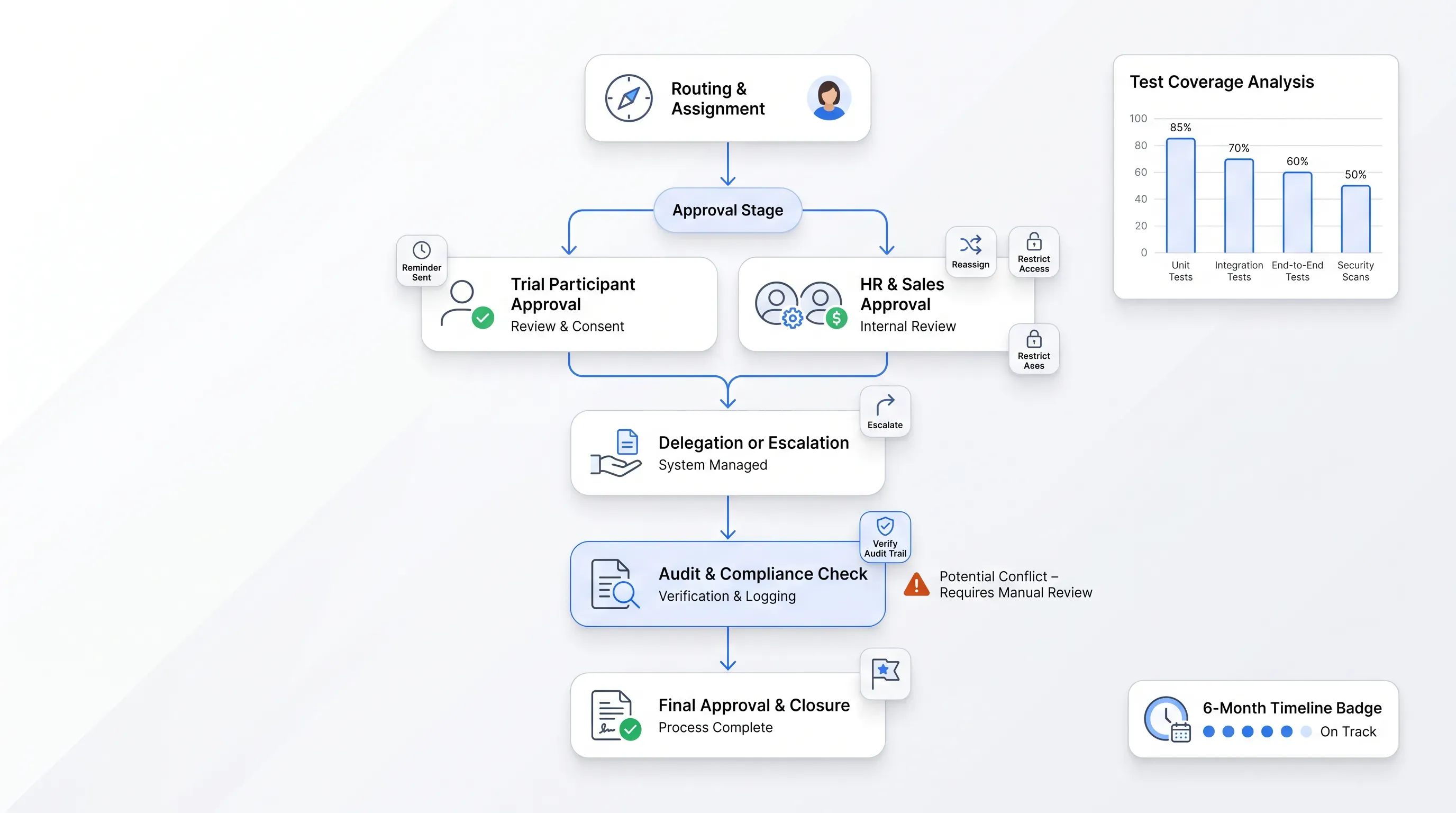
Routing is where most trials succeed and most deployments fail, because routing has to survive people being out of office. Four patterns cover nearly everything, from sequential handoffs to conditional routing. Most real HR and sales processes combine at least two.

During a trial, put the routing under the pressure it will face in month three:

  • Reassign an approval mid-flight and confirm the audit record shows both the original assignee and the substitute.

  • Set an approver to unavailable and see whether the workflow delegates automatically or silently stalls.

  • Send a reminder and check whether the recipient can act from the notification without a licensed seat.

  • Restrict a participant to one document and verify they can't see the rest of the folder.

Contract value erosion, mentioned earlier, mostly accumulates in exactly this layer. Approval evidence you can't produce six months later is the same problem as approval that never happened, so treat the audit record as a routing requirement.

Document generation needs controlled source data

Generation quality is decided by the source data because a clean template merged with a wrong field produces a confident-looking error. Compare how each product handles DOCX templates with named fields and spreadsheet-driven bulk creation for cases like fifty contractor agreements at once.

Then look at what stops bad data from entering. Field validation and version control on the template itself.

Spreadsheets deserve particular scrutiny as a source. Deloitte UK's risk practice notes that when a spreadsheet hasn't been robustly tested, errors present at build time simply go unnoticed and propagate through everything downstream.

Bulk generation multiplies that exposure. One mistyped column header in a source file becomes fifty documents with the wrong salary figure, all correctly formatted, all signed. Ask each vendor what happens between upload and generation, and treat a preview-and-confirm step as a requirement.

E-signing requirements depend on context

Your signing requirements come from the transaction and the jurisdiction, so evaluate signing methods against your document types. Signer order and identity verification are the practical dimensions. Each one behaves differently across HR and sales documents.

Jesse Wood, CEO of eFileCabinet, told SHRM that the essential requirement is proving legitimacy, and that every signature needs an unalterable audit trail recording the document's complete history.

Get legal review on jurisdiction-specific validity before you commit. The eIDAS point raised earlier applies to the EU, and the US Electronic Signatures in Global and National Commerce Act (E-SIGN) works on different principles around consent and record retention.

Here's the part vendors won't spell out: a platform supporting a qualified signature method doesn't make every document you send through it qualified. The method is selected per envelope, which means your workflow configuration determines legal standing as much as your vendor choice does.

Cut contract signing time by 60%

See how Agrello can automate your contract workflows from creation to e-signature in one free consultation.

Monitoring must expose workflow status

Status visibility means someone can answer "where is this document" in under thirty seconds without asking anyone. That requires a dashboard showing live state and a named owner per pending item.

Five states cover most questions, from waiting to stalled. That last one is the hardest to surface, because nothing has technically failed.

Deloitte's contracting research found that 48% of respondents who invested in their contracting process named better contract data visibility as a key benefit, ahead of other outcomes.

Visibility is what converts a fragmented process into a managed one, and the practical test is uncomfortable but fast. Ask your trial group to name every document currently waiting on an external signer. If they open a spreadsheet or a shared inbox to answer, the platform has added one more place to look.

Exceptions reveal whether automation is resilient

Test the failure paths, because the happy path works in every demo. Six exceptions cover most of what actually happens, from a required field that arrives empty to the Customer Relationship Management (CRM) integration that times out.

What separates resilient software is the recovery path. Can you correct the data and resume from the failed step, or does the whole workflow restart?

PwC's 2026 survey found that 89% of respondents gave at least one reason their technology investments hadn't delivered, with a substantial majority citing two or three reasons.

Multiple simultaneous reasons is the signature of a system that handles normal operation and abandons users at the edges. When a workflow can't recover in-platform, the team finishes the job over email, and that email chain is now the real process. Your audit trail ends where the exception began.

A scorecard makes products comparable

Score each product against one representative HR workflow and one sales workflow, and weight the ten capability areas by what your process actually depends on. Run the same two documents through every shortlisted tool and record the result.

Weight these ten areas and adjust the percentages to your own process:

  1. Inputs and data sources (10%) and templates and generation (15%), with routing and approvals at 15%.

  2. Validation and controls (10%), signing method and evidence (15%).

  3. Status visibility (10%) and exception recovery (10%), with integrations at 5%.

  4. Governance and access control (5%), total cost including administration time (5%).

Deloitte's research found that over 50% of organizations have neither carried out nor planned any contract simplification initiative.

Which suggests the scorecard has a second use. If a workflow needs eleven conditional rules to survive the test, the problem is upstream of the software, and no product will score well until the process itself is cut down.

Best fit requires end-to-end evidence

The winning product is the one that completed both test workflows without anyone leaving the platform. Manual effort you can accept and traceability that survives a six-month lookback.

Record specifics as you test. Minutes spent per document and whether the CRM record updated without a manual push.

The integration complexity finding from PwC's survey, cited earlier, is why the integration column deserves real weight even when it looks like plumbing.

A product that scores well on generation and signing but needs a person to copy the signed file into your HRIS has moved the manual step to the end, where it's harder to notice and easier to skip.

Poor fit appears in workflow gaps

Poor fit shows up as work the platform pushes back onto your team. Watch for a spreadsheet reappearing to track status and an exception with no recovery path except starting over.

Any one of these means the workflow is incomplete, regardless of how the feature comparison looked.

Recall the Gartner finding on error rates rising under capacity pressure. Manual gaps are exactly where that pressure lands.

One caveat on your own results. A score measures fit for the two workflows you tested in your systems. A tool that loses your comparison because it can't handle conditional clause logic is the right answer for a company sending one document type at high volume, so keep the scorecard as a record of your scenario.

Could Agrello fit repeatable document workflows?

Agrello is a document management and e-signing platform built for both personal and business use, and it fits teams whose workflows centre on DOCX templates and Excel-driven bulk creation. If your two test workflows are an offer letter pack and a standard sales agreement, that's the shape it's designed for.

Check three things against your own scorecard before you commit:

  • Whether your integrations are covered natively, through Zapier, or through the API, and what that means for maintenance.

  • Which capabilities sit on which plan, since routing and bulk features are frequently plan-dependent.

  • Which signature method applies to your documents, and whether that method meets requirements in the jurisdictions where you operate.

Pricing and automation pages change, so read the current versions. Then do the only test that settles it. Run one real HR document and one real sales document through the platform end to end, and score what you get.

Cut contract signing time by 60%

See how Agrello can automate your contract workflows from creation to e-signature in one free consultation.

End the trial after both test workflows complete under normal and failure conditions, rather than after a fixed number of days. Include an absent approver, incorrect source data, and a failed integration. The product has passed only if staff can resolve each case without moving the work to email or a spreadsheet.

Include the HR and sales process owners, the person who administers templates or routing, and the systems owner responsible for integrations. Each participant should test the tasks they perform after launch. Their results expose configuration work, ownership gaps, and access limits that a vendor-led demonstration won't show.

Multiply each capability score by its assigned percentage, then add the results for each product. For example, a routing score of 8 out of 10 with a 15% weight contributes 1.2 points to a ten-point total. Keep written notes beside each score so the final result remains auditable.

Request current documentation for user access controls and audit-log retention, then confirm how your team can export records after a dispute or staff departure. Ask where customer data is stored and who can access it. Your legal and security teams should review the evidence against your internal requirements.

Store each completed document in the system your team already uses as the authoritative record, such as the HRIS for offer letters or the CRM for sales agreements. Preserve the signed file with its audit evidence and a link to the relevant record. Test that this handoff occurs automatically.

Schedule a Meeting

Book a time that works best for you and let's discuss your project needs.

You Might Also Like

Discover more insights and articles

Business professional presenting document workflow software for routing, automation, and electronic signing.

Document Workflow Software: Compare Routing, Automation and Signing

This article compares tools that create recurring business documents and route them to signature, and explains how to evaluate document routing software as one connected process. It includes a scoring method with knockout criteria and a way to structure vendor demonstrations so you see real behavior instead of a polished pitch.

Title:
How to Choose Contract Repository Software

Meta description:
Learn how to select a contract repository that fits your operational needs and avoids costly software traps.

Article:
# How to Cho

How to Choose Contract Repository Software

Choose contract repository software by testing findability and export against your own signed agreements. Storage capacity is the least useful comparison point. Run a pilot with real contracts from your shared drive and confirm you can leave with your data intact.

Title:
Contract Repository Software: What to Evaluate Before You Buy

Meta description:
Learn how to score contract repository software options so you pick the right tool for your signed agreements.

Contract Repository Software: What to Evaluate Before You Buy

This article is a buyer's guide for teams that want their signed agreements out of shared drives and into one searchable digital contract repository. It covers what to test during demos and how to score shortlisted products against your current setup.

Title:
Document Automation Software for Growing Workflow Teams

Meta description:
Learn how document automation software simplifies your workflow and cuts turnaround time from template to signed file.

Document Automation Software for Growing Workflow Teams

This article explains how document workflow automation software works end to end, from an approved template to storage. It walks through the capabilities worth checking before you buy and a template-to-sign workflow you can copy.