Professional woman using digital signature software to quickly sign and send documents online

What’s the fastest way to sign and send documents online?

Paperwork bottlenecks quietly drain productivity in growing companies. If you still print, sign, scan, and email documents, you are wasting hours on a process that should take seconds. This guide shows how to modernize approvals with secure digital tools, mobile signing, and an automated digital signing workflow that works without heavy IT support.

Content authorBy Toomas PihlPublished onReading time11 min read

Overview

Slow document workflows create hidden delays that ripple across hiring, sales, procurement, and compliance processes. Modern e-signature platforms - including solutions like Agrello designed for fast department-level adoption - replace manual approvals with secure, trackable, and legally valid digital signing from any device. This guide walks through the practical steps to eliminate bottlenecks, accelerate turnaround times, and build a scalable digital signing workflow that keeps operations moving.

Switch to cloud-based e-signature platforms

The absolute fastest way to handle documentation is to stop treating files as static images and start treating them as dynamic data. Traditional methods rely on local software or hardware that tethers you to a desk. Cloud-based platforms remove these physical barriers. They allow you to send a secure link to a recipient who can sign from any device, anywhere in the world.

Legacy habits die hard, but the shift is undeniable. Top-tier platforms allow you to finalize contracts faster by eliminating the print-sign-scan routine. This transition does more than just save paper; it fundamentally changes the velocity of your business operations.

Why cloud platforms outperform email attachments

Sending a document as a standard email attachment creates friction. The recipient must open, download, print (or open in a separate editor), sign, save, and re-attach. A dedicated digital signature platform consolidates this into a single browser window.

  • Centralized tracking: You know exactly when a document is opened, viewed, and signed.

  • No installation required: Recipients do not need special software; they sign directly in their web browser.

  • Instant distribution: You can send the same document to fifty people in the time it takes to email one.

For mid-market teams that need to move fast without a dedicated legal operations department, tools like Agrello offer a streamlined interface that simplifies these complex lifecycle management tasks. By focusing on ease of use, you reduce the time your team spends figuring out the software and increase the time they spend closing deals.

The adoption of these tools is massive because they work. Platforms like DocuSign have seen incredible growth, where over 1.7 million customers and 1 billion people use the platform to handle their most critical agreements. This level of adoption suggests that if you are not using a dedicated e-signature platform, you are already behind the curve.

If you’re looking for a broad comparison, check out the 12 Must-Have eSignature Tools for Teams and Enterprises to help select the right platform for your needs.

Transitioning to the cloud is the foundation, but the real speed gains come from how you prepare your documents before you even hit send.

Automate document preparation with templates

Starting from a blank page for every NDA, offer letter, or vendor agreement is a waste of time. The most efficient teams build a library of pre-approved templates. This ensures that the structure, legal language, and formatting are correct every time, leaving you to simply fill in the variable data like names, dates, and dollar amounts.

Templates act as a force multiplier for functional managers. instead of reviewing every single clause for every new hire, you only need to review the specific changes. This dramatically reduces the risk of human error and speeds up the internal approval process.

For a practical deep dive, see How to Create a docusign contract template Step-by-Step for mapping variables and refining template-driven workflows.

Setting up a reusable template library

Creating a robust template library requires a small upfront investment of time for a massive long-term payoff.

  • Identify high-volume documents: Look for forms you send more than three times a week.

  • Define static vs. variable text: Lock the legal clauses that should not change and place text tags where unique data goes.

  • Pre-place signature fields: distinct spots for signatures, initials, and dates should be pre-set so you never forget a field.

Sophisticated tools allow for deep customization. For instance, DocuSign supports diverse global teams because it supports signing in 44 languages and includes document generation with 20+ tags and fields. This flexibility means you can handle complex, multi-lingual agreements as quickly as simple domestic forms.

Cost is often a concern for growing departments, but many platforms offer scalable solutions. SignNow, for example, allows unlimited users on paid plans starting at $20/month and provides unlimited templates. This makes it accessible for teams that need to scale their operations without exponentially increasing their software budget.

Once your templates are ready, you need to ensure your recipients can sign them immediately, regardless of where they are or what device they are holding.

Enable mobile-first signing for instant turnaround

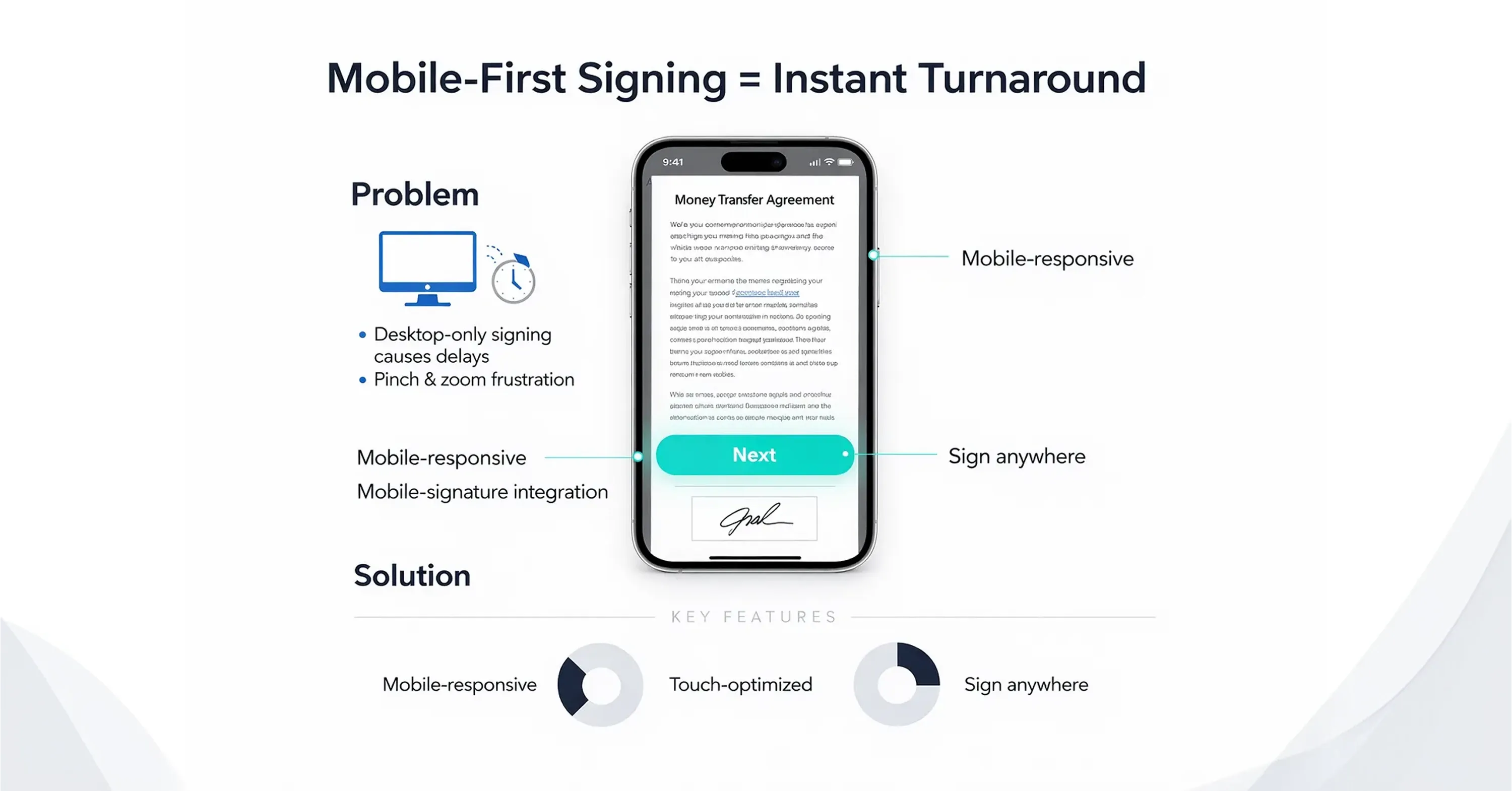
Mobile-first digital signature interface on smartphone showing instant document signing and mobile-responsive e-signature solution

We live in a mobile-centric culture. Executives, partners, and clients often check their email on their phones between meetings or while traveling. If your document requires them to sit at a desktop computer to sign, you are introducing an unnecessary delay. The fastest way to get a signature is to meet the signer where they are: on their smartphone.

Mobile-responsive signing experiences reformat the document for small screens. This prevents the frustrating "pinch and zoom" dance that often leads to abandonment. When a document is easy to read and sign on a phone, the turnaround time drops from days to minutes.

For a breakdown of today’s leading sign-anywhere software, check the Best E-Signature Apps for Mobile Signing (iOS & Android).

Creating a frictionless mobile experience

To ensure speed, your signing process must be optimized for touch interaction.

  • Vertical scrolling: Ensure the document flows naturally down the screen.

  • One-tap navigation: Use "Next" buttons that automatically jump the user to the required field.

  • Legible fonts: Use standard web fonts that render clearly on mobile devices.

Some platforms prioritize this specific capability. DottedSign, for instance, is designed specifically for speed and convenience with a strong focus on mobile experience. This focus is crucial for sales teams or field service coordinators who need client sign-offs immediately after a conversation, rather than waiting for the client to return to an office.

Agrello also shines here by offering an interface that remains intuitive across devices. By removing the technical hurdles for the signer, you ensure that the technology facilitates the agreement rather than obstructing it.

While mobile signing speeds up the recipient's action, integrating your signing tool with your other business systems accelerates your internal administration.

Integrate digital signing workflows with existing tools

The actual signing is only one part of the process. Data entry before the signature and data storage after the signature are often where the real bottlenecks exist. Manually typing customer names from your CRM into a contract, and then manually uploading the signed PDF back to a shared drive, is slow and error-prone.

Integration allows your different software platforms to talk to one another. You can trigger a signature request automatically when a deal stage changes in your CRM, or when a new row is added to a spreadsheet. This creates a cohesive digital signing workflow that runs in the background.

Connecting your stack for automation

You do not need to be a developer to set up these integrations. Middleware tools like Zapier connect thousands of apps with simple logic.

  • Trigger: An event occurs (e.g., "New Deal" in HubSpot).

  • Action: The signature tool creates a contract using a template and the data from HubSpot.

  • Outcome: The contract is sent to the client without you lifting a finger.

The power of this automation is significant. DocuSign integrates with Zapier to enable dynamic, end-to-end contract workflows that automatically generate requests. Furthermore, AI capabilities can now assist in extracting key contract details and updating your records automatically.

This level of automation is vital for mid-market companies where resources are tight. It frees up coordinators to focus on relationship management rather than data entry.

Sometimes, however, a standard PDF is not engaging enough to get a quick signature. In these cases, upgrading the format itself can be the accelerator.

Use interactive web-based proposals

Sending a static PDF proposal can feel passive. If the client wants to change the quantity or service level, they have to email you, wait for a revised PDF, and then sign. This back-and-forth kills momentum. Interactive, web-based proposals solve this by allowing clients to select options and sign within the same interface.

These tools function more like a webpage than a document. They can include videos, pricing tables that update in real-time based on selection, and embedded case studies. This keeps the prospect engaged and removes the barriers to immediate approval.

For details on streamlining both contracting and proposal flows, see How to Put Your Contracts on Autopilot: A Small Business Template Playbook for 2025.

Merging sales and legal processes

When you combine the proposal and the contract, you shorten the sales cycle.

  • Interactive pricing: Let clients choose "Gold" or "Platinum" packages, with the contract total updating automatically.

  • Instant acceptance: The "Accept" button serves as the binding signature.

  • Rich media integration: Embed a personalized video greeting to build trust instantly.

Platforms like Qwilr excel at this. They transform static documents into interactive, web-based proposals that allow clients to approve deals instantly without leaving the document. This approach is particularly effective for creative agencies, consultancies, and SaaS companies where the scope of work might be variable.

Once you have selected the right platform and format, the final step in maximizing speed is optimizing how you route and manage the documents during the sending process.

Optimizing the sending process for speed

Even with the best tools, poor routing choices can cause delays. If a document sits in a manager's inbox because they are on vacation, the process stalls. Setting up intelligent routing orders and automated reminders ensures the document keeps moving until it is fully executed.

Speed also comes from confidence. When you know you can fix a mistake or void an envelope instantly, you move faster. Many platforms offer free trials or low-barrier entry points, such as DocuSign's free trial which allows users to upload a document, prepare it for signatures, and send to recipients in minutes. This is ideal for urgent situations where you need a solution immediately.

configuring intelligent routing

Take control of the signing order to avoid confusion.

  • Sequential signing: Person A must sign before Person B receives the notification. This is essential for internal approvals before external sending.

  • Parallel signing: Everyone receives the document at once. This is fastest when the order does not matter.

  • Automated reminders: Set the system to nudge signers every 48 hours if they haven't signed yet.

By implementing these routing rules, you remove the need for manual follow-up emails. The system chases the signature for you, ensuring that your projects and deals conclude as quickly as possible.

How to Sign and Send Documents in Minutes

The fastest way to sign and send documents online is to utilize a cloud-based e-signature platform that supports mobile-responsive signing and reusable templates. By integrating this platform with your CRM via automation tools like Zapier, you eliminate manual data entry and routing delays.

Conclusion

In fast-moving organizations, slow paperwork is more than an inconvenience - it is a direct barrier to revenue, productivity, and customer experience. Modern digital signing workflows eliminate these hidden delays by turning approvals into a seamless, trackable process that can be completed from anywhere in minutes rather than days. By combining cloud-based platforms, reusable templates, mobile-first signing, and automation, teams can move from reactive document handling to a scalable system that supports growth.

Platforms built for department-level adoption, such as Agrello, make it possible to implement this transformation without complex deployments or dedicated legal infrastructure. Instead of chasing signatures and managing inbox chaos, your team can focus on closing deals, onboarding talent, and executing strategy. The fastest way to sign documents is ultimately the one that removes friction entirely - creating a workflow where agreements move forward automatically and business momentum never stalls.
Yes, in the vast majority of jurisdictions, including the United States (ESIGN Act) and the European Union (eIDAS), electronic signatures hold the same legal weight as handwritten ink signatures. Secure platforms provide an audit trail that proves who signed, when, and from which IP address, often making them more defensible in court than paper documents.

Absolutely. Most modern digital signature platforms allow for "bulk sending" or "batch sending." You can upload a list of recipients (usually via CSV), and the platform will send a unique copy of the document to each person individually. Alternatively, you can route a single document to multiple people if they all need to sign the same agreement.

No, recipients typically do not need to pay or create an account to sign a document sent via a professional e-signature platform. They simply click the secure link in their email, follow the prompts to sign, and the process is complete. The sender is the one who holds the license or subscription.

If the document has not yet been signed, most platforms allow you to "correct" or "void" the envelope. Correcting allows you to modify fields or recipient details without changing the core document, while voiding cancels the transaction entirely so you can start fresh. Once a document is fully signed, however, it usually cannot be changed and must be amended with a new agreement.

Online signature platforms are significantly more secure than standard email. They use high-level encryption (often 256-bit SSL) to protect the document during transit and storage. Additionally, they use multi-factor authentication and rigorous identity verification methods to ensure the person signing is who they say they are, which is impossible to verify with a simple email attachment.

Schedule a Meeting

Book a time that works best for you and let's discuss your project needs.

You Might Also Like

Discover more insights and articles

Close-up of professional woman with text “How do electronic signatures work?” representing digital signing process and e-signature technology

How do electronic signatures work?

You have probably signed a digital document recently - clicked a link, typed your name, or scribbled a signature and pressed “Finish.” It felt quick and effortless. But for managers responsible for important contracts, that simplicity can raise a key question: what actually happened behind the scenes? This article explains how electronic signatures secure documents, verify identity, and create a legally reliable record - in clear, non-technical terms.

Smiling professional woman signing a document digitally, illustrating how to create a digital signature in Microsoft Word

How to create a digital signature in Microsoft Word

Printing a document just to sign and scan it back is unnecessary. Microsoft Word lets you approve contracts and internal documents directly on your screen using built-in signature features. This guide shows how to create a digital signature in Word, add signature lines, apply document protection, and manage multiple signers. It also explains when Word’s native tools are enough and when a certified external solution is needed for legally critical documents.

Business professionals discussing document security as AI tools detect and prevent forged digital signatures

How can AI detect and prevent forged digital signatures?

You have likely signed dozens of contracts this year without touching a pen. While this speed is great for business, it creates a nagging worry for department heads and process owners. If you can sign a document in seconds with a click, how hard is it for a fraudster to do the same in your name? This article breaks down exactly how artificial intelligence acts as a digital gatekeeper for your contracts. We will look at how AI moves beyond basic security checks to analyze behavior, spot visual tampering, and verify identity in real time. You will learn how modern tools protect your HR, Sales, and Operations documents without requiring a massive IT overhaul.

A professional stands before a whiteboard diagram with text explaining PAdES, XAdES, and ASiC digital signature formats

What are PAdES, XAdES, and ASiC signature formats?

You may have seen unfamiliar acronyms like PAdES, XAdES, or ASiC when signing documents digitally. This guide explains the three main EU e-signature formats in simple terms and shows when each should be used. By the end, you’ll know how to choose the right format to keep your contracts compliant, secure, and future-proof.