Close-up portrait of a woman with blue eyes looking upward beside automation-themed graphics

What’s the difference between typed, drawn, and scanned signatures?

Processing contracts and employee onboarding forms often leaves teams wondering which signature format protects the company best. Choosing the wrong method can expose your business to compliance failures, forged documents, and wasted administrative time. You need a clear understanding of your options before you finalize your next big agreement.

Content authorBy Toomas PihlPublished onReading time11 min read

Overview

This guide explores the distinct security levels, legal acceptance, and everyday risks associated with different signature input types. We will compare how typed, drawn, and scanned signatures function in real business environments. You will learn exactly which format to use for quick internal approvals, high-stakes client contracts, and everything in between.

By matching the right signing method to the right scenario, your HR and operations teams can maintain speed without sacrificing legal protection. We will look closely at how modern platforms secure these inputs, why static images fail in court, and how accessibility plays a major role in your decision.

Understanding the core signature input types

Every modern document workflow relies on a specific way to capture consent. Understanding exactly how these methods work is the first step toward building a secure, efficient approval process for your department.

The main differences between signature input types come down to data capture and security. Typed signatures use a keyboard to input a name in a stylized font. Drawn signatures use a mouse, finger, or stylus to create a handwritten shape on a screen. Scanned signatures are simply static images or photographs of a physical signature pasted into a document.

The mechanics of typed signatures

Typing your name is perhaps the most common way to sign digital documents today. This method relies entirely on keyboard input rather than physical mimicry.

Typed signatures simply convert keystrokes into a formatted text block. Most platforms apply a cursive font to make the text look formal. Because they require no special hardware, they are incredibly fast for high-volume paperwork.

Here is why teams rely on typed input:

  • They require zero physical effort or stylus tools.

  • They work seamlessly on older desktop computers.

  • They prevent illegible names or messy handwriting.

  • They speed up repetitive tasks like HR onboarding.

When you implement keyboard-based signing for routine forms, you can reduce signing time by up to 50% across your department.

While typing is undeniably fast, it only captures keystrokes. This leads us to consider methods that capture physical movement.

The mechanics of drawn signatures

Capturing a physical motion brings a traditional feel to digital documents. Drawn signatures try to replicate the pen-and-paper experience on modern devices.

This format requires the signer to trace their name using a touchscreen, trackpad, or digital pen. Drawn signatures often feel more authentic to clients signing major deals. They also support mobile-first environments, which matters heavily since 70% of business users access documents via apps.

Consider these benefits of drawing a signature:

  • It provides a visual match to a person's traditional handwriting.

  • It feels natural and professional during in-person meetings.

  • It frequently captures biometric data like stroke speed.

  • It works beautifully on modern smartphones and tablets.

Drawing adds a layer of personalization that typing lacks. However, both methods are distinctly different from just uploading a picture of your signature.

The mechanics of scanned signatures

Many professionals still sign a piece of paper, take a photo with their phone, and save it as an image file. This process creates a scanned signature.

A scanned signature is just a static picture file like a JPEG or PNG. You simply drag and drop this image onto a PDF or Word document. It contains no underlying code or verification data linking the image to the person who placed it there.

Scanned signatures function through these basic steps:

  • A user signs a blank sheet of paper.

  • They scan the paper or snap a photo.

  • They crop the image and save it to their hard drive.

  • They paste that same image into every document they need to sign.

Understanding how these three inputs work mechanically reveals their fundamental flaws and strengths. The real test comes when we evaluate how secure they actually are against forgery.

Evaluating security and forgery risks

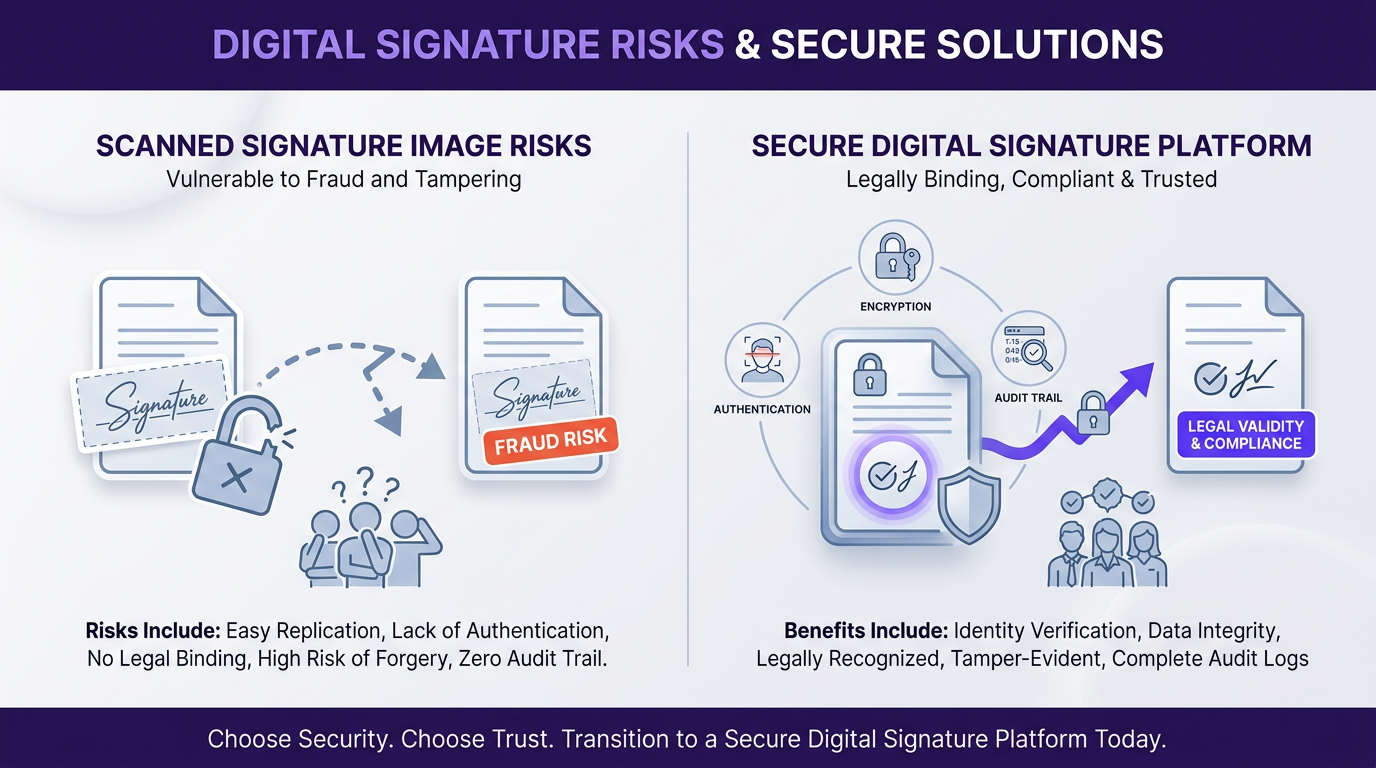
A tech infographic with a split layout showing risks of scanned signatures on the left and a secure digital signature platform on the right.

A signature is only as valuable as its ability to prove identity and intent. When we compare these three methods, the security differences become startlingly clear.

Letting your team paste a scanned image of a signature is highly dangerous. Scanned signatures lack authentication, audit trails, and encryption. Anyone with access to the image file can copy and paste it into unauthorized contracts. You have zero proof of who actually placed the image on the page.

Typed and drawn signatures offer robust security when backed by a proper digital signature platform. The visible text or drawn shape is just a surface layer. The real security happens entirely in the background.

Modern platforms secure these inputs through:

  • Cryptographic hash functions that seal the document.

  • Detailed audit trails tracking IP addresses and time stamps.

  • Email or SMS authentication required before signing.

  • Device tracking to verify exactly where the signature happened.

If you manage high-stakes agreements, using a secure platform like Agrello ensures your drawn or typed inputs become a legally binding digital signature. To see real-world workflow examples for high-stakes contracts and onboarding forms, consult Electronic Signature Examples (Real Documents, Correct Use Cases).

Security mechanisms protect you from fraud, but your documents also need to hold up in court. This naturally leads to questions about legal validity and everyday compliance.

Legal acceptance and global regulations

Navigating the legal landscape of e-signatures can feel overwhelming for operations coordinators. Fortunately, major regulations provide clear guidance on which signature input types hold up in court.

Scanned signatures are widely considered legally invalid in most jurisdictions. Because you cannot prove the identity or the intent of the person pasting the image, courts frequently reject them. Relying on scanned images for employee agreements puts your entire company at financial risk.

Typed and drawn signatures are highly accepted under major frameworks. The laws do not mandate a specific physical input method. They care primarily about the digital audit trail attached to the input.

Meeting the requirements of the ESIGN Act

In the United States, the ESIGN Act governs electronic records and signatures. This legislation states that a signature cannot be denied legal effect simply because it is in electronic form.

However, the ESIGN Act requires proof of the signer's intent to sign. When a user creates a typed signature through a verified portal, the system logs their action and confirms their intent. A copied and pasted scanned signature provides zero evidence of intent.

Key requirements for ESIGN compliance include:

  • Clear consent from the user to do business electronically.

  • A visible connection between the signature and the document.

  • Retention of the associated electronic records.

  • A reliable audit trail tracking the exact moment of signing.

Meeting these standards ensures your business contracts remain fully enforceable. The European market follows a similar, though slightly more structured, approach to electronic consent.

Navigating the eIDAS Regulation in Europe

The European Union uses the eIDAS Regulation to standardize digital transactions across member states. This framework categorizes signatures into simple, advanced, and qualified levels.

A basic typed or drawn signature qualifies as a Simple Electronic Signature. This level works perfectly for low-risk internal documents and basic HR forms. For higher security, Advanced Electronic Signatures require a unique link to the signer and a high level of control over the signature creation data.

Understanding the evolving digital signature landscape in the EU is essential for compliance - see What are the legal requirements for digital signatures in the EU?.

Important factors to remember under eIDAS include:

  • Scanned signatures do not meet the security standards for advanced levels.

  • Drawn signatures capture biometric data that helps strengthen identity claims.

  • Typed signatures backed by two-factor authentication can meet advanced requirements.

  • Your chosen digital signature platform handles the heavy lifting for compliance.

Understanding these legal frameworks protects your growing business from unnecessary disputes. With the legal foundation set, we can look at how specific departments should apply these methods.

Matching signature formats to specific departments

Every team handles different types of paperwork, meaning they face different risk levels. Applying the correct signature input types to specific departments keeps your operations smooth and secure.

Human Resources and high-volume onboarding

Human Resources departments process massive amounts of repetitive paperwork. New employees often need to sign dozens of policy acknowledgments, tax forms, and confidentiality agreements on their first day.

For these repetitive tasks, typed signatures are the clear winner. They remove the friction of physically drawing a name over and over.

HR teams benefit from typed inputs in several ways:

  • Employees complete onboarding packets much faster.

  • Document legibility remains perfect across all employee files.

  • The team spends less time explaining how to use digital drawing tools.

  • Automated reminders work seamlessly with simple click-to-type prompts.

To see how AI can further streamline HR document workflows by automating signature routing and tracking, read How Does AI Improve HR Document Signing Processes?.

When you let new hires type their consent, you eliminate delays and keep the focus on welcoming them to the company. Sales teams require a slightly different approach.

Sales teams and client-facing contracts

Sales professionals handle high-stakes agreements that require a more personalized touch. When closing a major deal, you want the signing process to feel formal, professional, and authentic.

Drawn signatures excel in sales environments. Asking a client to draw their name on a tablet during an in-person meeting replicates the traditional closing experience.

Consider these advantages for your sales department:

  • Drawn inputs add a sense of gravity and commitment to the contract.

  • They impress clients with modern, mobile-friendly signing technology.

  • They capture biometric stroke data, adding a layer of non-repudiation.

  • They work flawlessly on iPads and smartphones during field sales.

For a practical breakdown on layout, design, and signature experience, see How to Create a Professional E-Signature Design.

Providing a premium signing experience helps close deals faster. Behind the scenes, your operations team needs a reliable way to manage all these completed documents.

Operations and vendor management

Operations coordinators juggle vendor agreements, purchase orders, and internal approvals daily. This department needs maximum flexibility to keep the business running.

Operations teams should actively ban the use of scanned signatures. Relying on static images for vendor contracts creates massive legal vulnerabilities if a dispute arises.

Instead, operations should blend typed and drawn inputs using a secure digital platform. For example, a department manager might type their signature for a routine internal expense report. That same manager might choose to draw their signature on a high-value vendor contract.

Understanding the differences between digital and electronic signatures further protects your business. Learn more in What’s the difference between electronic and digital signatures?.

This flexibility leads directly into our final consideration regarding everyday workflows.

Accessibility considerations for everyday workflows

Legal security means little if your users physically struggle to sign their documents. The way a signature is captured directly impacts accessibility and overall team efficiency.

Drawing a signature requires a certain level of fine motor control. On a small smartphone screen, creating a legible drawn signature can frustrate users. More importantly, forcing users to draw can create severe hurdles for accessibility.

When you build a document workflow, you must consider compliance with standards like the Americans with Disabilities Act. Typed signatures are often much more accessible for users with motor impairments. A user can easily type their name using adaptive keyboard technologies, whereas tracing a complex shape with a mouse might be impossible.

To keep your team workflows inclusive, follow these guidelines:

  • Offer multiple signature input types on every document.

  • Allow users to choose typing if they lack a touchscreen device.

  • Ensure your signature platform works smoothly with screen readers.

  • Train your support staff to help users navigate their signing options.

Agrello makes this process effortless by allowing signers to choose the input method that fits them best. The platform automatically attaches a secure digital signature to the document, regardless of whether the user typed their name or drew it.

For insights on security, accessibility, and usability comparisons among leading platforms, read Electronic Signing Apps Compared: Which One Is Safest?.

Balancing security, legal compliance, and user accessibility creates a highly professional document workflow. Providing safe options ensures you get contracts signed faster without compromising on legal protection.

Conclusion

Choosing the right signature format directly impacts your company's security, legal standing, and daily efficiency. Scanned signatures pose too much risk and offer zero legal protection, making them obsolete for modern business. Typed signatures provide unbeatable speed for high-volume tasks like HR onboarding, while drawn signatures deliver the authenticity needed for major client contracts. By adopting a secure digital platform that supports both typed and drawn inputs, your team can accelerate approvals while keeping every document fully compliant and protected against fraud.

The main input types are typed, drawn, and scanned signatures. Typed signatures use a keyboard to generate a stylized font. Drawn signatures use a mouse or touchscreen to capture a physical stroke. Scanned signatures are static image files of a physical signature pasted into a document.

In most jurisdictions, scanned signatures are not legally binding. They are simply static image files that lack a digital audit trail, encryption, and proof of intent. Because anyone can copy and paste an image file, courts frequently reject them as evidence of a valid agreement.

Yes, typed signatures are legally valid for most business contracts when backed by a compliant platform. Regulations like the ESIGN Act and eIDAS accept typed inputs as long as the software captures an audit trail proving the signer's identity and intent to sign.

Drawn signatures mimic the traditional physical act of signing with a pen and paper. This physical movement provides a visual match to a person's actual handwriting, making the process feel more formal and personalized for high-stakes agreements like sales contracts.

Scanned signatures are risky because they are just static image files with no built-in security. Anyone who has access to the image can reuse it across documents without the original signer’s consent. Unlike typed or drawn signatures in secure platforms, scanned images do not include audit logs, identity verification, or encryption. This makes them easy to forge and difficult to defend in legal disputes, which is why most modern compliance frameworks strongly discourage their use in business-critical documents.

Schedule a Meeting

Book a time that works best for you and let's discuss your project needs.