A professional team discusses how to create a secure e-signature online in a modern office setting, illustrating collaboration around digital document signing solutions

What’s the easiest way to create a secure e-signature online?

Have you ever needed to sign an urgent contract but found yourself without a printer or scanner? You are not alone; the old "print, sign, scan" routine is fading fast in favor of digital solutions. Creating a signature online is not only faster but can be far more secure than traditional paper methods if you follow the right steps. In this guide, we will walk through the simplest methods to create a secure e-signature online. You will learn how to select a trustworthy platform, verify your identity effectively, and apply a signature that holds up legally. We will also cover common pitfalls to help you avoid invalidating your important documents.

Content authorBy Toomas PihlPublished onReading time9 min read

Why Ease of Use Shouldn't Mean Less Security

Before we look at the specific steps, it is helpful to understand what happens behind the scenes. Many people assume that "easy" means "less secure," but modern technology has bridged that gap. A secure digital signature involves complex encryption that runs in the background while you enjoy a simple user interface.

The demand for these reliable solutions is exploding. In fact, the global digital signature market is projected to grow by USD 45.8 billion from 2024 to 2028, driven by businesses needing speed without sacrificing trust. When you create secure e-signature documents, you are not just pasting an image; you are generating a cryptographic fingerprint. According to NIST, a digital signature guarantees the signer's identity and ensures the data has not been modified.

This combination of ease and security is the foundation of a good workflow. You want a tool that handles the heavy lifting of encryption so you can focus on the content of your agreement. For a deeper evaluation of security features, see Are Your Digital Contracts Secure? A Look into e-Signature Security.

Choose a Verified E-Signature Platform

The first and most critical step is selecting the right tool. You might be tempted to use a basic drawing app or a generic PDF editor, but these often lack the necessary security protocols to make a signature legally binding.

Verified platforms are designed to protect your data. For example, industry giants like DocuSign have grown massive user bases, where over 1.3 million customers and 1 billion users operate across 180 countries. However, if you are looking for a platform that specifically emphasizes high-security identity verification with a user-friendly interface, Agrello is a powerful option. Agrello simplifies the process of creating digital signatures while maintaining strict compliance with international standards, making it ideal for users who need both speed and legal certainty. For a step-by-step breakdown of crafting your electronic signature by drawing, typing, or uploading, see How to Use a Digital Signature Generator (Free & Paid Tools) and check the detailed walkthrough at Creating Digital Signature.

When evaluating a platform, look for these features:

  • Encryption Standards: Ensure the service uses at least AES 256-bit encryption.

  • Audit Trails: The platform must record who signed, when, and from which IP address.

  • Compliance: Look for adherence to regulations like eIDAS or the U.S. ESIGN Act. What Is a Certified Digital Signature? Legal Meaning & How to Get One offers a thorough walk-through of digital signature legal status and multilingual standards.

Once you have selected a reliable platform that suits your needs, you are ready to set up your document for signing.

Upload and Prepare Your Document

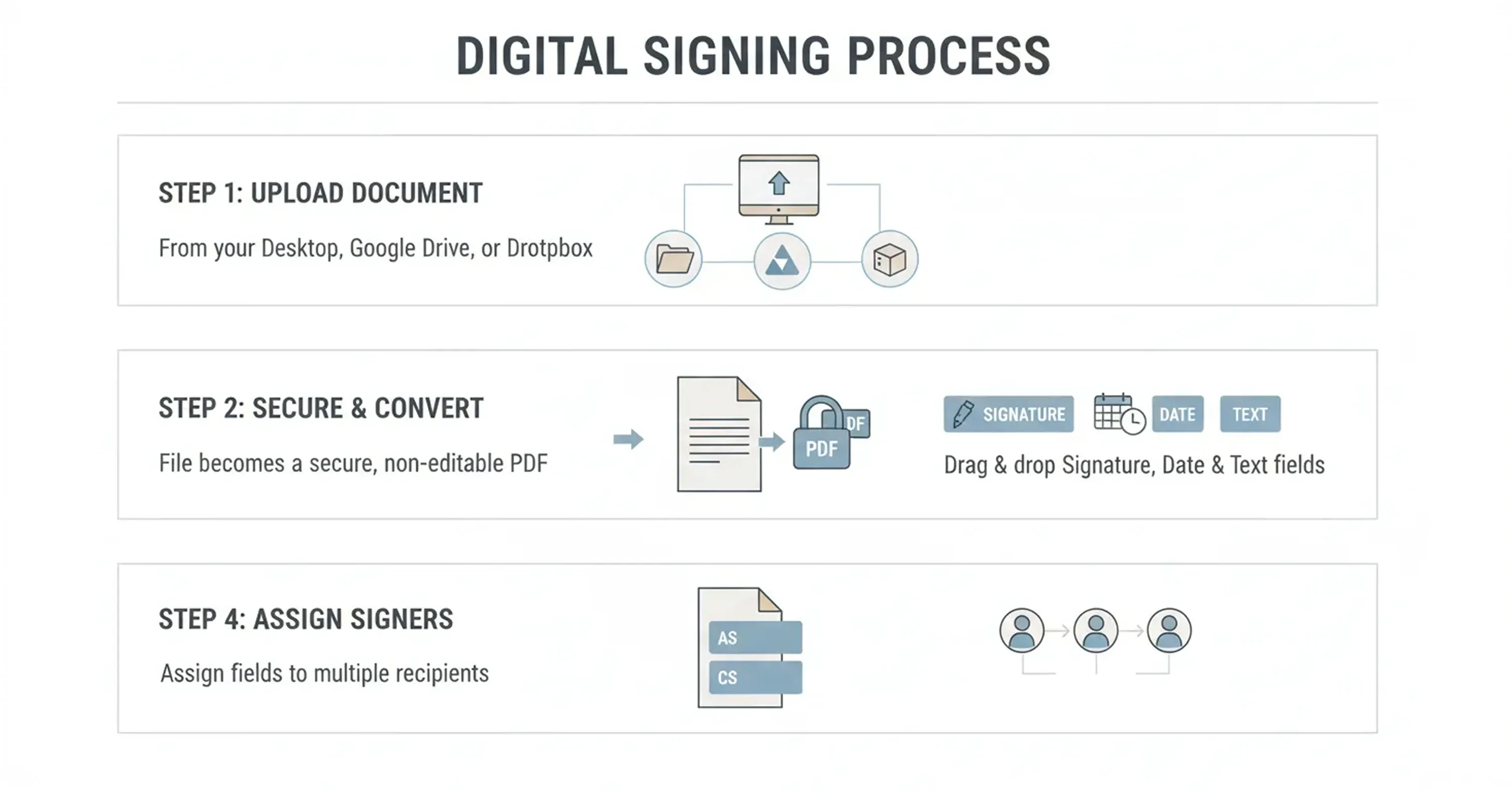
An infographic illustrates the digital signing process, showing how users upload a document, convert it into a secure PDF, add signature fields, and assign signers for online e-signatures

Getting your document into a digital format is usually straightforward, but proper preparation is key to a smooth signing experience. You need to make sure the document is legible and that the signature fields are placed correctly.

Most platforms allow you to upload various file types, though PDF is the gold standard for preserving formatting. Once uploaded, the software typically converts the document into a secure, non-editable format for the main text, leaving only specific fields open for input.

  • Upload your file from your desktop, Google Drive, or Dropbox.

  • Drag and drop "Signature," "Date," and "Text" fields onto the document.

  • Assign specific fields to different signers if multiple people are involved.

This stage is also where you add any necessary labels or instructions. If you are sending the document to others, clear labeling prevents confusion and reduces the chance that they will sign in the wrong spot or miss a required field.

With your document structured and ready, you move on to the most technologically significant part of the process: proving who you are.

Verify Identity and Sign

The core difference between a simple electronic mark and a secure digital signature is identity verification. This step confirms that the person clicking "sign" is genuinely the authorized individual, preventing fraud and repudiation later.

Secure platforms use various methods to verify identity. This can range from clicking a link in an email to more advanced methods like SMS authentication or using a government-issued digital ID. The push for verified digital identities is strong, with the EU aiming for 80% of its residents to have a digital identity by 2030. Agrello stands out in this area by integrating directly with high-security verification methods like Smart-ID and Mobile-ID. This allows you to create secure e-signature documents that carry significant legal weight without needing a separate card reader or complex hardware. For more insight on verified digital identities and borderless e-signing, check Cross-border Digital Identity and E-signing in the Baltic States: A Practical Guide for SMEs.

How the signing process works

  1. Authentication: You enter a PIN or code sent to your mobile device.

  2. Hashing: The software creates a mathematical hash of the document content.

  3. Encryption: Your private key encrypts this hash, creating the digital signature.

This process essentially "locks" the document. If anyone tries to change even a single comma after you sign, the hash will change, and the signature will show as invalid. This mechanism provides the security that a pasted image simply cannot match.

Now that the document is signed and verified, you need to verify the result and store it safely.

Validate and Store the Signed Document

The process does not end the moment you apply your signature. To maintain the long-term validity of the agreement, you must store the document correctly and know how to check its status.

A secure e-signature platform will generate a final version of the document, often accompanied by a completion certificate. This certificate acts as a logbook for the transaction.

  • Download the final PDF: Always keep a local copy or store it in a dedicated cloud archive.

  • Check the validity: Open the PDF in a viewer like Adobe Acrobat. You should see a green checkmark or a notification stating that "Signed and all signatures are valid."

  • Review the Audit Trail: This separate page or file lists every action taken on the document, providing evidence in case of a legal dispute.

Proper storage is vital because technology evolves. A high-quality digital signature embeds the validation data directly into the file, meaning you do not always need the original platform to prove the signature is real years down the line.

While the steps are simple, there are still traps that beginners often fall into. Let’s review what to avoid.

Common Mistakes to Avoid When You Create Secure E-signatures

Even with good tools, human error can compromise the security of your documents. Being aware of these common mistakes will help you keep your digital agreements watertight.

One frequent error is relying on "wet ink" scans for high-value contracts. While pasting a picture of your handwritten signature might feel personal, it often lacks the metadata required for a robust legal defense. Another issue is failing to check regional compliance. For example, under EU regulations, a qualified electronic signature is explicitly granted the same legal effect as a handwritten signature, but lesser forms of e-signatures may not hold up for certain government forms or property deeds.

You should also be wary of sharing your signing credentials. Your digital identity is as personal as your bank PIN. Never let an assistant or colleague log in to sign on your behalf, as this breaks the chain of custody and invalidates the "non-repudiation" aspect of the signature. The market for these tools is expanding rapidly, and the global digital signature market is expected to reach USD 104.49 billion by 2032. This growth means more standardized and secure options are becoming available, so sticking to outdated, insecure methods is an unnecessary risk. If you're looking for sample workflows that illustrate compliant, audit-ready processes, see Electronic Signature Examples (Real Documents, Correct Use Cases).

By steering clear of these errors, you guarantee that your digital workflow remains efficient and legally sound.

How Secure E-Signatures Work: A Simple Step-by-Step Overview

To create a secure e-signature online, choose a compliant platform that supports digital certificates and audit trails. Upload your document, verify your identity using multi-factor authentication (such as email or mobile ID), and apply your signature. This process generates a cryptographic hash that permanently links your identity to the document version.

Conclusion

Transitioning to digital signing is one of the smartest moves you can make for your personal or professional productivity. By following the steps outlined above - choosing a reputable platform, verifying your identity, and storing your proofs - you can create secure e-signature documents that are as valid as any ink-on-paper contract.

Tools like Agrello and others have made this technology accessible to everyone, removing the technical barriers that used to exist. There is no need to wait for a printer or courier ever again; you have the power to sign securely from anywhere in the world.
An e-signature becomes legally binding when it meets specific criteria set by laws like eIDAS in Europe or the ESIGN Act in the US. The key factors are intent to sign, consent to do business electronically, and a clear association between the signature and the record. Most importantly, the system must retain a record (audit trail) that proves who signed and when.

Technically, yes, you can place an image of your signature on a document, but it offers very low security. This is often called a "simple electronic signature." For contracts involving money, property, or legal liabilities, it is much safer to create secure e-signature documents using a platform that uses cryptographic validation to prove the document hasn't been altered.

It does not have to be. Many platforms offer free tiers or trial periods for individual users. For businesses or frequent signers, paid plans usually offer better features like bulk sending, advanced identity verification, and team management. The cost is often far lower than the expense of printing, mailing, and storing physical paper records.

An electronic signature is a broad term that covers any electronic method of indicating agreement, like typing your name or clicking a box. A digital signature is a specific, more secure type of electronic signature that uses encryption technology to verify the identity of the signer and protect the document from tampering.

No, modern cloud-based platforms have removed the need for USB tokens or smart card readers for most use cases. You can create secure e-signature transactions using just your smartphone or laptop. Identity verification is handled through software solutions like banking logins, mobile IDs, or SMS codes.

Schedule a Meeting

Book a time that works best for you and let's discuss your project needs.

You Might Also Like

Discover more insights and articles

Close-up of professional woman with text “How do electronic signatures work?” representing digital signing process and e-signature technology

How do electronic signatures work?

You have probably signed a digital document recently - clicked a link, typed your name, or scribbled a signature and pressed “Finish.” It felt quick and effortless. But for managers responsible for important contracts, that simplicity can raise a key question: what actually happened behind the scenes? This article explains how electronic signatures secure documents, verify identity, and create a legally reliable record - in clear, non-technical terms.

Professional woman using digital signature software to quickly sign and send documents online

What’s the fastest way to sign and send documents online?

Paperwork bottlenecks quietly drain productivity in growing companies. If you still print, sign, scan, and email documents, you are wasting hours on a process that should take seconds. This guide shows how to modernize approvals with secure digital tools, mobile signing, and an automated digital signing workflow that works without heavy IT support.

Smiling professional woman signing a document digitally, illustrating how to create a digital signature in Microsoft Word

How to create a digital signature in Microsoft Word

Printing a document just to sign and scan it back is unnecessary. Microsoft Word lets you approve contracts and internal documents directly on your screen using built-in signature features. This guide shows how to create a digital signature in Word, add signature lines, apply document protection, and manage multiple signers. It also explains when Word’s native tools are enough and when a certified external solution is needed for legally critical documents.

Business professionals discussing document security as AI tools detect and prevent forged digital signatures

How can AI detect and prevent forged digital signatures?

You have likely signed dozens of contracts this year without touching a pen. While this speed is great for business, it creates a nagging worry for department heads and process owners. If you can sign a document in seconds with a click, how hard is it for a fraudster to do the same in your name? This article breaks down exactly how artificial intelligence acts as a digital gatekeeper for your contracts. We will look at how AI moves beyond basic security checks to analyze behavior, spot visual tampering, and verify identity in real time. You will learn how modern tools protect your HR, Sales, and Operations documents without requiring a massive IT overhaul.