A professional portrait-style header image illustrating a guide on digital signing certificates, explaining what they are and how to issue a trusted digital certificate for secure document signing

Digital Signing Certificates: What They Are & How to Issue One (2025)

Not all electronic signatures offer the same level of security or legal weight. If you need to prove your identity with certainty and protect a document from tampering, a simple on-screen signature is not enough. That is where a digital signing certificate comes in - a verified digital ID for high-trust transactions. This article explains what a digital signing certificate is, how it works, how to obtain one, and how to manage it safely. By the end, you will know how to secure your digital identity and apply legally reliable signatures to your most important documents.

Content authorBy Toomas PihlPublished onReading time11 min read

Understanding the Digital Signing Certificate

A digital signing certificate is a digital file that cryptographically binds your identity to a pair of encryption keys. It is the core component of a digital signature, which is a specific, highly secure type of electronic signature. While a standard electronic signature might just be an image of your name, a digital signature uses this certificate to prove that you are who you say you are and that the document has not changed since you signed it.

These certificates rely on a framework known as Public Key Infrastructure (PKI). PKI creates a secure chain of trust using two distinct keys:

  • The Private Key: This is kept secret by you. You use it to apply your signature to a document.

  • The Public Key: This is shared with anyone who receives your document. They use it to verify that the signature was made with your private key.

If the document is altered even slightly after signing, the mathematical check fails, and the software alerts the recipient that the signature is invalid. This level of security is why the market for these tools is exploding. In fact, a 2024 report by Fortune Business Insights values the global digital signature market at $7.13 billion, driven by the need for secure, compliant documentation.

According to What Is a Certified Digital Signature? Legal Meaning & How to Get One, certified digital signatures drive measurable business gains and are projected to grow rapidly.

Why You Need Verified Identity

The main difference between a basic e-signature and a digital signing certificate is third-party verification. Anyone can create a generic e-signature, but a digital certificate requires a vetting process. This makes it indispensable for legal contracts, government filings, and regulated industries like healthcare or finance.

Global adoption trends highlight this shift toward verified identities. For instance, Biometric Update reported in May 2025 that Brazil’s Gov.br platform now has 166 million registered users capable of signing documents digitally. Similarly, in Europe, 32% of adults in Lithuania used qualified electronic signatures last year, a massive increase from just 6% in 2014. These numbers show that verified digital identities are quickly becoming a standard requirement for modern business and citizen services.

To learn more about the meaning, legality, and practical scenarios of various electronic signatures, see Electronic Signature Definition: Meaning, Legality & Use Cases.

The Role of Certificate Authorities (CAs)

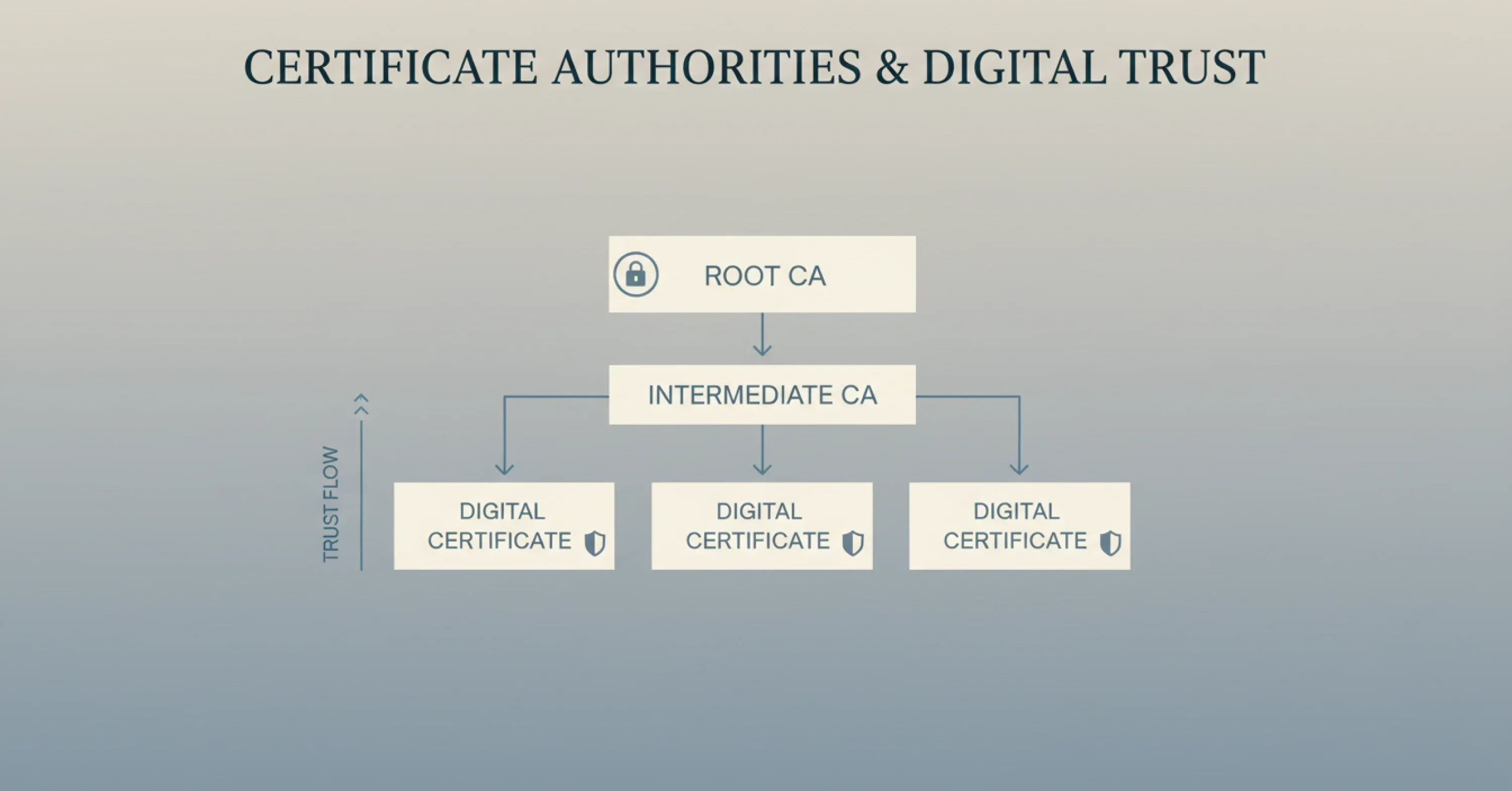
A clean infographic illustrates the digital trust hierarchy, showing how Root Certificate Authorities delegate trust through Intermediate CAs to issue secure digital certificates

You cannot simply create a trustworthy digital signing certificate on your own laptop. For a certificate to be trusted by software like Adobe Acrobat or Microsoft Word, it must be issued by a Certificate Authority (CA).

A Certificate Authority is a trusted entity responsible for verifying the identity of the applicant before issuing a certificate. Think of the CA as a passport office. They check your ID documents, confirm you are a real person or legitimate business, and then issue the credential. When a recipient opens your signed PDF, their software automatically checks the CA’s digital signature to ensure your certificate is valid.

For a comprehensive explanation of this trust workflow, see How Trust Works Online: Verified Digital Signatures.

The Hierarchy of Trust

CAs operate within a strict hierarchy to maintain security.

  • Root CAs: These are the top-level authorities whose root certificates are pre-installed in operating systems and browsers.

  • Intermediate CAs: These authorities are trusted by the Root CAs and handle the day-to-day issuance of certificates to users.

This chain ensures that when you apply a digital signature, the recipient’s computer can trace the trust path back to a source it already knows and trusts. Without this involvement from a CA, a digital certificate is known as "self-signed." Self-signed certificates trigger security warning messages and are generally not legally binding for external contracts.

How to Issue a Digital Signing Certificate (Step-by-Step Guide)

Issuing a digital signing certificate involves a formal application process conducted by a trusted Certificate Authority (CA). While requirements vary by provider and jurisdiction, the overall workflow follows a consistent step-by-step pattern worldwide.

Unlike creating a simple e-signature, obtaining a trusted certificate requires identity validation, approval, and secure installation.

To dig deeper into the certified signing workflow in a real-world context, consult What Is a Certified Digital Signature? Legal Meaning & How to Get One.

Step 1: Choose the Right Type of Certificate

Before applying, you must decide which type of certificate fits your needs. Certificates are categorized by validation level and intended use.

  • Individual Certificates: These are for professionals who need to sign documents personally. They display the individual’s legal name.

  • Organization Validation (OV) Certificates: These identify a specific company. They are often used for automated document signing or departmental seals.

  • Qualified Certificates: In regions like the EU (under eIDAS regulations), these offer the highest legal standing, equivalent to a handwritten signature.

You also need to consider where the certificate will be stored.

  • Hardware Token (USB): The certificate lives on a physical USB stick. You must plug it in to sign.

  • Cloud-Based Signing: The certificate is hosted on a secure server (HSM). You access it via a login and two-factor authentication (2FA).

For further guidance regarding which certificate levels are supported by leading platforms, read What Level Signatures Can You Give on Agrello Platform.

Step 2: Submit Your Order and Identity Documents

Once you select a provider - such as DigiCert, Sectigo, or a regional provider like GlobalSign - you will purchase the license and begin the validation phase. This is the most critical part of the process.

The CA will ask you to provide proof of identity.

  • For Individuals: You typically need to upload a government-issued ID (passport or driver’s license).

  • For Organizations: You will need to provide business registration documents, Articles of Incorporation, or proof of physical address.

Modern CAs have streamlined this step using automated video verification tools, but some high-security certificates may still require a brief video call with a validation agent to confirm that your face matches your ID.

Step 3: Validation and Approval

After you submit your documents, the CA reviews them. This can take anywhere from a few minutes to several days, depending on the complexity of the check.

During this phase, the CA verifies that:

  • The organization exists and is in good standing.

  • The individual requesting the certificate is employed by the organization (if applicable).

  • The contact information provided is accurate.

This rigorous checking is what gives the digital signing certificate its value. It assures relying parties that the identity behind the signature has been thoroughly vetted.

Step 4: Installation and Activation

Once approved, you will receive an email with instructions to retrieve your certificate. The installation method depends on the storage medium you chose in Step 1.

For USB tokens, the CA will often ship a pre-configured USB stick to your physical address. You will need to install specific driver software (middleware) on your computer, plug in the token, and set a PIN code.

For browser-based or file-based certificates, you will follow a secure link to generate and download the certificate file (usually a .p12 or .pfx file). You then import this file into your operating system’s certificate store or your browser settings.

Once installed, your digital signing certificate is ready. When you click "Sign" in a program like Adobe Acrobat, the software will detect the certificate and ask for your PIN or password to apply the signature.

Step 5: Test Your Digital Signature

Before using the certificate for legally significant documents, sign a test file to confirm that the signature validates correctly and is recognized by standard software such as PDF readers or document management systems.

Managing Your Certificates and Avoiding Risks

Issuing the certificate is only half the battle. Managing the lifecycle of these certificates is equally important. Digital certificates have an expiration date, usually ranging from one to three years. If a certificate expires, you lose the ability to sign valid documents until it is renewed.

Poor certificate management is a surprisingly common and costly issue. DigiCert’s July 2025 survey found that 45% of organizations experienced service downtime in the past year due to certificate incidents. Specifically, 37.5% of these incidents were caused by certificates simply expiring without anyone noticing.

For a practical checklist on what to consider and how to avoid gaps in security, check out Are Your Digital Contracts Secure? A Look Into E-signature Security.

The Cost of Neglect

Failing to renew a digital signing certificate doesn't just stop you from signing; it can disrupt entire business workflows. The same DigiCert report highlights that 31% of organizations reported financial losses between $50,000 and $250,000 due to these management issues.

To avoid this, businesses should:

  • Centralize Visibility: Keep a clear inventory of who has a certificate and when it expires.

  • Automate Renewals: Use management platforms that alert admins well before an expiration date.

  • Revoke Compromised Certificates: If a private key is lost or an employee leaves, the certificate must be revoked immediately to prevent unauthorized use.

With Technavio projecting the digital signature market to grow by $45.8 billion through 2028, the volume of certificates companies handle is only going to increase. Establishing a solid management process now is essential for future scalability.

Simplifying the Workflow with Agrello

While understanding the technical issuance process is vital, dealing with USB tokens and driver installations can be cumbersome for daily business operations. This is where modern platforms like Agrello provide significant value. Agrello bridges the gap between complex PKI technology and user-friendly document management.

If you're interested in implementing seamless electronic and digital signing across your workflows, visit the Electronic Signing overview page.

Agrello allows users to manage contracts and apply secure signatures without getting bogged down in the technical minutiae of certificate maintenance. Whether you are using a cloud-based certificate or integrating with national identity schemes like Smart-ID (common in Europe), Agrello streamlines the signing experience. It provides a unified interface where you can create, approve, and sign documents while the heavy lifting of cryptographic security happens in the background.

By using a platform like Agrello, teams can focus on the content of their agreements rather than worrying about whether their USB drivers are up to date. It simplifies the lifecycle of a digital signature, ensuring that your workflow remains fast, compliant, and legally binding.

What is a digital signing certificate?

A digital signing certificate is a secure digital ID issued by a trusted Certificate Authority (CA) that validates your identity and links it to a pair of cryptographic keys. It is used to create digital signatures, ensuring that a document was signed by a specific person and has not been altered since the signature was applied. These certificates are essential for creating legally binding, tamper-evident electronic documents.

Conclusion

A digital signing certificate is more than just a piece of software; it is the foundation of trust in a digital economy. By anchoring your identity to a verified credential, you protect your documents from tampering and ensure your signature carries the full weight of the law. While the issuance process involves strict identity checks and technical steps, the result is a high-security tool that enables safe global business.

As market data suggests, the reliance on these certificates is growing rapidly across Europe, Asia, and the Americas. Whether you are an individual consultant or a large enterprise, obtaining and managing these certificates properly is no longer optional - it is a critical operational requirement. Platforms that integrate these secure signatures into smooth workflows, like Agrello, help ensure that security enhances efficiency rather than hindering it.

A standard electronic signature can be as simple as an image of a handwritten signature or a ticked box. It shows intent to sign but offers little security against tampering or identity fraud. A digital signature, backed by a digital signing certificate, uses cryptography to cryptographically bind your identity to the document. It provides proof of origin and integrity, meaning any change to the document after signing will invalidate the signature.

The time varies by verification level. For a basic individual certificate, issuance can happen in minutes if automated identity checks are used. For high-assurance organizational certificates requiring business document verification, the process typically takes 1 to 3 business days. Some providers offer expedited vetting for an additional fee.

It depends on how the certificate is stored. If your certificate is on a USB hardware token, you can use it on any computer by plugging in the token. If it is a file-based certificate (like a PFX file), you can install it on multiple machines, provided your license allows it. Cloud-based signing certificates are the most flexible, as they can be accessed from any device via a secure login.

Once a certificate expires, you can no longer use it to sign new documents. However, documents signed before the expiration date usually remain valid, provided the signature included a "timestamp." A trusted timestamp proves the signature was applied when the certificate was still active. If you fail to renew on time, you will need to go through the issuance and identity verification process again.

Yes. In most countries, digital signatures created with a valid certificate are legally binding if they meet local regulations (such as eIDAS in the EU or ESIGN/UETA in the US). The certificate must be issued by a trusted authority and include identity verification and tamper protection.

Schedule a Meeting

Book a time that works best for you and let's discuss your project needs.

You Might Also Like

Discover more insights and articles

Close-up of professional woman with text “How do electronic signatures work?” representing digital signing process and e-signature technology

How do electronic signatures work?

You have probably signed a digital document recently - clicked a link, typed your name, or scribbled a signature and pressed “Finish.” It felt quick and effortless. But for managers responsible for important contracts, that simplicity can raise a key question: what actually happened behind the scenes? This article explains how electronic signatures secure documents, verify identity, and create a legally reliable record - in clear, non-technical terms.

Professional woman using digital signature software to quickly sign and send documents online

What’s the fastest way to sign and send documents online?

Paperwork bottlenecks quietly drain productivity in growing companies. If you still print, sign, scan, and email documents, you are wasting hours on a process that should take seconds. This guide shows how to modernize approvals with secure digital tools, mobile signing, and an automated digital signing workflow that works without heavy IT support.

Smiling professional woman signing a document digitally, illustrating how to create a digital signature in Microsoft Word

How to create a digital signature in Microsoft Word

Printing a document just to sign and scan it back is unnecessary. Microsoft Word lets you approve contracts and internal documents directly on your screen using built-in signature features. This guide shows how to create a digital signature in Word, add signature lines, apply document protection, and manage multiple signers. It also explains when Word’s native tools are enough and when a certified external solution is needed for legally critical documents.

Business professionals discussing document security as AI tools detect and prevent forged digital signatures

How can AI detect and prevent forged digital signatures?

You have likely signed dozens of contracts this year without touching a pen. While this speed is great for business, it creates a nagging worry for department heads and process owners. If you can sign a document in seconds with a click, how hard is it for a fraudster to do the same in your name? This article breaks down exactly how artificial intelligence acts as a digital gatekeeper for your contracts. We will look at how AI moves beyond basic security checks to analyze behavior, spot visual tampering, and verify identity in real time. You will learn how modern tools protect your HR, Sales, and Operations documents without requiring a massive IT overhaul.