Defining the Core Concepts
Before we get into the technical mechanics, we need to establish the hierarchy. The most important thing to remember is that "electronic signature" is a broad category, while "digital signature" is a specific, highly secure version of that category. Think of it like "vehicle" versus "armored truck."
What is an electronic signature?
An electronic signature, often called an e-signature, is a catch-all term. It refers to any electronic data that carries the intent of a signature. It is about the user's acknowledgment. The barrier to entry here is low. If you type your name at the bottom of an email or click "I Agree" on a software installer, you have technically created an electronic signature.
Common forms include:
-
A scanned image of your handwritten signature pasted into a Word doc.
-
A tick box on a web form.
-
A typed name in a signature field.
-
A stylus signature on a courier’s handheld device.
While these are convenient, they lack built-in security. Electronic signatures encompass a wide range of methods like recorded voices or simple checkmarks, but they do not inherently prove who clicked the button or if the document changed afterward.
For practical examples and use cases, you can refer to Electronic Signature Examples (Real Documents, Correct Use Cases).
What is a digital signature?
A digital signature is a distinct breed. It focuses on authenticity and integrity. It uses advanced mathematics to attach your identity to the document in a way that cannot be faked easily.
When you use a digital signature, you are not just pasting an image. You are using cryptographic technology to create a unique digital fingerprint of that specific file. If someone changes a single comma in the contract after you sign it, the "fingerprint" breaks, and the signature becomes invalid. This makes it far superior for high-stakes agreements.
The technology behind digital signatures is what sets them apart from basic e-signatures. While an electronic signature captures intent, a digital signature secures the entire package. Let's look at how that works under the hood.
How the Technology Works

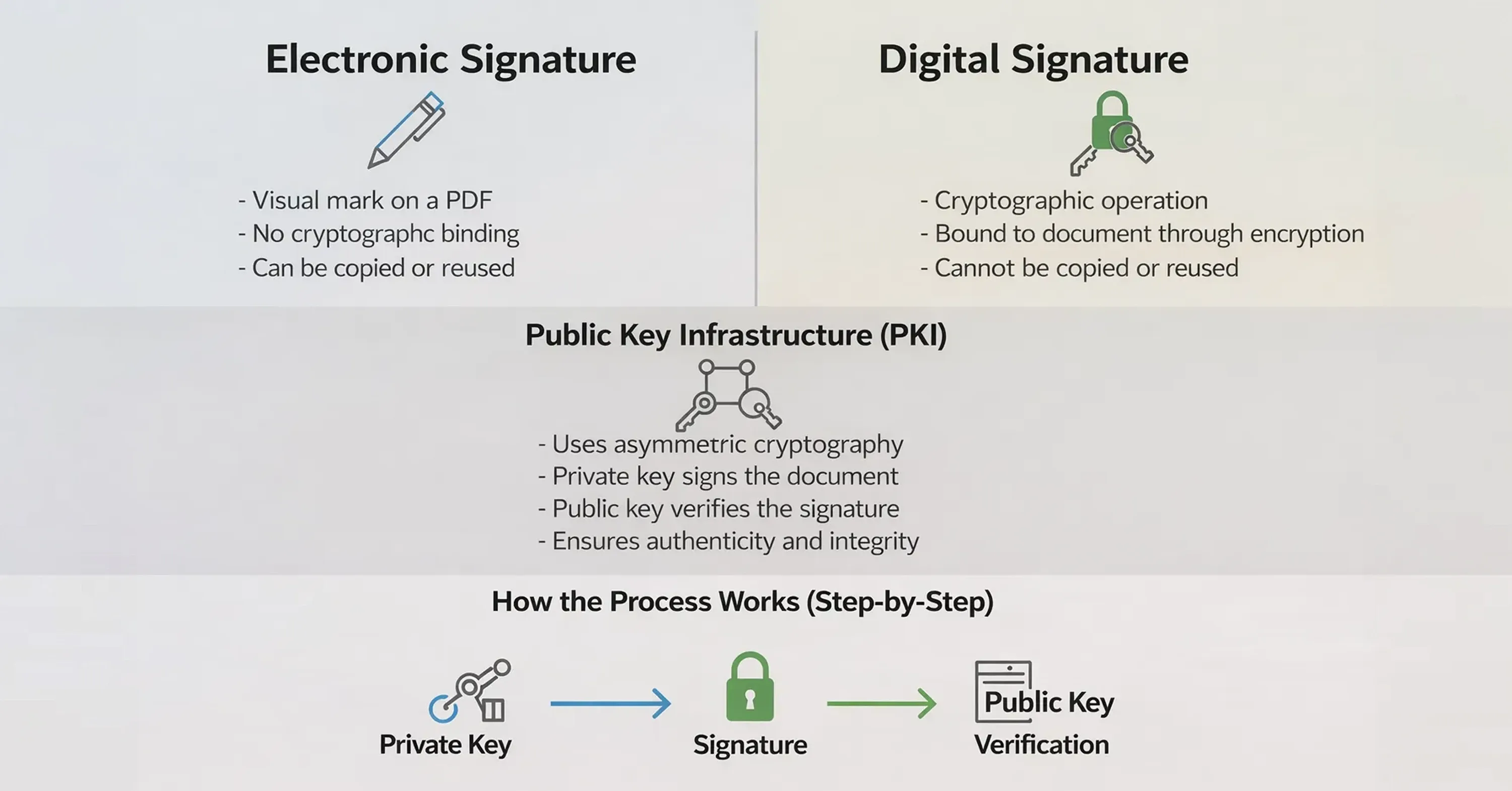
The main difference between electronic and digital signatures lies in what happens in the background. An electronic signature is often just an image layer on top of a PDF. A digital signature is a cryptographic operation.
The mechanics of trust
Digital signatures rely on a system called Public Key Infrastructure (PKI), which is the framework that makes secure digital signatures possible by managing public/private key pairs and digital certificates. PKI uses asymmetric cryptography, where a private key (kept secret by the signer) is used to generate a signature and a public key (freely shared) is used by anyone to verify it. This ensures that digital signatures both authenticate the signer and protect against tampering.
Because digital signatures are a specific type of electronic signature built on PKI, their security is mathematical rather than visual - no one can simply copy and paste a digital signature from one document to another because the signature is uniquely tied to the contents of that exact document and the signer’s private key.
For deeper context on how digital signatures use PKI certificates to verify identity and prevent forgery, see authoritative explanations like “What are digital signatures and how do they work” from Sectigo
Here is how the process flows:
-
Hashing: The software turns the document data into a unique string of characters (a hash).
-
Encryption: The signer's private key encrypts this hash.
-
Verification: The recipient uses the signer's public key to decrypt the hash and compares it to the document they received.
If the hashes match, the document is authentic. If they do not, someone tampered with it.
To understand the framework and steps in detail, visit Digital Signing Certificates: What They Are & How to Issue One.
Identity verification
Basic electronic signatures use basic authentication like phone PINs and email addresses to guess who is signing. It is fairly easy to fake an email address.
Digital signatures often require a digital certificate issued by a trusted third-party known as a Certificate Authority (CA) — an organisation that verifies identities and issues certificates binding a public key to a signer’s identity. CAs act like digital notaries in cryptography, helping others trust that a public key truly belongs to the person or organisation named in the certificate, which is essential for secure verification.
For a comprehensive explanation of trust and digital certificates, see How Trust Works Online: Verified Digital Signatures.
Understanding the technology helps, but usually, people care more about the result: is the document safe? Next, we will examine how these technical differences translate to actual security.
Security and Integrity Comparison
When you compare the difference electronic vs digital signature through a security lens, the gap widens significantly. If you are signing a birthday card, security does not matter. If you are signing a mortgage, it is everything.
Detecting tampering
The biggest risk with digital documents is undetectable alteration. With a standard electronic signature, nothing prevents a bad actor from editing the text of a PDF after the image of your signature has been applied.
Digital signatures solve this problem completely. Digital signatures provide a higher level of security because any change to the document invalidates the signature immediately. The software will alert you that the document is no longer trusted.
Encryption happens at two layers:
-
Signature level: Prevents tampering with the signature itself.
-
Document level: Protects the content, including metadata like IP addresses and timing.
This means a digital signature applies encryption at two levels to lock down the entire file.
Proof of origin
Another key security factor is non-repudiation - a legal concept meaning the signer cannot deny they signed the document. Digital signatures provide this by cryptographically binding the signer’s identity and the signed data, so a signer can’t later claim they didn’t sign or that the document was tampered with. In contrast, basic electronic signatures (like an email click or IP address) offer weaker evidence and are easier to contest. The stronger non-repudiation and cryptographic proof of digital signatures is recognised in many legal frameworks, giving them greater weight in disputes and court settings.
Legal Standards and Regulations
Not all signatures hold the same weight in a court of law. While most countries recognize electronic signatures as valid, they often grant special status to digital signatures due to their reliability.
The eIDAS framework
In the European Union (and followed as a standard by many other regions), the eIDAS regulation (2014/910) provides a clear structure. It defines three levels of signatures.
-
Simple Electronic Signatures (SES): basic data in electronic form (like an email signature). Good for low risk.
-
Advanced Electronic Signatures (AES): linked uniquely to the signer and capable of identifying them.
-
Qualified Electronic Signatures (QES): the gold standard. Created by a qualified device and based on a qualified certificate.
Under these rules, there are two main types of digital signatures: Advanced Electronic Signatures (AES) and Qualified Electronic Signatures (QES).
For a practical breakdown of what you need to know about eIDAS compliance, see What Should You Know About eIDAS When E-signing EU Business Contracts.
Why the distinction matters legally
Under the EU’s eIDAS Regulation, electronic signatures of all types are admissible in legal proceedings and cannot be denied legal effect solely because they are electronic. However, only a Qualified Electronic Signature (QES) has the same legal effect as a handwritten signature - meaning it is automatically presumed valid and binding without needing additional proof. This is because QES is an advanced form of digital signature based on a qualified certificate issued by a trusted provider, giving it the highest level of assurance under the law. In contrast, a basic electronic signature might still be legally valid, but you may have to prove its authenticity if its validity is challenged in court.
Choosing the Right Option for Your Needs
Deciding between an electronic and a digital signature comes down to a trade-off between convenience and security. Not every document needs a digital padlock.
When to use electronic signatures
Standard electronic signatures are fast, easy, and user-friendly. They work well for low-risk, high-volume situations where the identity of the signer is not likely to be challenged.
Use them for:
-
Internal employee onboarding documents.
-
PTO requests and expense reports.
-
Sales proposals and purchase orders.
-
Non-disclosure agreements (NDAs) in early discussions.
In these cases, an electronic signature provides evidence of the signatory's agreement without adding friction to the process.
When to use digital signatures
Digital signatures are necessary when the document has significant legal value, regulatory requirements, or a long shelf life. If you need to prove the document's integrity ten years from now, go digital.
Use them for:
-
Real estate contracts and deeds.
-
Financial transactions and loan agreements.
-
Government forms and tax filings.
-
Intellectual property licensing.
-
Healthcare records requiring HIPAA or other compliance.
In these scenarios, a digital signature provides evidence that the document itself is authentic, protecting you from fraud and tampering.
Making the choice
If you are a freelancer sending a quote, a simple e-signature is fine. If you are a corporation signing a merger, you need a digital signature. Many modern platforms offer hybrid solutions, allowing you to choose the level of security appropriate for each specific document workflow.
Key Differences at a Glance
For quick reference, here is how the two compare across the most critical categories.
The primary difference lies in the mechanism: Electronic signatures capture a user's intent to sign (like a checkbox or typed name), making them suitable for everyday, low-risk agreements. Digital signatures are a secure subset of electronic signatures that use cryptographic encryption to verify the signer's identity and guarantee the document has not been altered, making them essential for legally sensitive or high-value contracts.
Conclusion
Understanding the difference between electronic and digital signatures allows you to protect your business without overcomplicating your workflow. While electronic signatures offer speed and convenience for everyday tasks, digital signatures provide the cryptographic armor necessary for sensitive, high-stakes agreements.
By choosing the right tool for the job, you guarantee that your contracts are not just signed, but also secure, compliant, and legally resilient. Whether you need a quick approval on a project plan or a verified signature on a multi-year contract, knowing the distinction safeguards your most important documents.