What does a free e-signature certificate actually mean?
When people search for a "free e-signature certificate," they mean one of four different things, and the differences matter. The phrase can point to a free signing account on a SaaS platform, a time-limited vendor trial, a government-issued digital ID, or a self-generated test certificate. Each option gives you a way to sign a PDF, but the legal value behind that signature is not the same.
This confusion isn't accidental. Under eIDAS, the European Commission separates electronic signatures into simple and advanced categories, with qualified signatures as the highest tier. A free account on a signing platform doesn't automatically give you a qualified certificate in your own name. So before you click "sign up free," it's worth knowing which of these four things you're actually getting, because that decision shapes whether your signed contract will hold up in a dispute or a cross-border deal.
Is the certificate or the platform free?
A free SaaS offer gives you platform access, while the certificate remains a separate issue. When a SaaS vendor advertises a free plan, you're getting access to their signing interface and the platform's internal signing infrastructure. The vendor owns and manages the certificate that actually binds the signature; a personal qualified credential is issued in your own name.
A personal qualified certificate has to come from a Qualified Trust Service Provider listed on the EU Trusted List, and those providers verify your identity in person or via a notified eID before they issue anything. That means "free certificate" describes the wrapper rather than the cryptographic credential tied to you. If you need a signature with your name embedded in a qualified certificate, use a Qualified Trust Service Provider instead of a free SaaS tier.
What legal weight does a free certificate carry?
Free and trial certificates produce simple or advanced electronic signatures, while qualified signatures require a higher-assurance route. Under eIDAS, only a Qualified Electronic Signature (QES) carries the equivalent legal effect of a handwritten signature across every EU Member State, according to ENISA's 2016 guidelines. Simple and advanced signatures are admissible as evidence, but they don't get the automatic cross-border recognition that QES does.
This matters in practice because the burden of proof shifts. With a QES, the relying party challenging the signature has to disprove it. With a simple signature from a free tool, you have to prove the signer's intent and identity yourself if the contract is contested. For routine internal approvals that's fine. For regulated transactions, it isn't.
Where can you get a free e-signature trial online?
There are four concrete channels: free plans from SaaS e-signature vendors, time-limited trials from paid providers, national digital identity programs, and self-signed or sandbox certificates from test certificate authorities. Each fits a different scenario, and picking the wrong one wastes time.
The e-signature market has grown enough that competition pushes vendors to give away meaningful functionality. Deloitte estimated the global market would reach over USD 14 billion by 2026, with a compound annual growth rate near 28 to 30 percent. That growth funds generous free tiers and trials because vendors know the conversion math works in their favor. The practical implication for you is that you can test almost any commercial platform without paying, as long as you know which channel to use and what you're trying to learn from the test.
Free plans from e-signature vendors
Free plans from e-signature vendors are best for occasional personal signing because bulk business use quickly runs into limits. A permanent free tier lets you keep an account indefinitely, but the volume cap is the catch. DocuSign's free signer account, for example, lets you send up to three documents for signature and store signed agreements, with most of the advanced features stripped out.
That ceiling tells you exactly who these plans are designed for. A landlord sending a single lease or a freelancer closing one client agreement a quarter will fit comfortably. A sales team trying to push through dozens of contracts a week will burn through the cap in a day. If your real usage is somewhere in between, treat the free tier as a long evaluation with a clear upgrade point.
Time-limited trials from paid providers
Time-limited trials unlock full features for 7, 14, or 30 days, which makes them the right way to evaluate a platform before buying. DocuSign offers a 30-day free trial based on its Business Pro plan; reusable templates and advanced fields are included, signing reminders are part of the trial, and no credit card is required at sign-up. Agrello runs a similar trial, and comparable access is also available through PandaDoc and Dropbox Sign.
The practical move is to align the trial window with a real signing project you already have queued up. Testing with synthetic documents tells you whether the buttons work. Running an actual client onboarding sequence through the platform tells you whether the workflow fits your team. That's the only test that matters before you commit to an annual contract.
Government issued digital identities
Government-issued digital identities are the only way to get a legally qualified certificate at no personal cost. Smart-ID, Mobile-ID, national eID cards, and Estonia's e-Residency program issue certificates that meet the QES bar under eIDAS. Smart-ID has been recognised as a Qualified Signature Creation Device since 2018, with over 730,000 users in Estonia alone as of 2024, and using it for personal identification is free and unlimited.
Eligibility is the constraint. You need to qualify through citizenship or residency in a country that runs such a scheme, with e-residency where available. If you qualify, the upside is significant: you get a portable digital identity that works across EU public and private services, and the signatures you produce have the same legal effect as handwritten ones across every Member State.
Self signed and test certificates
Self-signed and test certificates are valid for internal testing only and have no legal standing with third parties. You can generate one with OpenSSL in a single command or create a self-signed digital ID inside Adobe Acrobat; a test CA like Let's Encrypt's staging environment provides a sandbox certificate too. The certificate will sign a PDF and produce a cryptographically valid signature.
A self-signed or test certificate cannot prove your identity to a counterparty, and the same trust gap applies in court or an audit. Without a trusted certificate authority in the chain of trust, the signature fails validation by default in Adobe Reader and any compliance tool. These certificates are useful for developers building integrations or QA engineers running test suites, and they also work for internal demos. They're not for signing contracts you intend to enforce.
How do you sign up for a trial step by step?
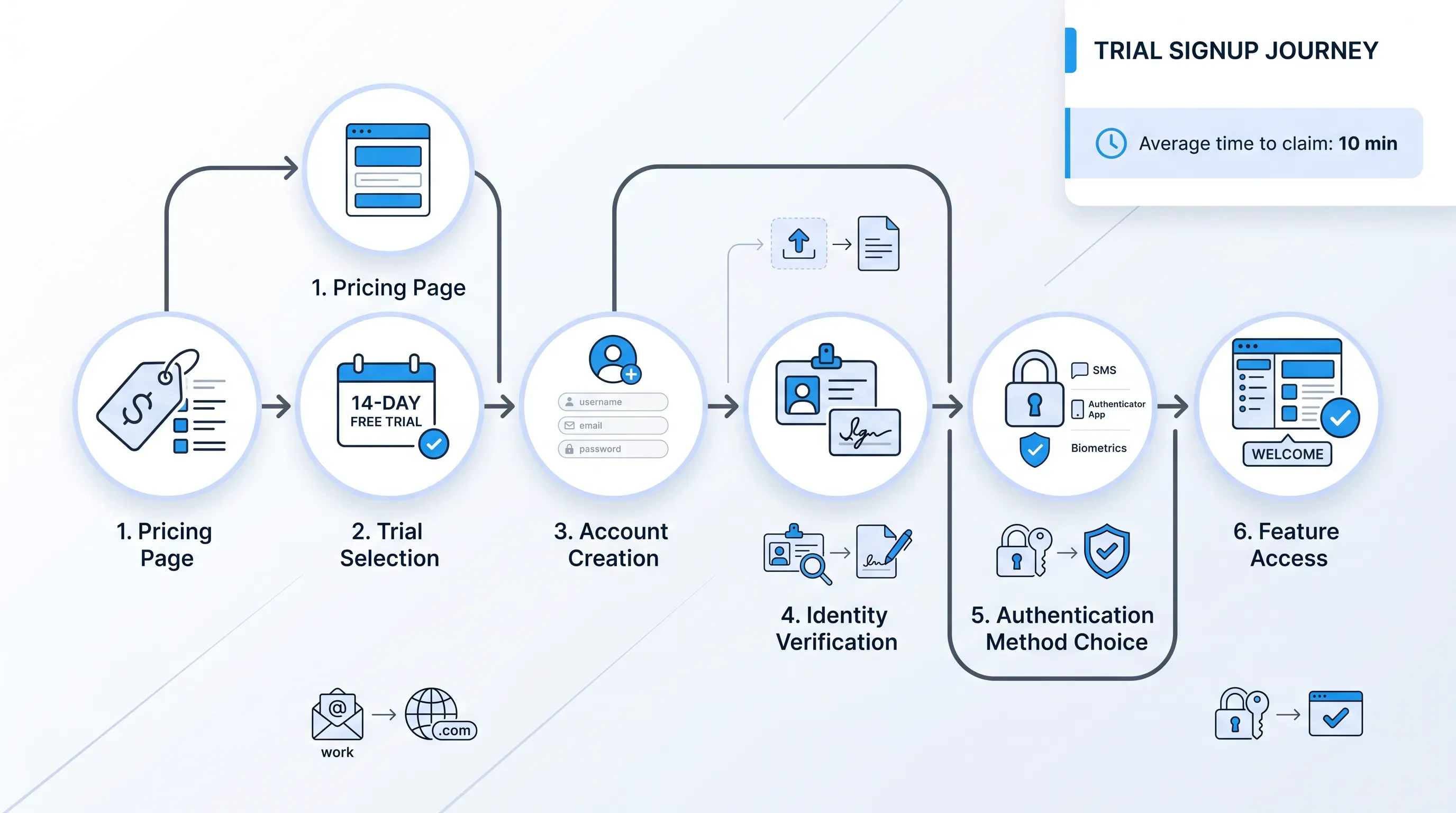
Claiming a trial from a typical commercial provider takes about ten minutes and follows the same pattern across vendors.
Here's the sequence:
-
Go to the vendor's pricing page and select the trial option, labelled "Start free trial" or "Try for free." Major providers such as DocuSign do not require a credit card.
-
Create an account with a work email and a password. The work email matters because vendors tie trial limits and feature unlocks to business domains.
-
Verify your identity. This step varies. Some vendors send an email confirmation only. Others, especially European platforms aiming at QES-level signing, ask you to authenticate through Smart-ID, Mobile-ID, while national eID support appears where the platform offers it.
-
Pick an authentication method for signing. SMS one-time codes and email verification are common options, with eID-based authentication used for stronger identity checks. Stronger authentication produces stronger audit trails.
-
Upload a first document and place signature fields, then send it to a real counterparty or to yourself. This is the moment you find out whether the platform fits your workflow or fights it.
What limitations should you expect from free options?
Free and trial options restrict signature volume, document storage, team seats, branding, integrations, and legal validity outside the issuing jurisdiction. Forrester's Digital Signature And Trust Solutions Landscape Q1 2024 flagged that vendors are shifting investment toward identification and onboarding features, which means the gap between free and paid tiers is widening on exactly the controls that matter for compliance.
That shift has a clear consequence for buyers. The features being moved behind paywalls are the ones regulated industries actually need: strong identity proofing, qualified timestamps, audit-grade event logs, and integrations into CRM and HR systems. Free tiers are increasingly fine for casual signing and less suited for anything tied to a compliance regime. Knowing this in advance prevents the painful midstream switch from a free tool to a paid one halfway through a customer onboarding rollout.
Volume and feature caps
Free tiers support only a handful of documents per month. DocuSign's free signer account caps outbound documents at three total, and most permanent free plans across the market sit in the same range; PandaDoc and Dropbox Sign each offer modest monthly envelope counts, as does SignRequest. Reusable templates, bulk send, advanced fields, and multi-signer routing are paid features.
The deeper restriction is on templates. Without reusable templates, every contract has to be set up from scratch, which destroys the efficiency gain that drove you to e-signing in the first place. If your team sends the same NDA or service agreement repeatedly, a free tier turns into a manual data-entry job dressed up as automation.
Identity verification and audit trails
A signature needs strong KYC and full audit trails to stand up in a dispute, with trusted timestamping part of the same evidentiary package. Free tiers include a basic event log that records who opened the document and when they clicked sign, along with the signer's IP address. They exclude qualified timestamps from a trusted authority and government-grade identity verification.
This is the silent risk in free signing. The signed PDF looks identical to one produced by a paid plan. The difference shows up only when someone challenges the signature in court or during an audit, and the audit trail can't prove the signer's identity to the standard required. Paid plans bundle qualified timestamps and BankID or Smart-ID verification, with tamper-evident sealing added precisely because that's what stands up when challenged.
Cross border legal recognition
Only qualified electronic signatures get automatic cross-border recognition under eIDAS. The European Commission states that a qualified electronic signature has the equivalent legal effect of a handwritten signature across all EU Member States. Simple signatures from free tools don't carry that guarantee, even if they're admissible as evidence locally.
For a business signing within one country and one regulatory regime, this distinction is academic. For a company onboarding clients across several Member States such as France and Germany, with Estonia in the same workflow, or working in regulated industries like financial services or healthcare, it's the deciding factor. A simple e-signature on a banking contract in one EU country does not satisfy the form requirements of the same contract in another. That's where the QES tier earns its cost.
When is a free or trial certificate the right choice?
Free tiers fit personal low-volume use, trials fit vendor evaluation, government eIDs fit citizens needing qualified signatures, and test certificates fit developers only. Matching the option to the use case is the entire decision.
For a freelancer or small operator signing a handful of agreements a month, a permanent free plan from DocuSign or Dropbox Sign covers the workload without any spend, and PandaDoc covers the same pattern too. For a department head evaluating whether to roll out e-signing across a 30-person team, a 30-day full-feature trial gives the right answer faster than any demo call. For Estonian or Latvian residents who need legally binding qualified signatures, Smart-ID delivers QES at zero cost, and Lithuanian residents use the same route. The Estonian government estimates the country saves 2% of its GDP annually through digital signature use, which gives a sense of what a working free QES infrastructure looks like at scale. The lesson for everyone else is to match the tool to the legal weight you actually need instead of the option with the loudest marketing.
When should you move to a paid certificate?
Recurring business contracts, regulated transactions, customer onboarding flows, and any signing volume above the free cap require a paid plan with proper identity assurance. The trigger comes when volume and legal exposure reach the same wall as team size adds pressure at the same time.
The signs are practical. You're hitting the monthly envelope cap by mid-month. Your sales operations specialist is manually re-entering the same contract template for the fifth time this week. A counterparty's legal team has asked for a qualified electronic signature or a stronger audit trail. Your team has grown past one or two seats and you need shared templates and centralized billing. Industry data from Deloitte shows financial services is the fastest-growing e-signing sector through 2026 precisely because regulated industries can't operate on free tiers. If your contracts carry real financial or compliance risk, the cost of a paid plan is small relative to the cost of a contested signature.
Try Agrello free before you commit
If you've read this far, you're past the stage of looking for any free tool and into the stage of looking for the right one. Agrello offers a free trial of its full SME-focused signing and contract management platform, so you can test a production-grade workflow before paying.
The trial includes the parts that matter for real business signing:
-
Strong digital identity verification, with native support for Smart-ID and Mobile-ID, so signatures meet QES requirements for eligible users
-
Bulk contract creation from templates, useful for HR onboarding and recurring client agreements, with sales operations workflows handled through the same setup
-
Cloud storage for signed contracts with searchable metadata, so the audit trail stays in one place
-
A clean signing experience for counterparties who don't have an Agrello account, which keeps turnaround time short
After you Start the trial, run one real contract cycle through it end to end so your team's experience becomes the basis for the decision. If it fits, upgrade. If it doesn't, you've lost nothing but a week.