Why contract speed matters in 2026
Every unsigned contract is a stalled revenue line. The deal is done, the handshake happened - but nothing moves until the paperwork closes. For European teams managing cross-border agreements, that wait carries a second cost: legal exposure when a signature doesn't meet the standard required by the jurisdiction on the other end. Modern e signature software has reframed the contract phase from a bottleneck into a workflow step that finishes in minutes. According to a 2025 study commissioned by DocuSign and conducted with Deloitte, involving 1,400 business leaders, sales teams running advanced agreement management report 29% fewer deal delays, while HR teams complete onboarding paperwork 33% faster.
The gap between teams using e signature software and those still on email-and-PDF workflows keeps widening. A Forrester Total Economic Impact study commissioned by LinkSquares found that turnaround on routine contracts improved by up to 70% after adopting digital workflows with embedded e-signature. So when shoppers compare platforms in 2026, speed is the differentiator that matters most.
How e signature software speeds up signing
The time savings come from removing every step that used to surround the signature. Print, scan, attach, email, wait, remind, re-send, and file. Each of those steps is a place where a contract used to stall for a day or longer. Good e signature software collapses the whole sequence into a single browser tab.
Three feature categories drive most of the speed gains. Each one targets a specific delay in the old workflow.
Reusable templates
Templates eliminate the rebuilding step. Rather than open last quarter's NDA for manual changes, a sales rep loads a saved template with the approved language and sends it after entering two variables. Prep time drops from an hour to under a minute. A rep sending standard NDAs ten times a week saves close to a full workday.
The quality stays consistent too. Legal teams using preapproved templates report a 21% increase in compliance of first drafts, because the risky clauses are already vetted.
Bulk send and sequential signing
Bulk send dispatches the same document to dozens of recipients in one action. It's how HR teams push out updated employee handbooks and how procurement collects vendor acknowledgments; event organizers use the same flow for participant waivers. Without it, someone is copying and pasting email addresses for an afternoon.
Sequential routing handles the opposite problem. When a contract needs five signatures in a specific order, the system pings person two only after person one signs, then person three, and so on. The manual chasing disappears. Common use cases include:
-
New-hire onboarding packets that route from candidate to hiring manager to HR
-
Vendor agreements that need legal review before the CFO signs
-
Multi-party partnership deals with general counsel approvals at each stage
Mobile and in-person signing
The single biggest reason contracts used to take three days was that one party was traveling, in meetings, or away from a desktop. Mobile-friendly signing kills that delay. A buyer can review and sign on a phone during a commute. In-person mode lets a sales rep hand a tablet across the table and close on the spot, which is exactly how car dealerships and real estate agents now operate. Removing the desktop dependency is what gets a contract from sent to signed inside an hour instead of a week.
Top e signature software compared

The market has dozens of players, but five platforms dominate when speed is the deciding factor. Each one approaches the problem differently. Here's how they stack up.
Agrello
Agrello solves a different problem than the other platforms on this list. Where DocuSign, Adobe, and Dropbox Sign handle the signing step, Agrello handles the legal weight behind it.
For European teams, that distinction is the one that matters. A signature created through a standard e-sign platform may not satisfy the requirements of German, Estonian, or Polish contract law without additional verification. Agrello's signatures meet the QES standard - the highest tier under eIDAS - which means they carry the same legal force as a handwritten signature across all EU member states, by default, without add-ons.
That's not a compliance feature. It's risk elimination. One disputed contract in a cross-border deal costs more than an annual subscription.
Templates, mobile signing, and a clean interface are included from the base tier. CRM integration depth is narrower than DocuSign or Adobe, which makes Agrello the right call for legal, HR, and operations teams managing EU agreements - not for sales teams living inside Salesforce.
If your contracts need to hold up in court across borders, Agrello is the only platform on this list built for that from the ground up.
DocuSign
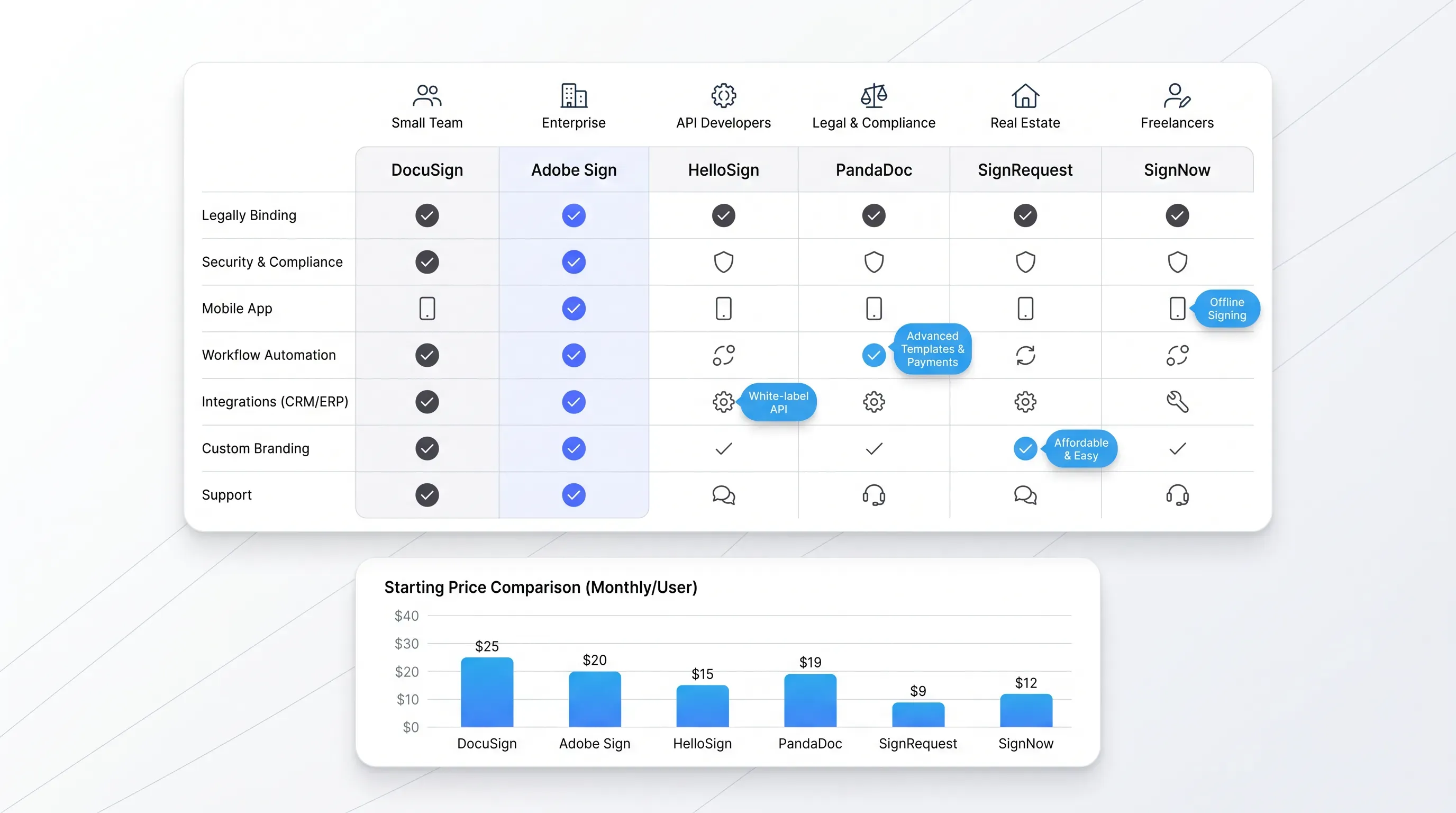
DocuSign is the market leader, and for high-volume teams it's hard to beat on routing logic and template management. The platform supports routing workflows for conditional fields and parallel or sequential paths, and its Salesforce, Workday, and SAP integration set is broad. Pricing starts around $15 per user per month on the Personal plan, with the Business Pro tier near $65 per user per month unlocking bulk send and advanced fields.
DocuSign sits at the top of the speed spectrum once templates are set up, though the initial configuration takes longer than lighter tools. It fits best at enterprise and mid-market companies with high contract volume and existing CRM stacks.
Adobe Acrobat Sign
Acrobat Sign earns its place through deep PDF handling and native ties to Microsoft 365. If your team already lives inside Microsoft 365, the signing flow happens without leaving those apps. Acrobat Sign has 467 verified reviews on Gartner Peer Insights and consistently scores well on integration depth.
Pricing for the Acrobat Pro with e-sign bundle sits at around $23.99 per user per month, which undercuts DocuSign's comparable tier. The catch is send volume. Standard plans cap transactions per user per year, so high-volume sales teams sometimes hit the limit faster than expected. For teams already paying for Adobe Creative Cloud or Acrobat Pro, the marginal cost of adding signing is low.
Dropbox Sign
Dropbox Sign (formerly HelloSign) is the lightweight option. The clean interface and short learning curve let a new user send their first signed contract within ten minutes of signing up. It's the e signature software we'd recommend for a five-person startup that just needs contracts out the door.
Pricing starts at $20 per user per month for the Essentials plan and $30 per user per month for Standard, which adds team templates and branding. Integrations are solid for Dropbox and Google Drive, but if your stack runs deeper than HubSpot and the core supported apps you'll be using Zapier connectors. The trade-off is intentional. Dropbox Sign optimizes for fast adoption rather than enterprise configurability.
PandaDoc
PandaDoc combines document creation and signing into one flow, which removes a step from the usual contract cycle. Instead of moving a draft from Word into a PDF and then into a signing tool, the proposal is built and sent from the same workspace. That matters for sales teams sending custom quotes every day.
Pricing runs from $19 per user per month on the Essentials plan to $49 per user per month on Business, which unlocks CRM integrations across the Salesforce, HubSpot, and Pipedrive ecosystem. PandaDoc is the strongest fit for revenue teams whose contracts are also their sales collateral.
SignNow
SignNow is the budget pick. At around $8 per user per month for the Business plan, it costs roughly half of DocuSign's comparable tier and still includes templates and bulk send. The interface is less polished and the integration library is shorter, but the core signing speed matches the bigger names.
Where SignNow falls short is in advanced routing logic and reporting. Teams that need conditional workflows or detailed analytics on signing cycles will outgrow it. For small businesses sending standard agreements at high volume, it's the value leader.
Features that actually cut turnaround time
Feature lists on vendor sites run to fifty items. Most don't matter. The features that consistently drive the 60% improvement in cycle time are smaller in number and easy to identify.
-
Reusable templates with variable fields. This is the single biggest time saver because it cuts prep from hours to minutes on repeat contracts.
-
Bulk send with merge fields. Essential for any team sending the same document to more than five people at a time.
-
Sequential and parallel routing. Removes the manual chasing that adds days to multi-party contracts.
-
Mobile signing with no app required. A signer who has to download anything will stall the deal.
-
Real-time status notifications. Lets the sender know the moment a contract is opened or signed without checking inboxes.
If an e signature software platform handles those five things well, the rest of the feature list is mostly noise. Audit trails and advanced authentication are useful at scale, but they don't move the turnaround number.
Pricing and value for fast-moving teams
The cheapest e signature software isn't always the fastest. SignNow's $8 entry tier is a strong deal, but if your team is sending fifty contracts a week without templates or bulk send, you'll spend the savings on labor. The math favors paying $30 or $40 per user per month to unlock the speed features.
A rough comparison of where speed features live in each platform:
-
DocuSign: bulk send on Business Pro, around $65 per user per month
-
Agrello: identity-backed QES signing with templates included from the base tier - competitive with Adobe and Dropbox Sign on price, with EU legal compliance built in
-
Adobe Acrobat Sign: bulk send on the for Business tier, around $23.99 per user per month
-
Dropbox Sign: team templates on Standard, $30 per user per month
-
PandaDoc: CRM and template logic on Business, $49 per user per month
-
SignNow: bulk send on Business Premium, around $20 per user per month
For a sales team of ten people closing a contract in four hours instead of four days, the labor savings dwarf the subscription cost within a quarter. That's why pricing alone is rarely the right axis for comparison.
Integrations that remove extra steps
Integrations are where invisible time gets saved. A contract that auto-fills from a Salesforce opportunity and writes the signed PDF back to the opportunity record involves zero manual file transfers. The signer experience is identical, but the operations cost on the sending side drops by half.
DocuSign and Adobe Acrobat Sign lead on native integration depth, with direct hooks into Salesforce, Workday, SAP, NetSuite, and Microsoft Dynamics. PandaDoc is strong on CRM-specific connectors. Dropbox Sign and SignNow rely more on Zapier-style middleware for anything beyond their core supported apps, which works but adds a configuration layer.
The rule of thumb is direct. If a signing tool can't talk to your CRM or HRIS without a third-party connector, you're going to keep doing manual file work. That's where the extra days sneak back into the cycle.
Picking the right tool for your workflow
The right platform depends on what your team sends and how often.
Here's the short version:
-
Sales teams sending quotes and proposals: PandaDoc, because document creation and signing live in one flow.
-
HR teams running onboarding at scale: DocuSign or Adobe Acrobat Sign, both of which handle bulk send and HRIS integrations cleanly.
-
Legal teams managing complex multi-party agreements: DocuSign for routing logic, or Agrello if those agreements cross EU borders and need to hold up in court.
-
Small businesses that need fast contracts without complexity: Dropbox Sign or SignNow, based on whether you prefer interface quality or price.
-
Teams already inside Microsoft 365 or Adobe Creative Cloud: Adobe Acrobat Sign, because the marginal cost is low and the integration is native.
If you're not sure, start with the platform that fits your existing stack. The integration savings outweigh small differences in the signing UI.
Final take and next step
The right e signature software is the one that fits your workflow. A ten-person startup running on Google Workspace doesn't need DocuSign's enterprise tier, and a thousand-person company with Salesforce shouldn't be wrestling with Zapier connectors. Pick two shortlisted platforms and test a real contract type your team sends weekly, then measure the turnaround difference yourself.
If you want a platform built specifically for fast, compliant signing across borders, Agrello is built for teams where the signature has to carry legal weight - QES-compliant, identity-verified, and ready for any EU jurisdiction out of the box. Start a free trial with Agrello and measure how much your contract cycle shortens in the first week.