Understanding AI Signature Design and Generation
Artificial intelligence has moved far beyond simple cursive fonts. Modern algorithms can now generate unique, personalized visuals that mimic the stroke, pressure, and flow of human handwriting. This process allows functional managers in HR or Operations to create consistent signature styles for their teams without asking every employee to draw on a trackpad.
Recent research confirms just how convincing these generations have become. A 2024 study published in Applied Sciences found that AI-generated handwritten signatures closely matched real ones, achieving an average structural similarity index (SSIM) of 0.9806 and a root mean square error (RMSE) of 0.1819 against originals. This means the digital output is nearly indistinguishable from a pen-and-paper counterpart to the naked eye.
AI achieves this level of realism through several key mechanisms:
-
Stroke Variation: Algorithms adjust line thickness to simulate the pressure of a pen tip hitting paper.
-
Natural Imperfections: Unlike static fonts, AI adds subtle irregularities in spacing and slant to make the signature feel organic.
-
Contextual Flow: The software analyzes how letters connect, ensuring the transition between characters looks fluid rather than disjointed.
While the visual quality is impressive, the primary value for a business lies in scalability. You can generate distinct styles for different departments or seniority levels instantly. However, creating a pretty image is only half the battle; ensuring it serves as a valid mark of intent is the next critical step.
Legal Validity: Electronic vs. Digital Signatures

A common misconception is that a signature must look exactly like your driver's license to be legally binding. In the business world, the legality of a signature depends more on the "intent to sign" and the security of the process than the artistic quality of the mark itself. It is vital to distinguish between a generated image and a secure digital signature.
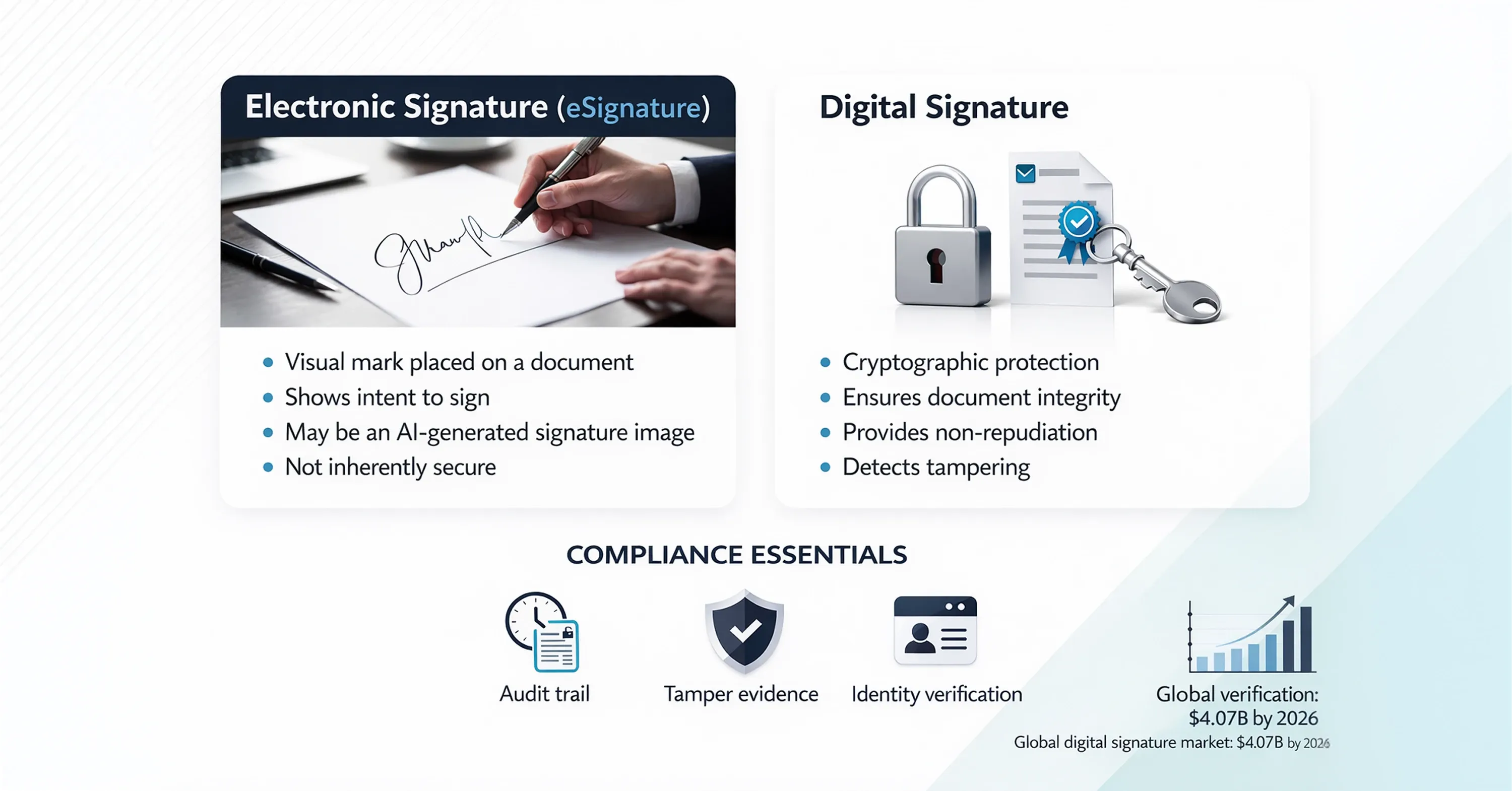
An AI-generated signature acts as an "electronic signature" (eSignature). It is the visual representation you place on a document. For high-stakes contracts, this visual must be backed by a "digital signature," which is a cryptographic technology that secures the document's integrity. As the global e-signature market grows, projected to reach $4.07 billion by 2026, understanding this distinction is essential for compliance.
When implementing these tools, keep these compliance factors in mind:
-
Audit Trails: The visual signature must be linked to a log that records who signed, when, and from what IP address.
-
Tamper Evidence: If the document is altered after signing, the signature should become invalid.
-
Identity Verification: The system must prove that the person using the AI signature is who they claim to be.
To dive deeper into how electronic and digital signatures differ from a legal and technical perspective, and why digital signatures offer superior non-repudiation and security, see What’s the difference between electronic and digital signatures?.
This is where platforms like Agrello provide significant value. Agrello allows users to upload or generate personalized signature images while handling the heavy lifting of cryptographic security and audit trails in the background. By combining a personalized AI-designed look with a legally robust platform, businesses get the best of both worlds: personal branding and legal safety.
Once you understand the legal groundwork, the next logical question is how to apply this technology across a company without causing administrative headaches.
Why a Signature Image Alone Is Not a Legal Electronic Signature
Placing a handwritten-style image into a PDF file does not automatically make it a legally valid electronic signature.
A static signature image is simply a visual element. It does not contain cryptographic protection, does not bind the signer’s verified identity to the document, and does not ensure document integrity. On its own, it carries no independent legal strength.
Even a simple electronic signature (SES) typically relies on a signing certificate issued and managed by a trusted platform provider such as Agrello or DocuSign. The certificate links the signer’s identity to the document and creates a verifiable audit trail.
In the case of Qualified Electronic Signatures (QES), the standard is significantly higher. The signing certificate is issued directly to an individual or legal entity by an accredited authority - such as a government body or regulated financial institution. The certificate provides the legal validity, not the visual signature image.
An AI-generated handwritten signature may enhance presentation and branding. However, the enforceability of an agreement always derives from the underlying certificate and secure signing process - never from the image itself.
Practical Applications for Mid-Market Teams
For companies with 50 to 300 employees, consistency and speed are vital. You likely do not have a dedicated IT security team to manage complex hardware for every signer. AI signature design offers a lightweight solution for functional managers who need to standardize external communications and contracts.
Consider the volume of documents your teams handle. Sales proposals, offer letters, and vendor agreements all require sign-offs. Using a standardized, professional-looking AI signature can elevate the perception of your brand. It removes the "messy" look of mouse-drawn scrawls or the impersonal feel of standard Times New Roman text stamps.
Here is how different departments can leverage personalized AI signatures:
-
Human Resources: generate warm, handwritten-style signatures for offer letters to make new hires feel welcome before they even join.
-
Sales Teams: use consistent, high-quality signatures on proposals to project a unified and professional corporate identity.
-
Executive Management: authorize a specific AI-generated style for routine approvals, saving time on high-volume internal documents.
Major players are recognizing the importance of this technology. For instance, DocuSign recently announced a significant investment to expand its AI capabilities, signaling that intelligent document handling is the future standard.
For a practical look at how AI-powered signature automation improves document workflows and reduces manual effort for growing organizations, read How can AI help me automate document signing?.
Adopting these tools improves workflow, but it also introduces new questions regarding security. If an AI can create a signature, can it also fake one?
Security Risks and Verification Challenges
As AI becomes better at creating legitimate signatures, it unfortunately becomes better at forgery. The ability to generate realistic handwriting is a double-edged sword that security teams must monitor. A functional manager does not need to be a cybersecurity expert, but awareness of the risks is necessary when choosing a provider.
Recent studies highlight the sophistication of these threats. A 2024 paper on generative adversarial networks (GANs) reported that certain AI models achieved 80% to 100% success rates in spoofing signature verification systems. This means a standalone image of a signature is no longer enough proof of identity on its own.
However, defensive AI is advancing just as quickly. Verification systems are now using "Siamese networks" and other advanced models to detect forgeries with incredible precision. Research published in Scientific Reports notes that new verification models have achieved 99.06% accuracy in distinguishing real handwriting from fakes.
To mitigate risks, follow these guidelines:
-
Never rely solely on the image: Always use a secure platform that validates the metadata, not just the pixels.
-
Use Multi-Factor Authentication (MFA): Ensure the person applying the signature verifies their identity via email or SMS.
-
Centralize Control: Tools like Agrello help you manage who has access to apply specific signatures, reducing the risk of unauthorized use.
For a comprehensive guide to how AI-driven tools detect and prevent digital signature forgeries—including technical and behavioral safeguards - see How can AI detect and prevent forged digital signatures?.
Balancing these risks with the benefits of digitization ensures your organization remains efficient and secure.
What is an AI-generated handwritten signature?
An AI-generated handwritten signature is a unique digital image created by artificial intelligence algorithms that mimic the stroke, pressure, and stylistic nuances of human handwriting. Unlike standard cursive fonts, which repeat identical character shapes, AI signature tools generate variations in spacing, slant, and line thickness to produce a result that looks organic and personalized. These signatures are primarily used for their visual appeal and professional branding on electronic documents, while the legal validity is typically provided by the underlying digital signature software that records the transaction's metadata and audit trail.
Conclusion
Can AI create handwritten-style personalized signatures? Yes, and it does so with remarkable accuracy and aesthetic appeal. For mid-sized companies, this technology offers a practical way to maintain professional branding and a personal touch without sacrificing the speed of digital workflows.
However, the visual component is just the surface. The true value comes from pairing these authentic-looking designs with secure platforms that ensure legal compliance. By understanding the difference between the art of the signature and the security of the transaction, you can modernize your document processes confidently.