Business professionals discussing document security as AI tools detect and prevent forged digital signatures

How can AI detect and prevent forged digital signatures?

You have likely signed dozens of contracts this year without touching a pen. While this speed is great for business, it creates a nagging worry for department heads and process owners. If you can sign a document in seconds with a click, how hard is it for a fraudster to do the same in your name? This article breaks down exactly how artificial intelligence acts as a digital gatekeeper for your contracts. We will look at how AI moves beyond basic security checks to analyze behavior, spot visual tampering, and verify identity in real time. You will learn how modern tools protect your HR, Sales, and Operations documents without requiring a massive IT overhaul.

Content authorBy Toomas PihlPublished onReading time8 min read

The Growing Risk in Digital Workflows

Moving from wet ink to digital workflows has streamlined operations, but it has also changed the nature of forgery. In the past, a forger needed to physically practice a signature to fool a handwriting expert. Now, the threat comes from stolen credentials, copy-pasted images, and manipulated PDF metadata.

Most standard digital solutions rely on cryptography. This confirms that the document hasn't been changed after signing. However, cryptography cannot always prove who clicked the button if their login details were compromised. This is where the limitations of basic electronic signatures become apparent for mid-market companies handling sensitive data.

To close this security gap, modern platforms are integrating AI signature verification. This technology adds a layer of intelligence that watches the signing process itself, not just the final document. It allows teams to trust that the person behind the screen is legitimate, ensuring that contracts hold up during audits or disputes.

If you're interested in a practical guide for automating document signatures and identity checks, see How do I generate a digital signature automatically with AI?.

How AI Signature Verification Analyzes Patterns

AI does not look at a signature the way a human does. Instead, it breaks down the signing event into thousands of data points to find inconsistencies that the naked eye would miss. This process happens in the background, so the user experience remains fast and simple.

Machine learning models are trained on millions of legitimate and fraudulent transaction examples. By comparing a new signature request against these vast datasets, the AI can instantly flag probability scores for fraud. This goes far beyond checking if a password is correct.

Here is how the technology breaks down the verification process:

  • Visual Pattern Recognition: The AI compares the visual structure of a signature (if drawn) against known profiles, checking for unnatural jaggedness that suggests a robotic attempt or a cut-and-paste job.

  • Device Fingerprinting: It analyzes the device being used. If a user typically signs from a laptop in London but suddenly signs from a mobile device in a different country, the system flags the anomaly.

  • Metadata Inspection: The software looks at the underlying code of the document to ensure layers have not been injected to hide terms or alter signature fields.

By handling these checks automatically, AI removes the burden of manual review. This is crucial because AI-based identity verification can eliminate up to 90% of human errors in the verification process.

Want more info on the technical differences between simple e-signatures and cryptographically secure digital signatures? Check out What’s the difference between electronic and digital signatures?.

Using Biometrics to Verify Identity

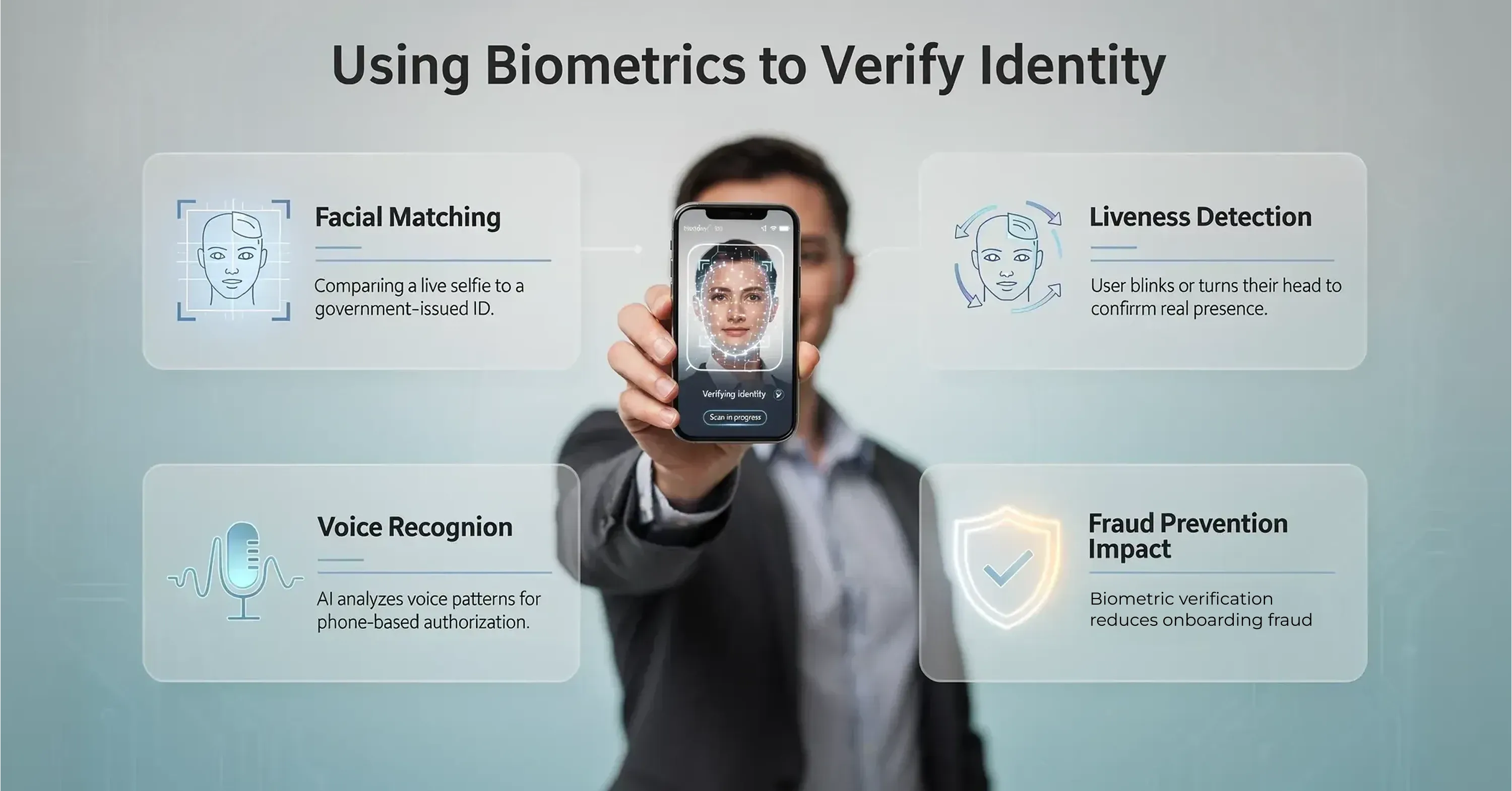
User verifying identity with biometric authentication, including facial matching, liveness detection, and voice recognition

The most effective way to prevent forgery is to confirm the signer’s physical presence before the digital signature is applied. AI plays a massive role here through biometric authentication. This ensures that the person holding the device matches the ID on file.

In high-stakes scenarios, such as onboarding a remote employee or closing a large sales deal, simple email verification is often insufficient. AI-driven systems can request a quick facial scan or liveness check. This prevents "presentation attacks," where a fraudster uses a photo or video of the victim to bypass security.

Key biometric safeguards include:

  • Facial Matching: Comparing a live selfie to a government-issued ID uploaded during the process.

  • Liveness Detection: instructing the user to blink or turn their head to prove they are a real human and not a static image.

  • Voice Recognition: Analyzing voice patterns for phone-based authorizations.

The impact of this technology on fraud reduction is measurable. For example, incorporating biometric face matching with liveness checks helped one bank cut onboarding fraud by 50%. This level of security is becoming standard, with 90% of companies expected to be using biometric technology in recent years.

To see real-world biometrics and advanced signature case studies, visit Electronic Signature Examples (Real Documents, Correct Use Cases).

Detecting Behavioral Anomalies

Beyond physical features, AI excels at analyzing behavior. Every user has a specific "digital rhythm" when they interact with software. This concept is known as behavioral biometrics, and it is incredibly difficult for forgers to replicate.

When a legitimate user signs a document, they navigate the interface in a predictable way. A bot or a fraudster often moves differently. They might move the mouse in perfectly straight lines (robotic behavior) or hesitate significantly at steps where a real user would be decisive.

AI monitors these subtle cues to detect forgery attempts:

  • Keystroke Dynamics: The speed and rhythm of typing a name or password.

  • Mouse Movement: The path taken to click the "Sign" button.

  • Session Timing: How long it takes to review and sign the document compared to the average human reading speed.

If the behavior deviates from the norm, the system can trigger a step-up authentication challenge, asking for a second factor like an SMS code. This dynamic approach keeps the process smooth for legitimate users while blocking bad actors.

For an overview of document automation and the role of AI across industries, check out How can AI help me automate document signing?.

Reducing Costs and Complexity for Mid-Market Teams

For department heads in companies with 50 to 300 employees, the primary concern is often balancing security with efficiency. Implementing AI signature verification might sound expensive, but it actually reduces operational costs.

Manual verification is slow and prone to error. Chasing down employees to confirm they signed a document or dealing with the legal fallout of a disputed contract eats into productivity. By automating these checks, companies significantly lower their risk profile and administrative burden.

Consider the financial impact:

This efficiency is driving massive growth in the sector. The global signature verification market size was USD 2.42 billion in 2024 and is growing rapidly as more businesses realize the ROI of automated security.

For more on choosing platforms and comparing modern tools, see Best Digital Signature Tool of 2025 (Security-Focused Comparison).

Choosing the Right Tool for the Job

You do not need to build these AI models yourself. The goal for a mid-market leader is to find a digital signature platform that has this technology built-in.

The market is shifting away from simple "e-signing" tools toward comprehensive contract management platforms. These solutions handle the document creation, signing, and verification in one place. Platforms like Agrello are designed for this specific need, offering robust signature security features that work automatically in the background without confusing the end-user.

When evaluating a solution, look for these features:

  • Integrated Identity Verification: Can the tool verify IDs without third-party plugins?

  • Detailed Audit Logs: Does it record the IP address, timestamp, and verification method?

  • User-Friendly Interface: Is it simple enough for your sales team to use without training?

By selecting a platform that prioritizes both security and usability, you ensure that your digital contracts are legally binding and tamper-proof. Agrello and similar modern tools allow operations teams to deploy enterprise-grade security with consumer-grade ease of use.

What is AI Signature Verification?

AI signature verification is a security process that uses machine learning to authenticate digital signatures by analyzing visual patterns, signer behavior, and document metadata. Unlike traditional visual checks, AI evaluates thousands of data points - such as stroke speed, device fingerprints, and biometric markers - to detect forgeries, deepfakes, and unauthorized account access in real time. This technology enables businesses to prevent fraud and ensure document integrity without slowing down the signing workflow.

Conclusion

Forged signatures are no longer just about handwriting; they are about digital identity theft and manipulated data. As your company relies more on digital contracts, trusting a simple checkbox is a risk you cannot afford to take.

AI provides the solution by working silently in the background to verify identities and detect tampering. It allows HR, Sales, and Operations leaders to move fast without sacrificing security. By adopting tools that utilize AI signature verification, you ensure that every contract you sign is authentic, compliant, and secure.
AI models are trained to recognize natural variations in a person’s signature versus the hesitation marks typical of a forgery. While humans are inconsistent, the "flow" and geometry of their writing usually remain stable. AI looks at these underlying geometric patterns rather than just doing a pixel-by-pixel overlay, allowing it to accept genuine variations while flagging structural mismatches.

Yes, AI can detect copy-pasted signatures by analyzing the image metadata and the document layer structure. When an image is pasted, it often lacks the biometric data (like pressure or speed) associated with a native digital signature. AI tools can also spot pixel-level inconsistencies or "halos" around the signature that indicate it was lifted from another source.

AI verification itself is a security measure that strengthens the legal weight of a digital signature. The signature itself is legally binding if it meets regional regulations like eIDAS in Europe or the ESIGN Act in the US. AI provides the necessary evidence (audit trails, identity proof) to defend the validity of that signature in court, making it harder for a signer to repudiate it later.

No, you typically do not need special hardware. Modern AI verification works with standard smartphones and computers. For biometric checks, the software uses the device's built-in camera. For behavioral analysis, it uses standard input data from the mouse, keyboard, or touchscreen. This makes it easy to deploy across a company without buying new equipment.

No. AI does not replace legally required digital certificates. It adds an extra security layer by verifying who actually signed and how the signature was created, helping prevent misuse, fraud, and disputes - especially when qualified signatures are not mandatory.

Schedule a Meeting

Book a time that works best for you and let's discuss your project needs.

You Might Also Like

Discover more insights and articles

Close-up of professional woman with text “How do electronic signatures work?” representing digital signing process and e-signature technology

How do electronic signatures work?

You have probably signed a digital document recently - clicked a link, typed your name, or scribbled a signature and pressed “Finish.” It felt quick and effortless. But for managers responsible for important contracts, that simplicity can raise a key question: what actually happened behind the scenes? This article explains how electronic signatures secure documents, verify identity, and create a legally reliable record - in clear, non-technical terms.

Professional woman using digital signature software to quickly sign and send documents online

What’s the fastest way to sign and send documents online?

Paperwork bottlenecks quietly drain productivity in growing companies. If you still print, sign, scan, and email documents, you are wasting hours on a process that should take seconds. This guide shows how to modernize approvals with secure digital tools, mobile signing, and an automated digital signing workflow that works without heavy IT support.

Smiling professional woman signing a document digitally, illustrating how to create a digital signature in Microsoft Word

How to create a digital signature in Microsoft Word

Printing a document just to sign and scan it back is unnecessary. Microsoft Word lets you approve contracts and internal documents directly on your screen using built-in signature features. This guide shows how to create a digital signature in Word, add signature lines, apply document protection, and manage multiple signers. It also explains when Word’s native tools are enough and when a certified external solution is needed for legally critical documents.

A professional stands before a whiteboard diagram with text explaining PAdES, XAdES, and ASiC digital signature formats

What are PAdES, XAdES, and ASiC signature formats?

You may have seen unfamiliar acronyms like PAdES, XAdES, or ASiC when signing documents digitally. This guide explains the three main EU e-signature formats in simple terms and shows when each should be used. By the end, you’ll know how to choose the right format to keep your contracts compliant, secure, and future-proof.