Woman using a tablet to sign documents digitally, illustrating how to bulk sign multiple documents with AI and eSignature software.

How can I bulk sign multiple documents with AI?

Arriving on a Monday morning to hundreds of contracts awaiting your signature is a frustrating reality for many managers. Manually signing each document is slow, repetitive, and error-prone - which is why modern teams are turning to AI-powered bulk signing to handle the workload in minutes instead of days. This guide shows how to implement bulk digital signing quickly and without complex IT projects. You will learn how to structure your data, create compliant templates, and execute large signing batches securely - using modern tools designed specifically for HR and operations teams that need speed, accuracy, and full control

Content authorBy Toomas PihlPublished onReading time12 min read

Overview

AI-powered bulk signing enables organizations to generate, sign, and send hundreds of documents in a single streamlined workflow - without manual effort or complex implementation. By combining standardized templates, structured data, and secure digital signatures, modern platforms eliminate repetitive tasks while maintaining full compliance and control.

This guide explains how to prepare your documents and data, execute large signing batches efficiently, and apply bulk signing across common use cases such as HR onboarding, renewals, and vendor agreements.

The evolution of bulk digital signing

Digital signing once meant opening each file, placing a signature, and sending it individually. While faster than paper, this process still required manual effort for every agreement - a serious bottleneck as document volumes grew. The rapid adoption of e-signature tools highlights this shift, with DocuSign reporting 1.5 million customers worldwide as of early 2024.

Today, organizations are moving from one-by-one processing to batch operations to save time and reduce costs. Studies show that going paperless with e-signatures can cut document-related expenses by roughly 80–97% per employee, making automation a clear business advantage rather than a convenience.

Industry forecasts confirm this is a long-term shift. Analysts expect the global digital signature market to grow by USD 45.78 billion between 2024 and 2028, signaling that bulk signing is becoming standard infrastructure for scaling companies.

However, success requires more than software alone. Teams must treat documents as structured data combined with standardized templates, not as isolated files. This workflow shift enables AI systems to generate, sign, and distribute hundreds of agreements consistently. For a deeper look at automated document workflows, see How can AI help me automate document signing?.

Standardizing your document templates

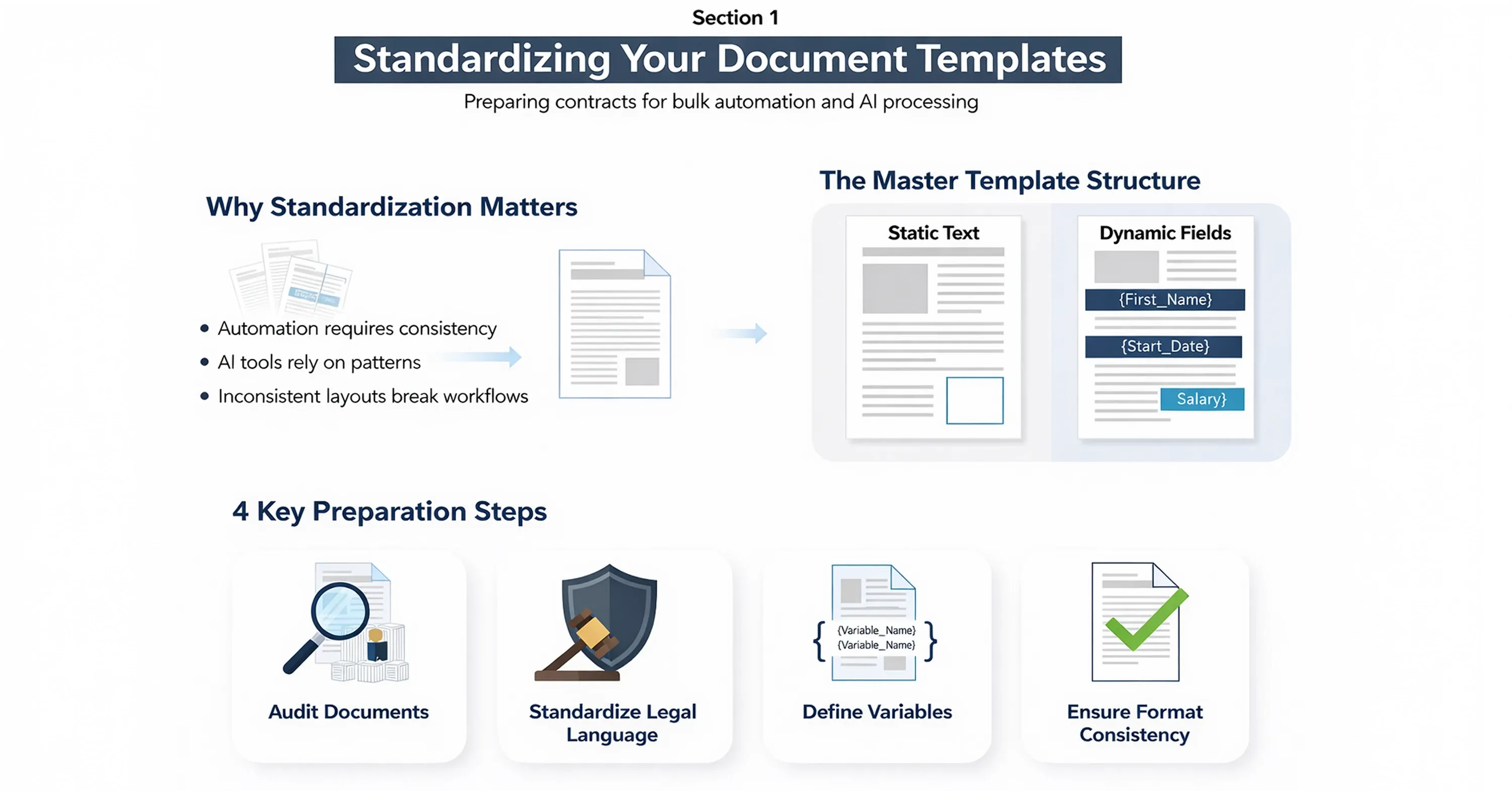
Infographic showing how to standardize document templates for AI bulk automation, including static text, dynamic fields, and key preparation steps

Before you can sign hundreds of documents instantly, you must ensure those documents are uniform. AI and bulk processing tools rely on patterns. If every contract has a different layout or inconsistent wording, the automation will fail. The first step in the process is creating a master template that serves as the skeleton for all your individual agreements.

You should identify the static text that remains the same across all documents and the dynamic fields that change for every recipient. Common dynamic fields include the recipient's name, email address, contract start date, salary figures, or specific deliverables. By isolating these variables, you create a "placeholder" structure that the software can populate automatically.

  • Audit your current documents: Gather a sample of 20 to 50 past contracts to see where variations occur naturally.

  • Lock down legal language: Ensure your legal team approves a standard clause set so you do not have to review the body text of every single file later.

  • Define your variables: Create a clear list of data points that need to be merged into the document, such as {{First_Name}} or {{Renewal_Date}}.

  • Test format consistency: Make sure your formatting (bolding, font size) is consistent around these variable placeholders to avoid visual glitches in the final PDF.

This preparation phase is critical because it eliminates the need for manual review. When you trust the template, you do not need to read every single page of a 500-page batch. You only need to verify the data that flows into it. This standardization is what allows platforms like Agrello to function effectively, as they are designed to ingest these templates and map them to your data sources seamlessly.

To learn actionable tips and a clear walk-through of template mapping, see How to Create a docusign contract template Step-by-Step.

Once your templates are rigid and ready, you can move on to the fuel that powers the bulk signing engine: your data.

Preparing and cleaning your recipient data

The most common cause of failure in a bulk digital signing campaign is bad data. If your spreadsheet has a typo in an email address or a missing value for a required field, the system will flag an error or, worse, send a document with blank spaces. AI tools are smart, but they cannot guess a missing surname or correct a malformed email domain without guidance.

Data preparation involves aggregating all your signer information into a structured format, typically a CSV (Comma Separated Values) or Excel file. This file acts as the "truth" for your bulk batch. Every row in your spreadsheet represents one document, and every column represents a variable in your template.

  • Verify email addresses: Use a quick validation check to ensure no emails have spaces, missing "@" symbols, or incorrect domains.

  • Check for special characters: Ensure names with accents or unique characters are encoded correctly so they appear properly in the final signature block.

  • Standardize date formats: If your template expects "MM/DD/YYYY," ensure your spreadsheet does not use "DD-Mon-YY" to prevent confusion.

  • Remove duplicates: Scan your list to ensure you are not sending two contracts to the same person, which can look unprofessional and cause legal confusion.

Clean data ensures that when you hit "send," the process runs smoothly. It also protects your reputation. Nothing ruins the professional image of an automated HR process faster than an email addressed to "Dear NULL."

With a clean dataset and a robust template, you have completed the hardest parts of the setup. Now you are ready to bring them together in the execution phase.

Executing the bulk signature process

This is the moment where the actual work happens. You will upload your template and your data file into your electronic signature platform. Modern platforms use AI to map the columns in your spreadsheet to the fields in your document. For example, the system will recognize the column header "Employee Name" and suggest linking it to the {{Employee_Name}} tag in your contract.

During this stage, you will also configure the signing order and permissions. Do you need to sign the document first, or does the recipient? In a bulk scenario, it is often more efficient for you to apply your signature to all documents simultaneously as the sender, and then blast them out to the individual recipients.

  • Upload and map: Import your CSV and confirm that the software has correctly identified all variables.

  • Apply your signature: Use the "bulk sign" feature to apply your digital signature to all 300 (or 3,000) copies in one action.

  • Set expiration dates: Configure the envelope to expire after a certain period (e.g., 7 days) to create urgency.

  • Preview a random sample: Always click through 3–5 random files in the batch preview to ensure the data merged correctly before final delivery.

This execution phase is where the efficiency gains become tangible. Instead of spending a week on renewals, you complete the task in minutes. Tools like Agrello are built to make this specific workflow intuitive, allowing functional managers in HR or Operations to handle the process without needing IT to run a script for them. By providing a user-friendly interface for bulk operations, these platforms democratize the power of automation.

If you want a deeper look at the features that make this possible, visit How can AI help me automate document signing?.

Once the documents are sent, the focus shifts from execution to management. You need to know who has signed, who hasn't, and if the process is secure.

Important note: Bulk signing vs QES limitations

While most modern electronic signature platforms support true bulk signing - allowing users to select multiple documents and apply a signature in one action - this approach does not always apply to Qualified Electronic Signatures (QES).

Agrello enables efficient bulk signing workflows for standard electronic signatures, where users can bulk-select documents and sign them in a single action.

However, when using QES, each signature is typically linked to a qualified certificate issued directly to an individual or legal entity by a qualified trust service provider (QTSP), government authority, or accredited financial institution. In many jurisdictions, this certificate must be reactivated for every signature event - often requiring PIN entry or secure authentication.

For this reason, fully automated one-click bulk signing may not always be compliant when using QES. While document generation and batch sending can still be automated, the signature activation itself may legally require individual confirmation.

Security and compliance in batch processing

When you automate a legal process, security is paramount. A mistake in a manual process affects one document; a mistake in a bulk process affects hundreds. Therefore, the security protocols of your chosen solution must be robust. You need to ensure that every generated document has a unique digital fingerprint and an audit trail that stands up in court.

Bulk signing does not mean bypassing security steps. In fact, it often strengthens them. Automated systems generate detailed logs of exactly when a document was created, sent, viewed, and signed. This is often more reliable than manual filing systems where papers can go missing.

  • Audit trails: Ensure your provider creates a separate certificate of completion for each individual envelope in the batch.

  • Identity verification: For high-value contracts, consider enabling two-factor authentication (2FA) via SMS for signers.

  • Data encryption: Verify that the data transfer from your spreadsheet to the cloud platform is encrypted.

  • Access control: Limit who in your organization has the permission to initiate bulk signing campaigns to prevent unauthorized mass agreements.

These security measures translate into real business value. The market acknowledges this, with projections showing the e-signature market to grow from USD 13.4 billion in 2025 to USD 70.2 billion by 2030. This massive investment in the sector is largely driven by the improved security and compliance capabilities that come with premium e-signature tools.

For essential security and compliance concepts, explore Electronic Signature Definition: Meaning, Legality & Use Cases.

Furthermore, speed does not just mean convenience; it means better business outcomes. DocuSign data shows 79% of e-signature transactions on its platform were completed within 24 hours. By combining security with speed, you ensure that your critical business documents are finalized quickly and safely.

Now that we understand the process and the safety measures, let's look at where this technology delivers the most value in a typical mid-sized company.

Real-world use cases for AI bulk signing

The theoretical benefits of bulk digital signing are clear, but how does it look in practice? For a mid-market company with 50 to 300 employees, the applications are often found in departments that handle high volumes of standardized paperwork. HR and Sales Operations are the usual suspects, but procurement and compliance teams also benefit significantly.

HR onboarding and policy updates

When a company updates its employee handbook or requires a new confidentiality agreement from all staff, HR managers face a nightmare of logistics. Sending an email with an attachment and asking employees to "print, sign, and scan" results in low compliance and high frustration. With bulk signing, HR can send a personalized copy of the new policy to every employee instantly. Dashboard analytics allow the HR team to see exactly who has opened the document and who needs a reminder. This approach drastically improves compliance rates.

Learn how HR teams are leveraging smart contracts and automation in From Paperwork to Smart Contracts – How AI and RPA Transform HR Contract Management.

Sales contract renewals

For businesses with subscription models, end-of-year renewals can be overwhelming. Sales Ops teams can automate the generation of renewal contracts where the only changing variables are the customer name and the pricing tier. By automating this, the sales team can focus on upselling rather than paperwork. Statistics support this impact, as companies report an average 75% improvement in contract turnaround times after adopting e-signature solutions.

Vendor agreements

Operations managers often need to update terms with dozens of suppliers simultaneously. Bulk signing allows them to execute these updates in one go, ensuring that the supply chain remains compliant without stalling operations. Additionally, this digital approach creates tangible savings on logistics, as adopting e-signatures can reduce traditional shipping/courier costs by up to 80%.

Transitioning to these automated workflows frees up your team to focus on strategy rather than administration. It solves the problem of scale, allowing you to grow your headcount or customer base without linearly growing your administrative burden.

What is AI bulk signing?

AI bulk signing is the automated process of digitally signing and distributing large volumes of documents simultaneously. It utilizes artificial intelligence to merge structured data (such as names and dates) into standardized document templates, apply the sender's digital signature to all generated files instantly, and dispatch them to individual recipients. This technology eliminates the manual repetition of preparing and sending contracts one by one, ensuring consistency, speed, and compliance across hundreds or thousands of agreements.

Conclusion

Bulk digital signing transforms a tedious administrative burden into a strategic advantage. By leveraging AI to handle the repetitive work of document preparation and signature application, you can process hundreds of agreements in the time it used to take to handle one. The market is clearly moving in this direction, with about 95% of businesses either using or planning to implement e-signature technology.

Whether you are an HR manager streamlining onboarding or a Sales Director accelerating renewals, the key to success lies in preparation. Standardize your templates, clean your data, and choose a platform that balances power with usability. When executed correctly, bulk signing delivers speed, accuracy, and significant cost savings, allowing your team to focus on the human relationships behind the contracts rather than the paperwork itself.

Yes, bulk signing is legally binding in most jurisdictions, including the US, EU, and UK. The key requirement is that each document in the batch must be treated as a unique transaction with its own audit trail. The signer must consent to the electronic signature process, and the system must securely record the identity of the signer and the integrity of the document.

The limit depends on the software provider you choose. Some platforms allow batches of 50 to 100 documents, while enterprise-grade solutions can handle thousands in a single operation. It is best to start with smaller batches (e.g., 50 recipients) to ensure your data mapping is correct before scaling up to larger numbers.

No, modern bulk signing tools are designed for business users, not developers. Platforms like Agrello provide visual interfaces where you can drag and drop fields, upload Excel sheets, and map variables without writing a single line of code. If you can use a spreadsheet and a word processor, you can manage a bulk signing campaign.

Yes, most bulk signing platforms allow you to use variables in the email subject line and body text, just like you do in the document itself. For example, you can use a placeholder like `{{First_Name}}` in the email greeting so that each recipient receives a message that feels personal and direct, rather than a generic "Dear Customer" notification.

Once a batch is sent, you generally cannot edit the documents that are already in the recipients' inboxes. You would need to void the envelopes, correct the template or data, and restart the batch process. This is why the "preview" step and testing with a small sample group are critical parts of the workflow.

Schedule a Meeting

Book a time that works best for you and let's discuss your project needs.

You Might Also Like

Discover more insights and articles

Woman reviewing signed documents with text about secure storage and management of e-signed documents, representing digital document security solutions.

What's the Safest Way to Store and Manage Signed Documents?

You just got a contract signed. It's locked in, legally binding, and ready to file away. But where exactly does it go, and who can access it six months from now when someone needs it for an audit? More importantly, will you be able to find the right version quickly, prove its authenticity, and show a clear record of who signed and accessed it?

Man signing a document with illustration of cloud workflow, representing automatic document sending for e-signature and digital signing process.

How Can I Send Documents for E-Signing Automatically?

Every week, your team sends the same contracts, NDAs, and approval forms. Someone downloads a template, fills in the names, attaches it to an email, and waits. Multiply that by dozens of documents, and you've built a bottleneck nobody asked for.

Team reviewing documents with overlay text about verifying if a digital signature is authentic.

How to Verify If a Digital Signature Is Authentic

You just received a signed contract, and now you're staring at a little icon or banner in your PDF reader wondering: is this signature actually real? You're not alone. With the global digital signature market valued at USD 9.85 billion in 2025, more documents than ever carry digital signatures, and knowing how to verify digital signature authenticity has become a daily workplace skill.

Professional man with glasses working on digital documents with text about creating a professional e-signature design.

How to Create a Professional E-Signature Design

Every contract, proposal, and agreement your team sends carries your brand's reputation. When a client opens a document and sees a messy, inconsistent signature block, it quietly chips away at trust before they even read the terms.