Online Document Signing Services Explained for Businesses

Content authorBy Toomas PihlPublished onReading time9 min read
Title:
Online Document Signing Services Explained for Businesses

Meta description:
See how an online document signing service helps you cut paper delays and choose a secure tool for your business.

A

This article explains what an online document signing service is and how cloud-based signing replaces the paper routine that slows so many businesses down. It walks through how these tools work end to end and how to pick a service that fits your volume and budget, with legal and security questions covered along the way.

The problem with signing on paper

You print the contract. After you sign your part, you send it to the client and wait. A day passes. Two days. Even after a polite nudge and a promise to get to it, the deal that felt closed on Monday is still open on Thursday. Anyone who runs contracts or client agreements on paper knows this exact stall.

The cost goes beyond patience. Paper gets lost or signed in the wrong place. Misfiled documents cost an organization about $125 each, and a fully lost one runs between $350 and $700 in administrative cleanup. Worse, 48% of businesses still approve and sign on paper, which makes signing order hard to enforce and errors easy to miss.

And the delay has a human cost. A client who goes quiet mid-process is a client rethinking the deal. Moving signing off paper is the natural fix, so let's look at what that actually means.

What an online document signing service is

An online document signing service is a cloud-based tool that turns an uploaded document into a completed, legally binding copy after you mark the signature locations and send it to whoever needs to sign. Everything happens in your browser or a phone app. Nothing gets printed, and no software gets installed on anyone's machine.

That's the part worth sitting with, because it separates a real signing service from the workarounds most offices already use. Emailing a PDF back and forth leaves you chasing versions and hoping someone signed the right line. Printing and scanning drags paper back into a process you wanted to keep digital. An online document signing service handles the whole exchange in one place and locks the final file after it tracks who has signed, so it can't be quietly altered.

The signer can use the link without an account or technical skill. They open a link, click to sign, and they're done. That's why an online document signing service works for a client who has never used one, which matters when the person on the other end isn't as comfortable with new tools as you are.

How the signing process works

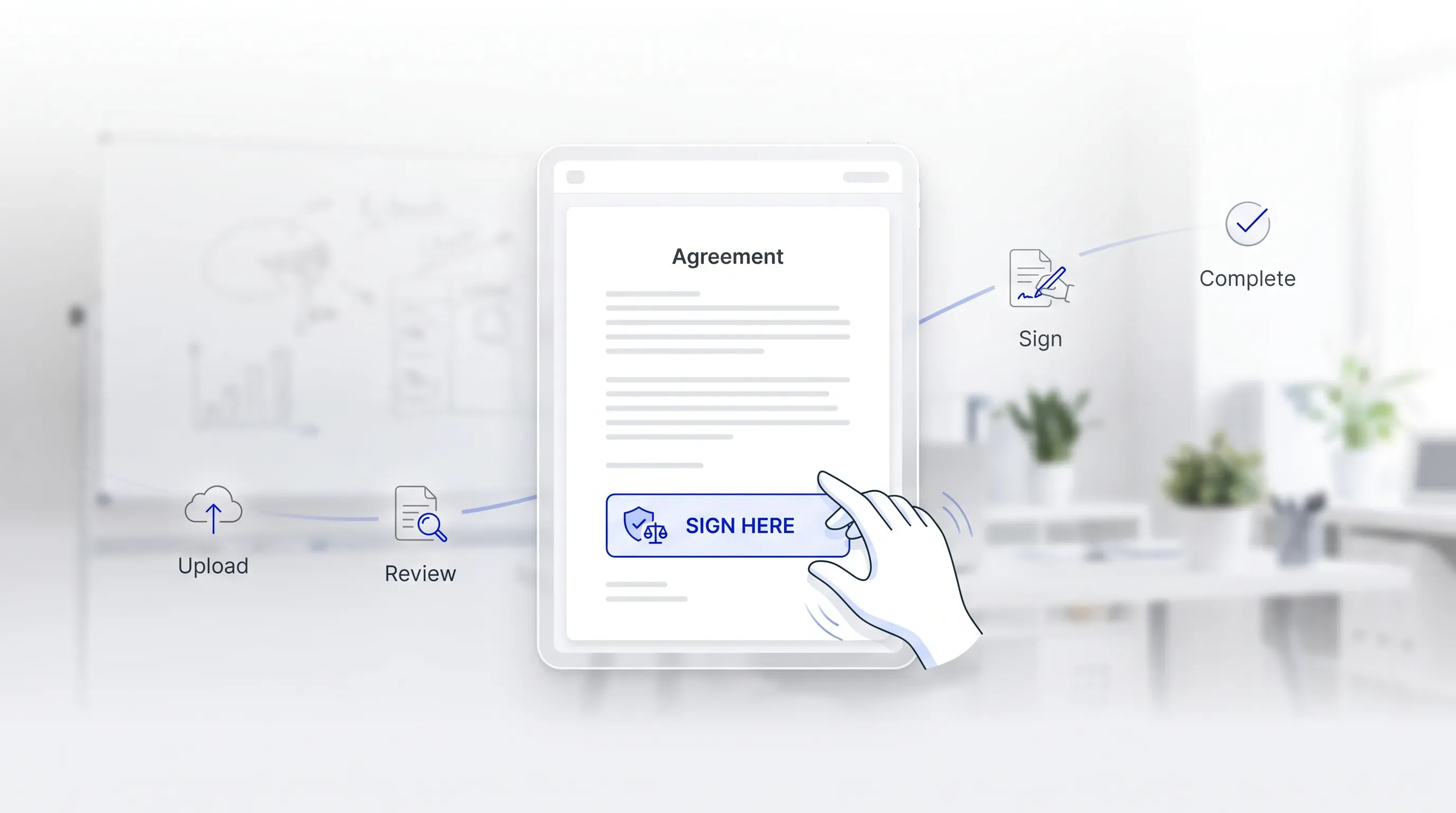
A soft-focus office scene featuring a digital document with a blue signature field, an animated hand, and workflow icons in a clean layout.

The idea stays abstract until you picture yourself doing it. So here is the flow a first-time user walks through, from the moment a file leaves your desktop to the moment the signed copy lands back in everyone's inbox. Each stage is its own small step, and none of them assumes you've done this before.

Uploading and preparing the document

You start by uploading the file you want signed. Most services accept PDF and Word documents, which covers the contracts and forms you already have. Once it's uploaded, you place the signature field and any date or initial fields where the page needs them.

If you send the same document over and over, like an offer letter or a standard client agreement, you save it as a template. Next time, the fields are already placed and you skip the setup entirely. For a nervous first-timer, this is the reassuring part. You point and click on a document you recognize.

Cut contract signing time by 60%

See how Agrello can automate your contract workflows from creation to e-signature in one free consultation.

Sending it to signers

When the document is ready, you send it by email link. The signer opens the message and sees exactly where to sign. If more than one person has to sign, you can set the order so it moves from the first signer to the next automatically once each one finishes.

Here's where the time savings over paper become obvious. The service sends automated reminders to anyone who hasn't signed yet, so you stop being the one chasing people. Signers need no account, and the Regulation explicitly allows them to sign from a smartphone. A client can approve a contract from a train platform.

Signing and getting the final copy

The signer adds their signature to each field and confirms. That's the whole act for them. The moment the last person signs, the service sends the completed document to everyone involved and stores a copy securely in your account.

That signed file is the finished legal record. The signed document lands in the inbox as the official record, complete and closed, with every signature captured in one version that everyone holds.

What changes when paper leaves the process

The payoff shows up first in speed. A large financial firm in a recent Aberdeen case study saw signed-document turnaround drop from an average of several days to under 20 minutes after adopting e-signatures. The contract that stalled on Thursday now closes over lunch.

The rest of the change follows from taking paper out of the loop:

  • Digital signing removes printing and scanning, which the European Commission counts among the costs and risks that disappear when signing goes digital.

  • Fewer lost or incomplete documents, because the file lives in one tracked place instead of a filing cabinet where 83% of employees end up recreating things they can't find.

Remote and cross-border signing stops being a headache too. A signer in another country opens the same link as one down the street, and time zones no longer add days to the process. What changes day to day is simple: you spend less time moving paper around and more time on the work the paper was about.

Cut contract signing time by 60%

See how Agrello can automate your contract workflows from creation to e-signature in one free consultation.

Are electronic signatures legally binding

This is the question that stops most people before they start, so here's the direct answer. Yes. An electronic signature carries the same legal weight as wet ink under the major frameworks, provided a few plain conditions are met.

In the United States, the ESIGN Act and the state-level UETA give electronic signatures legal standing as long as the signer intended to sign and consented to do business electronically. In Europe, the eIDAS Regulation has applied across all EU member states since 1 July 2016 and sets a principle of non-discrimination, which means a court cannot reject a signature as evidence only because it's electronic. A qualified electronic signature under eIDAS has the equivalent legal effect of a handwritten one.

What makes a signature defensible if anyone ever challenges it is the audit trail. Every reputable online document signing service records who signed and when, with the IP address and timestamps attached to each action. That record is stronger evidence than a scrawl on paper, because it ties the signer's identity to that one specific document. If you handle high-stakes or heavily regulated documents, confirm the specific requirements for that document type, since some formalities still call for a particular level of signature.

Security and keeping documents safe

Moving sensitive contracts online feels riskier than a locked drawer, until you look at how the drawer actually performs. Paper burns or floods, and copies leave no trace. A well-built online document signing service closes most of those gaps.

Reputable providers protect documents in a few concrete ways:

  • Encryption of files both while they move and while they sit in storage, so the contents stay unreadable to anyone without access.

  • Identity verification of signers, which binds each signature to a specific person.

  • Tamper-evident records, so any change to a signed document after the fact is detectable, a safeguard the eIDAS framework builds in through the link between signature and document integrity.

When you compare providers, look for recognizable trust signals. ISO/IEC 27001 certification shows a provider runs a formal information security management system, and leading platforms will hand over a copy on request. GDPR compliance matters if any signer sits in Europe, since the provider acts as a data processor and carries direct obligations for how personal data is handled. The audit matters more than the cryptography underneath. The provider needs to have been audited against standards someone else takes seriously.

Choosing an online document signing service

With the legal and security questions settled, the choice comes down to fit. The right tool matches how many documents you send and who has to sign them. A few questions sort the shortlist fast:

  1. How many documents do you send a month? Pricing tiers turn on signing volume, so an honest count keeps you from paying for capacity you'll never touch.

  2. Is it easy for non-technical staff and outside signers to use? If your team hesitates or your clients get stuck, the tool costs you the time it was meant to save.

  3. Does it connect to what you already use, like your CRM or storage system? Integrations remove the copy-paste steps that quietly eat the day.

  4. Does it carry the compliance and security features covered above, such as encryption and recognized certifications, with the audit trail to back them up?

Then stop comparing and start testing. Almost every online document signing service offers a free trial, so run one routine, low-risk document through it before you commit a cent. An internal form or a standard agreement tells you more in ten minutes than a feature list tells you in an hour. The right online document signing service is the one your least technical colleague can use without calling you.

Getting started with digital signing

The shift from paper to cloud-based signing is smaller than it looks from the outside. You upload a file and get back a signed legal record after you place the fields and send the link, without a printer or a stamp in sight. The legal footing is solid. The security beats a filing cabinet, and the trial costs you nothing.

So pick one routine document this week, an offer letter or a client agreement, and run it through a single tool instead of chasing another signature on paper. If you want a straightforward place to start, Agrello is an online document signing service built to move businesses from paper to digital without the friction.
Cut contract signing time by 60%

See how Agrello can automate your contract workflows from creation to e-signature in one free consultation.

Avoid electronic signing for documents that local law excludes or treats as formal instruments. This can include wills, court filings, notarized deeds, or family law documents, depending on the jurisdiction. If the document carries high financial or personal risk, ask counsel which signature level and identity check are required.

Prepare the PDF by checking names, dates, page order, and blank fields before upload. Use a final version, not a draft, because edits after signing usually require a new signing round. If the same form repeats, create a template with fixed signature and date fields.

A scanned signature is a weaker substitute because it usually lacks a full audit trail. It shows an image of a signature, but it doesn’t reliably prove who signed, when they signed, or whether the file changed later. Use a signing workflow when proof of intent and document integrity matter.

Use a typed signature for routine, low-risk documents when the law allows it. Use identity verification for higher-risk agreements, regulated documents, or deals with new people or companies. The right choice depends on the document’s value and the proof you’d need if a dispute arises.

Test an online document signing service with one low-risk internal form before using it with clients. Ask a non-technical colleague to complete it, then review the signed copy, email notifications, and audit trail. Agrello can be evaluated this way because the test shows whether the workflow fits your team’s routine.

Schedule a Meeting

Book a time that works best for you and let's discuss your project needs.

You Might Also Like

Discover more insights and articles

Title:
What Is an Online Signature Platform and Why Use One?

Meta description:
See how an online signature platform helps you cut signing delays and keep signed files easy to find.

Article:
# What I

What Is an Online Signature Platform and Why Use One?

This article explains what an online signature platform actually does and whether your own document process can benefit from one, with the signature itself treated as only part of the story. No technical background needed.

Title:
Online Signature Software: Sign Documents Without Printing

Meta description:
With online signature software, you can sign documents directly on your screen and save time on daily paperwork.

A

Online Signature Software: Sign Documents Without Printing

This article explains how online signature software lets you sign and send documents straight from a screen and shows why a digital-first workflow beats the old print-and-scan routine; it also covers legal validity and tool choice for a small operation.

Title:
Top eSignature Software Options for Faster Contract Management

Meta description:
Compare the best e signature software options to find the right tool for your team and speed up agreements.

Ar

Top eSignature Software Options for Faster Contract Management

This article walks you through what actually shortens contract turnaround for a growing team, then compares the best e signature software options against those criteria so you can shortlist two or three and start a focused trial this week.

Title:
eSign Software Explained: Faster Contract Work Without Paper

Meta description:
Learn how esign software cuts contract admin so you get offers and sales agreements signed faster from any device

eSign Software Explained: Faster Contract Work Without Paper

This article explains what eSign software is and how it strips the manual admin out of contract work, so a new hire can sign on day one and a sales rep can close while the buyer is still interested. We will cover how the tools work in plain terms and how to compare options, with the legal validity question handled along the way.