Top eSignature Software Options for Faster Contract Management

Content authorBy Toomas PihlPublished onReading time10 min read
Title:
Top eSignature Software Options for Faster Contract Management

Meta description:
Compare the best e signature software options to find the right tool for your team and speed up agreements.

Ar

This article walks you through what actually shortens contract turnaround for a growing team, then compares the best e signature software options against those criteria so you can shortlist two or three and start a focused trial this week.

Why slow contracts cost growing companies

A contract that sits unsigned for four days is a deal that hasn't closed and cash that hasn't landed. The best e signature software exists to close that gap, and the gap gets more expensive the faster you grow. When you were five people, chasing a signature meant one quick email. At thirty people sending dozens of agreements a week, that same manual habit turns into a daily tax on your sales and finance teams.

The math is unforgiving. Analysis of EU contracting found that signing a contract on paper takes 3.7 full-time-equivalent days, against 0.8 days when the same contract is signed directly on a digital platform. That's roughly five times the effort for the paper route. Multiply that across rising volume and you see why a workflow that felt fine last year feels broken now.

Here's the angle worth holding onto. The right tool gets your team and your signers from "send" to "signed" in the fewest steps. Speed and ease win. Everything else is secondary.

What actually speeds up signing

Modern flat-design SaaS infographic featuring a central e-signature document UI, surrounded by icons representing efficiency factors on a white gradient back

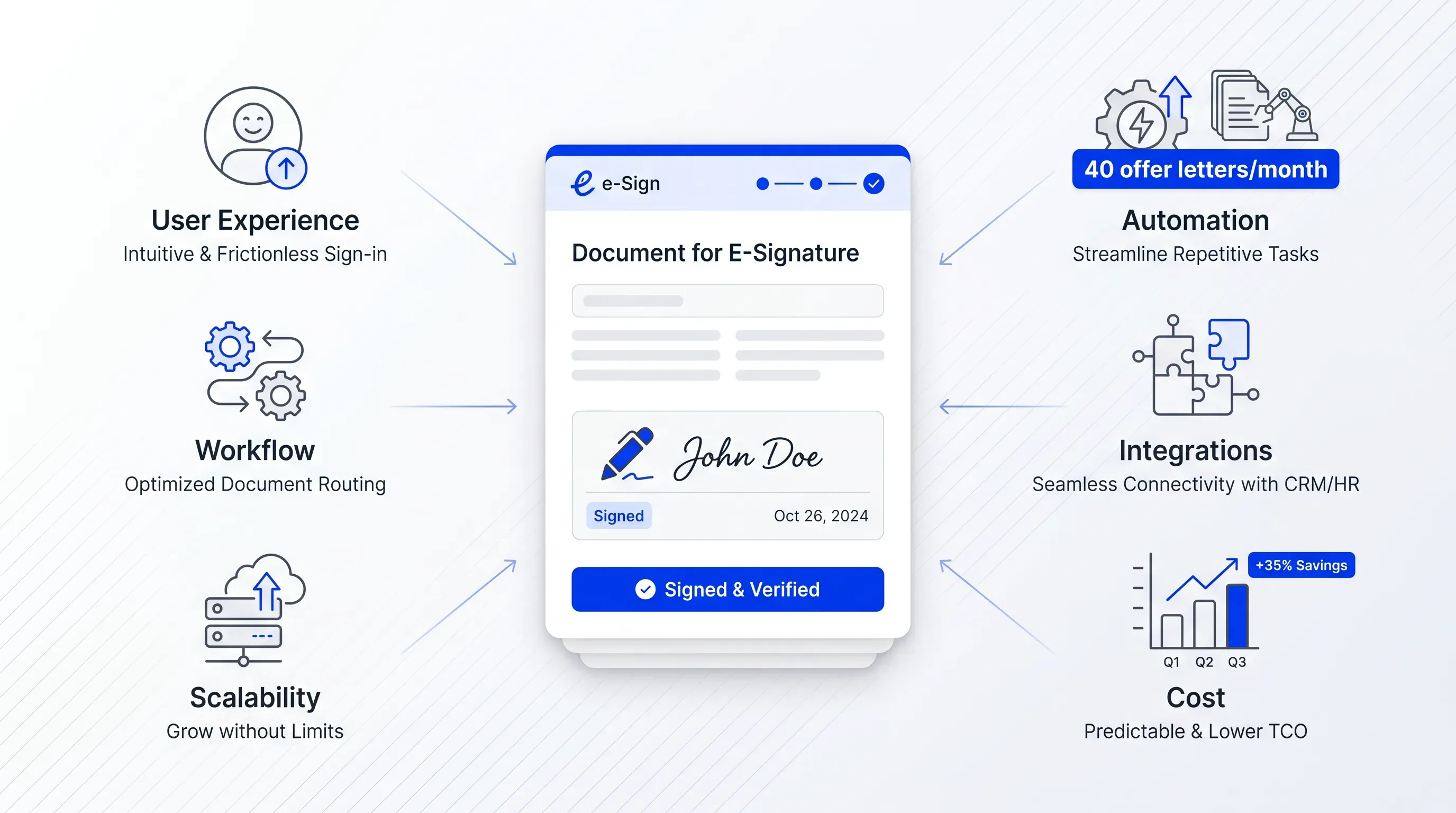
Three things decide whether the best e signature software genuinely cuts your turnaround time. You already know the basics of how these tools work, so the question now is which dimensions to weigh when you put platforms side by side. Keep these three in mind, because the roundup below judges every tool against them.

Ease of use for everyone

Signing speed depends on two people, and most buyers only think about one. There's the sender setting up the document, and there's the signer on the other end. A clunky interface kills adoption on either side, and it doesn't matter how powerful the engine underneath is if your account manager dreads sending a contract through it.

Think about the friction you already recognize. A signer who has to create an account before they can sign. A document that won't render on a phone, so the client waits until they're back at a desk. A setup screen so busy that a new hire in operations needs a walkthrough before sending their first agreement. Each of these adds hours, sometimes days.

What to look for is short and concrete:

  • Signers can complete the document on mobile without downloading anything or creating an account

  • A non-technical staff member can prepare and send a contract on their first day without training

That second point matters more as you grow, because the people sending contracts will include non-technical staff. They'll be spread across revenue teams, with HR and operations in the mix, and the tool has to fit their daily work.

Automation and templates

The fastest contract is the one nobody has to assemble from scratch. Automation is what turns a repetitive job into a near hands-off workflow, and it's where a scaling company pulls ahead of a one-off signer. When you send the same offer letter forty times a month, every manual step you remove compounds.

The features that move the needle here:

  1. Reusable templates so a standard agreement is ready in seconds every time

  2. Field pre-fill that pulls names and amounts in automatically

  3. Bulk send for pushing the same document to many signers at once

  4. Signing order so a multi-party contract routes itself through the right people

  5. Automatic reminders that chase signers so your team doesn't have to

That last one quietly saves the most time. Chasing signatures is the part everyone hates, and a tool that nudges signers on its own removes a job from someone's plate every single day.

Cut contract signing time by 60%

See how Agrello can automate your contract workflows from creation to e-signature in one free consultation.

Integrations and scaling

A signing tool in the best e signature software category that lives on an island forces your team into copy-paste handoffs, and every handoff is a place where a contract stalls. When the tool connects to the systems you already run, your Customer Relationship Management (CRM) platform and your Human Resources (HR) system, contracts move without anyone retyping a thing.

This is the part that decides whether a tool still fits after you double your volume. A platform wired into your existing stack scales with you because the data flows on its own. An isolated one becomes a bottleneck the moment your numbers climb. Watch the pricing model too, since per-user costs and tier jumps can change the math fast as your headcount grows. A plan that's cheap at five users can sting at thirty.

Best e signature software compared

Here's the roundup. Each tool below leads with who it suits. The comparison uses the three factors above and notes rough pricing rather than every feature on the box. The electronic signature category behind the best e signature software is large and continues to grow; one Deloitte estimate puts DocuSign's share near 75% of the market, so these are battle-tested options.

Agrello

Agrello is a strong choice for small and mid-sized businesses looking for an AI-powered eSignature platform that combines document creation, legally binding electronic signatures, and workflow automation in one solution.

The platform offers reusable templates, bulk sending, automated reminders, approval workflows, and AI-assisted document generation to reduce manual work and speed up contract turnaround. Its straightforward interface makes it easy for both internal teams and external signers to complete agreements without unnecessary friction, helping organizations shorten approval cycles and improve document consistency.

Agrello also supports businesses that want to scale their document processes without adding unnecessary complexity. Features such as centralized document management, reusable workflows, and automated signing processes help teams spend less time on administrative tasks and more time closing deals or onboarding customers. The platform is designed to fit naturally into modern business workflows while maintaining legally compliant electronic signing.

Agrello is particularly well suited for growing businesses that want modern document automation alongside secure electronic signing without the complexity often associated with enterprise platforms.

DocuSign

DocuSign suits the company that wants the category standard and expects to keep growing into more complex workflows. It's the name your signers will recognize, which removes a quiet layer of hesitation on their end.

Usability is strong for senders, and signers can complete documents on mobile without an account. Signing speed is reliable, and the automation covers templates and reminders well. Integrations are the real strength because deep CRM and payment connections keep it useful as volume climbs. DocuSign uses tiered subscription pricing that scales by user count and features, so check where your team size lands before committing.

Cut contract signing time by 60%

See how Agrello can automate your contract workflows from creation to e-signature in one free consultation.

Adobe Acrobat Sign

Adobe Acrobat Sign fits teams already living inside Adobe and Microsoft tools, where signing folds into work they're doing anyway. If your documents already pass through Acrobat, the handoff to signing is short.

The sender experience is polished, and signers get a clean mobile flow. Automation includes templates and reminders, and the tight link to Microsoft 365 removes copy-paste steps for teams that draft in Word. Adobe describes the ESIGN Act on its own resource pages and says the law guarantees electronic agreements "may not be denied legal effect" solely because they are electronic, which is the legal floor every tool here clears. Acrobat Sign runs on subscription tiers priced by user count and feature access.

Oneflow

Oneflow suits a sales-led team that wants the whole contract to live in one place, from drafting through signing. It treats the contract as an interactive document, which speeds up edits before signature.

Usability is a selling point, and the platform claims contracts get signed 8x faster through its automated process. Standout automation covers templates and approval workflows, so a contract routes itself instead of waiting in someone's inbox. Integrations connect to CRM and business systems, and Oneflow uses per-user subscription pricing with monthly or annual options. For a growing team that wants speed without bolting together separate drafting and signing tools, it's a strong fit.

PandaDoc

PandaDoc fits teams sending proposals alongside contracts, where the document is part of the sale. It's built for the front end of the deal and the signature at the end.

The sender experience is built around templates and a content library, which cuts assembly time on repetitive documents. Signers move through quickly on mobile, and automation covers reminders and signing order. PandaDoc has a strong reputation for shrinking document creation time and lifting close rates, per Gartner's category notes. Integrations reach CRM and payment systems, which matters when a signed quote triggers an invoice without a manual step.

SignWell

SignWell is the value pick, suited to a smaller or cost-conscious team that wants fast signing without paying for enterprise weight. Its founder, CEO Ruben Gamez, runs the Portland-based company as a focused B2B contracts and e-signature shop.

The whole product is built around getting a document signed fast, so the learning curve is short and signers move quickly on mobile. Automation covers the essentials, templates and reminders, without the sprawl of a larger suite. Integrations are leaner than the heavyweights, which is the trade you make for a lighter price. If your volume is moderate and your stack is simple, that trade makes sense.

How to pick the best e signature software

Use a short framework and a live test. Narrow the field with four questions about your own situation, then run a trial on real contracts.

Start by sizing yourself honestly:

  1. Volume. How many contracts do you send a week now, and what's that number after you double? If it's high and rising, weight automation and bulk send heavily.

  2. Team size. Who sends contracts, and how technical are they? Non-technical senders push you toward the simplest interfaces.

  3. Existing tools. What CRM and payment systems do you already run? The best e signature software that plugs into them wins on speed.

  4. Budget. What does per-user pricing look like at your future headcount?

Those four answers leave you with two or three candidates. From there, stop reading and start timing. Take a real contract you send often and measure the actual turnaround from send to signed in each shortlisted tool. Watch where your signers hesitate and where your own setup drags. The best e signature software for you is the one that measurably moves that number down on your specific workflow.

Start your shortlist today

Every day you keep researching is another deal sitting unsigned and another stretch of your team's week lost to chasing signatures. You now have what you need: judge each tool on ease for both sender and signer and on the automation that removes manual steps; then check how well it fits the systems you already run. Pick your top two and time a real contract in each this week. Agrello is built around exactly that test, fast, legally binding signing with the document management to keep agreements moving as you scale. Start a free trial and put the best e signature software to work on a live contract today.

Cut contract signing time by 60%

See how Agrello can automate your contract workflows from creation to e-signature in one free consultation.

Yes, electronic signatures are legally valid for most business contracts when the signer’s intent, consent, and record integrity are captured. In the U.S., the ESIGN Act and UETA support their use. In the EU, eIDAS sets the framework. Regulated documents can need extra checks, so confirm local rules for high-risk agreements.

Test for one to two weeks using live, low-risk contracts your team already sends. Track setup time, signer completion time, reminder use, and errors. A short trial works best when sales, HR, or operations staff each send documents, because the tool has to fit daily work across the company.

Check whether the platform records a tamper-evident audit trail and protects documents with encryption. For internal control, review access permissions and single sign-on support. Ask how completed files are stored, who can reopen them, and how long the provider keeps signer data.

Yes, you can usually keep your existing contract templates and add signature fields inside the signing platform. Tools such as Agrello let teams upload standard agreements, prepare reusable templates, and route them for signature. Before switching, test your common PDF or Word files to catch layout issues.

The best e signature software is worth paying for when manual signing slows revenue, hiring, or vendor approvals. If staff spend hours preparing files, chasing signers, or copying data between systems, paid features like templates, reminders, and integrations reduce repeated work enough to justify the cost.

Schedule a Meeting

Book a time that works best for you and let's discuss your project needs.

You Might Also Like

Discover more insights and articles

Title:
What Is an Online Signature Platform and Why Use One?

Meta description:
See how an online signature platform helps you cut signing delays and keep signed files easy to find.

Article:
# What I

What Is an Online Signature Platform and Why Use One?

This article explains what an online signature platform actually does and whether your own document process can benefit from one, with the signature itself treated as only part of the story. No technical background needed.

Title:
Online Document Signing Services Explained for Businesses

Meta description:
See how an online document signing service helps you cut paper delays and choose a secure tool for your business.

A

Online Document Signing Services Explained for Businesses

This article explains what an online document signing service is and how cloud-based signing replaces the paper routine that slows so many businesses down. It walks through how these tools work end to end and how to pick a service that fits your volume and budget, with legal and security questions covered along the way.

Title:
Online Signature Software: Sign Documents Without Printing

Meta description:
With online signature software, you can sign documents directly on your screen and save time on daily paperwork.

A

Online Signature Software: Sign Documents Without Printing

This article explains how online signature software lets you sign and send documents straight from a screen and shows why a digital-first workflow beats the old print-and-scan routine; it also covers legal validity and tool choice for a small operation.

Title:
eSign Software Explained: Faster Contract Work Without Paper

Meta description:
Learn how esign software cuts contract admin so you get offers and sales agreements signed faster from any device

eSign Software Explained: Faster Contract Work Without Paper

This article explains what eSign software is and how it strips the manual admin out of contract work, so a new hire can sign on day one and a sales rep can close while the buyer is still interested. We will cover how the tools work in plain terms and how to compare options, with the legal validity question handled along the way.