Woman smiling with text overlay about comparing electronic signing apps to determine the safest e-signature solution

Electronic Signing Apps Compared: Which One Is Safest?

Your team needs signatures on a contract by end of day. Half the signers are on their phones, one is at an airport, and another just switched to a new tablet. The question isn't whether you need an electronic signing app. It's whether the one you're using actually keeps those signatures safe.

Content authorBy Toomas PihlPublished onReading time8 min read

What This Article Covers

Choosing a secure electronic signing app goes beyond just picking the one with the nicest interface. This article breaks down what makes a mobile signing experience genuinely safe, from biometric authentication and encryption to regulatory compliance and audit trails. You'll learn which security features matter most for HR teams, operations managers, and sales coordinators who handle sensitive documents across distributed teams. By the end, you'll know exactly what to look for, and what to avoid, when comparing your options.

Why Safety in Electronic Signing Apps Matters More Than Ever

The digital signature market isn't slowing down. It was valued at USD 7.13 billion in 2024 and is projected to grow to USD 9.85 billion in 2025. Some forecasts even project the market reaching USD 104.49 billion by 2032, reflecting a CAGR of 40.1% during 2025 to 2032. That rapid adoption means more documents are being signed digitally every day, and more bad actors are looking for ways to exploit weak security.

If your electronic signing app doesn't prioritize safety, you're exposing your organization to:

  • Unauthorized access to confidential HR documents

  • Forged or disputed signatures with no verification trail

  • Compliance violations under regulations like eIDAS, ESIGN, or HIPAA

  • Data breaches from poorly encrypted mobile connections

For growing companies managing signatures across departments, the stakes are high. A secure digital signature workflow isn't a luxury. It's a basic requirement.

The good news? Most modern platforms take security seriously. The differences, though, are in the details.

Mobile Security: The First Real Test

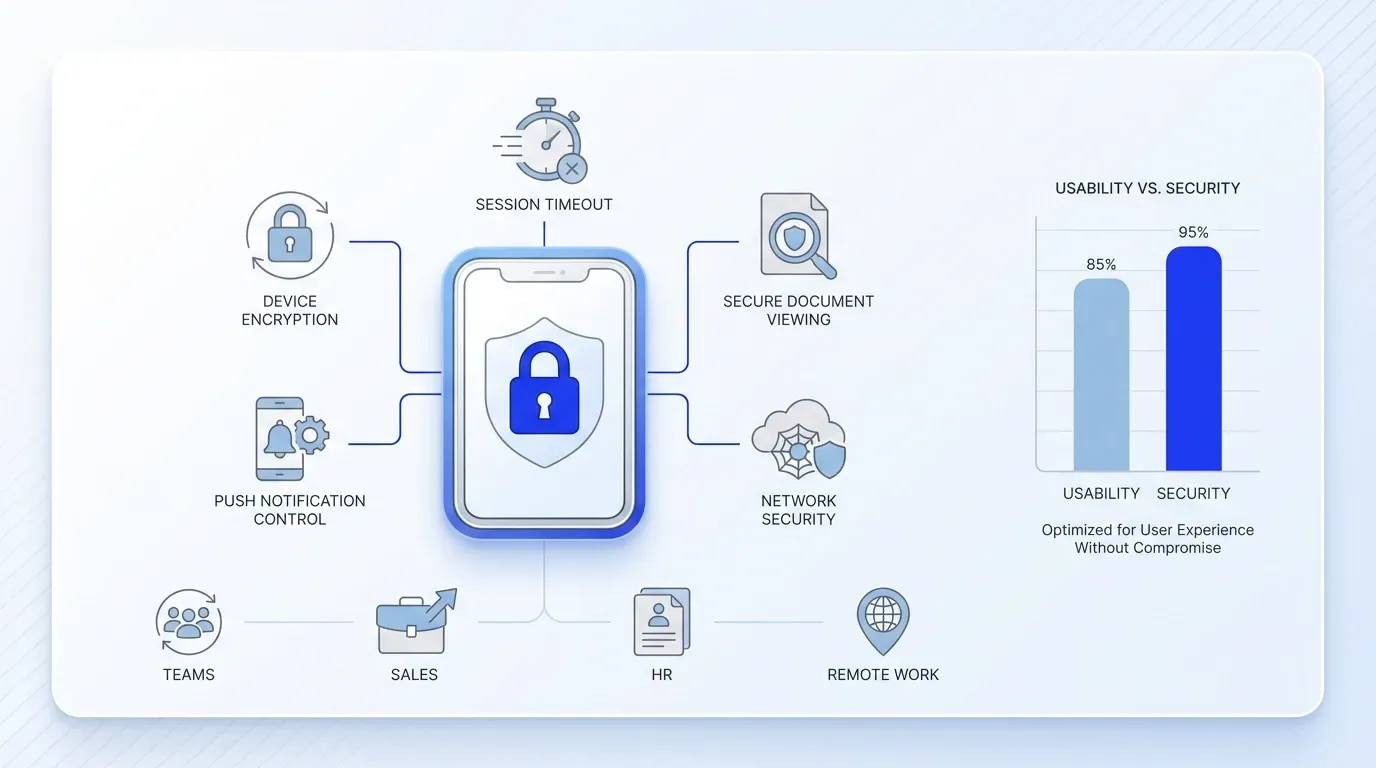
Create a clean, structured SaaS marketing infographic in the 'clean_compliance_ui' style, featuring a large secure mobile device icon with a lock at the center, rendered on a smooth white surface with

Most comparisons focus on desktop features. But let's be honest: your team signs documents on phones and tablets just as often as on laptops. A safe electronic signing app needs to perform on mobile without cutting corners on protection.

Not all signing apps handle the constraints of mobile devices well. For a direct comparison of top apps and a checklist of must-have features such as two-factor authentication and local encryption, see Best E-Signature Apps for Mobile Signing (iOS & Android).

What Strong Mobile Security Looks Like

Not every app treats mobile as a first-class citizen. Here's what separates genuinely secure mobile signing from apps that just "work on a phone":

  • Device-level encryption: The app should encrypt data stored locally on the device, not just data in transit.

  • Session timeouts: Automatic logout after inactivity prevents unauthorized access if someone leaves their phone unlocked.

  • Secure viewing: Documents should render inside the app without requiring downloads to the device's storage.

  • Push notification controls: Alerts should confirm activity without exposing document details on lock screens.

Why This Matters for Distributed Teams

When your sales coordinators are closing deals from coffee shops and your HR team is onboarding remote hires, every signature happens on a different network. A secure mobile experience means your team doesn't have to think twice about signing from a hotel Wi-Fi or a personal device.

Platforms like Agrello have focused on making the mobile signing experience both simple and secure, which is especially useful for mid-sized teams that don't have a dedicated IT department vetting every connection.

The mobile experience is the foundation. But the next layer of safety goes even deeper: proving who's actually signing.

Biometric Authentication: Proving the Signer Is Real

Passwords get shared. Email links get forwarded. If the only thing protecting a signature is a login credential, you have a problem. Biometric authentication changes the equation entirely.

For a technical look at how biometric verification is used -from facial recognition to liveness detection and behavioral analytics -read How can AI detect and prevent forged digital signatures?.

Types of Biometric Verification in Signing Apps

Different apps offer different levels of biometric security:

  • Fingerprint recognition: The most common method, supported by nearly all modern smartphones. Fast, familiar, and hard to spoof.

  • Facial recognition: Uses the device's front camera to verify the signer's identity. Useful when fingerprint sensors aren't available.

  • Behavioral biometrics: Some advanced platforms analyze how a person interacts with their device, including typing patterns, swipe pressure, and signing speed.

How Biometrics Strengthen the Audit Trail

Biometric authentication doesn't just block unauthorized signers. It creates a verifiable record that the correct person signed the document. This is critical for:

  • Employment agreements where identity disputes could arise

  • Sales contracts with high-value commitments

  • Compliance-sensitive documents in healthcare or finance

A strong audit trail ties the biometric verification event to the exact document, timestamp, and IP address. If anyone ever challenges a signature's validity, you have concrete proof.

It's worth noting that 76% of all DocuSign eSignature transactions in FY2024 were completed in less than 24 hours, and 41% were completed in 15 minutes or less. Speed matters, but only when paired with proper identity verification.

With identity confirmed, the next question is whether your signing app meets the legal standards your industry demands.

Compliance: The Non-Negotiable Layer

An electronic signing app can have the best encryption and biometrics available, but if it doesn't meet regulatory requirements, your signed documents may not hold up legally.

To see a hands-on compliance checklist and the latest market statistics, check How to Choose a Digital Signature Service for Your Organization.

Key Compliance Frameworks to Watch

Depending on your industry and geography, your signing app should support:

  • eIDAS (EU): Defines three levels of electronic signatures, from simple to qualified. A qualified electronic signature carries the same legal weight as a handwritten one.

  • ESIGN Act and UETA (US): Establish that electronic signatures are legally binding in interstate and intrastate commerce.

  • HIPAA (Healthcare): Requires specific safeguards for any platform handling protected health information.

  • SOC 2 Type II: Confirms that a vendor's systems meet security, availability, and confidentiality standards over time.

What Compliance Looks Like in Practice

Compliance isn't just a checkbox on a features page. Look for platforms that:

  • Store documents in data centers within your required jurisdiction

  • Provide tamper-evident seals on completed documents

  • Generate detailed audit logs with timestamps, IP addresses, and authentication events

  • Offer role-based access controls so only authorized team members can view sensitive agreements

Business leaders clearly care about these safeguards. In fact, 90% of business leaders worldwide express high trust in their agreement management systems. That trust is built on compliance.

For organizations evaluating broader market options, the global e-signature market was USD 2.5803 billion in 2023 and is forecast to reach USD 13.4073 billion by 2030, growing at a CAGR of 26.7%. As the market expands, compliance standards will only tighten.

Beyond meeting regulatory minimums, the safest apps also help your business perform better.

How Safe Signing Connects to Business Performance

Security and efficiency aren't competing goals. They reinforce each other. When your team trusts the signing process, they move faster and with fewer errors.

For practical workflow advantages and an executive overview of digital signing ROI, read Harnessing E-Signatures for a Smooth Operational Flow.

Research backs this up. In Deloitte's 2025 study, 77% of leaders in high-performing organizations credit digital agreement management for helping them outperform financial goals. Organizations using advanced contract creation capabilities were 55% more likely to report outperforming financial goals, while those with advanced routing, editing, and approval capabilities were 47% more likely.

Safe signing tools reduce friction in three tangible ways:

  • Fewer rejected or disputed signatures because identity is verified upfront

  • Faster turnaround because signers trust the process and complete documents promptly

  • Lower legal risk because audit trails and compliance are built in

For operations managers and administrative professionals, this translates directly into less time spent chasing signatures and resolving disputes.

What Makes an Electronic Signing App Safe: Quick Reference

A safe electronic signing app is one that combines end-to-end encryption, biometric signer authentication, tamper-evident audit trails, and compliance with relevant legal frameworks (such as eIDAS, ESIGN, or HIPAA) to ensure every digital signature is both legally binding and verifiable, especially on mobile devices.

For a closer look at how audit trails and tamper-evident encryption secure every transaction, see How do electronic signatures work?.

Conclusion

Choosing the safest electronic signing app is about more than comparing features on a pricing page. It is about making sure every signature your team collects is secure, verifiable, and legally reliable. The best platforms bring together several essentials: secure mobile access, strong identity verification, tamper-evident audit trails, and compliance with frameworks such as eIDAS and ESIGN. When these elements work together, the signing process becomes not only faster, but also far more dependable. For teams managing contracts across devices, locations, and departments, that matters a lot. A good signing app should help people complete documents easily without creating unnecessary risk or complexity. Platforms like Agrello are built around that balance, combining security, compliance, and a user-friendly experience in one workflow.

In the end, the safest solution is the one that makes digital signing simple for users and reliable for the business behind it.

A qualified electronic signature (QES) under the eIDAS regulation is generally considered the safest. It requires identity verification through a qualified trust service provider and carries the same legal weight as a handwritten signature across the EU.

Yes, but security varies widely between platforms. Look for apps that offer device-level encryption, biometric login, automatic session timeouts, and secure in-app document viewing. Not every app treats mobile security as seriously as desktop.

It's not legally required in most jurisdictions, but it significantly strengthens the validity and security of a signature. Biometrics add a verifiable layer of identity proof that passwords alone can't provide, which is especially important for high-value or compliance-sensitive documents.

Check whether the platform explicitly states compliance with regulations relevant to your industry and region. Look for certifications like SOC 2 Type II, support for eIDAS signature levels, and data residency options. A credible vendor will publish this information clearly.

Absolutely. Platforms like Agrello are designed for cross-department use, with role-based access controls that let HR, sales, and operations teams each manage their own documents while maintaining a unified security standard across the organization.

Schedule a Meeting

Book a time that works best for you and let's discuss your project needs.

You Might Also Like

Discover more insights and articles

Smiling man with overlay text about converting a handwritten signature into a digital signature for e-signing documents

How to Turn My Handwritten Signature Into a Digital One

Still printing contracts just to sign them by hand, scan the page, and email them back? For many people, that process still feels normal, but it slows everything down more than it should. The good news is that there’s a much easier way to handle signatures today.

Close-up of professional with overlay text about how AI improves HR document signing processes and digital signature automation

How Does AI Improve HR Document Signing Processes?

Every new hire means a stack of paperwork. Offer letters, tax forms, policy acknowledgments, benefits enrollment, direct deposit authorization. For HR teams managing dozens or hundreds of employees, keeping all of that moving smoothly is a constant challenge.

Woman reviewing signed documents with text about secure storage and management of e-signed documents, representing digital document security solutions.

What's the Safest Way to Store and Manage Signed Documents?

You just got a contract signed. It's locked in, legally binding, and ready to file away. But where exactly does it go, and who can access it six months from now when someone needs it for an audit? More importantly, will you be able to find the right version quickly, prove its authenticity, and show a clear record of who signed and accessed it?

Man signing a document with illustration of cloud workflow, representing automatic document sending for e-signature and digital signing process.

How Can I Send Documents for E-Signing Automatically?

Every week, your team sends the same contracts, NDAs, and approval forms. Someone downloads a template, fills in the names, attaches it to an email, and waits. Multiply that by dozens of documents, and you've built a bottleneck nobody asked for.