three professionals collaborating in an office while reviewing documents on a computer screen with overlay text about generating a certified digital signature in five steps

How to generate a certified digital signature

Need to sign an important document without delays, printing, or in-person meetings? A certified digital signature gives businesses a fast and legally reliable way to approve documents remotely. It combines identity verification, trusted Certificate Authorities, and digital certificates to securely link a signer to a document and ensure full legal validity.

Content authorBy Toomas PihlPublished onReading time10 min read

Overview

Creating a certified digital signature involves more than just adding a name to a document. It requires identity verification, a trusted Certificate Authority, and a digital certificate that links the signer to the file in a secure and verifiable way.

This article explains the full process step by step, including how to get verified, receive your certificate, apply your signature, and confirm its validity. It also covers when certified digital signatures are required and why they matter for legal and business compliance.

Why business operations rely on certified signatures

Moving away from paper contracts saves massive amounts of time for growing companies. Operations teams face constant pressure to close agreements faster while maintaining strict legal compliance.

Right now, an average B2B contract currently takes about 4–6 weeks to reach signature. That delay costs growing companies serious money. Certified signatures eliminate this wait time by allowing instant, verifiable approvals from anywhere.

Relying on verified digital approvals provides several key advantages for modern administrative teams:

  • Speeds up contract turnaround times significantly

  • Guarantees the verified identity of the person signing

  • Prevents document tampering after the file is finalized

  • Meets stringent international legal standards

If you want to dive deeper into measurable gains and the future outlook of digital signatures, see the business market figures and forecasts in What Is a Certified Digital Signature? Legal Meaning & How to Get One.

The demand for these secure solutions is accelerating rapidly as the global digital signature market was valued at USD 9.85 billion in 2025. More companies are shifting toward certified methods because standard electronic signatures simply cannot provide the same level of legal protection.

Understanding why these signatures matter is just the first step in upgrading your workflow. You also need to grasp the core mechanics behind the certified e-signature process.

Understanding the certified e-signature process

Creating a standard electronic signature is easy, but a certified signature requires an extra layer of security. This process relies on specialized organizations and technology to prove you are exactly who you say you are. Before you start signing, you must understand the basic components that make this system work.

The certified e-signature process involves three main elements:

  • A trusted software platform to host your documents

  • A recognized organization to verify your identity

  • A secure cryptographic key that acts as your digital seal

Want to understand the trust hierarchy and chain of endorsements in digital signatures? Check out How to Verify If a Digital Signature Is Authentic for a visual breakdown of the process.

Knowing how these parts work together removes the confusion from digital compliance. Let us look closer at the specific organizations that make this security possible.

The role of Certificate Authorities

A Certificate Authority acts exactly like a digital passport office. They are highly regulated, trusted third-party organizations that validate your identity before giving you the digital tools to sign.

Once they verify your credentials, they issue a digital certificate. This certificate permanently attaches to your signature, proving its authenticity to anyone who opens your document. Without this authority stepping in, your digital signature would hold very little legal weight.

For a comprehensive guide to the CA's function, including how identities are checked and verified, see Digital Signing Certificates: What They Are & How to Issue One.

Choosing a trusted authority ensures your documents hold up perfectly during an audit or a legal dispute. The next crucial phase involves proving your identity to that authority.

How identity verification works

You cannot get a certified signature by simply typing your name into a PDF document. The verification phase requires you to present official proof of your real-world identity.

The verification methods vary slightly depending on the provider, but they generally involve specific security checks:

  • Uploading a clear photo of a government-issued ID

  • Participating in a brief video call with a trained agent

  • Providing biometric data like a live facial scan

Learn more about the critical differences between simple e-signatures and robust digital certificates—and why identity checks matter—in What’s the difference between electronic and digital signatures?.

Once your identity clears this rigorous check, the system grants you the specific credentials needed to sign official paperwork. We can now look at the exact steps to get this done.

Step-by-step: How to generate a certified digital signature

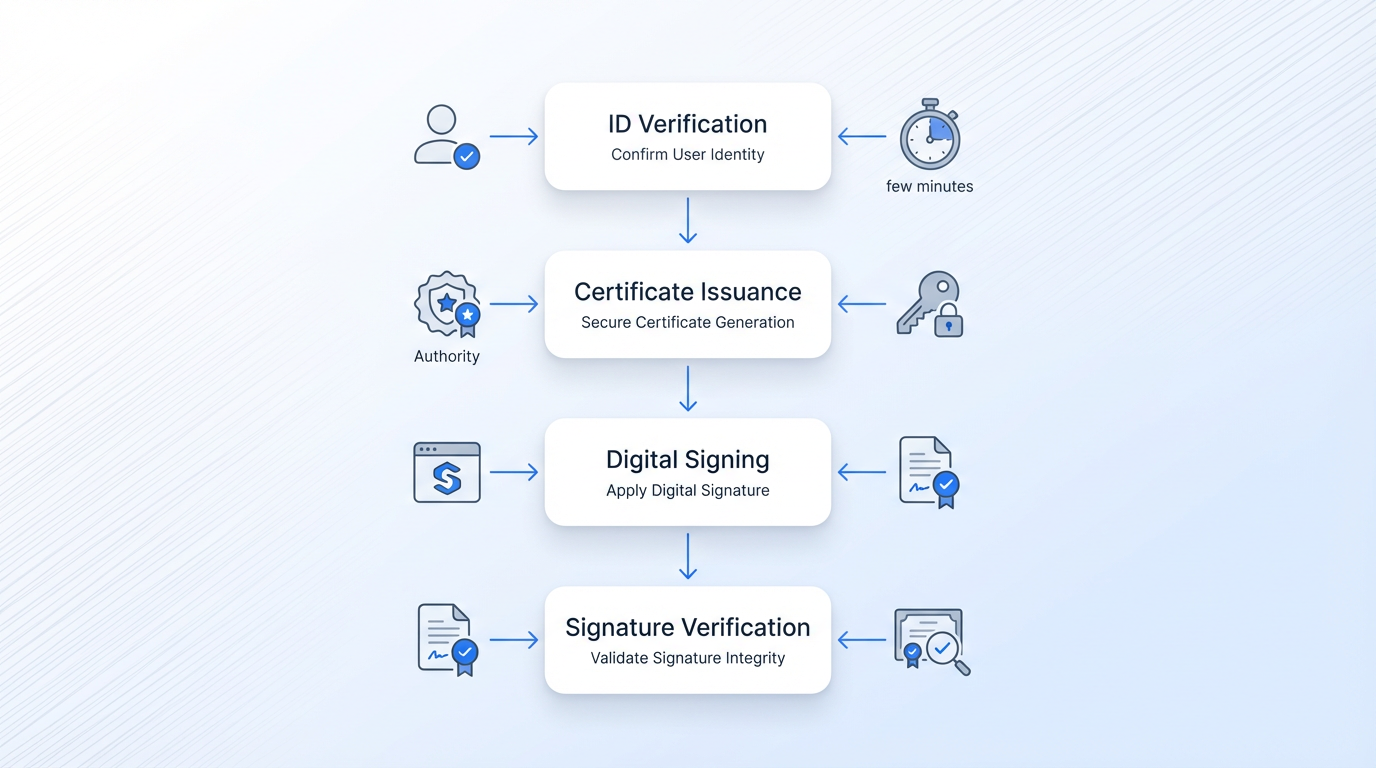
Vertical flowchart illustrating a certified digital signature process with four labeled boxes and muted icons on a light gradient background.

Setting up your signature might sound technical, but modern platforms make it incredibly straightforward for non-technical users. You just need to follow a clear, logical sequence.

Before starting, make sure you have the necessary items ready to ensure a smooth setup. You will need:

  • A stable internet connection

  • A valid government-issued ID card or passport

  • A computer or smartphone with a working camera

Gathering these items in advance speeds up the entire setup. Here is the exact path to generating your secure signature.

Step 1: Select your platform and Certificate Authority

Your first task is picking a software platform that automatically integrates with recognized Certificate Authorities. You want a user-friendly tool that handles the technical heavy lifting behind the scenes.

Need help evaluating or comparing software platforms with advanced security and compliance? See Best Digital Signature Tool of 2025 (Security-Focused Comparison) for top recommendations.

Many software platforms guide you directly to an approved authority during the account setup phase. This keeps your department managers and administrative professionals from having to manage complicated software configurations themselves.

After selecting your tool and creating an account, you move immediately into the formal identity check.

Step 2: Complete the identity verification

You will follow a secure link provided by your chosen platform to start the identity verification check. This step usually takes just a few minutes using your smartphone or your computer webcam.

The system will prompt you to photograph your ID card and take a live selfie. The authority compares these images using advanced software to ensure they match perfectly. They also check the ID against global databases to confirm it is completely authentic.

Approval usually happens within a few minutes, clearing the way for you to receive your new digital credentials.

Step 3: Receive your digital certificate

With your identity confirmed, the authority generates your unique digital certificate. This certificate lives securely in the cloud or on a physical hardware token provided by your company.

This acts as your official signing credential moving forward. It contains the complex cryptographic keys needed to lock your signature to any file you approve. You do not need to memorize these keys, as your software manages them invisibly.

You are now fully equipped to start signing official business documents with absolute legal certainty.

Step 4: Apply your certified signature to documents

You can now open any contract or HR form within your signing platform. Simply click the designated signature field to apply your certified mark.

Tools like Agrello make this seamless by allowing you to attach your secure digital signature to any PDF instantly. The software automatically links your new digital certificate to the document, embedding your verified identity directly into the file properties.

Want to learn how this works in practice or automate the process at scale? Visit How to Add a Digital Signature to a PDF Automatically.

The final step ensures the people receiving your document can trust its authenticity.

Step 5: Verify the signature validity

A signed document is only useful if others can easily verify it. Standard PDF readers automatically check the cryptographic seal on your certified signature the moment the file opens.

When someone opens the file, they will see a green checkmark or a security banner confirming the signature is valid. This banner also confirms that not a single word in the document has changed since you applied your signature.

Find practical tips and troubleshooting for verifying document signatures in How to Verify If a Digital Signature Is Authentic.

This simple verification step provides total peace of mind for both you and the document recipient.

When is a certified digital signature required?

Not every piece of paper needs a highly secure, verified signature. However, certain high-stakes situations absolutely demand this strict level of security and compliance.

Legal and notarial systems are rapidly shifting to digital processes, as Spanish notaries authorized 14,690,000 electronic notarial protocols in just two years. This massive volume highlights the growing necessity for strict digital compliance across all industries. You will typically need a certified signature for scenarios such as:

  • Executing major corporate mergers or business acquisitions

  • Filing official tax documents with government registries

  • Approving highly sensitive employee HR contracts

  • Finalizing real estate transfers or high-value banking loans

Identifying these specific scenarios helps your operations team know exactly when to require a standard signature versus a certified one. Knowing the difference prevents unnecessary legal risks down the road.

Streamlining document security for growing teams

Managing the certified e-signature process across an entire department can feel overwhelming without the right software. Administrative professionals need simple workflows that do not require an IT degree to manage.

You need a centralized hub where your team can track who has signed what and instantly verify the legal status of every document. A straightforward digital signature platform like Agrello removes the friction from managing complex approvals. It lets your HR and operations teams focus on the actual work rather than chasing down physical paperwork and filing cabinets.

The shift toward these platforms is undeniable since the digital signature industry generated USD 5,240.0 million in revenue in 2024 and shows incredible momentum. The general public is also growing comfortable with these verified methods, growing quickly because the Notarial Electronic Portal had over 597,100 users by November 2025.

Equipping your team with the right knowledge and tools ensures your business stays compliant and moves fast. Establishing a reliable process today will protect your company from compliance headaches tomorrow.

Generating a secure digital signature is no longer a complicated technical hurdle. By understanding the role of Certificate Authorities and completing a simple identity verification step, you can secure your daily business operations. Implementing this structured approach ensures your team can handle crucial document approvals swiftly while maintaining total legal compliance.

Conclusion

Certified digital signatures are no longer just a technical upgrade - they are a fundamental requirement for businesses that need speed, security, and legal certainty in their operations. By combining identity verification, cryptographic protection, and trusted third-party validation through Certificate Authorities, they provide a level of trust that standard electronic signatures simply cannot match.

As regulations like eIDAS Regulation and frameworks such as ESIGN Act continue to shape global standards, adopting certified signatures ensures your documents remain compliant across jurisdictions. This is especially critical for companies handling cross-border transactions, sensitive contracts, or high-value agreements.

The process itself is straightforward. Once you choose the right platform, complete identity verification, and receive your digital certificate, your team can start signing and approving documents within minutes. More importantly, every signed document becomes tamper-proof, traceable, and instantly verifiable.

For growing teams, this is not just about replacing paper - it is about building a faster, more reliable approval workflow. Implementing certified digital signatures today means fewer delays, stronger compliance, and greater confidence in every agreement your business executes.

A certified digital signature is legally binding because it uses cryptographic technology backed by a recognized Certificate Authority. This authority verifies the signer's identity before issuing a certificate. The cryptographic seal ensures the document cannot be altered after signing.

Managers do not issue the certificates themselves. Instead, they use user-friendly software platforms that connect employees to external Certificate Authorities. The platform guides the employee through the identity verification process automatically. This means non-technical staff can easily oversee the entire signing process without needing to understand the complex cryptography happening in the background.

The identity verification process usually takes less than ten minutes to complete. Modern platforms use automated ID scanning and facial recognition to verify credentials almost instantly. Once approved, the digital certificate is generated immediately for the user.

Digital certificates typically have an expiration date, usually ranging from one to three years. However, any document you signed while the certificate was valid remains legally binding forever. When your certificate expires, you simply undergo a quick renewal process through your chosen platform to receive a new, updated certificate for future signing.

No special software is required for document recipients. Anyone can open your signed document using standard, free PDF reader software. The PDF reader will automatically check the cryptographic seal and display a message confirming the signature is valid and the document is untouched.

Schedule a Meeting

Book a time that works best for you and let's discuss your project needs.

You Might Also Like

Discover more insights and articles

smiling professional in an office with whiteboard sketches, alongside bold text explaining how to add a digital signature to emails in Gmail and Outlook

How to Add a Digital Signature to Your Emails (Gmail, Outlook)

You just sent a contract to a client, and they reply asking, "How do I know this actually came from you?" It's a fair question. Without a digital signature in email, there's no cryptographic proof that your message is authentic or untampered.

Man smiling with text overlay about automatically filling and signing online forms using AI technology

How to Automatically Fill and Sign Online Forms with AI

If your workday involves copying the same employee names, addresses, and tax IDs into web form after web form, you already know how draining repetitive data entry can be. Worse, a single typo in a compliance form or client contract can trigger hours of rework.

Woman smiling with text overlay about comparing electronic signing apps to determine the safest e-signature solution

Electronic Signing Apps Compared: Which One Is Safest?

Your team needs signatures on a contract by end of day. Half the signers are on their phones, one is at an airport, and another just switched to a new tablet. The question isn't whether you need an electronic signing app. It's whether the one you're using actually keeps those signatures safe.

Smiling man with overlay text about converting a handwritten signature into a digital signature for e-signing documents

How to Turn My Handwritten Signature Into a Digital One

Still printing contracts just to sign them by hand, scan the page, and email them back? For many people, that process still feels normal, but it slows everything down more than it should. The good news is that there’s a much easier way to handle signatures today.