Overview
This article breaks down the three main levels of digital signatures, simple, advanced, and qualified, with real-world examples you can recognize from your daily workflows. You'll learn what each level looks like in practice, when compliance requirements demand a higher level of assurance, and how to pick the right method without needing a law degree or an IT certification.
What Are the Three Levels of Digital Signatures?
Before jumping into examples, it helps to see the big picture. Digital signatures aren't one-size-fits-all. Regulations like the EU's eIDAS framework sort them into three tiers based on identity verification, security, and legal weight.
-
Simple electronic signatures (SES): The broadest category. Typing your name, checking an "I agree" box, or pasting an image of your handwriting all count.
-
Advanced electronic signatures (AES): Linked uniquely to the signer, capable of identifying them, and created with data the signer controls. Tamper detection is built in.
-
Qualified electronic signatures (QES): The gold standard. Created using a qualified signature creation device and backed by a certificate from a government-accredited trust service provider (TSP).
Think of these levels as a ladder. Each rung adds more identity assurance, stronger encryption, and broader legal recognition. The right rung depends on the document, the risk, and the regulations that apply to your industry. For a technical and legal breakdown, see What are the legal requirements for digital signatures in the EU?.
Simple Electronic Signatures: Everyday Examples
Simple signatures are everywhere. If you've ever completed an online checkout or clicked "Accept" on a software license, you've used one. They require minimal technology and almost no setup, which is exactly why they're so popular for low-risk transactions.
Where You'll See Simple Signatures
-
Internal approvals and memos. A manager types their name at the bottom of a budget approval email. No certificate, no verification step, just a name.
-
HR onboarding forms. New hires tick a checkbox confirming they've read the employee handbook. The system logs the timestamp and IP address.
-
Sales order acknowledgments. A customer replies "confirmed" to a quote email, and the sales coordinator saves it as a record.
-
School and education forms. 33% of K-12 schools are converting at least some of their paper forms to electronic equivalents, and most of those conversions rely on simple e-signatures like typed names or click-to-sign fields.
For more visual and practical examples of how simple signatures look in real workflows, check out Electronic Signature Examples (Real Documents, Correct Use Cases).
Compliance Considerations
Simple signatures are legally valid in many jurisdictions for general contracts and internal documents. However, they offer the weakest evidence trail. If a signer disputes the signature, proving authenticity can be tough.
Use simple signatures when:
-
The financial risk is low
-
Both parties trust each other
-
No specific regulation demands a higher level
For anything involving regulatory scrutiny, employee disputes, or cross-border agreements, you'll want to step up to the next level.
Advanced Electronic Signatures: Stronger Identity, Better Audit Trails

When documents carry more weight, you need a signature that's harder to fake and easier to verify. Advanced electronic signatures bridge the gap between casual click-to-sign and fully regulated qualified signatures.
How AES Works in Practice
An advanced signature typically involves:
-
Unique link to the signer. The system ties the signature to a specific person using credentials only they control, like a password plus a one-time code sent to their phone.
-
Signer identification. The platform verifies who the person is before the signature is applied, often through multi-factor authentication (MFA).
-
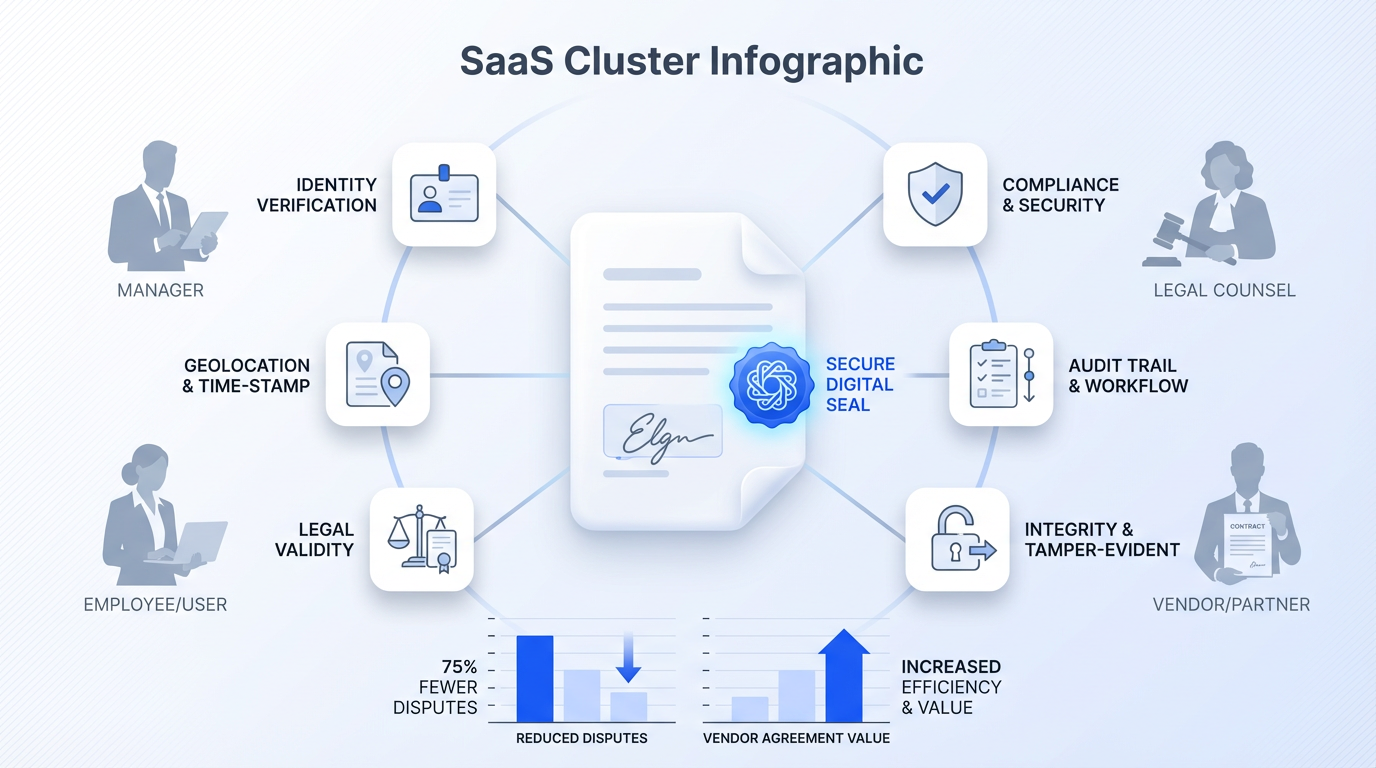
Tamper evidence. A cryptographic seal is applied to the document. If anyone changes even a single character after signing, the seal breaks and the modification is visible.
Real-World AES Scenarios
-
Employment contracts. An HR specialist sends a new hire's contract through a signing platform. The signer logs in with their email, receives an SMS code, and signs. The platform records the authentication steps, IP address, and a hash of the document.
-
Vendor agreements. An operations team finalizes a supplier contract worth tens of thousands of euros. Both sides sign through a platform that applies PKI-based (public key infrastructure) certificates to detect post-signature tampering.
-
NDAs and confidentiality agreements. A department manager sends an NDA to a freelance consultant. The consultant verifies their identity via an email link and a PIN, then signs digitally. The audit log captures every step.
Why AES Matters for Growing Companies
Companies that handle a high volume of contracts across multiple departments benefit from AES because it reduces disputes. If a vendor claims they never signed a supply agreement, the audit trail, complete with timestamps, authentication records, and a tamper-proof hash, tells a different story.
Platforms like Agrello make this practical for mid-size teams by combining identity verification and document tracking in a single workflow, so you don't need separate tools for signing and compliance. For step-by-step insights on leveraging audit trails and secure signature workflows, see How do electronic signatures work?.
Still, advanced signatures stop short of the highest legal recognition. For certain regulated documents, you'll need the next tier.
Qualified Electronic Signatures: Maximum Legal Weight
Qualified electronic signatures carry the same legal standing as handwritten signatures across the entire European Union. They're the only digital signature type that enjoys this automatic recognition under eIDAS, with no need to prove validity in court.
What Makes a Signature "Qualified"
A QES must meet every AES requirement, plus two additional conditions:
-
Qualified signature creation device (QSCD). The private key used to create the signature is stored on a certified device, often a smart card, USB token, or a secure cloud-based HSM (hardware security module).
-
Qualified certificate. Issued by a trust service provider that appears on a government-maintained trusted list. The certificate confirms the signer's identity has been verified face-to-face or through an equivalent method.
QES in Action
-
Real estate transactions. Buying property in Germany or Estonia often requires a QES. The buyer's identity is verified in person or via video identification, and the signature is created using a QSCD-backed certificate.
-
Government submissions. Filing certain corporate documents with national registries (e.g., articles of incorporation) may require a qualified signature to be accepted.
-
Regulated financial agreements. Loan contracts, insurance policies, and investment documents in EU member states frequently mandate QES to satisfy anti-fraud and consumer protection rules.
-
Cross-border contracts. A French company signing a distribution agreement with an Italian partner can use QES knowing both countries recognize it without additional proof.
Adobe Acrobat Sign uses cloud signatures backed by the Cloud Signature Consortium (CSC) standard published in 2023, making remote QES more accessible than it was when physical smart cards were the only option.
For a detailed comparison of QES and the technical/legal steps to implement one, read What Is a Qualified Electronic Signature?.
When QES Is Worth the Extra Effort
QES involves more setup: identity verification, certificate issuance, and sometimes hardware. It's not necessary for every document. But when the stakes are high, regulated industries are involved, or the contract crosses borders, the extra effort pays for itself in legal certainty.
How to Choose the Right Signature Level
Picking the correct signature type doesn't need to be complicated. Start with these three questions:
-
What's the regulatory requirement? Some documents have a legally mandated signature level. Check local and industry-specific rules first.
-
What's the financial or legal risk? Higher-value contracts and documents that could end up in court deserve stronger signatures.
-
Who are the signers? Internal team members on trusted devices may be fine with AES. External parties in different countries may need QES for mutual legal recognition.
Here's a quick reference:
-
Low risk, internal: Simple electronic signature (checkbox, typed name)
-
Medium risk, external parties: Advanced electronic signature (MFA, audit trail, tamper seal)
-
High risk, regulated, or cross-border: Qualified electronic signature (QSCD, qualified certificate, full eIDAS compliance)
For a practical playbook on aligning signature types with your organization's needs, see How to Choose a Digital Signature Service for Your Organization.
A digital signature platform that supports multiple levels, like Agrello, lets you match the signing method to each document type without switching tools or vendors. That flexibility matters when your team handles everything from internal time-off requests to multi-country vendor contracts.
Quick-Reference: Digital Signature Levels at a Glance
Simple (SES): No identity verification required. Typed name, checkbox, or scanned signature image. Legally valid for most informal agreements. Weakest evidence trail.
Advanced (AES): Unique link to signer. Multi-factor authentication. Tamper detection via cryptographic hash. Solid audit log. Accepted for most business contracts.
Qualified (QES): Equivalent to a handwritten signature under eIDAS. Requires a qualified certificate and a certified creation device. Highest legal standing. Mandatory for specific regulated documents.
Conclusion
Not every document requires the same level of signing assurance, and understanding that distinction is what separates efficient workflows from risky ones. Simple signatures help keep everyday operations fast and frictionless. Advanced signatures add the structure, identity verification, and auditability needed for business-critical agreements. Qualified signatures, in turn, provide the highest level of legal certainty when regulation, risk, or cross-border recognition comes into play.
The real advantage comes from using these levels intentionally. Instead of defaulting to a single approach, organizations that align signature types with document value and compliance requirements reduce disputes, improve traceability, and scale their processes more confidently.
As digital transactions continue to replace paper-based workflows, choosing the right signature level is no longer just a legal detail. It becomes part of how your business manages risk, builds trust, and operates efficiently across teams and markets.