Professional man with glasses working on digital documents with text about creating a professional e-signature design.

How to Create a Professional E-Signature Design

Every contract, proposal, and agreement your team sends carries your brand's reputation. When a client opens a document and sees a messy, inconsistent signature block, it quietly chips away at trust before they even read the terms.

Content authorBy Toomas PihlPublished onReading time9 min read

What You'll Learn

This guide walks you through the visual and branding side of e-signature design, step by step. You'll learn how to choose the right fonts, structure your layout, keep things consistent across teams, and use AI tools to polish the final result. Whether you manage an HR department or oversee sales operations, you'll walk away with practical signature design tips you can apply immediately to make every signed document look sharp and cohesive.

The stakes are real. The global electronic signature software market was valued at USD 3.3 billion in 2022 and is growing fast, which means your partners, clients, and competitors are all paying attention to how digital documents look and feel. Getting your e-signature design right isn't a nice-to-have. It's a competitive edge.

What Makes a Professional E-Signature Design?

A professional e-signature design is a visually consistent, brand-aligned signature block that includes a realistic signature element, clear signer details, and company branding, formatted for readability across digital and print formats. It uses 1-2 fonts, balanced spacing, minimal color accents, and adapts cleanly to different screen sizes and document types.

Define Your Brand's Signature Style

Before you open any design tool, take a moment to clarify what your signature should communicate. A law firm's e-signature carries a different tone than a creative agency's. Your visual identity needs to translate into that small block at the bottom of the document.

Start by answering three questions:

  • What impression should the signer get? (Formal, modern, friendly, authoritative)

  • Does your company have established brand guidelines for fonts and colors?

  • Will multiple people across departments use the same signature template?

If your organization has a brand book, pull it out now. Your e-signature should feel like a natural extension of your website, business cards, and email signatures. Consistency is what makes a brand feel trustworthy.

For teams where multiple people prepare documents but executives or external partners handle the actual signing, a unified visual standard prevents the awkward situation where every contract looks slightly different depending on who built it.

For an overview of how electronic signatures can be tailored to reflect your company’s style, review Electronic Signature 101.

Choose the Right Font for Your E-Signature

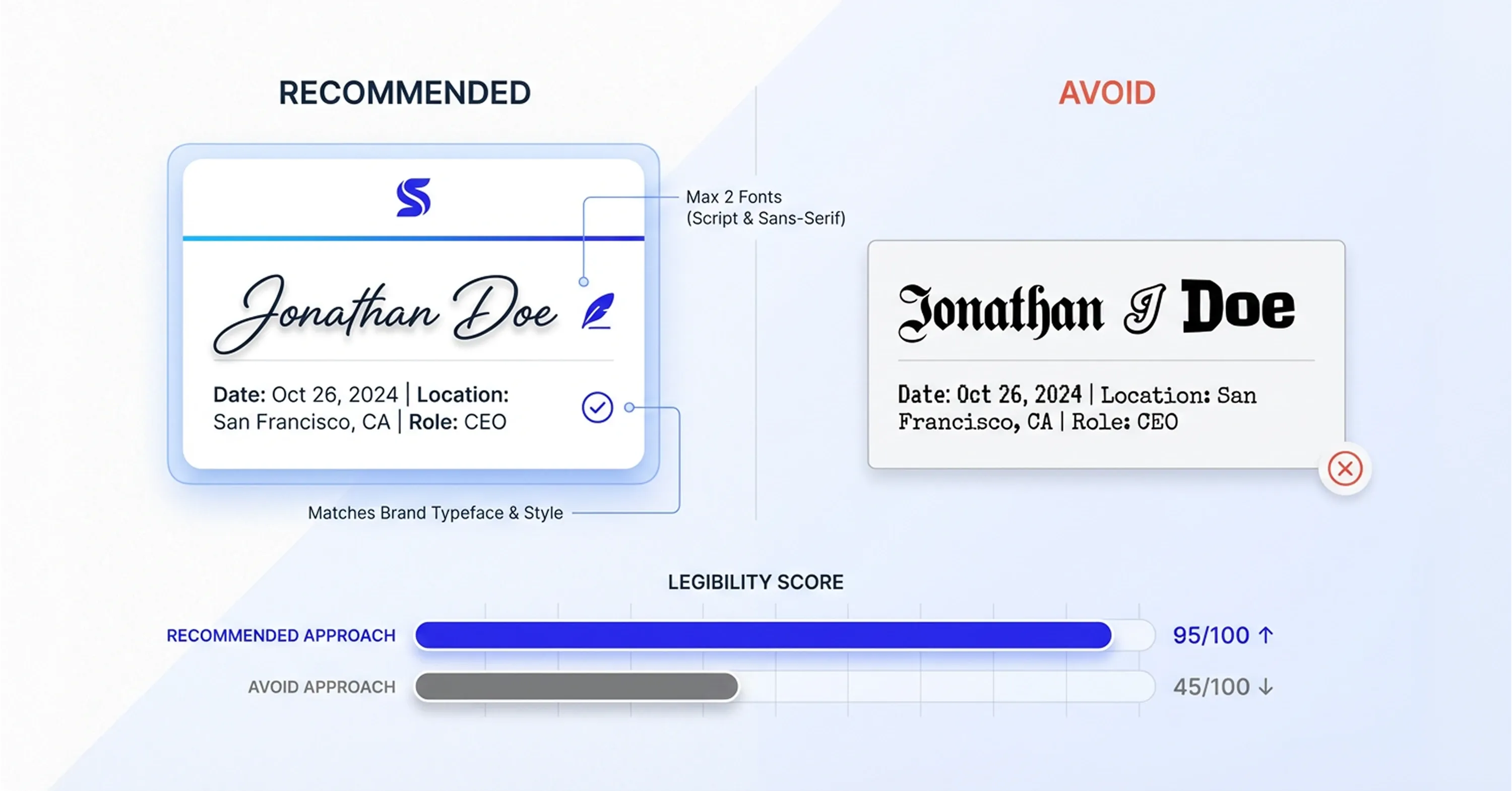
Comparison of professional e-signature design showing recommended clean font versus hard-to-read signature with legibility scores.

Typography is the backbone of any professional e-signature design. The font you pick influences how legible, modern, and credible your signature appears on screen and in print.

Here's what to keep in mind when selecting fonts:

  • Stick to 1-2 fonts maximum. One for the signature name, one for supporting details like title and company.

  • Prioritize readability over flair. Script fonts look elegant but become unreadable at small sizes. Sans-serif fonts like Helvetica, Inter, or Lato work well for clean, modern signatures.

  • Match your brand's typography. If your website uses a specific typeface, mirror it in your e-signature for visual continuity.

  • Test across devices. A font that looks great on a desktop monitor may render poorly on a mobile screen.

For a detailed walkthrough on creating and personalizing electronic signatures - as well as tips on font selection and signature styles -see How to Use a Digital Signature Generator (Free & Paid Tools).

Script vs. Sans-Serif: When to Use Each

Script-style fonts can work nicely for the actual signature element, the name that mimics a handwritten look. But for the rest of the signature block (job title, phone number, company name), a clean sans-serif font keeps things legible and professional.

Avoid decorative or novelty fonts entirely. They may seem distinctive, but they undermine credibility in a business context. The goal is for your signature to feel intentional and polished, not distracting.

Getting the font pairing right is one of the most impactful signature design tips you can follow because it sets the visual tone for everything else.

Structure a Clean, Balanced Layout

A professional e-signature design isn't just about the signature itself. It's about how the entire signature block is arranged. Layout determines whether the signing experience feels organized or cluttered.

Think of your signature block as having three zones:

  • Primary zone: The signature (name, handwritten-style element)

  • Secondary zone: Title, department, company name

  • Tertiary zone: Contact details, company logo, legal disclaimers

Spacing and Alignment Matter

White space is your friend. Cramming every detail into a tight block makes the signature harder to scan and less visually appealing. Leave breathing room between the signature, the signer's details, and any logos. Align elements consistently. Left-aligned layouts feel clean and modern. Centered layouts can work for formal documents but require more careful spacing. Avoid mixing alignment styles within a single signature block.

A few layout principles that help:

  • Keep the logo small and positioned consistently (top-left or bottom-left of the block)

  • Use a subtle horizontal line or color accent to separate the signature from body text

  • Limit the block to 4-5 lines of information, no one needs a full biography

When your layout is well-structured, the document feels finished. The signer's eye moves smoothly from the content to the signature without friction.

For real-world samples and additional tips on legally acceptable signature formats and layout details, check out Electronic Signature Examples (Real Documents, Correct Use Cases).

Maintain Consistency Across Your Entire Team

This is where most organizations stumble. One department uses blue text, another uses black. Someone in sales adds a motivational quote under their name. The result? Documents that look like they came from five different companies.

For HR teams, sales operations specialists, and department managers, standardizing e-signature design across the organization is critical. Here's how to make it happen:

  • Create a master template. Build one approved signature block that everyone uses, with locked formatting for fonts, colors, spacing, and logo placement.

  • Distribute editable fields only. Team members should be able to change their name and title but not the font, layout, or color scheme.

  • Document the rules. A short style guide (even just a one-page PDF) clarifies expectations and reduces back-and-forth.

  • Audit periodically. Check outgoing documents quarterly to make sure signatures haven't drifted from the standard.

If you want a step-by-step process for rolling out templates and maintaining consistency in team workflows, visit How to Create a docusign contract template Step-by-Step.

Why Consistency Builds Trust

When a client or partner receives multiple documents from your organization and each one carries the same clean, branded signature, it signals professionalism. It tells them your team is organized and detail-oriented, qualities that matter enormously in contract negotiations and ongoing business relationships.

The digital signature market is growing rapidly, with projections showing it could reach USD 104.49 billion by 2032 at a CAGR of 40.1%. As more business happens digitally, the visual quality of your signing experience becomes a differentiator.

Use AI Tools to Polish and Automate Your Design

AI has made it significantly easier to create a professional e-signature design without hiring a graphic designer. Modern tools can generate handwriting-style signatures, suggest font pairings, and auto-format signature blocks based on your brand's color palette.

Here's where AI can help most:

  • Signature generation. AI tools can create realistic handwritten-style signatures from typed names, offering multiple style options in seconds.

  • Template formatting. Some platforms auto-adjust spacing, alignment, and sizing so your signature block looks polished regardless of the document format.

  • Brand compliance checks. AI can flag when a signature deviates from your approved template, catching inconsistencies before documents go out.

For a deep dive into how AI-generated handwritten signatures work and improve business branding, read Can AI create handwritten-style personalized signatures?.

The broader market recognizes this trend. The digital signature market is expected to increase by USD 45.8 billion between 2024 and 2028, with AI driving key trends.

Platforms like Agrello make it straightforward to create and manage professional e-signatures at a team level, combining clean design with document workflow tools so managers don't need to juggle separate apps for signing and formatting.

Balancing Automation with Personal Touch

AI should handle the tedious parts: alignment, formatting, consistency enforcement. But the signature itself should still feel personal. A signature that looks completely machine-generated can feel cold. The sweet spot is an AI-assisted design that retains a human, natural quality.

To understand how to generate signatures automatically, automate verification, and integrate identity management, see How do I generate a digital signature automatically with AI?.

Test Your E-Signature Across Formats and Devices

Your e-signature will appear in PDFs, email clients, web-based signing platforms, and occasionally in printed documents. What looks perfect in one context can break in another.

Before rolling out your new design, run these checks:

  • PDF rendering. Open the signed document in multiple PDF readers (Adobe, browser-based, mobile) and confirm the signature block displays correctly.

  • Mobile preview. Over half of business emails are opened on mobile. Make sure your signature doesn't overflow or become unreadable on smaller screens.

  • Print test. If contracts are ever printed, verify that colors and logo resolution hold up on paper.

  • Dark mode. Some email and signing platforms support dark mode. Check that your signature colors work against both light and dark backgrounds.

Catching these issues before launch saves you from sending documents that look unprofessional, exactly the opposite of what you're trying to achieve.

If you need guidance on rapid multi-platform testing and template-driven email and PDF workflows, take a look at What’s the fastest way to sign and send documents online?.

With over 1.5 million customers and more than 1 billion users across 180+ countries relying on e-signature solutions like DocuSign alone, the reality is clear: your recipients are comparing your documents to a very high standard. Testing ensures you meet it.

Conclusion

A professional e-signature design is more than a visual detail. It shapes how your documents are received, how consistent your brand appears, and how much confidence recipients feel when reviewing important agreements. The right combination of typography, layout, standardization, and AI support helps every document look deliberate, polished, and business-ready.

For HR teams, sales coordinators, and department managers, improving e-signature design is a practical way to bring more consistency into everyday workflows without adding complexity. A clear template, shared rules, and regular testing can reduce avoidable mistakes, strengthen trust, and create a more professional signing experience across the organization. When every signature looks aligned with your brand, every document leaves a stronger impression.

Sans-serif fonts like Helvetica, Inter, or Lato work well for the text portions of your signature block because they're clean and readable at any size. For the signature element itself, a script-style font can add a personal, handwritten feel. The key is pairing no more than two fonts and matching your company's existing brand typography.

Create a master template with locked formatting for fonts, colors, spacing, and logo placement. Only allow team members to edit their name and title. Distribute the template through your signing platform or document management system, and audit outgoing documents quarterly to catch any drift.

Yes. AI tools can generate realistic handwriting-style signatures, suggest font and color combinations, auto-format signature blocks, and flag brand inconsistencies. They handle the tedious formatting work while letting you maintain a personal, human look in the final design.

In most cases, yes. A small, well-placed logo reinforces brand identity without cluttering the signature block. Keep it positioned consistently (typically top-left or bottom-left) and make sure it's high enough resolution to look sharp on screens and in print.

Test your signature in multiple contexts: mobile email clients, PDF readers on phones, and web-based signing platforms. Keep the signature block narrow (avoid wide layouts that force horizontal scrolling), use legible font sizes, and avoid relying on fine details that disappear on small screens.

Schedule a Meeting

Book a time that works best for you and let's discuss your project needs.

You Might Also Like

Discover more insights and articles

Professional using document automation tools to add a digital signature to a PDF automatically.

How to Add a Digital Signature to a PDF Automatically

Still relying on print, sign, scan, and email workflows for PDFs? That outdated process slows teams down, increases administrative work, and creates avoidable friction in everyday document handling. Automatic PDF digital signing offers a faster and more secure alternative. With the right setup, businesses can apply compliant signatures to documents in seconds, reduce manual errors, and keep files verifiable for years. For teams managing contracts, HR paperwork, or internal approvals, automated signing turns a repetitive task into a streamlined workflow that saves both time and effort.

Business team discussing AI-powered e-signature workflows and digital document automation in a modern office meeting.

What Are the Key Benefits of AI-Powered E-Signature Workflows?

If your team still routes contracts through email chains, printers, and filing cabinets, you already know the pain. Deals stall, errors multiply, and compliance feels like guesswork. The real question isn't whether to modernize, it's how much you're losing by waiting.

Business professional using AI-powered tools for contract management and document automation for small businesses

How can AI streamline contract management for SMBs?

Managing contracts used to mean dusting off filing cabinets or searching through endless email threads. For small and medium-sized businesses (SMBs), this manual approach creates bottlenecks that slow down revenue and increase risk. Today, artificial intelligence has moved beyond buzzwords to become a practical tool for operations managers and HR leaders. AI helps teams regain control over their documentation. It automates the tedious parts of the lifecycle, from drafting the first clause to securing the final signature. By handing repetitive tasks over to software, businesses can focus on the relationships behind the agreements rather than the paperwork itself.

Expert explaining the legal requirements for digital signatures in the European Union under eIDAS regulation

What are the legal requirements for digital signatures in the EU?

Navigating the rules for electronic signatures in Europe can be complex. Unlike the United States, where a simple click may be enough for many contracts, the European Union follows a structured legal framework that defines different levels of electronic signatures based on security and identity verification. This article explains the legal requirements for digital signatures in the EU, outlines the three signature types defined under eIDAS, and helps you understand which option is appropriate for different business documents.