eSign Software Explained: Faster Contract Work Without Paper

Content authorBy Toomas PihlPublished onReading time10 min read
Title:
eSign Software Explained: Faster Contract Work Without Paper

Meta description:
Learn how esign software cuts contract admin so you get offers and sales agreements signed faster from any device

This article explains what eSign software is and how it strips the manual admin out of contract work, so a new hire can sign on day one and a sales rep can close while the buyer is still interested. We will cover how the tools work in plain terms and how to compare options, with the legal validity question handled along the way.

Why contracts still move slowly

The contract was ready Tuesday morning. By Friday it still wasn't signed, and the reason had nothing to do with negotiation. You handled your signature on paper and emailed back the scanned offer letter before the wait began. The candidate opened it on a phone and put it off until the weekend because signing required a different setup. Meanwhile a competing offer landed in their inbox.

This is the loop that eats your week. Paper handling turns into chasing. When the other party is in a different time zone, a single round trip burns a full day before anyone has done anything wrong. Then a second version starts floating around after someone edits the document, and you lose track of which file is the real one.

The cost shows up later. Half of all hourly workers leave new jobs within the first 120 days, and a slow, clumsy start sets the tone before they have done a day of work. On the sales side, the World Commerce & Contracting Association found that 9.2 percent of annual contract value is lost through poor contract management across the life cycle. A deal that stalls at signature is a deal cooling toward dead.

If you feel this every week, you have learned to blame the other party or the time zone. The real culprit is the manual workflow itself. That's what the rest of this piece is about.

What eSign software actually does

Start with the simple part. eSign software is a tool that lets you send a document and collect signatures on it electronically, with a verified record of what happened. You upload the file with each signature or fill-in field marked, then send it to the people who matter. They open it, sign with a click or a typed name, and the signed copy lands back with you.

The signature itself is the small part. A typed name, a drawn squiggle, a click on a box: that's the visible bit, and on its own it would save you a few minutes. What changes your week is the workflow wrapped around it. The platform decides who gets the document and in what order. The platform sends the reminders for you. And when everyone has signed, it files the finished document with a record showing who signed and when, with location captured as part of that record.

Think of it as the difference between a pen and a courier. The pen makes a mark. The courier handles delivery and brings back proof of delivery. With eSign software, the signing is the pen and the automation is the courier. Once you see contracts that way, the question stops being "how do people sign" and becomes "how do I stop being the courier."

How eSign software speeds up contract work

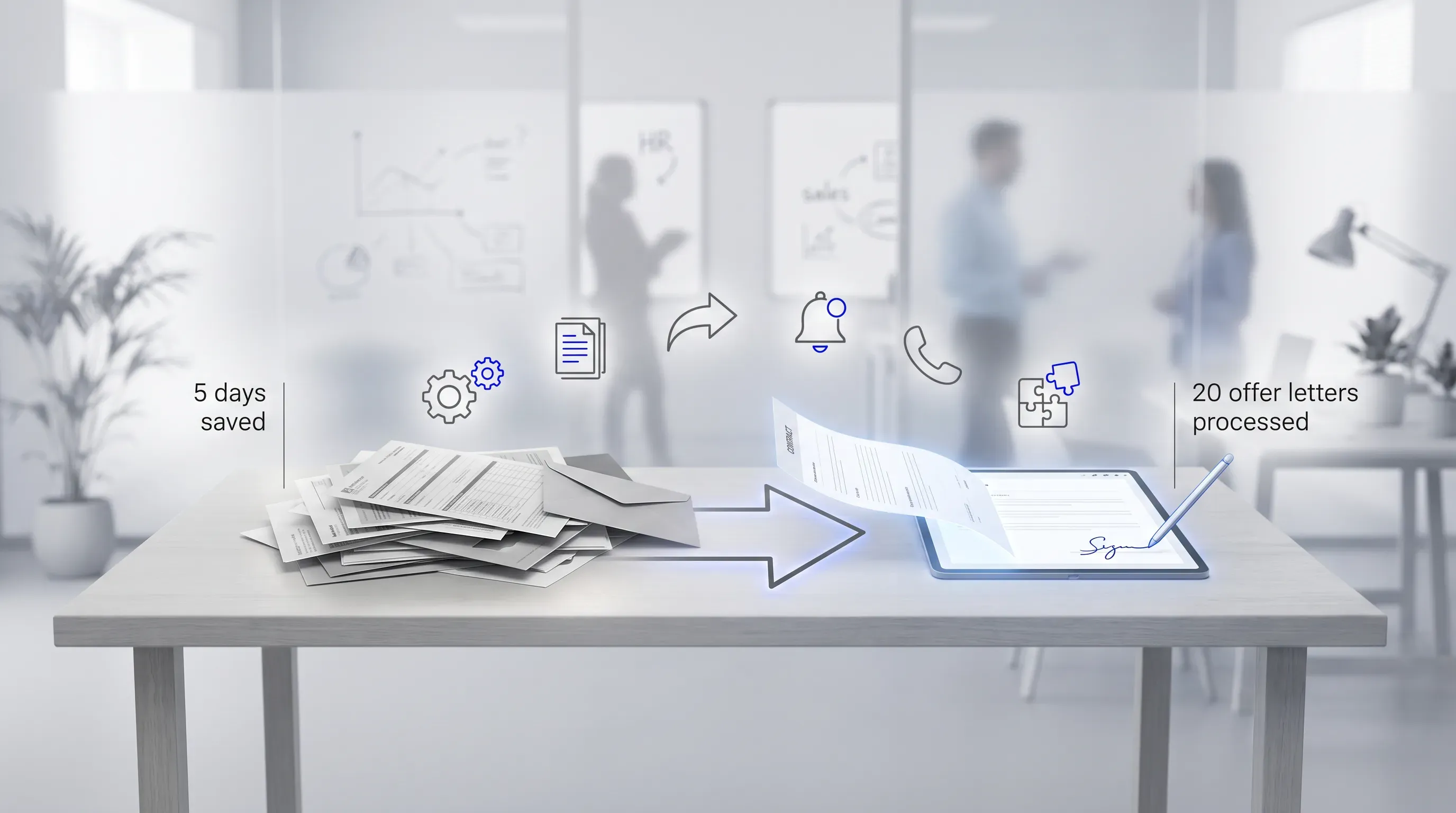
A softly lit office scene showing a contract document transforming from a cluttered stack to a digital form, with automation icons and callouts.

The time savings come from specific places in the process, and each one removes a different chunk of manual admin you currently do by hand. Ricoh, the office technology supplier, trimmed five days from its sales contract process by switching to electronic and digital signatures, according to Adobe. That kind of gain comes from several connected mechanisms, and you can grasp them one at a time.

Cut contract signing time by 60%

See how Agrello can automate your contract workflows from creation to e-signature in one free consultation.

Templates and reusable fields

Most of your contracts are the same document with a few details swapped out. You rebuild documents like the offer letter and the standard sales agreement constantly, and each rebuild is a chance to make a mistake. A template fixes the document once. You save the offer letter after marking the signature fields and the variable details, and from then on you fill in the changing parts and send.

Here's the before-and-after. An HR coordinator with twenty offer letters to send by hand spends an afternoon on file edits and email attachments, then repeats the same steps. With a template, the same twenty letters go out in minutes because the structure never changes and the fields are already where they belong. The repetitive part is gone.

This matters most when volume spikes. A hiring push or a busy sales quarter is exactly when the manual approach breaks, and it's exactly when a template earns its keep.

Automated routing and reminders

Routing is the software deciding who gets the document next. You set it once, and it handles the order. There are two patterns worth knowing:

  • Sequential signing sends the document to one person and then to the next after the first signer finishes. Use it when order matters, like a hiring manager who must approve before the candidate signs.

  • Parallel signing sends it to everyone at once so they can sign in any order. Use it when two parties just need to sign and sequence doesn't matter.

The bigger relief is the chasing. The platform takes over manual signer follow-up by sending reminders on day two and day four, with a stall alert when someone stops. That follow-up is what quietly eats days in a paper process, because a human has to remember to do it, and humans forget. Forrester's analysis of LinkSquares found that automating intake and routing cut sales contract cycle time from weeks to days.

Tracking and a digital signing app

With paper, the honest answer to "where is the contract right now" is "I'm not sure." eSign software replaces that with a live dashboard. You open it and see exactly who has signed and who has stalled. The where-is-it-now uncertainty disappears.

The other half of this is mobile. A digital signing app lets a signer complete a document from a phone in seconds, wherever they are. A candidate can sign away from a desk with a printer. A buyer can sign from an airport or a meeting room. When the document reaches someone the moment they're ready to act, turnaround collapses. A digital signing app turns the dead time between "yes" and "signed" into almost nothing.

That speed cuts both ways for your team. The candidate signs the offer before the competing one arrives. The buyer signs while still interested. A digital signing app directly contributes to faster turnaround. And because the same digital signing app shows the signer their part clearly, there's less confusion about what they're agreeing to. Mobile signing through a digital signing app separates a same-day close from a three-day wait, which is why a digital signing app belongs at the center of how you think about speed.

Cut contract signing time by 60%

See how Agrello can automate your contract workflows from creation to e-signature in one free consultation.

Integrations with your existing tools

The contract belongs inside the rest of your workflow. It connects to systems such as your applicant tracking system and your customer relationship management (CRM) tool. Integrations let those systems talk to your eSign software so contracts trigger and file themselves without you rekeying anything. A candidate moves to "offer" in the recruiting system, and the offer letter goes out automatically. A signed sales agreement files itself against the right account in the CRM.

Some teams go further with an electronic signature api. An electronic signature api builds signing directly into your own systems, so the signing step happens inside software your team already uses. If you're not technical, the short version is this: an electronic signature api lets developers embed signing where it makes sense, and an electronic signature api is how a product company puts a "sign here" button inside its own app.

The benefit also comes through no-code, click-to-connect integrations, which remove the copy-paste admin between tools where most of the daily friction lives. An electronic signature api is the deeper option for teams that want signing woven into a custom system, while the prebuilt connectors cover the common cases. For HR and sales teams, the prebuilt route does the job, and the electronic signature api stays available if you ever outgrow it.

Are e-signatures legally valid

This is the objection that stops adoption before it starts. Someone asks whether an electronic signature is even legal, and the conversation stalls. The short answer is yes, and the law has said so for a long time.

In the United States, the Electronic Signatures in Global and National Commerce Act of 2000 established that an electronic signature carries the same legal weight as a handwritten one, and that a document can't be denied validity solely because it was signed electronically. Most states also adopted the Uniform Electronic Transactions Act, which runs on the same principle. In the European Union, the eIDAS Regulation does the equivalent by defining three signature levels that build from simple through qualified.

What makes an electronically signed document hold up is the audit trail. Every completed document carries a record of who signed and when, with location captured too, which is stronger evidence than a scanned page that shows nothing about how it was executed. That trail is the reason a well-designed eSign workflow stands up better in a dispute than the paper version it replaced.

There are limits worth knowing. The ESIGN Act carves out wills and certain family law matters. For most offer letters and sales agreements, a standard electronic signature is fine. For higher-stakes documents, a stronger signature type like the qualified level under eIDAS Regulation gives you more assurance about the signer's identity. The point is to match the signature to the stakes, which is a calm judgment call.

Choosing the right eSign software

Once you're convinced, the question becomes which tool. The market is large and DocuSign alone holds an estimated 75% market share, but fit for an HR or sales team depends on a few things more than the rest:

  • Ease of use for non-technical signers. If a candidate or buyer struggles to sign, you've reintroduced the friction you were trying to remove.

  • Template support, so your high-volume documents set up once and reuse forever.

  • The specific integrations you actually need, such as your ATS or your CRM.

  • A clear audit trail on every completed document.

  • Pricing that scales with volume and fits the usage you expect.

The common mistake is overbuying. Enterprise eSign software comes loaded with governance and configuration features built for legal departments processing thousands of complex contracts. A small team sending offer letters and sales agreements will pay for that complexity and use a fraction of it. Buy for the documents you send weekly.

Match the eSign software to your real workflow and the decision gets simple. The right tool is the one your signers can use without a phone call and your systems can connect to without a project.

Getting started without the paper

Start with one high-volume document, the offer letter or your standard sales agreement, and move just that into an eSign workflow as a pilot. Build the template and run it for a few weeks with routing and reminders turned on. The goal is reclaiming the admin time you lose to print-sign-scan-chase.

Measure one number: turnaround time from send to signed, before and after. That figure is what you take to the rest of the team, because it turns "this feels faster" into proof. Agrello is a document management and e-signing platform built for exactly this kind of pilot, and trialing eSign software on a single workflow is the fastest way to see whether it fixes your bottleneck.
Cut contract signing time by 60%

See how Agrello can automate your contract workflows from creation to e-signature in one free consultation.

Yes, if the sender’s tool supports guest signing. The signer opens a secure link, reviews the required fields, and signs without setting up a full workspace. After signing, they should download the completed document and keep the audit summary if one is provided.

PDFs work best because the layout stays fixed across devices. Word documents often convert to PDF before the signing step, which reduces formatting problems. Use a clean final file with clear signature spots, readable text, and the right signer names before you send it.

Cancel or void the sent document and send a corrected version. Don’t ask a signer to edit a completed PDF, because the audit record needs to match the final document. If one person has already signed, restart the process to keep the version history clean.

Add identity checks when the signer’s identity matters more than speed. A routine offer letter often needs a standard audit trail, while a high-value agreement can justify stronger checks such as verified login, one-time passcodes, or qualified signatures where the law requires them.

Compare esign software with a short test: create one template, send it to an internal signer, check mobile signing, routing, reminders, and the final audit record. Agrello fits this kind of evaluation because teams can test signing and document handling in one workflow before moving more contracts.

Schedule a Meeting

Book a time that works best for you and let's discuss your project needs.

You Might Also Like

Discover more insights and articles

Title:
What Is an Online Signature Platform and Why Use One?

Meta description:
See how an online signature platform helps you cut signing delays and keep signed files easy to find.

Article:
# What I

What Is an Online Signature Platform and Why Use One?

This article explains what an online signature platform actually does and whether your own document process can benefit from one, with the signature itself treated as only part of the story. No technical background needed.

Title:
Online Document Signing Services Explained for Businesses

Meta description:
See how an online document signing service helps you cut paper delays and choose a secure tool for your business.

A

Online Document Signing Services Explained for Businesses

This article explains what an online document signing service is and how cloud-based signing replaces the paper routine that slows so many businesses down. It walks through how these tools work end to end and how to pick a service that fits your volume and budget, with legal and security questions covered along the way.

Title:
Online Signature Software: Sign Documents Without Printing

Meta description:
With online signature software, you can sign documents directly on your screen and save time on daily paperwork.

A

Online Signature Software: Sign Documents Without Printing

This article explains how online signature software lets you sign and send documents straight from a screen and shows why a digital-first workflow beats the old print-and-scan routine; it also covers legal validity and tool choice for a small operation.

Title:
Top eSignature Software Options for Faster Contract Management

Meta description:
Compare the best e signature software options to find the right tool for your team and speed up agreements.

Ar

Top eSignature Software Options for Faster Contract Management

This article walks you through what actually shortens contract turnaround for a growing team, then compares the best e signature software options against those criteria so you can shortlist two or three and start a focused trial this week.