How can AI help automate contract approval workflows?

Content authorBy Toomas PihlPublished onReading time11 min read
Title:
How can AI help automate contract approval workflows?

Meta description:
Ask: How can AI help automate contract approval workflows? You will learn to skip manual reviews and save hours.

Articl

AI automates contract approval workflows by handling the manual steps that slow them down. It routes each contract to the right approver and clears low-risk standard agreements automatically. Policy checks determine which exceptions need human judgment. The result is approval turnaround measured in hours instead of days.

What is a contract approval workflow?

A contract approval workflow is the defined sequence of reviews and sign-offs a contract passes through, from the moment someone requests it to the final signature, with each step assigned to a specific role. If you run this informally, the workflow still exists. It just lives in people's heads and email threads instead of in a documented process.

Think of it as the chain of custody for an agreement. A sales contract starts with a request and moves through manager and legal review before signature. Each handoff has an owner, and each owner has a decision to make before the contract advances.

PwC's contract lifecycle research notes that ownership is fragmented across business functions, which leaves approvals delayed and obligation tracking manual. That fragmentation is the real problem. A five-step process runs smoothly when every owner knows their role, and a three-step process stalls when nobody does. Mapping your own steps against this definition is the first move toward fixing it.

What are the typical approval stages?

Most contracts move through six recognizable stages in order.

The sequence runs like this:

  1. Intake and request, where someone asks for an agreement and provides the basic terms.

  2. Drafting from a template, where the contract takes shape.

  3. Internal review by a manager or department lead.

  4. Stakeholder sign-off from anyone with a stake in the deal.

  5. Compliance or legal check against policy and law.

  6. Final signature that makes the agreement binding.

Deloitte's work on contract management in life sciences describes how redundant steps and a lack of standardization create delays and missed opportunities across these stages. The lesson for a lean team is that repetition between stages is the bottleneck. When you can see all six laid out, you can spot which ones repeat work and which ones run without a person touching them.

Why do manual approvals slow down?

Manual approvals slow down because nobody can see where a contract is or who owns the next decision. Bottlenecks come from unclear ownership and endless email back-and-forth, especially when agreements sit idle because there is no central view of status. One absent approver stalls a deal for days when the contract lives in their inbox alone.

The pain compounds on a small team. With fewer people in the chain, each person carries more weight, so a single gap halts everything behind it.

A Forrester study of procurement workflows found one organization's end-to-end cycle time dropped from 73 days to 23 days after redesigning an approval process that previously required navigating 17 nodes and answering more than 100 questions. The size of that gap tells you something direct. Most of the delay was waiting and re-entering information. Cut the waiting, and the workflow speeds up before anyone makes a faster decision.

How does AI automate approval workflows?

AI automates an approval workflow by taking over four jobs the workflow used to do by hand. It routes each contract to the correct approver and clears low-risk agreements automatically. Policy checks determine which exceptions need human review. Everything else in this article breaks down how each of those four mechanisms works.

The shift is from a process driven by people chasing each other to a process driven by rules and context. A contract enters the system, and the system decides what happens next based on what the contract actually contains.

McKinsey reported that an AI system reviewing contracts achieved evaluation accuracy of about 96 percent with processing time of eight minutes per contract, work that manual review would have taken months to finish. That accuracy figure matters because it sets the boundary for trust. At 96 percent, the smart design lets AI handle the routine 96 percent and route the rest to a human, which is exactly what the four mechanisms below do.

Cut contract signing time by 60%

See how Agrello can automate your contract workflows from creation to e-signature in one free consultation.

How does AI route contracts to the right approver?

AI routes contracts after it reads the document's type and terms, and it then assigns each one to the correct approver in the right order. The guesswork of who reviews next disappears. A high-value vendor agreement goes to legal and finance, while a standard renewal goes to a single manager the moment the contract enters the system.

This turns a manual handoff into an instant decision based on rules plus context. Instead of someone forwarding an email and hoping the right person sees it, the system matches the contract's content to a routing rule and moves it.

Forrester's analysis of LinkSquares CLM found that structured intake and automated approval routing helped reduce the time spent on escalated reviews of major contracts from 7.5 hours to under 3 hours per contract by year three. The hours saved point to something past speed. When routing is automatic, approvers only ever open contracts that genuinely belong to them, so the time they spend is spent on judgment rather than figuring out whether the contract was even theirs to handle. That is how contracts stop sitting in the wrong inbox.

Can AI approve contracts on its own?

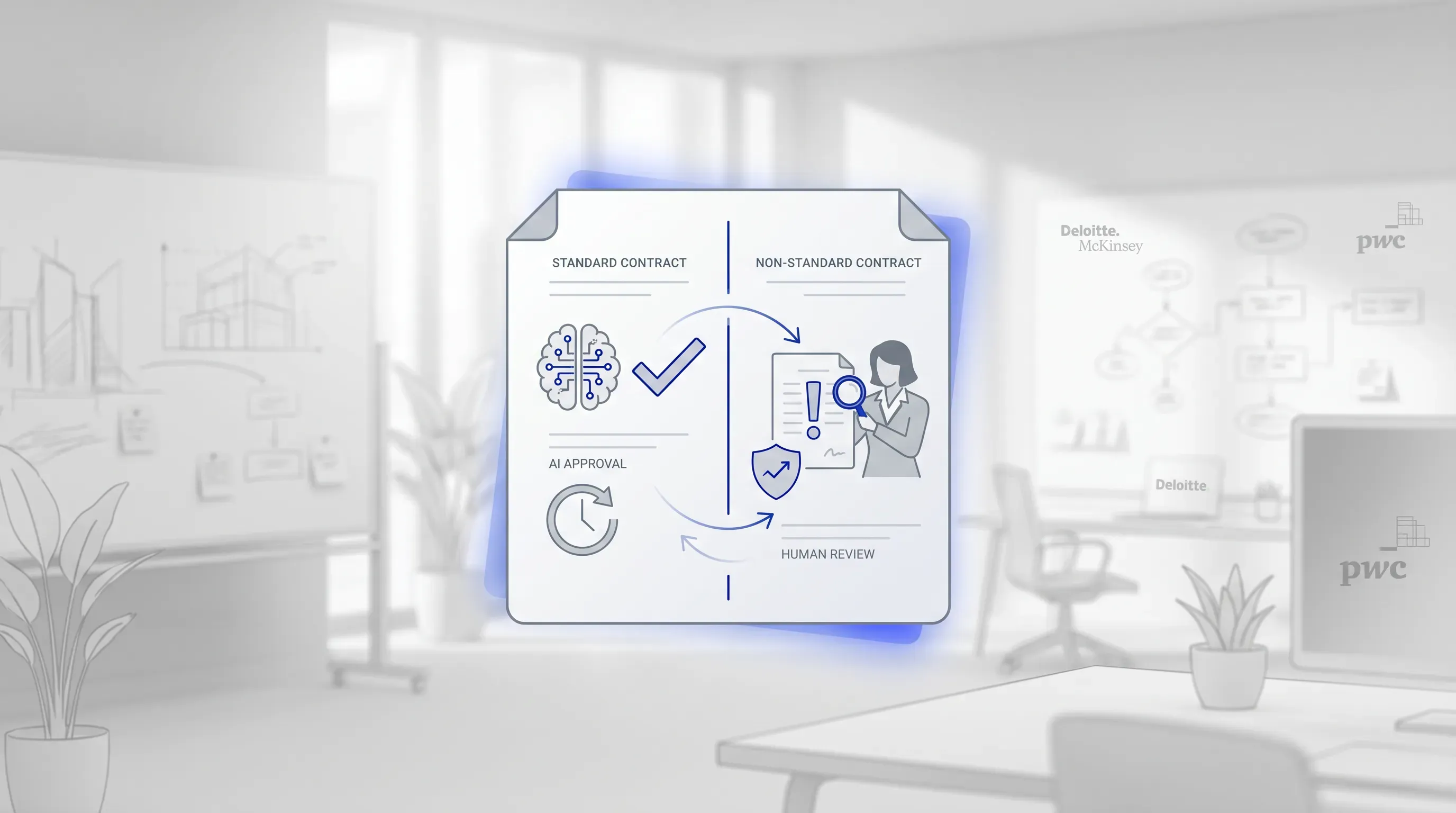
A high-key monochrome office scene features a split contract document, with an AI icon on one side and a human figure on the other.

AI can approve contracts on its own, but only low-risk, standard agreements that match pre-approved terms. Anything that deviates from those terms gets flagged for a human. This exception-based automation keeps trust in the system intact.

The boundary is deliberate. AI clears the contracts where the answer is already known and routes the rest to the people equipped to judge them.

Deloitte's analysis of generative AI in legal departments describes a shift where legal teams move from reviewing every contract's legality to validating the accuracy of AI-generated contracts, which reduces the margin for human error on routine work. Read that carefully and the implication is reassuring rather than threatening. When AI auto-approves, the human role concentrates on the contracts that carry actual risk, which is where you wanted that attention in the first place.

Which approvals can be fully automated?

Standardized, low-value agreements built from approved templates with unchanged terms are the strongest candidates for straight-through approval. If a contract uses your standard template and stays under a set value threshold, AI can clear it without a person when the clauses are unchanged.

Here is a practical test. Ask whether you are comfortable approving the contract yourself in under a minute without reading every line. Non-disclosure agreements and routine renewals pass that test.

McKinsey's procurement work showed AI extracting key terms and identifying where contracts miss key clauses across an entire repository. That capability is what makes auto-approval safe. The system confirms the unchanged contracts are unchanged, which is the whole basis for letting them through.

When should a human stay in the loop?

A human stays in the loop whenever a contract carries non-standard terms or unusual risk, especially with a counterparty you've never worked with. These are the contracts where judgment beats pattern-matching, and the system is designed to send them to you.

Keeping humans on exceptions is the point of the automation.

PwC's legal generative AI work stressed that its contract review relied on human-in-the-loop validation at each stage to stay reliable and accurate. The takeaway for your workflow is that automation and oversight aren't opposites. The fastest systems route the routine away from people precisely so those people have time for the deals that need a careful read.

Cut contract signing time by 60%

See how Agrello can automate your contract workflows from creation to e-signature in one free consultation.

How does AI check contracts for compliance?

AI checks compliance by extracting the key clauses from a contract and comparing them against your approved standards and legal requirements, then it flags anything missing or non-compliant. The clause-by-clause review that used to take a person an afternoon happens in minutes.

This catches gaps a rushed reviewer misses. The system automatically surfaces a missing liability cap or a payment term outside policy.

McKinsey found that large language models trained on a company's contract database can automatically extract key terms and obligations and continuously compare contracts against real transaction data. The deeper value here is consistency. A human reviewer applies the policy slightly differently on a Friday afternoon than on a Monday morning, while the AI applies the same standard to every contract every time. For a lean team handling high volume, that consistency is worth as much as the speed, because it means the hundredth contract gets the same scrutiny as the first.

How does AI handle exceptions and escalations?

AI handles exceptions by routing any flagged contract straight to the right human with the issue clearly marked. The reviewer opens the contract already knowing what failed and why, so their time goes only to what genuinely needs judgment.

This exception-driven model is the real source of speed. The team stops touching routine work entirely and looks only at the contracts that broke a rule.

The Forrester procurement study quantified what removing manual follow-ups does, with requester effort dropping from an average of four hours to about 30 minutes per request after the workflow was redesigned. That drop reveals where the hours actually went. Those hours were spent on coordination and chasing. When AI delivers the exception pre-marked to the right person, you remove the coordination cost and keep only the judgment, which is the part you were paying people for anyway.

How much faster does AI make approvals?

AI compresses approval turnaround from days or weeks down to hours by removing the idle waiting and email back-and-forth that consume most of the time. The gains come from specific eliminated steps. A forwarded email stops being the gate, and an absent approver's inbox stops parking the contract.

Forrester's LinkSquares analysis documented a composite organization shortening contract cycle time from 12 weeks to under nine weeks through streamlined intake and automated approvals, a 30 percent improvement in processing time. Pair that with the procurement case earlier, where 73 days fell to 23, and a pattern holds across both. The biggest cuts came from the waiting stages. That tells you where to look in your own process. The slowest part of your approval workflow is the time a contract spends doing nothing, and that is the exact time AI removes.

What should you keep human in the workflow?

Keep final accountability and relationship-sensitive decisions with people, with human judgment reserved for unusual or high-stakes terms. AI handles the repetitive routing and checking, while a person owns the call on anything that carries real consequence. The goal is a workflow where automation accelerates the routine without removing oversight from the contracts that matter.

Drawing the line is straightforward. Let AI do the work that has a known right answer, and keep humans on the work that requires weighing trade-offs.

PwC's legal generative AI deployment processed high-volume contract portfolios in 1.5 weeks with human validation built into every stage, which compressed a multi-week effort and preserved accuracy. The design principle worth borrowing is that speed and oversight reinforced each other rather than competing. Because AI cleared the routine volume, the humans had room to focus their attention where it counted. Build your workflow the same way, and you get faster approvals and tighter control at once, instead of trading one for the other.

Automate the final approval and signature with Agrello

Once a contract clears approval, it still has to be signed, and that's the step a fast workflow funnels toward. A quick approval means little if the signature stage drags because of printing or a counterparty who has never met you. This is where execution either holds the speed you've gained or loses it.

Agrello is an Estonian e-signing and contract management platform built for small and mid-size businesses, and it handles exactly this execution stage. Its capabilities cover document automation and e-signatures backed by strong digital identity, which means two parties who have never met can still sign with verified legal validity. Agrello reports that its platform reduces signing time by up to 60 percent.

If you've reached the point where your approvals move quickly but signing still slows you down, that's the gap Agrello closes. Map your approval stages first, then connect automated routing and checks to a signature that's both fast and legally sound. Start with a single high-volume contract type and measure the turnaround before and after.
Cut contract signing time by 60%

See how Agrello can automate your contract workflows from creation to e-signature in one free consultation.

Start by documenting each approval path before adding AI. List the contract types, approvers, value thresholds, required clauses, and exception rules. Then remove duplicate review steps. AI works best when it follows a defined process, because unclear ownership turns into automated confusion.

AI needs structured intake data and readable contract text. Capture contract type, counterparty, value, department, jurisdiction, renewal status, and requested deviations before review starts. These fields let the system match the contract to approval rules and reduce rework caused by missing details.

Run the AI workflow in parallel with your current process first. Compare its routing, clause checks, and exception flags against human decisions for one contract type. Fix rule gaps before expanding. This test gives you evidence that the system follows your policy.

Yes, keep a full audit trail for every AI-assisted approval. It should record who requested the contract, which rules were applied, what the AI flagged, who approved exceptions, and when each action happened. This record supports internal reviews and helps resolve disputes.

Avoid automating unclear processes before you define ownership and risk rules. AI will repeat a poor workflow if the approval logic is incomplete. Start with one standard contract type, set value thresholds, define exception triggers, and assign human owners for each escalation.

Schedule a Meeting

Book a time that works best for you and let's discuss your project needs.

You Might Also Like

Discover more insights and articles

Title:
What Is an Online Signature Platform and Why Use One?

Meta description:
See how an online signature platform helps you cut signing delays and keep signed files easy to find.

Article:
# What I

What Is an Online Signature Platform and Why Use One?

This article explains what an online signature platform actually does and whether your own document process can benefit from one, with the signature itself treated as only part of the story. No technical background needed.

Title:
Online Document Signing Services Explained for Businesses

Meta description:
See how an online document signing service helps you cut paper delays and choose a secure tool for your business.

A

Online Document Signing Services Explained for Businesses

This article explains what an online document signing service is and how cloud-based signing replaces the paper routine that slows so many businesses down. It walks through how these tools work end to end and how to pick a service that fits your volume and budget, with legal and security questions covered along the way.

Title:
Online Signature Software: Sign Documents Without Printing

Meta description:
With online signature software, you can sign documents directly on your screen and save time on daily paperwork.

A

Online Signature Software: Sign Documents Without Printing

This article explains how online signature software lets you sign and send documents straight from a screen and shows why a digital-first workflow beats the old print-and-scan routine; it also covers legal validity and tool choice for a small operation.

Title:
Top eSignature Software Options for Faster Contract Management

Meta description:
Compare the best e signature software options to find the right tool for your team and speed up agreements.

Ar

Top eSignature Software Options for Faster Contract Management

This article walks you through what actually shortens contract turnaround for a growing team, then compares the best e signature software options against those criteria so you can shortlist two or three and start a focused trial this week.